Self-HostingNetworking

Obsidian vs Plain Markdown for Homelab Documentation in 2026: Which One Actually Ages Better?

Obsidian vs plain Markdown for homelab documentation: compare search, portability, Git fit, lock-in risk, and which workflow ages better in 2026.

AU

Author

James Reeves

Transparency note: This guide contains no affiliate links. If we ever add product recommendations later, we will disclose that clearly.

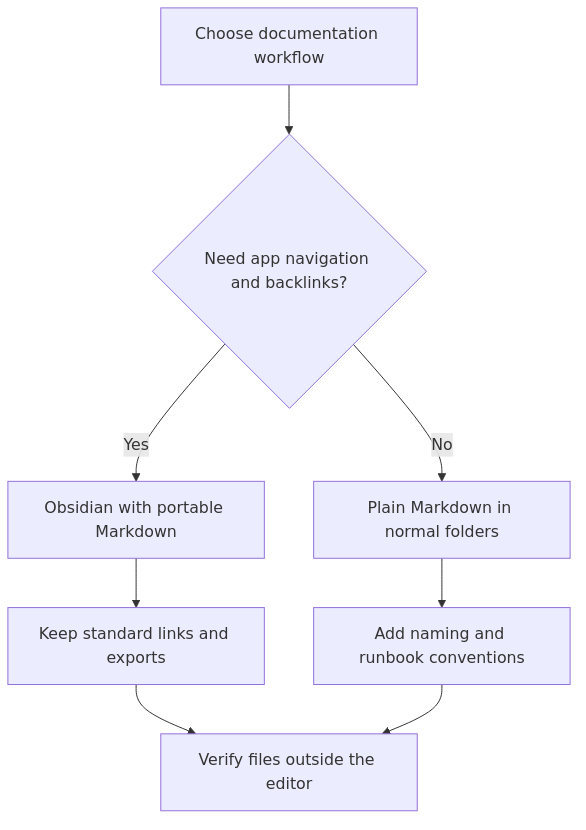
If you want the short answer, Obsidian is the better default for most solo homelabbers who struggle to keep documentation alive, while plain Markdown is the better long-term fit if your top priority is Git-native portability, editor freedom, and zero workflow lock-in.

That is the real split.

Obsidian wins when your problem is not file ownership but documentation follow-through. It gives you search, backlinks, a cleaner browsing experience, and enough structure that you are more likely to update notes after a change. Plain Markdown wins when your lab docs already live comfortably in folders, repos, and terminal-friendly tools, and you do not want another application sitting in the middle.

The mistake I see most often is treating this like a philosophy debate. It is not. It is an operational choice. You are choosing the documentation system you will still trust when a reverse proxy breaks at a bad hour and you need the right host, port, backup note, and rollback step fast.

Key Takeaways

  • Best default for most solo homelabbers: Obsidian
  • Best for maximum portability and Git-first workflows: plain Markdown
  • Best if your docs double as a runbook, inventory, and searchable notebook: Obsidian
  • Best if you want every note to remain editor-agnostic forever: plain Markdown
  • Most important caveat: Obsidian stays portable only if you stay disciplined about using standard Markdown links and avoid too much app-specific syntax
  • My verdict: start in Obsidian if your docs keep dying, but write with plain-Markdown discipline so you can leave later without a cleanup project

My evaluation setup

I am not treating this like a synthetic benchmark shootout because that would miss the point.

For homelab documentation, the failure mode is usually not CPU usage. It is abandonment. Notes get scattered across screenshots, random README files, stale text snippets, and half-finished wiki pages. So for this comparison, I weighted the things that matter in a real lab:

1. Capture friction - how quickly you can open the docs and add one useful note.

2. Retrieval during troubleshooting - how fast you can find the host, IP, service path, or recovery step you need.

3. Portability and lock-in risk - how hard it is to move, export, or repurpose your notes later.

4. Git and infrastructure friendliness - how cleanly the docs fit with repositories, plain folders, and normal file-based workflows.

5. Long-term maintainability - whether the system still feels sane after six months of changes.

That lens matters more than arguing about which app has the prettier interface.

If you need the broader beginner workflow first, read How to Document Your Homelab So Future You Stops Guessing and the copyable Homelab Documentation Template. If you want the broader tooling shortlist, start with Best Homelab Documentation Tools in 2026: Obsidian vs BookStack vs Wiki.js. This article is the narrower choice inside that cluster: should you use Obsidian at all, or just keep everything as plain Markdown files?

The comparison table most people need first

transmission signup

article_topic // Obsidian vs Plain Markdown for Homelab Documentation in 2026

Don't leave without the setup notes.

Get practical homelab guides, failure logs, and beginner-friendly build notes in your inbox.

Enter your email address to receive the Homelab Addiction newsletter.

Weekly only. No spam. Unsubscribe anytime.
Decision point Obsidian Plain Markdown Winner
Best fit Solo operators who want searchable, connected notes Git-first operators who want zero tool lock-in Depends on your workflow
Storage model Local Markdown files inside a vault with app metadata Plain files in normal folders Tie
Search and navigation Stronger out of the box Depends on your editor and folder discipline Obsidian
Backlinks and note discovery Built in Manual unless you add tooling Obsidian
Portability Good if you stay close to standard Markdown Excellent Plain Markdown
Git friendliness Good, but .obsidian/ config and app habits need discipline Excellent Plain Markdown
Friction for beginners Lower once installed Low at file level, higher at organization level Obsidian
Risk of app-specific habits Medium Low Plain Markdown
Best long-term default Better for most people who actually want to keep docs updated Better for people who already live in repos and editors Obsidian for most, Markdown for purists

My practical verdict is simple: Obsidian is the better default for most homelab documentation, but plain Markdown is the cleaner long-term base layer.

Why Obsidian wins for most real homelabs

The strongest case for Obsidian is not that it stores notes in Markdown. Plenty of tools do that. The strongest case is that it makes those Markdown files easier to revisit.

On its own site, Obsidian emphasizes three things that matter here: it stores notes privately on your device, it uses open file formats, and it lets you shape the workflow with plugins and links. For homelab documentation, those features translate into very practical advantages.

1. Search is better, which means your docs are more useful under pressure

A plain folder of files is portable, but portability does not guarantee fast retrieval.

During a real failure, you are not admiring your file ownership model. You are trying to answer questions like:

  • Which host runs the reverse proxy?
  • Where is the Compose file?
  • Did I document the static IP or VLAN note anywhere?
  • What changed right before this broke?

Obsidian makes that faster because the vault behaves like a documentation workspace, not just a directory tree. Search, recent notes, backlinks, and graph-adjacent navigation all help you jump to the answer faster.

That matters more than people think. The best documentation system is often the one that lowers the time between "I need a note" and "I found the note".

2. Backlinks are genuinely useful in infrastructure docs

This is where Obsidian starts separating itself from a plain folder.

A homelab note is rarely isolated. Your DNS note points to your reverse proxy note. Your runbook should link to the service inventory. Your Proxmox node page should connect to storage, VLAN, and backup notes. Obsidian makes those relationships visible with very little effort.

That turns a pile of Markdown into something closer to an operational map.

A plain Markdown folder can do the same thing in theory. In practice, many people do not keep those links updated unless the tool makes linking easy. Obsidian does.

3. The barrier to keeping documentation alive is lower

This is the biggest point in Obsidian's favor.

A raw Markdown workflow is great for disciplined people who already know where everything goes. But a lot of homelabbers are not failing because Markdown is weak. They are failing because their note system never became habitual.

Obsidian helps because it makes the habit easier:

  • open the vault
  • hit search
  • create a note
  • link it to the service or host you were already editing
  • keep writing

That is smoother than juggling a repo, a code editor, a folder layout, and whatever mental model you are using to remember how the notes relate.

If your documentation currently dies because it feels annoying to maintain, Obsidian solves the right problem.

Where plain Markdown still wins cleanly

Plain Markdown is not the runner-up because it is weak. It is the runner-up because it asks more of you.

When it works, it works beautifully.

1. Maximum portability is still the safest long game

CommonMark exists partly because Markdown implementations have diverged over time. That matters here.

The more your workflow depends on app-specific behavior, the more careful you need to be about future portability. Obsidian's homepage is right to say your notes are stored in open file formats, but that only tells half the story. The files are portable. Your habits may not be.

If you keep everything in straightforward Markdown, normal links, simple folders, and plain attachments, you can open the same notes in VS Code, Neovim, Typora, a Git repo, a static site generator, or another note app later. That is hard to beat.

For operators who care about longevity more than convenience, plain Markdown remains the cleanest base layer.

2. Git workflows are simpler and cleaner

If your lab documentation already lives next to infrastructure code, plain Markdown usually feels more natural.

You can:

  • review changes in normal diffs
  • keep service docs beside Compose files
  • use README files as the front door for each stack
  • search and edit notes from the terminal
  • back everything up with the same repository or sync system

That is a serious advantage.

Obsidian can still work well with Git, but the discipline has to be intentional. You need to think about whether to commit .obsidian/ settings, whether your link style stays standard, and whether a plugin-based workflow is quietly making the notes less portable than you think.

3. Plain Markdown travels better across tools and publishing targets

The Markdown Guide is a good reminder that compatibility varies across processors, especially once HTML, extensions, or editor-specific behavior enter the picture.

That is exactly why plain Markdown stays attractive. If your notes are mostly headings, lists, tables, links, and short code blocks, they travel well.

And in a homelab context, that travel matters. You may want to:

  • publish a cleaned-up guide later
  • embed the docs in a Git repo
  • render them in a static site
  • open them from a phone with a different app
  • hand them to someone who does not use your note tool

Plain Markdown makes all of that easier.

The real danger: Obsidian habits that quietly reduce portability

This is the part many Obsidian fans downplay.

The files are still Markdown, but your vault can become much harder to move if you lean heavily on Obsidian-specific features.

The portability friction usually comes from habits like:

  • relying on [[wiki links]] instead of normal Markdown links
  • using app-specific callouts everywhere
  • embedding notes and media in ways other tools do not resolve cleanly
  • depending on plugin metadata, dashboards, or dynamic queries
  • letting the vault structure make sense only inside Obsidian

That does not mean Obsidian is a trap. It means you should use it like an adult.

My rule is simple: use Obsidian as an interface, not as a private file format.

That means:

1. Prefer standard Markdown links when possible.

2. Keep folder names and file names clean - this pairs well with Homelab Naming Conventions and Folder Layout.

3. Treat plugins as optional accelerators, not structural dependencies.

4. Keep important runbooks readable in any plain-text editor.

5. Assume one day you may want to move the vault into Git, BookStack, Wiki.js, or a published docs site.

If you follow those rules, Obsidian stays much safer as a long-term documentation home.

Decision by use case

Pick Obsidian if...

  • you are the main operator
  • your docs keep drifting because a plain folder never became a habit
  • you want better search, discovery, and note linking
  • you like the idea of one vault for runbooks, host notes, service inventory, and architecture notes
  • you want to grow the system before you worry about publishing or team documentation

This is the most common winning case.

If your documentation exists but never quite becomes usable, Obsidian fixes a lot of that friction fast.

Pick plain Markdown if...

  • your notes already live in Git or should live in Git
  • you use VS Code, Neovim, or terminal tools more than note apps
  • you care deeply about editor independence
  • you want each service folder to stay self-contained
  • you expect the docs to be repurposed for repos, static sites, or shared infra docs later

This is the more disciplined, lower-magic path.

It is also the right one if you already have strong note hygiene and do not need Obsidian to add structure.

My winner for most homelabbers

Obsidian wins for most solo homelab documentation.

Not because plain Markdown is inferior, but because a documentation system that never gets updated is worse than a system with a small amount of app-level opinion.

Most people need a workflow that makes writing and finding notes easier now. Obsidian does that. Plain Markdown only wins overall if you are already organized enough to benefit from its minimalism more than you suffer from its lack of built-in navigation.

The best hybrid approach

This is what I actually recommend most often.

Use Obsidian on top of a plain-Markdown discipline.

In practice, that looks like this:

  • store everything in normal folders
  • use predictable file names
  • prefer standard Markdown links over wiki links when the note needs to travel well
  • keep important notes valid and readable outside Obsidian
  • use Obsidian for search, browsing, backlinks, and day-to-day editing
  • back the vault up like any other documentation folder

That hybrid model gives you the best of both worlds.

You keep the local-first file ownership Obsidian promotes, but you do not let the workflow become dependent on Obsidian-only behavior. If you later outgrow it, the vault is still much easier to move.

A practical starter structure for either option

No matter which side you choose, start with the same boring structure:

  • README.md
  • services.md
  • network.md
  • runbooks.md
  • changes.md

That structure is explained in the documentation template guide, and it works in both workflows.

What changes is the interface:

  • In plain Markdown, you browse the files directly in your editor, repo, or folder tree.
  • In Obsidian, you browse the same files with stronger navigation and relationship tooling.

That is why this comparison matters. The storage model can stay almost identical. The operator experience changes a lot.

Common mistakes to avoid

1. Thinking "local Markdown files" automatically means zero lock-in

It reduces lock-in. It does not erase workflow lock-in.

If the notes depend on Obsidian-specific syntax or plugins, leaving becomes messier.

2. Treating plain Markdown as automatically more maintainable

It is more portable. It is not automatically easier to maintain.

Many people are more consistent in Obsidian because the app makes discovery, linking, and note retrieval less painful.

3. Building the perfect vault before writing useful notes

This mistake hits both camps.

Whether you choose Obsidian or plain files, do not spend a weekend designing the perfect folder tree and then leave services.md empty. One accurate runbook beats ten elegant placeholders.

4. Ignoring link hygiene

If you care about portability, link discipline matters.

Use clean filenames, clear headings, and consistent link styles. That is what keeps the notes usable across tools later.

Final verdict

If you are a typical solo homelabber and your documentation is inconsistent, Obsidian is the better choice.

It gives you enough structure, search, and note relationship tooling that you are more likely to keep the docs updated. And documentation that gets maintained is worth more than theoretical purity.

If you already operate from Git repos, README files, and terminal-friendly editors - and you like that workflow - plain Markdown is still the cleaner, more future-proof option.

So the answer is not really Obsidian or Markdown.

The better answer is this:

Use Obsidian if you need a better interface. Use plain Markdown discipline if you want your files to outlive the interface.

That is the balance that ages best.

Frequently Asked Questions

Is Obsidian better than plain Markdown for homelab documentation?

For most solo homelabbers, yes. Obsidian is usually better because search, backlinks, and easier note retrieval make documentation more likely to stay current.

Does Obsidian lock you in if it stores notes as Markdown files?

Not automatically, but your workflow can become harder to migrate if you rely heavily on Obsidian-specific syntax, plugins, and wiki-link habits.

When should you stay with plain Markdown instead of using Obsidian?

Stay with plain Markdown if your docs already live comfortably in Git, normal folders, and editor-agnostic workflows, and you do not need Obsidian's navigation features.

What is the safest way to use Obsidian for homelab docs?

Use Obsidian as the editing interface, but keep clean folders, standard Markdown links, predictable filenames, and important runbooks readable outside the app.

transmission signupstatus: open channel

article_topic // Obsidian vs Plain Markdown for Homelab Documentation in 2026

Start building a smarter homelab.

Join readers learning Proxmox, networking, storage, backups, and self-hosting without breaking everything.

Enter your email address to receive the Homelab Addiction newsletter.

Beginner-friendly

No gatekeeping. Just clear, actionable guides.

1 useful email / week

Practical tips, real-world setups, and lessons learned.

Zero hype, practical only

What works, what breaks, and how to fix it.

Reply to any email with what you're building.
I read and reply to as many as I can.

— The Homelab Addiction Operator