Budget UPS for Homelabs: Choose by Load, Output, and Shutdown Support
Choose a budget homelab UPS by matching real wattage, output type, shutdown support, outlet count, and physical fit to the devices that need protection.
Disclosure: This article may contain affiliate links. If you purchase through a link, we may earn a commission at no additional cost to you. Recommendations are matched to the documented requirements described below.
Choose a budget homelab UPS by matching real wattage, output type, shutdown support, outlet count, and physical fit to the devices that need protection. The useful question is not which component looks most impressive, but which design keeps failure boundaries, maintenance, and recovery understandable.
The framework below translates primary documentation into practical selection rules. It separates documented capabilities from local variables such as workload, network exposure, storage growth, and available maintenance time.
Not sure what size you need? The free UPS runtime calculator adds up what plugs into your UPS and shows which APC and CyberPower models give your lab enough time to shut down cleanly.
Key Takeaways
Start with requirements and failure boundaries before choosing hardware or software.
Prefer documented compatibility, access controls, and recovery procedures over anecdotal claims.
Verify the final configuration from outside the assumed trust boundary and keep a rollback path.
The comparison table
If you have already narrowed down your UPS shortlist, one easy way to reduce the final cost is to check for coupons or cashback before checkout. Coupert can help surface both while you shop.
Get practical homelab guides, failure logs, and beginner-friendly build notes in your inbox.
Enter your email address to receive the Homelab Addiction newsletter.
Weekly only. No spam. Unsubscribe anytime.
Best overall fit: APC BR1500MS2
For most readers, the APC BR1500MS2 is the right answer.
APC lists it as a 1500VA / 900W tower UPS with 10 NEMA 5-15R outlets, AVR, LCD status, and USB-A plus USB-C charging ports on the official product page. That combination matters because it lands right where a lot of homelabs live: one NAS, one small server or mini PC, a switch, and a router.
Why it leads this group:
900W is enough headroom for a normal tower or mini-PC lab without making you pay for enterprise gear.
It is pure sine wave, which is where the real budget line should start for modern active-PFC power supplies.
APC replacement batteries and documentation are easy to find.
If you care more about boring reliability than about saving the last few dollars, APC still has the cleaner reputation here.
Where it falls short
If your load is climbing toward a hungry tower plus NAS plus more networking gear, the CyberPower CP1500PFCLCD gives you more real wattage.
If your lab lives in a rack, the form factor is wrong.
If you want SmartSlot expandability and a bigger management path, you step up to Smart-UPS money.
Who should buy it
Buy the BR1500MS2 if your homelab looks like this:
a Proxmox mini PC or low-power tower host
a 2-bay or 4-bay NAS
one managed switch
router or firewall appliance
cable modem or ONT on the protected side
That is the most common serious-but-not-crazy homelab load, and this UPS fits it cleanly.
The cheapest sensible pick: CyberPower CP1000PFCLCD
If your goal is to spend as little as possible without making a bad recommendation, this is the one.
CyberPower lists the CP1000PFCLCD at 1000VA / 600W, line-interactive, pure sine wave, with 10 outlets and USB-based communication. That is not enough for a power-hungry tower plus big NAS stack, but it is absolutely enough for:
one mini PC host
one small NAS
router + switch
modem or ONT
This is a sensible fit if your current setup looks more like a compact lab than a basement rack.
Why it wins the low-budget slot
It stays pure sine wave instead of dropping into the junk tier.
600W is enough for plenty of real low-draw homelabs.
The price usually lands meaningfully below 1500VA models.
It still gives you a workable path to NUT, which matters more than fancy marketing language.
When not to buy it
Skip it if:
you plan to add a second larger host soon
your NAS is already heavy on spinning disks
you want extra headroom for runtime rather than bare-minimum safe shutdown
A UPS is one of those purchases where undersizing by one tier is annoying for years.
Best value for growing tower labs: CyberPower CP1500PFCLCD
If your lab is starting to look like a real multi-box setup, the CP1500PFCLCD is the better value move than trying to squeeze everything onto a 600W unit.
CyberPower's official page lists it at 1500VA / 1000W, line-interactive, sine wave, 12 outlets, USB and relay communication, optional remote management with the RMCARD205, and a 3-year warranty. That extra 100W over the APC BR1500MS2 is not life-changing, but it is enough to matter once you add a heavier NAS, more disks, or a more power-hungry host.
Why it stands out
Best watt-per-dollar profile in this group.
Pure sine wave and outlet count are both strong.
Good choice if you want one UPS to protect the lab you have now and the slightly larger one you will probably build next.
Why it is not the overall winner
APC still gets the nod for ecosystem maturity and replacement-battery comfort.
CyberPower's build feel and long-tail support story are usually good, but not quite as confidence-inspiring as APC when prices are close.
Who should buy it
Choose this one if you run:
a bigger tower host
a 4-bay or 6-bay NAS
a switch plus modem plus router on the battery side
maybe one more small box you do not want to lose during a short outage
This is the model for the person who already knows their lab is past the "one mini PC under the desk" stage.
Best premium step-up: APC SMT1500C
This remains a budget-focused guide, but the SMT1500C is not a cheap option. But it is the point where you stop buying a home-office-flavored UPS and start buying a more serious long-term power platform.
APC's official listing describes the SMT1500C as a 1500VA line-interactive tower UPS with 8 outlets, SmartConnect, SmartSlot, AVR, and LCD management. This is the pick if you know you care about management-card options, better integration, and more confidence around long-term serviceability.
Why you might step up
SmartSlot matters if you want better management later.
Better fit for a homelab you treat like production infrastructure.
Strong choice if your power events are frequent and you are tired of consumer-tier compromises.
Why most people should not start here
The price jump is real.
If your current goal is graceful shutdown for a small lab, the BR1500MS2 or CP1500PFCLCD is usually enough.
This is a good upgrade path, not the default budget answer.
Best rack pick: CyberPower OR1500PFCRT2U
Rack gear changes the math because form factor becomes part of the recommendation.
CyberPower positions the OR1500PFCRT2U as a 1500VA / 1050W pure sine, line-interactive 2U rack or tower UPS. That combination is exactly why it makes the list. If your lab already lives in a rack, a tower UPS on the floor is usually the wrong answer no matter how good the numbers look on paper.
Why this is the smart rack budget pick
1050W is plenty for a small rack homelab.
Rack form factor means cleaner cabling and no awkward tower UPS compromise.
Pure sine wave keeps it in the real server-safe tier.
Trade-offs
Heavier and physically more annoying than a tower UPS.
More expensive than the entry-level tower picks.
If you want premium APC rack management, the bill goes up fast.
Buy it if
you already own a rack
your UPS is protecting 1 or 2 rack servers, networking, and storage
you care about keeping the entire power path rack-clean
From the lab
The mistake most buyers make: shopping by VA alone
The easiest way to buy the wrong UPS is to see 1500VA and assume it solves everything.
It does not.
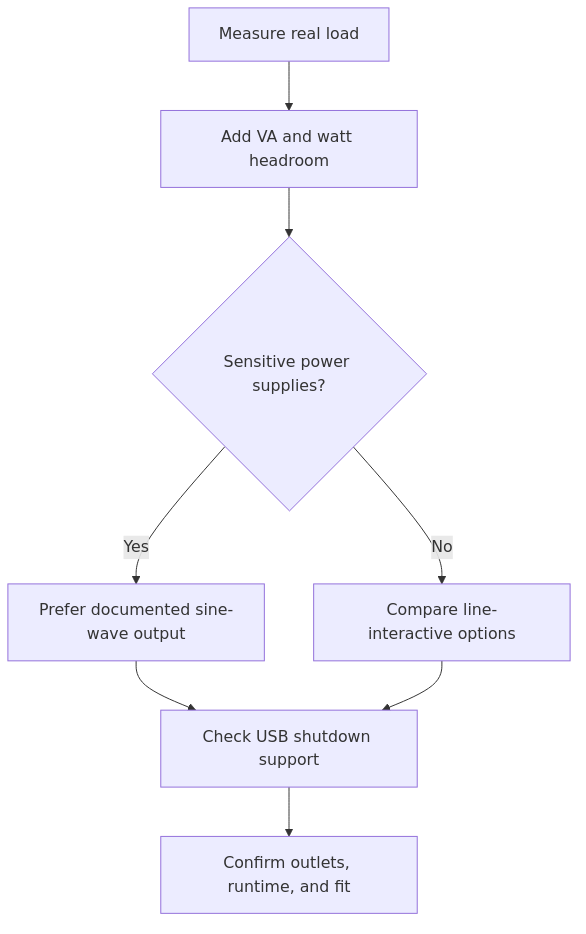
For homelab gear, Start with these three checks:
1. Is the real watt rating high enough?
2. Is the output pure sine wave?
3. Can it shut the gear down cleanly?
Missing any of those can leave a homelab with a UPS that technically works but still does not protect your actual server stack the way you think it does.
The Network UPS Tools documentation is worth bookmarking here. If your shutdown plan depends on USB HID or network-based monitoring, compatibility is part of the purchase decision, not an afterthought.
How big should your UPS be?
For most homelabbers, This guide recommends sizing around 1.5x to 2x your normal steady load instead of trying to calculate the absolute smallest number that will boot the gear.
A few practical examples:
Homelab shape
Typical protected load goal
Buying guidance
1 mini PC + router + switch
60W to 150W
CP1000PFCLCD is enough and sensible
Mini PC + 4-bay NAS + switch + router
150W to 280W
BR1500MS2 or CP1500PFCLCD
Larger tower host + NAS + networking
250W to 450W
CP1500PFCLCD or SMT1500C
Small rack with server + NAS + network
300W to 500W
OR1500PFCRT2U or SMT1500RM2UC-class gear
The point is not to run for an hour. The point is to buy enough time for a clean shutdown and enough headroom that battery age does not immediately make the setup useless.
If you have not already done the operator side of this, pair the buying decision with your shutdown workflow. These two pages are the right follow-up reads:
This is the point where the cheaper unit is still a good unit. It matches the kind of load you are actually protecting and avoids wasting money on capacity you will not use yet.
2. Mini PC + NAS + switch + router
Get the APC BR1500MS2.
This is the most balanced pick for a normal serious homelab. Enough wattage, enough outlets, and less long-term regret.
3. Growing tower lab with more disks or a hungrier host
Get the CyberPower CP1500PFCLCD.
When load growth is obviously coming, a modest capacity step-up can be sensible than replace the UPS a year later.
4. Small rack homelab
Get the CyberPower OR1500PFCRT2U.
The form factor alone makes this the right category pick. If the rack is real, buy the rack UPS.
The gear not to cheap out on
There are three things avoid in a "budget" UPS purchase:
simulated sine wave for active-PFC server gear
very low watt ratings that leave no growth room
no realistic shutdown integration path
If your lab includes equipment you have already spent good money on, the worst UPS purchase is the one that technically turns on but still leaves you exposed during the exact outage you bought it for.
Recommended pairing by adjacent HomelabAddiction articles
If you are building the power-protection side of a broader lab, these articles fit naturally with this guide:
If your homelab uses modern active-PFC power supplies, yes. Pure sine wave output is the safer default for servers, NAS devices, and better power supplies. A cheaper stepped-sine unit may still work, but it is the wrong place to gamble if the goal is graceful shutdown instead of surprise behavior on battery.
Is 1000VA enough for a homelab?
It can be enough for a small mini-PC or single-NAS homelab, but you need to check the watt rating and your real load, not just the VA number. A 1000VA / 600W unit is a sensible floor for compact low-draw setups, not for heavier multi-box labs.
Can Proxmox shut down automatically with a UPS?
Yes. A UPS that exposes USB or network monitoring can work with Network UPS Tools so Proxmox can shut down cleanly before the battery is depleted. If you want the full setup path, read this NUT guide.
If your gear already lives in a cabinet and you are deciding between 1U and 2U instead of tower models, read Best Rackmount UPS for a Homelab in 2026. It breaks down the short-depth, outlet-count, and shutdown trade-offs that only show up once the UPS has to fit a real rack.
Final verdict
For a normal tower homelab, the documented fit is the APC BR1500MS2.
For a lower-cost option, the documented fit is the CyberPower CP1000PFCLCD.
For a rack installation, the documented fit is the CyberPower OR1500PFCRT2U.
That is the cleanest way to think about this market. Buy for your load shape, not for the biggest VA badge you can afford, and do not skip the shutdown side after the hardware arrives.
Sources and verification
Primary documentation checked before this revision:
Verification scope: source URLs were checked for reachability; article claims are framed as documentation-based guidance rather than private testing results.
transmission signupstatus: open channel
article_topic // Budget UPS for Homelabs
Start building a smarter homelab.
Join readers learning Proxmox, networking, storage, backups, and self-hosting without breaking everything.
Enter your email address to receive the Homelab Addiction newsletter.
Beginner-friendly
No gatekeeping. Just clear, actionable guides.
1 useful email / week
Practical tips, real-world setups, and lessons learned.
Zero hype, practical only
What works, what breaks, and how to fix it.
Reply to any email with what you're building. I read and reply to as many as I can.
— The Homelab Addiction Operator
support // the lab
Found this guide useful?
If it saved you time or a rebuild, you can support more practical homelab guides.