
FTC Disclosure: This article contains affiliate links. If you buy through them, HomelabAddiction may earn a commission at no extra cost to you.
NAS & Storage
Best NAS Hardware for a Homelab: Choose 2-Bay, 4-Bay, or Mini PC + DAS by Growth Path
Choose 2-bay NAS, 4-bay NAS, or mini PC + DAS hardware by matching backup growth, drive expansion, software overhead, and network speed to the job your homelab storage actually needs to do.
HomelabAddiction Research Desk15 min read

Key Takeaways
- A 4-bay NAS is the best choice for most homelab readers because it gives you expansion room before you hit your first real storage wall.
- A 2-bay NAS still makes sense if your job is simple: backups, family photos, and light file sharing with minimal maintenance.
- A mini PC + DAS setup can be the best value for tinkerers, but it only wins if you actually want to manage the software stack yourself.
- Networking can flatten expensive hardware fast. PCMag's testing of the UGREEN NASync DXP4800 Plus dropped to 116MB/s write and 113MB/s read on a 1GbE network, which is a good reminder that a fast enclosure cannot outrun a slow switch.
- If you want one answer instead of a shopping spiral, buy the 4-bay box.
Documentation basis: This comparison is grounded in the Synology DS223 specifications, the UGREEN NASync DXP4800 Plus product specifications, and the PCMag plus NASCompares review data already cited in the article. No side-by-side bench test of these exact products on one lab bench is claimed here unless explicitly stated.
A 4-bay NAS is the safest default when the main job is to grow into backups, media, and snapshots without replacing the enclosure too early.
A 2-bay NAS still fits simpler jobs such as family backups, light file sharing, or a first private-cloud box where low maintenance matters more than long expansion runway.
A mini PC plus DAS stack fits tinkerers who want more software control and better value per dollar, but only if they are willing to own the OS, updates, and storage stack themselves.
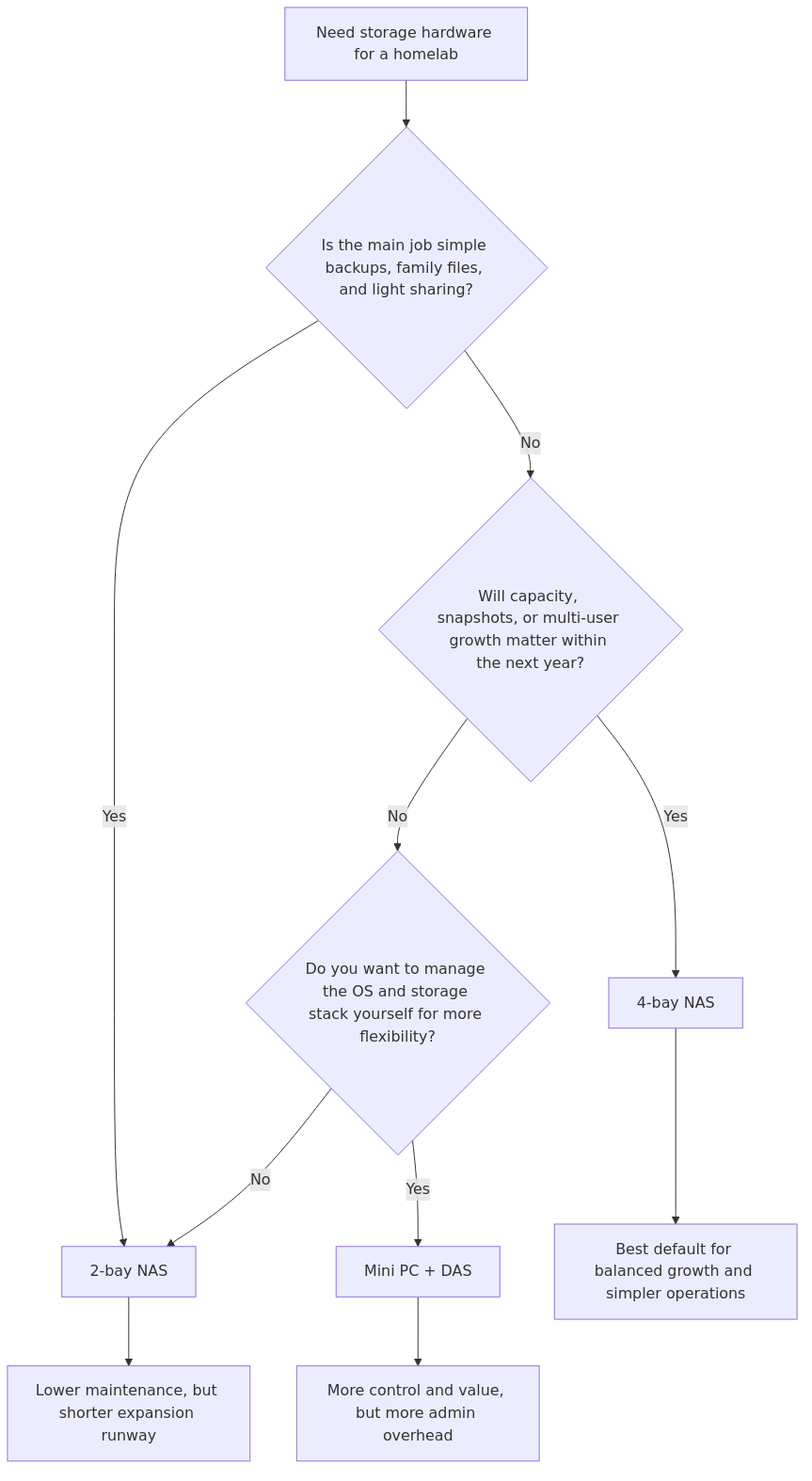
The Quick Comparison Table
Before you buy, it is worth checking whether Coupert can surface a working coupon or cashback offer for the store you are using. If you are already price-checking this hardware, you can try Coupert to see whether there is an extra discount or cashback available at checkout.
| Option | Best for | Main advantage | Main drawback | Real-world signals that matter |
|---|---|---|---|---|
| 2-bay NAS | Backups, family photos, simple private cloud | Lowest friction and best software polish | You outgrow it fast | Synology rates the DS223 at 17.3W in operation, with a single 1GbE port and up to 40TB raw capacity |
| 4-bay NAS | Most homelabs, Plex, multi-user storage, moderate growth | Better expansion without full DIY complexity | Higher upfront cost | PCMag measured the UGREEN DXP4800 Plus at 288MB/s write and 168MB/s read on a faster network, but only 116MB/s write and 113MB/s read on 1GbE |
| Mini PC + DAS | Tinkerers, flexible software stacks, mixed services | Best software freedom and often strong value | More admin overhead, more parts, more ways to misconfigure | NASCompares logged the Beelink ME Mini class at 6.9W idle, 580-600MB/s aggregate across dual 2.5GbE, and 60-75% CPU during simultaneous dual-client access |
Documentation basis and comparison method
This is not a lab shootout between three exact SKUs on one desk. It is a buying-path comparison built from representative hardware, official specs, and published review data.
Here is the comparison framework:
- 2-bay reference point: Synology DS223 class hardware and its official specs, especially power use, 1GbE ceiling, and its software-first design
- 4-bay reference point: UGREEN NASync DXP4800 Plus review data from PCMag, because it includes both multi-gig and 1GbE transfer results
- Mini PC reference point: Beelink ME Mini / low-power N150 class NAS hardware from NASCompares, because it includes idle power, aggregate throughput, and CPU-utilization behavior under simultaneous access
This page does not claim a single lab-bench shootout across every SKU in this category. The more useful question is which hardware path is least likely to create regret for the workload and growth pattern you expect.
transmission signup
article_topic // Best NAS Hardware for a Homelab
Don't leave without the setup notes.
Get practical homelab guides, failure logs, and beginner-friendly build notes in your inbox.
Enter your email address to receive the Homelab Addiction newsletter.
Weekly only. No spam. Unsubscribe anytime.
That is the question most buyers should answer before they start comparing product badges.
Why 2 Bays Feels Cheaper Than It Really Is
A 2-bay NAS is the easiest box to recommend to someone who has never owned a NAS before. It is simple, quiet, and usually backed by the cleanest software ecosystem in the segment. That still matters. A polished OS saves time every single week.
The Synology DS223 is a good example of why 2-bay boxes remain popular. Synology's official specs pitch it as a private-cloud and backup platform for home and small office use, with up to 40TB raw capacity, one 1GbE port, and just 17.3W during operation. Synology also claims the DS223 delivers 30% faster photo indexing than its predecessor, which matters if your NAS is mostly a family photo sink rather than a Plex and Docker host.
That sounds great, and for a lot of households it is. The problem is not what a 2-bay NAS does on day one. The problem is what happens around month twelve.
Once you start using a NAS seriously, your storage profile changes fast:
- You add nightly PC backups
- You start syncing phone photos for multiple users
- You add ripped media or camera footage
- You decide snapshots are worth keeping longer than one week
- You discover that parity, rebuild time, and expansion options matter a lot more than they did at checkout
With only two bays, most upgrade paths are ugly. If you mirrored two 8TB drives and need more space, you are replacing both drives or replacing the enclosure. There is very little graceful growth.
Pros of a 2-bay NAS
- Easiest setup and lowest maintenance
- Usually the best app ecosystem and documentation
- Lower power draw
- Small footprint and low noise
- Strong fit for backup-first workloads
Cons of a 2-bay NAS
- Limited expansion headroom
- Usually capped at 1GbE unless you buy a higher-end model
- Less comfortable for Docker, media indexing, and concurrent users
- Upgrade path often means replacing hardware instead of growing into it
Who should pick a 2-bay NAS
Pick a 2-bay NAS if all of the following are true:
- Your main job is backup, sync, and family file storage
- You want the least possible management overhead
- You are not planning to run a stack of services on the same box
- Your realistic storage horizon is modest enough that mirrored drives still make sense two years from now
If that sounds like you, a 2-bay system is not a compromise. It is the right tool.
Why 4 Bays Is the Sweet Spot for Most Homelabs
This is usually the safest default category for a growing homelab, and the cited specs plus review data support that conclusion.
A good 4-bay NAS is where expansion, redundancy, media handling, and sane management finally line up. It is also where you stop treating your NAS like an external drive with networking and start treating it like infrastructure.
The UGREEN NASync DXP4800 Plus shows the appeal clearly. According to PCMag's review, it gives you four drive bays, a 12th-gen Intel Pentium Gold CPU, 8GB of DDR5 memory expandable to 64GB, two M.2 slots, and both 10GbE and 2.5GbE networking. That is a real jump from entry-level 2-bay gear.
The benchmark split is the important part. PCMag recorded:
- 288MB/s write and 168MB/s read on its faster switched test setup
- 116MB/s write and 113MB/s read when the NAS and desktop were both on 1GbE router ports
That tells you two useful things immediately.
First, a better 4-bay box can push far past what a 1GbE home network can expose. Second, if your network is still 1GbE end to end, a more expensive enclosure does not magically fix that bottleneck. Many buyers spend too much on the NAS and too little on the switch.
Even so, the 4-bay path wins because performance is only half the story. The other half is growth.
A 4-bay platform gives you:
- More flexible RAID layouts
- Better usable capacity without giving up redundancy immediately
- More comfortable rebuild and migration planning
- More room for SSD cache or higher-capacity staging later
- More confidence that you will still like the box after your first expansion cycle
That last point matters. The cheapest NAS is often the one you do not have to replace early.
Pros of a 4-bay NAS
- Best balance of expansion and simplicity
- Better fit for Plex, media indexing, and multi-user use
- Usually stronger CPUs, more RAM, and more network options
- More forgiving long-term capacity planning
- Can remain a pure NAS while still handling a few side workloads
Cons of a 4-bay NAS
- Higher enclosure cost
- Physically larger and usually louder than 2-bay boxes
- Better hardware does not matter much if your network is stuck on 1GbE
- App ecosystem can vary widely by vendor
Who should pick a 4-bay NAS
Pick a 4-bay NAS if any of these sound familiar:
- You want to run Plex or Jellyfin and care about future-proofing
- You already know two bays will not be enough in a year
- You want more than one person actively using the box
- You want room for snapshots, backups, and media without playing capacity Tetris
- You want a clear winner that is still easier to live with than a DIY build
For most HomelabAddiction readers, this is the answer.
Where a Mini PC + DAS Actually Wins
This path gets oversold and undersold at the same time.
It gets oversold by people who love flexibility and forget to price in their own time. It gets undersold by buyers who assume DIY always means messy, unstable, or loud. In reality, a mini PC + DAS setup can be excellent if you know what you are optimizing for.
The attraction is obvious. A modern low-power mini PC gives you much better software freedom than a locked-down appliance:
- TrueNAS, Unraid, OpenMediaVault, or plain Linux
- Better container support
- Easier sidecar workloads
- More control over shares, monitoring, automation, and backup tooling
The tradeoff is that you become the integration layer.
The Beelink ME Mini data from NASCompares is useful here because it shows both the upside and the limits of the category. Their review reports:
- 6.9W idle power draw
- Dual 2.5GbE networking
- 580-600MB/s aggregate throughput across both LAN ports in bandwidth testing
- 60-75% CPU utilization during simultaneous dual 2.5GbE access and SSD activity
- 31-34 dBA noise at idle, rising to about 40 dBA under load
Those are good numbers for a compact always-on box. They also show where the ceiling is. Low-power N150 class systems are efficient, but they are not magic. CPU headroom gets tighter when you stack simultaneous transfers, media jobs, indexing, containers, and management tasks together.
The other issue is storage topology. A mini PC plus USB or DAS enclosure is only as elegant as the OS, filesystem, and backup design you put on top of it. Some buyers think DIY automatically means better value. Sometimes it does. Sometimes it means you bought yourself a second job.
Pros of a mini PC + DAS build
- Maximum software flexibility
- Often better CPU value than turnkey NAS boxes
- Strong fit for Docker, Linux-first workflows, and custom monitoring
- Can double as a broader homelab utility node
- Excellent if you already know your preferred OS stack
Cons of a mini PC + DAS build
- More pieces to buy, cable, cool, and monitor
- Backup, alerting, and drive-health discipline are all on you
- USB and enclosure choices matter more than most guides admit
- Can become messy if you keep adding roles to the same machine
- Troubleshooting burden is significantly higher than a turnkey NAS
Who should pick a mini PC + DAS build
Pick this path if you genuinely enjoy doing the following:
- Choosing your own NAS OS
- Managing updates yourself
- Tuning services and shares
- Verifying SMART, snapshots, and backup jobs without vendor hand-holding
- Accepting that the best-value setup is sometimes the one that requires the most adult supervision
If that sounds fun rather than exhausting, this path can be the best long-term value in the group.
Real Metrics That Matter More Than Marketing
A lot of NAS buying guides obsess over CPU model names and not enough over the numbers that actually change your day-to-day experience.
Here are the evaluation criteria that matter most in this comparison:
| Metric | 2-bay NAS class | 4-bay NAS class | Mini PC + DAS class | Why it matters |
|---|---|---|---|---|
| Network ceiling | Often 1GbE | Often 2.5GbE or better | Often 2.5GbE or better | Determines whether faster disks can even show up on your desktop |
| Power behavior | Usually lower and predictable | Moderate | Can be excellent, but varies by enclosure and OS | Matters for 24/7 operating cost |
| Expansion path | Weakest | Strongest without going full DIY | Flexible, but software-dependent | Determines how painful growth becomes |
| Software polish | Usually best | Vendor-dependent | Entirely self-managed | Time saved has real value |
| Side workloads | Limited to moderate | Moderate to strong | Strongest | Important if NAS also runs apps or containers |
If you want a concrete example of why these numbers matter, look at network limits. PCMag's UGREEN testing shows that once the box was forced onto a 1GbE path, it dropped to 116MB/s write and 113MB/s read. That is not a knock on UGREEN. It is a reminder that your switch and client links are part of the NAS purchase.
Likewise, Synology's DS223 official numbers tell a useful story even without flashy benchmark charts. A 17.3W operating profile and 30% faster photo indexing than its predecessor are exactly the kind of metrics that matter if your NAS is mostly a dependable family data appliance.
And on the DIY side, NASCompares' Beelink data shows why the mini-PC path is not just about raw speed. A 6.9W idle figure is attractive. So is 580-600MB/s aggregate throughput. But 60-75% CPU use during dual-client access is your warning label that cheap, low-power hardware still has limits when you pile on concurrent work.
From the lab

Common Buying Mistakes in This Category
1. Buying for today's capacity instead of next year's layout
If you already know you will store media, backups, and photos for multiple users, two bays is usually a temporary decision.
2. Paying for multi-gig NAS hardware while keeping a 1GbE network
If your switch, router, and client path are still 1GbE, you are leaving a lot of expensive performance on the table.
3. Confusing software freedom with lower maintenance
DIY is flexible. DIY is not low-effort.
4. Treating the NAS like a backup plan instead of one component of the backup plan
A NAS is not the 3-2-1 rule. It is one stop in the chain. If you need a refresher, read NAS Backup Strategies: How to Use the 3-2-1 Rule Without Turning Your Homelab Into a Full-Time Job.
The Winner
The winner is the 4-bay NAS.
Not because it is the fastest in every possible benchmark, and not because every 4-bay model is automatically good. It wins because it gives the broadest range of homelab readers the best mix of:
- usable expansion
- sane redundancy options
- enough hardware for media and service growth
- less friction than a DIY stack
- lower regret than starting too small
If you want one clean recommendation, buy the 4-bay path and pair it with the best disks you can justify. Then make sure the rest of your network is not holding it back.
Who Should Pick What
Pick a 2-bay NAS if...
- You want the cleanest experience
- Your NAS is mostly for backup and private-cloud duties
- You value software polish more than hardware headroom
- You are confident your growth curve is modest
Pick a 4-bay NAS if...
- You want the best all-around answer
- You expect your storage needs to grow
- You care about Plex, snapshots, and multi-user workloads
- You want room to make one good decision instead of two expensive ones
Pick a mini PC + DAS if...
- You like building infrastructure more than buying appliances
- You want OS freedom and stronger general-purpose compute value
- You already understand how you will handle backups, alerts, and drive management
- You accept more complexity in exchange for flexibility
Recommended Gear
If you want a short list, these are the three product paths worth starting with in this category:
- Simple 2-bay choice: Synology DS223 on Amazon
- Best overall 4-bay path: UGREEN NASync DXP4800 Plus on Amazon
- Best DIY-friendly storage add-on: TerraMaster D4-320 DAS on Amazon
If you are still working through the rest of your storage stack, these guides pair well with this decision:
- TrueNAS Scale vs Core vs Unraid: Which NAS OS Wins in 2026?
- Best NAS for Plex in 2026: QNAP TS-464 vs UGREEN DXP2800 vs Synology DS224+
- WD Red Plus vs Seagate IronWolf vs Toshiba N300: Which NAS Hard Drive Should You Buy in 2026?
- Best NVMe SSD for NAS Cache in 2026: WD Red SN700 vs Samsung 970 EVO Plus vs Crucial P3 Plus
For official product and platform details, start with Synology's DS223 product page, the Synology RAID calculator, and the TrueNAS Core hardware guide.
What to Learn Next
Once you pick your hardware path, the next decisions are usually more important than the enclosure badge:
1. Pick the right drives for your workload
2. Decide whether cache actually helps your usage pattern
3. Set up a backup plan that survives drive failure and user error
4. Fix any 1GbE bottlenecks in the rest of your network
Hardware gets the headlines. Storage design is what saves you from rebuilding the whole thing later.
Frequently Asked Questions
Is a 2-bay NAS enough for home use?
Yes, if your main jobs are backup, photo sync, and light file sharing. It becomes limiting once you need more capacity, heavier media use, or more flexible redundancy.
Why is a 4-bay NAS the best default recommendation?
A 4-bay NAS gives you more capacity options, better long-term growth, and enough hardware headroom for common homelab workloads without the maintenance burden of a DIY stack.
Is a mini PC plus DAS better than Synology or UGREEN?
It can be better for tinkerers who want operating-system freedom and stronger general-purpose compute value. It is worse if you want the easiest setup and lowest maintenance.
Do I need 2.5GbE for a home NAS?
Not always, but it matters once you start moving large files regularly, using multiple clients, or buying hardware faster than a 1GbE network can expose.
transmission signupstatus: open channel
article_topic // Best NAS Hardware for a Homelab
Start building a smarter homelab.
Join readers learning Proxmox, networking, storage, backups, and self-hosting without breaking everything.
Enter your email address to receive the Homelab Addiction newsletter.
Beginner-friendly
No gatekeeping. Just clear, actionable guides.
1 useful email / week
Practical tips, real-world setups, and lessons learned.
Zero hype, practical only
What works, what breaks, and how to fix it.
Reply to any email with what you're building.
I read and reply to as many as I can.
— The Homelab Addiction Operator
support // the lab
Found this guide useful?
If it saved you time or a rebuild, you can support more practical homelab guides.