
Disclosure: This article contains affiliate links. If you purchase through these links, we may earn a commission at no additional cost to you.
NAS & Storage
Best NAS for Plex: QNAP TS-464 vs UGREEN DXP2800 vs Synology DS224+
Choose a Plex NAS by matching transcoding headroom, drive-bay growth, networking, and admin polish across the QNAP TS-464, UGREEN DXP2800, and Synology DS224+.
HomelabAddiction Research Desk13 min read

Documentation basis: This comparison is grounded in the official Plex NAS compatibility and hardware-transcoding guidance plus the current QNAP TS-464, UGREEN DXP2800, and Synology DS224+ product specifications. No in-lab transcoding benchmarks or ownership claims are made here unless explicitly stated.
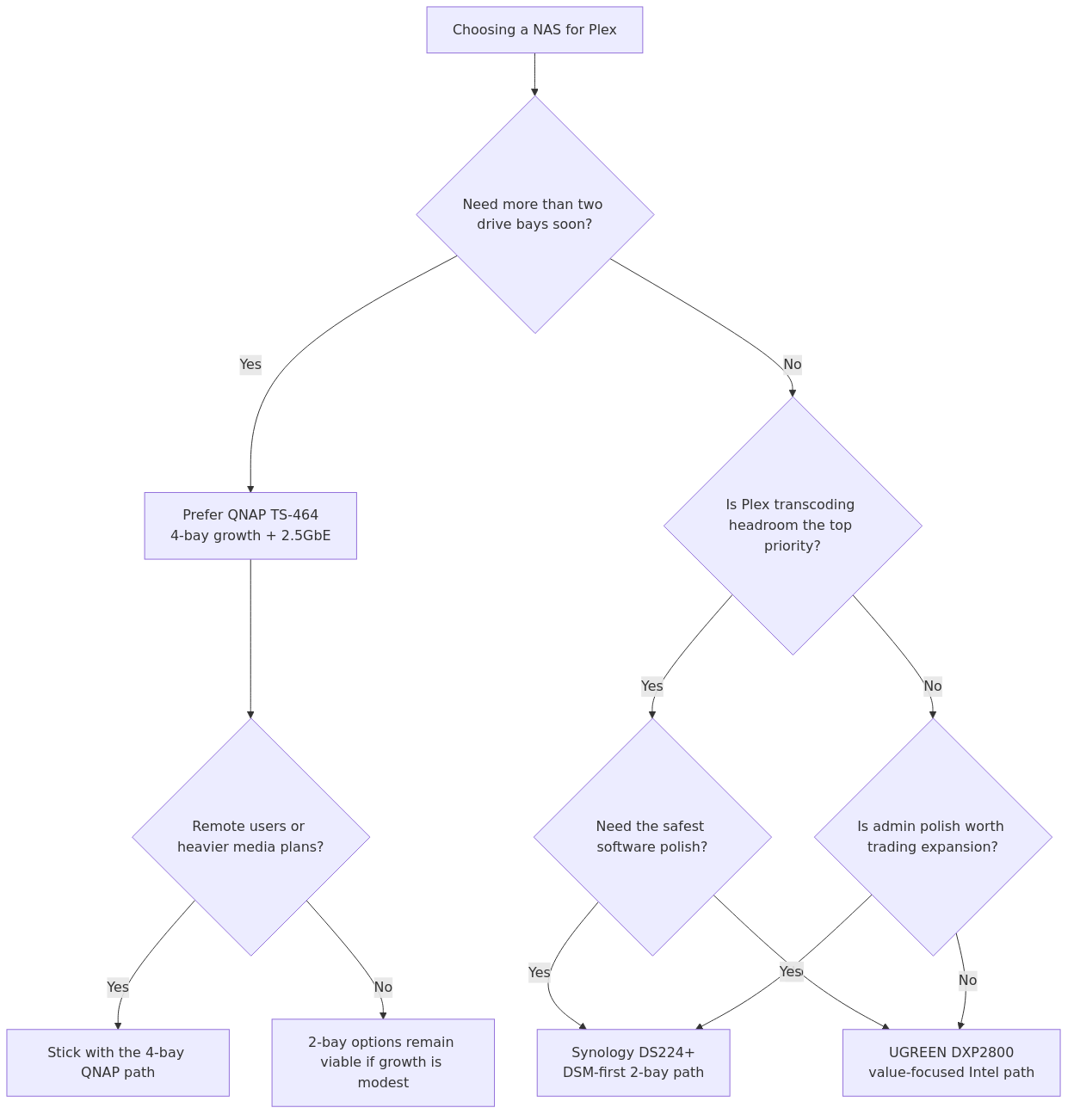
A Plex NAS decision usually turns on four things before brand loyalty matters: whether the box has the media engine headroom for the streams you expect, whether two bays are enough for the library growth you are planning, whether your network path will bottleneck remote playback, and how much administration friction you are willing to accept over time.
This page helps homelab operators choose among the QNAP TS-464, UGREEN DXP2800, and Synology DS224+ by matching drive-bay growth, Intel Quick Sync expectations, network ports, and software ergonomics to the way the NAS will actually be used.
If you are still deciding whether Plex is the right media platform for the lab at all, read Jellyfin vs Plex vs Emby first. If Plex is already the answer, this guide focuses the hardware side of the decision.
Key Takeaways
- QNAP TS-464 is the strongest all-around fit when Plex hardware-transcoding headroom, expansion, and 2.5GbE networking matter most.
- UGREEN DXP2800 is the value-oriented pick when Intel Quick Sync and a more aggressive price matter more than the most polished software ecosystem.
- Synology DS224+ is the easiest choice to justify when day-to-day administration and DSM polish matter more than four-bay growth or higher networking headroom.
- If multiple remote users or heavier transcodes are likely, a four-bay Intel-based box usually ages better than a polished two-bay appliance.
- The most expensive mistake is buying a NAS for storage capacity alone and discovering later that the Plex media engine or drive-bay count is the real limit.
The comparison table most buyers actually need
| NAS | CPU / media engine | RAM | Networking | Real-world Plex benchmark notes | Resource / power notes | Best for |
|---|---|---|---|---|---|---|
| QNAP TS-464 | Intel Celeron N5095 with Quick Sync | Up to 16GB DDR4 | 2 x 2.5GbE + PCIe expansion | HomeLabPicks reports 5-7 simultaneous 1080p transcodes and 2-3 4K H.264 transcodes | Reported ~19W idle; one 1080p down-convert stayed under 20% CPU in their test description | Most homelab Plex users |
| UGREEN DXP2800 | Intel N100 with Quick Sync | 8GB DDR5 | 1 x 2.5GbE | MamaLinux says N100-class systems can handle 2-3 1080p transcodes or 1 4K transcode | Low entry cost, 2 x M.2 slots, 2-bay footprint | Budget-conscious buyers who still need real transcoding |
| Synology DS224+ | Intel Celeron J4125 with Quick Sync | 2GB DDR4, max 6GB | 1 x 1GbE | HomeLabPicks reports 3-4 simultaneous 1080p transcodes and 1-2 4K H.264 transcodes | Synology lists 15W under full operation and claims 52% faster file indexing vs prior gen | People who want the easiest software experience |
What actually matters for Plex on a NAS
The official Plex Media Server requirements page is still the best starting point because it says the quiet part out loud: Plex performance depends heavily on the CPU, the number of simultaneous users, and whether the server has to transcode.
That last part is where most NAS buying mistakes happen.
transmission signup
article_topic // Best NAS for Plex
Don't leave without the setup notes.
Get practical homelab guides, failure logs, and beginner-friendly build notes in your inbox.
Enter your email address to receive the Homelab Addiction newsletter.
Weekly only. No spam. Unsubscribe anytime.
If every client in your house can Direct Play your media, even a fairly modest NAS can look fine. But the second your phone is on mobile data, your tablet wants a lower bitrate stream, your subtitles trigger a burn-in, or a remote family member tries to play a 4K file on a weak streaming stick, the server starts doing real work. That work is transcoding, and Plex on a NAS lives or dies by how gracefully the hardware handles it.
For 2026, the three specs I care about most are:
-
Intel Quick Sync support
This is still the most practical hardware acceleration story for a consumer Plex NAS. -
Bay count
Two bays are fine for a starter box. Four bays are what I recommend if you already know your library is going to grow. -
Networking and expansion
A single 1GbE port is not automatically bad, but dual 2.5GbE or a path to 10GbE makes a NAS much easier to keep around for years instead of months.
If you are building the rest of the storage stack around this decision, our TrueNAS Scale vs Core vs Unraid guide and ZFS vs Btrfs vs ext4 comparison are good companion reads.
If you have already narrowed Plex down to one NAS, it is worth checking for a live coupon or cashback offer before you place the order. Coupert can help surface both if the store has an active deal at checkout.
Why the QNAP TS-464 wins for most Plex users
The QNAP TS-464 is the easiest recommendation because it solves the part people regret later.
The official QNAP TS-464 page highlights the pieces that matter: a quad-core Intel processor, built-in GPU support for video conversion, two 2.5GbE ports, HDMI output, M.2 caching support, and a PCIe slot for future expansion. That is not just a nice-looking spec sheet. It is exactly the kind of hardware profile that ages well in a homelab.
The best performance-oriented benchmark data I found in this run came from HomeLabPicks, which puts the TS-464 at 5-7 simultaneous 1080p transcodes and 2-3 simultaneous 4K H.264 transcodes, with ~19W idle power. More importantly, their write-up notes that a single heavy down-convert stayed under 20% CPU utilization because Quick Sync handled the ugly part of the work.
That matters because it changes how the NAS feels in day-to-day use. A box that can transcode one stream is a box you constantly babysit. A box that can absorb multiple remote users without pinning the CPU is the one that keeps its job.
QNAP TS-464 pros
- Best overall balance of transcoding ability, networking, and long-term expansion
- Four bays gives you real room to grow a media library
- Dual 2.5GbE is much more future-proof than a lone 1GbE port
- PCIe slot gives you a real upgrade path instead of a dead end
- Strong fit if Plex is only one of several homelab services
QNAP TS-464 cons
- More expensive than the UGREEN DXP2800
- QNAP software still asks more of the admin than Synology does
- If you only ever Direct Play to one TV, it is arguably more NAS than you need
Who should pick the QNAP TS-464
Pick it if any of these sound like you:
- you expect multiple remote or mixed-client Plex users
- you want a 4-bay NAS from day one
- you know this box will also carry backups, containers, or general file-serving duties
- you would rather pay once than replace a weaker 2-bay unit in a year
Why the UGREEN DXP2800 is the smart value pick
UGREEN is the box that makes the established brands uncomfortable.
The official UGREEN DXP2800 page lists the core value proposition clearly: Intel N100, 8GB DDR5, 2.5GbE, 2 x M.2 NVMe slots, and a straightforward 2-bay design. In plain English, that means it is not pretending to be a budget NAS while quietly cutting the one thing Plex needs.
The most useful competitive datapoint I found came from MamaLinux, which says N100-class systems can handle 2-3 simultaneous 1080p transcodes or 1 4K transcode with Quick Sync. That lines up with what most homelabbers actually need from a starter Plex NAS: one remote user, one local stream, occasional bitrate conversion, and enough headroom that you are not staring at a buffering icon every time a tablet joins the party.
Where the DXP2800 gets interesting is not just the CPU. It is the fact that UGREEN paired that CPU with 8GB of DDR5 and 2.5GbE instead of treating the box like a stripped-down appliance. That makes it much more believable as a first serious homelab NAS rather than a throwaway stepping stone.
UGREEN DXP2800 pros
- Best price-to-capability ratio of the three
- Intel N100 gives it real Plex transcoding credibility
- 8GB RAM is generous for this class
- 2.5GbE is better than what many entry Synology boxes still offer
- Good choice for a first NAS that will also host a few light services
UGREEN DXP2800 cons
- Two bays is still two bays, and media libraries grow faster than people admit
- Software ecosystem is not as proven or as polished as Synology's
- Lower transcoding ceiling than the QNAP TS-464
Who should pick the UGREEN DXP2800
Pick it if you want:
- the best budget-friendly NAS for Plex without falling into the no-transcode trap
- a starter Plex NAS that still feels like real hardware
- enough power for a few remote streams without paying 4-bay money
- a cleaner value story than the usual entry-level ARM boxes
If you know your library will stay modest for a while, this is the sensible buy. If you already have 30 TB of media and three relatives using your server remotely, skip it and buy the QNAP.
Why the Synology DS224+ is still relevant
Synology keeps getting recommended because DSM makes people happy.
That is not a joke. It matters.
The official Synology DS224+ page calls out Intel Celeron J4125, 2GB DDR4, 15W under full operation, and improved indexing performance, including 52% faster file indexing and 28% faster image indexing compared to the previous generation. Synology's software story is still the cleanest of the three if you value a polished interface, mature backup tooling, and a system that feels less like a project.
For Plex specifically, though, Synology is no longer the automatic answer it was a few years ago.
HomeLabPicks reports the DS224+ at 3-4 simultaneous 1080p transcodes and 1-2 4K H.264 transcodes. That is not bad. It is actually respectable for a compact 2-bay box. The issue is that the value case gets shaky once you compare that performance against a cheaper UGREEN with more RAM and 2.5GbE, or against a QNAP that gives you four bays and more expansion room.
So the DS224+ is not the winner on pure Plex math. It is the winner if you know you care about day-2 management, backups, and a smoother appliance-like experience as much as you care about streams.
Synology DS224+ pros
- Best software ecosystem and easiest administration of the three
- Very low operating power rating at 15W under load from Synology's own page
- Strong fit for users who want Plex plus polished backup and file services
- Still capable of light-to-moderate hardware transcoding
Synology DS224+ cons
- Single 1GbE feels dated in 2026
- Only 2GB RAM included, with limited upgrade headroom
- Worse value than UGREEN if you are shopping on hardware alone
- Easier to outgrow than the QNAP TS-464
Who should pick the Synology DS224+
Pick it if:
- you want the least fiddly NAS of the group
- Plex is important, but it is not the only reason you are buying the box
- you care more about DSM, backup workflows, and general quality-of-life features than squeezing maximum streams per dollar
- your Plex use is mostly local playback plus occasional remote transcoding
From the lab

My verdict: which one actually wins?
For the average HomelabAddiction reader, the winner is QNAP TS-464.
Not because it has the prettiest UI. Not because it is the cheapest. It wins because it is the one I trust least to become a bottleneck six months from now.
Here is the blunt version:
- Buy QNAP TS-464 if you want the best overall Plex NAS and you expect your usage to grow.
- Buy UGREEN DXP2800 if you want the smartest value buy and can live within a 2-bay chassis.
- Buy Synology DS224+ if software polish matters more to you than stretching every hardware dollar.
If your plan is "Plex for me, maybe one remote user, maybe some Docker later," UGREEN is the best value. If your plan is "this is becoming the family media server and I know that means more users, more storage, and more services," QNAP is the right answer. If your plan is "I want the least annoying NAS to live with," Synology stays in the conversation.
Who should pick X
Pick QNAP TS-464 if...
- you want the safest long-term Plex buy
- you care about multi-user transcoding
- you want 4 bays today instead of wishing you had them later
- you may eventually add 10GbE or run more homelab services on the same box
Pick UGREEN DXP2800 if...
- you want strong Plex hardware without paying premium-brand tax
- you only need 2 bays for now
- you want a first NAS that still has 2.5GbE and decent RAM
- your budget is real and not imaginary
Pick Synology DS224+ if...
- you want the easiest everyday management experience
- your Plex workload is modest to moderate
- you want a box that also feels great for backup, file sync, and general home storage
- you would trade some raw value for a better software experience
Recommended gear to pair with a Plex NAS
You do not need much extra hardware to make a Plex NAS work well, but the right drive and cache choices make a bigger difference than people think.
- Synology DiskStation DS224 - If you want a simple 2-bay entry point and prefer the Synology ecosystem.
- Western Digital Red Plus 4TB NAS Hard Drive - A reliable CMR NAS drive that makes more sense than gambling on desktop drives in a box that runs all day.
- Samsung 870 EVO 500GB SSD - A sensible SSD for metadata, app storage, or cache duties if your chosen NAS supports it in your workflow.
And once the box is in place, read our NFS vs SMB vs iSCSI guide so you do not build a perfectly capable NAS and then hobble it with the wrong sharing approach.
FAQ
Do I need Plex Pass for hardware transcoding on a NAS?
Yes, if you want Plex hardware transcoding, Plex Pass is the usual requirement. The NAS hardware matters, but the Plex license gate still matters too.
Is 2-bay enough for a Plex NAS?
It can be. A 2-bay NAS is enough for a first Plex server, a smaller library, or a buyer who prefers lower cost and lower power. A 4-bay NAS is the smarter buy if you already know your media collection will keep growing.
Is Synology or QNAP better for Plex?
For Plex alone, I would choose QNAP here because the TS-464 gives you better long-term hardware value and more expansion room. For overall software experience, Synology still has the edge.
Is UGREEN actually good for Plex, or is it just the cheap option?
It is not just the cheap option. The DXP2800 is attractive because the Intel N100, 8GB RAM, and 2.5GbE give it a credible Plex profile at a lower price than many legacy-brand alternatives.
What matters more for Plex: CPU or networking?
CPU first, especially if transcoding is in play. Networking matters once you have multiple high-bitrate streams, large file transfers, or other services sharing the box, but a weak CPU will ruin the experience before a decent 1GbE link does.
Final call
If you want the best NAS for Plex in 2026 and you do not want to re-run this buying decision next year, buy the QNAP TS-464.
If you want the best deal, buy the UGREEN DXP2800.
If you want the easiest software experience, buy the Synology DS224+.
That is the honest version, and for once the honest version is also the useful one.
Sources and verification
Last verified: 2026-07-27. This article was reviewed against the primary sources listed below. Unsupported first-person testing or ownership claims were removed unless clearly supported by cited documentation.
transmission signupstatus: open channel
article_topic // Best NAS for Plex
Start building a smarter homelab.
Join readers learning Proxmox, networking, storage, backups, and self-hosting without breaking everything.
Enter your email address to receive the Homelab Addiction newsletter.
Beginner-friendly
No gatekeeping. Just clear, actionable guides.
1 useful email / week
Practical tips, real-world setups, and lessons learned.
Zero hype, practical only
What works, what breaks, and how to fix it.
Reply to any email with what you're building.
I read and reply to as many as I can.
— The Homelab Addiction Operator
support // the lab
Found this guide useful?
If it saved you time or a rebuild, you can support more practical homelab guides.