Best NVMe SSD for NAS Cache: Compare WD Red SN700, Samsung 970 EVO Plus, and Crucial P3 Plus
Compare three common NAS cache SSD choices by endurance, sustained write behavior, DRAM design, and budget so the cache layer matches the workload instead of the marketing sheet.
Choosing a cache SSD for a NAS is less about chasing the biggest sequential-read number and more about matching the drive to the kind of churn the cache layer will see. A light read cache for a media library has a different risk profile from a busier mixed-use NAS that keeps rewriting thumbnails, metadata, and small random blocks all day.
That makes endurance, sustained write behavior, and controller design more useful filters than marketing language alone. A NAS-rated drive can justify its price when the cache sees constant write activity, while a cheaper consumer NVMe drive can still fit perfectly well when the workload stays lighter and the budget is tighter.
This page helps a homelab operator choose between WD Red SN700, Samsung 970 EVO Plus, and Crucial P3 Plus by focusing on the cache behaviors and purchase tradeoffs that cited product documentation actually supports.
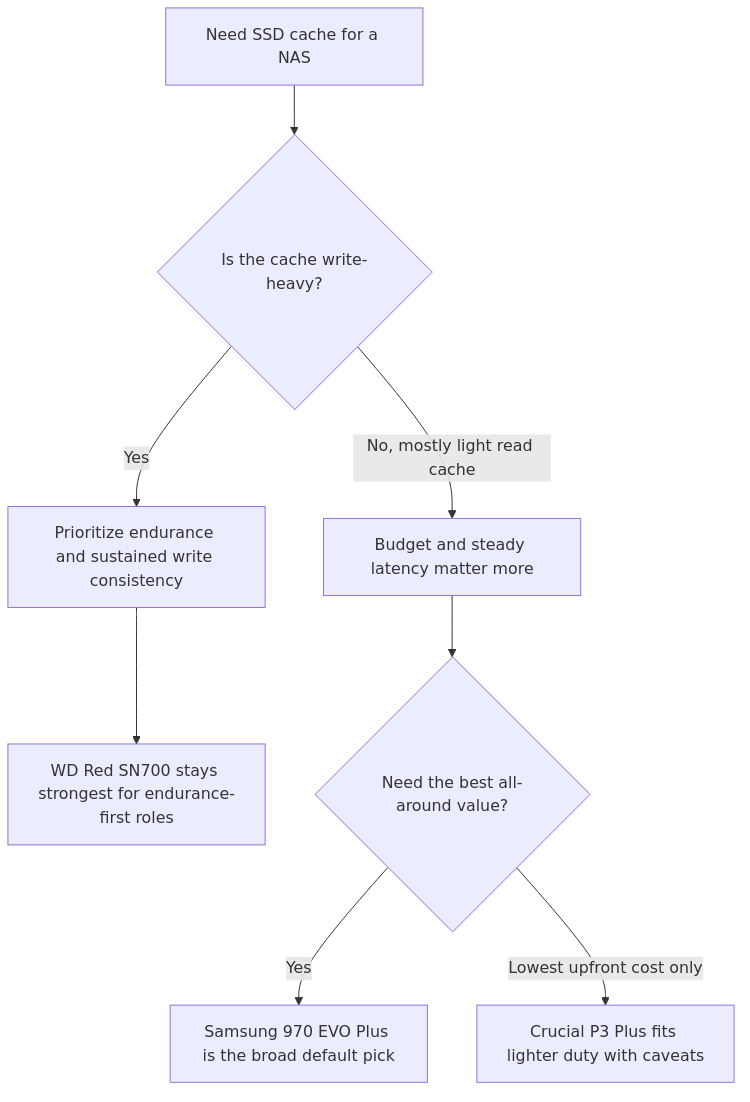
NAS cache fit map: prioritize endurance, sustained write behavior, and budget before treating headline read speed as the buying decision.
Quick comparison table
Drive
NAND / cache behavior
Sequential read
Sequential write
Random read/write
Endurance
Warranty
Best fit
Samsung 970 EVO Plus 1TB
TLC, DRAM-backed
3,500 MB/s
3,300 MB/s
620K / 560K IOPS
600 TBW
5 years
Best overall for most homelabs
WD Red SN700 1TB
TLC, NAS-focused, SLC caching
3,430 MB/s
3,000 MB/s
515K / 560K IOPS
2,000 TBW
5 years
Best for heavier read-write cache duty
Crucial P3 Plus 1TB
QLC, DRAM-less / HMB budget design
5,000 MB/s
4,200 MB/s
Not prominently published in reviewed source
220 TBW
5 years
Budget read-heavy cache only
The table already tells most of the story.
The Crucial drive looks fast because Gen4 numbers are easy to market. The WD drive looks slower because PCIe 3.0 is older. But NAS cache is not a desktop benchmark contest. It is a consistency, endurance, and latency problem.
That is why the Samsung and WD drives are still the serious contenders.
What NAS cache actually rewards
SSD cache helps when your NAS is serving lots of small, repeated requests:
- Synology Photos or Immich thumbnails
- VM disk metadata
- Docker volumes and app databases
- office shares with many tiny files
- active working sets that fit in cache
It helps much less when your NAS mostly does:
- big Plex movie reads
- nightly backup dumps
- large archive storage
- sequential media copies over a 1GbE link
Get practical homelab guides, failure logs, and beginner-friendly build notes in your inbox.
Enter your email address to receive the Homelab Addiction newsletter.
Weekly only. No spam. Unsubscribe anytime.
How published cache benchmarks map to NAS behavior
Spec sheets are abstract, so I translated the published write speeds into a simple 250 GiB cache-fill scenario.
These are best-case theoretical write times, not a promise that your NAS will hit them during every operation.
Drive
Published write speed
Theoretical time to write 250 GiB
Crucial P3 Plus 1TB
4,200 MB/s
1m 04s
Samsung 970 EVO Plus 1TB
3,300 MB/s
1m 21s
WD Red SN700 1TB
3,000 MB/s
1m 29s
This is exactly why peak write speed can mislead you.
Yes, the Crucial P3 Plus is fastest in this synthetic framing. But the difference between 64 seconds and 89 seconds is not the thing most homelab buyers will notice day to day. What they notice is whether the drive stays responsive under constant mixed I/O, whether it wears out early, and whether it behaves predictably inside a cramped always-on NAS chassis.
Endurance is where the buying decision gets real
This is the section most listicles soften because the answer gets inconvenient.
If you run a read-only cache, endurance is usually not the limiting factor. If you run read-write cache, endurance becomes the whole ballgame.
Using the published TBW ratings, here is how the three drives look if your cache absorbs roughly 100 GB/day of writes versus a heavier 400 GB/day:
Drive
Endurance
Approx life at 100 GB/day
Approx life at 400 GB/day
WD Red SN700 1TB
2,000 TBW
54.8 years
13.7 years
Samsung 970 EVO Plus 1TB
600 TBW
16.4 years
4.1 years
Crucial P3 Plus 1TB
220 TBW
6.0 years
1.5 years
That table is why WD Red SN700 remains compelling even when its peak speeds are lower.
A NAS cache drive is not a boot SSD that spends half its life idling between browser launches. It is sitting in a 24/7 box that may be chewing through photo indexing, sync jobs, metadata churn, or VM activity all day. Endurance matters more here than it does in a gaming rig.
Samsung 970 EVO Plus: the best overall pick
The data says Samsung wins for most people because it hits the best middle ground.
Tom's Hardware rated the 970 EVO Plus as one of the fastest PCIe 3.0 SSDs of its class and highlighted its strong overall performance, solid efficiency, and mature software stack. The drive also carries a DRAM cache, which matters for NAS usage more than many buyers realize.
On the 2026 SERP, HomeLabPicks makes the strongest practical case for Samsung as the all-around cache winner: DRAM-backed designs maintain low latency more gracefully under constant random I/O, while DRAM-less HMB designs can spike much harder when the workload gets messy.
That lines up with the kind of tasks homelabs actually throw at a cache drive:
- photo libraries
- app metadata
- containers
- VM-related small-file churn
- lots of repeated random reads
Pros
DRAM-backed design is a better fit for mixed random I/O than cheap DRAM-less budget drives
3,500 / 3,300 MB/s is still plenty for NAS cache roles
620K / 560K random IOPS gives it strong responsiveness where cache matters most
600 TBW is not elite, but it is still healthy for most home use
mature firmware and broad real-world compatibility
Cons
lower endurance than the WD Red SN700
no NAS-specific branding or positioning
pricing is sometimes awkward if the SN700 is discounted nearby
Who should pick Samsung 970 EVO Plus
Pick it if:
- your NAS cache is mostly accelerating home-lab responsiveness, not taking punishment from heavy write-back workloads
- you want the best all-around compromise between latency behavior, price, and reliability
- you are running Synology, QNAP, or DIY NAS builds with mixed app and small-file traffic
For many homelab readers, Samsung 970 EVO Plus remains the broad default pick because its price, DRAM-backed design, and mature platform support stay well balanced for lighter or mixed cache duty.
WD Red SN700: the best endurance-first NAS pick
WD did the obvious smart thing here. Instead of chasing bigger desktop benchmark headlines, it built a drive that makes more sense in sustained NAS duty.
Tom's Hardware called the SN700 unexciting in pure general-use performance, but also praised its consistency, strong sustained workload behavior, and efficiency. That is exactly the kind of boring I want in a NAS cache drive.
The SN700 is rated up to 2,000 TBW at 1TB and scales all the way to 5,100 TBW on the 4TB model. That is not a small advantage. It is a category-defining one.
WD Red SN700 fits best when the cache is expected to absorb heavier daily write churn rather than mostly light read acceleration.
Pros
much stronger endurance than Samsung 970 EVO Plus and especially Crucial P3 Plus
purpose-built NAS positioning is actually meaningful here
strong sustained-workload reputation from SSD reviewers
5-year warranty and capacity options up to 4TB
safer pick for read-write caching
Cons
slower than the others on peak sequential write numbers
weaker value if your cache workload is mostly read-heavy and light
usually not the cheapest option per TB
Who should pick WD Red SN700
Pick it if:
- you are using read-write cache, not just read cache
- your NAS hosts Docker databases, surveillance metadata, active sync workloads, or VM-heavy traffic
- you want a conservative endurance-first decision and do not care about winning a desktop benchmark chart
- you are the type of buyer who would rather overbuy endurance now than replace a dead cache SSD early
If your stack also includes protocol-heavy file serving, NFS vs SMB vs iSCSI is worth reading alongside this purchase decision. Protocol choice and cache choice often get blamed for each other's problems.
Crucial P3 Plus: the budget answer with real caveats
This is the one people want me to bless because the price is attractive and the sequential spec sheet looks fantastic.
I get it.
At 1TB, the P3 Plus posts 5,000 / 4,200 MB/s sequential numbers and often costs dramatically less than NAS-focused alternatives. Tom's Hardware also described it as efficient and good value for capacity. If you stop there, it looks like the obvious buy.
But the caveat is not small: this is a QLC, DRAM-less, lower-endurance drive. Tom's also flagged the lower endurance as a core downside, and HomeLabPicks is blunt about the broader problem with cheap DRAM-less cache candidates - they can look fine in short desktop tests yet behave worse under constant random NAS workloads.
At 220 TBW for the 1TB model, the endurance story is not in the same league as the other two drives.
Pros
usually the cheapest way into 1TB NVMe cache capacity
fastest headline sequential numbers in this three-way comparison
good enough for lighter read-heavy cache roles
5-year warranty is still respectable
Cons
dramatically lower endurance than WD or Samsung
QLC and DRAM-less design are not what I want for heavier mixed cache abuse
weaker long-term value if the drive ends up wearing out early
much easier to recommend for secondary or light-duty use than for serious 24/7 cache work
Who should pick Crucial P3 Plus
Pick it only if:
- you are building a budget box
- your cache role is mostly read-heavy
- your write volume is light
- you understand that the low price is buying a compromise, not a hidden bargain miracle
For a lighter home backup NAS, a lower-cost drive can be acceptable; for a busier mixed-use lab, paying for the higher-endurance option once is usually easier than replacing a marginal cache drive early.
From the lab
Who wins by use case?
Use case
Best pick
Why
Best overall for most homelabs
Samsung 970 EVO Plus
Best balance of DRAM-backed responsiveness, firmware maturity, price, and still-solid endurance
Best for heavier read-write cache
WD Red SN700
2,000 TBW endurance and stronger sustained-workload story make it the safer long-haul choice
Best strict-budget option
Crucial P3 Plus
Lowest cost entry, but only if you accept the endurance and DRAM tradeoffs
Best "I do not want to think about replacing this soon" pick
WD Red SN700
Endurance margin is massively better
Best for mixed app metadata and small-file responsiveness
Samsung 970 EVO Plus
DRAM-backed behavior and strong random I/O matter more than Gen4 headline speed
Is SSD cache even worth it?
Sometimes yes. Sometimes absolutely not.
If the NAS mostly serves large sequential media files, the better upgrade may be networking, memory, or the base HDD layer rather than adding SSD cache simply because an M.2 slot is available.
But if your box also runs apps, thumbnails, databases, sync jobs, or VM-related metadata, SSD cache is one of the few upgrades you can actually feel immediately.
Before you buy, it is worth checking whether Coupert can surface a working coupon or cashback offer for the store you are using. If you are already price-checking this cache SSD, you can try Coupert to see whether there is an extra discount or cashback available at checkout.
In short: choose Samsung 970 EVO Plus for the broad default case, WD Red SN700 for endurance-first cache duty, and Crucial P3 Plus only when the budget matters more than long-write headroom.
Recommended default pick
For most HomelabAddiction readers, Samsung 970 EVO Plus wins.
It is the best mix of responsiveness, random performance, mature platform behavior, and reasonable endurance. It feels like the most balanced recommendation because it does not over-index on one metric while quietly failing another.
Endurance-first pick: WD Red SN700 fits best when heavier write churn matters more than lowest initial cost.
Budget-first pick: Crucial P3 Plus can fit lighter read-heavy cache duty, but its lower endurance makes it harder to justify for heavier mixed-use NAS churn.
That is the real conclusion here: the best NAS cache SSD is not the one with the biggest spec-sheet read number. It is the one whose latency behavior, endurance, and sustained consistency actually match a 24/7 cache workload.
For most people, that still points to Samsung. For harder-duty buyers, WD is the smarter answer.
FAQ
Is WD Red SN700 better than Samsung 970 EVO Plus for NAS cache?
For heavier read-write cache use, yes. The WD Red SN700 has a much stronger endurance rating and a more NAS-specific sustained-workload story. For most mixed home-lab use, Samsung 970 EVO Plus is the better overall value and still the better overall recommendation.
Is Crucial P3 Plus good enough for Synology or TrueNAS cache?
It can be good enough for light read-heavy cache duty, but it is harder to justify for heavier 24/7 mixed workloads because the 1TB model's 220 TBW endurance is much lower than the other two drives here.
Does DRAM matter for a NAS cache SSD?
Yes. DRAM matters more in NAS cache than in many desktop use cases because cache workloads often involve constant small random I/O. DRAM-backed drives generally handle that type of pressure more gracefully than cheaper DRAM-less alternatives.
Should I buy a Gen4 SSD for NAS cache if my NAS only supports PCIe 3.0?
Not automatically. If the Gen4 drive is cheaper and durable enough, fine. But do not pay extra for headline Gen4 numbers your NAS cannot use. Endurance and consistency matter more than interface bragging rights in most cache roles.
Is SSD cache worth it for Plex alone?
Usually not for pure media streaming. Plex benefits more from CPU, networking, and media-drive choices unless your NAS is also handling thumbnails, metadata, downloads, and lots of concurrent small-file activity.
transmission signupstatus: open channel
article_topic // Best NVMe SSD for NAS Cache
Start building a smarter homelab.
Join readers learning Proxmox, networking, storage, backups, and self-hosting without breaking everything.
Enter your email address to receive the Homelab Addiction newsletter.
Beginner-friendly
No gatekeeping. Just clear, actionable guides.
1 useful email / week
Practical tips, real-world setups, and lessons learned.
Zero hype, practical only
What works, what breaks, and how to fix it.
Reply to any email with what you're building. I read and reply to as many as I can.
— The Homelab Addiction Operator
support // the lab
Found this guide useful?
If it saved you time or a rebuild, you can support more practical homelab guides.