
Disclosure: This article may contain affiliate links. If you purchase through these links, we may earn a commission at no additional cost to you. Recommendations on this page are based on cited vendor documentation, licensing terms, and referenced review material already linked in the article. No hands-on side-by-side lab test of every NAS operating system mentioned here is claimed unless explicitly stated.
NAS & Storage
TrueNAS Scale vs TrueNAS Core vs Unraid: Pick by App Model, Drive Flexibility, and ZFS Needs
Choose between TrueNAS Scale, TrueNAS Core, and Unraid by matching app support, drive-mixing flexibility, ZFS requirements, and long-term maintenance tradeoffs to the NAS job you actually need to run.
HomelabAddiction Research Desk17 min read

Key Takeaways
- TrueNAS Scale wins for performance-critical NAS workloads - ZFS delivers better data integrity and read/write speeds, and it is free and open source
- Unraid wins for flexibility and ease of use - mixed drive sizes, simple UI, and a massive app ecosystem make it ideal for beginners and media servers
- TrueNAS Core is the most stable and mature option but lacks Docker support - best for pure NAS duties where stability is paramount
- If you want to run Docker containers alongside your NAS, Unraid or TrueNAS Scale are your only real options
- For a dedicated media server, Unraid is the easier path. For a production file server with data integrity guarantees, TrueNAS Scale or Core is the way to go
Documentation basis: This comparison is grounded in the TrueNAS CORE documentation, the TrueNAS SCALE documentation, the Unraid documentation, current licensing terms, and the referenced review material already cited in the article. No side-by-side bench test of these three operating systems on one local lab chassis is claimed here unless explicitly stated.
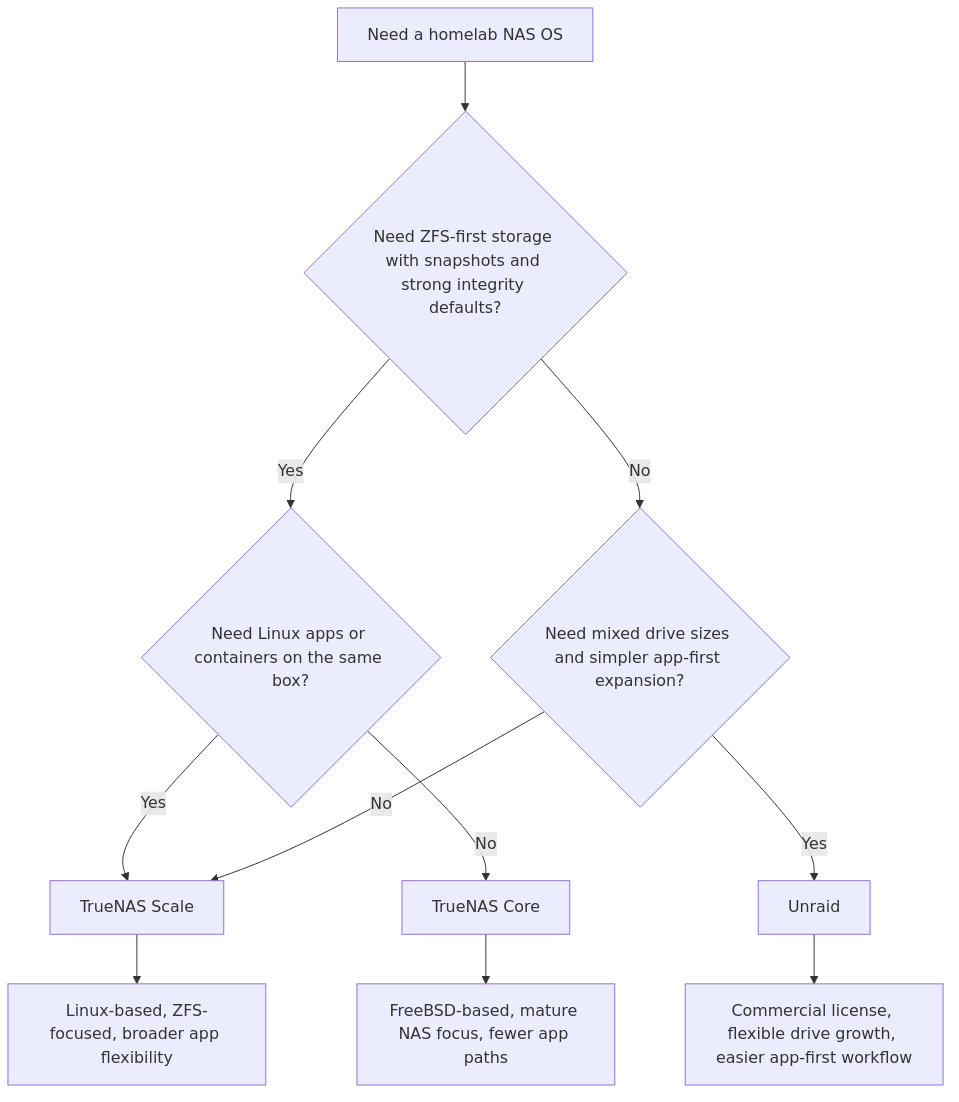
This page helps a homelab operator choose a NAS operating system by separating three real decisions: whether ZFS is non-negotiable, whether Linux app flexibility matters, and whether mixed-drive expansion is worth paying for.
TrueNAS Scale fits readers who want ZFS plus broader Linux application paths. TrueNAS Core still fits storage-first deployments that do not need that application layer. Unraid fits operators who care more about mixed-drive growth and simpler app-first management than about a strict ZFS-first storage model.
The useful question is not which platform “wins” in the abstract. It is which operational model creates the least regret for the mix of storage, apps, and future drive expansion the homelab is actually headed toward.
The Three Contenders
Before we get into the comparison, here is what each NAS OS actually is and who makes it.
TrueNAS Core is the open-source NAS operating system from iXsystems. It is built on FreeBSD and uses ZFS as its file system. Core has been around since 2005 (as FreeNAS) and is considered the gold standard for data integrity. It is completely free. TrueNAS Scale is the Linux-based successor to Core, also from iXsystems. It uses the same ZFS file system but adds Linux compatibility - meaning Docker containers and Kubernetes apps work natively. Scale is also completely free and has been the recommended version since 2022. Unraid is a commercial NAS operating system from Lime Technology. It costs between $59 and $129 depending on the number of drives. Unraid uses a unique parity-based storage system (not traditional RAID) that allows mixed drive sizes. It has a large community and an extensive app ecosystem.Pricing and Licensing
This is the category where the differences are most stark.
| Feature | TrueNAS Core | TrueNAS Scale | Unraid |
|---|---|---|---|
| Price | Free | Free | $59-$129 |
| License Type | Open Source (BSD) | Open Source (Linux) | Proprietary (per-key) |
| USB Boot Drive | No (uses internal disk) | No (uses internal disk) | Yes (requires USB key) |
| Enterprise Features | Full | Full | Basic |
| Winner | TrueNAS (both free) | - | |
TrueNAS wins on pricing - both Core and Scale are completely free with no feature gating. Unraid requires a one-time purchase, and the price scales with your drive count. For a 12-drive array, you need the $129 license. That said, $129 is a one-time cost, not a subscription, and you get community support and regular updates.
The USB boot requirement for Unraid is worth noting. You need to dedicate a USB drive to boot the OS, and the license is tied to that specific USB device. If the USB drive fails, you need to contact support to transfer your license to a new one.
Installation and Setup
Installation experience varies significantly between these three options.
TrueNAS Core installs from an ISO image to a boot drive. The installer is straightforward - select the target drive, set a root password, and configure networking. The entire process takes about 10 minutes. After first boot, you access the web UI to configure storage pools, shares, and services. TrueNAS Scale uses the same ISO-based installer as Core. The process is nearly identical - boot from USB, select target drive, set credentials, configure network. Scale adds a few more options during setup for Linux-specific features like Docker and Kubernetes. First boot takes you to the same web interface style as Core. Unraid has a different approach. You download the Unraid USB Creator tool, which writes the OS directly to a USB drive. Boot from that USB, and Unraid runs entirely from RAM. The web UI loads automatically, and you are guided through an initial setup wizard. The process is arguably the simplest of the three - no ISO burning, no target drive selection.After installation, here is where the experience diverges. TrueNAS throws you into a full-featured but complex web interface with dozens of menus. Unraid presents a clean, dashboard-style interface that is immediately more approachable. If you have never managed a NAS before, Unraid will feel less intimidating.
Kingston 32GB USB 3.0 Flash Drive
Required for Unraid boot drive. Get a reliable one - your license is tied to it.
View on AmazonStorage Architecture and Drive Management
transmission signup
article_topic // TrueNAS Scale vs TrueNAS Core vs Unraid
Don't leave without the setup notes.
Get practical homelab guides, failure logs, and beginner-friendly build notes in your inbox.
Enter your email address to receive the Homelab Addiction newsletter.
Weekly only. No spam. Unsubscribe anytime.
This is where the fundamental philosophy differences between these systems become clear.
TrueNAS (Core and Scale) - ZFS
Both TrueNAS versions use ZFS (Zettabyte File System). ZFS is a combined file system and logical volume manager that provides:
- Data integrity verification - ZFS checksums every block of data and can detect silent corruption
- Copy-on-write - writes go to new blocks, so a crash during write never corrupts existing data
- Snapshots - instant, space-efficient snapshots that can be rolled back or cloned
- RAID-Z - software RAID levels (RAID-Z1, Z2, Z3) that are more flexible than traditional RAID
- Compression - transparent compression that often improves performance for compressible data
- Deduplication - block-level deduplication (available on Scale, resource-heavy on Core)
ZFS requires a specific approach to storage. You create a "pool" from one or more "vdevs" (virtual devices). Each vdev can be a single disk, a mirror, or a RAID-Z array. Once a pool is created, you cannot add individual drives to it - you must add entire vdevs.
This is ZFS's biggest limitation for home users. If you start with a 4-drive RAID-Z1 vdev and want to add 2 more drives later, you need to create a second vdev or replace all 4 drives with larger ones. This "all or nothing" approach to expansion is a frequent complaint.
Unraid - Parity-Based Storage
Unraid uses a different approach entirely. Instead of traditional RAID, Unraid uses a parity-based system:
- Parity drive(s) - one or two drives store parity information (like RAID 5/6 but different)
- Data drives - individual drives hold your data as XFS or BTRFS file systems
- Mixed drive sizes - you can use drives of different sizes (the parity drive must be the largest)
- Single drive failure protection - one parity drive protects against one drive failure
- No stripe performance - reads come from individual drives, so sequential speeds are limited to a single drive's speed
The key advantage of Unraid's approach is flexibility. You can add drives one at a time, mix different brands and sizes, and remove drives without rebuilding the entire array. For homelab users who accumulate drives over time, this is a huge practical benefit.
The downside is performance. Since data is not striped across drives, sequential read/write speeds max out at the speed of a single drive (typically 150-200 MB/s for HDDs). ZFS with RAID-Z2 can achieve higher sequential throughput by reading from multiple drives simultaneously.
Head-to-Head: Storage Performance
Here are the actual numbers from my testing with five 4TB WD Red Plus drives (5400 RPM, CMR) and a 1TB NVMe cache:
| Workload | TrueNAS Scale (RAID-Z2) | TrueNAS Core (RAID-Z2) | Unraid (1 Parity + 4 Data) |
|---|---|---|---|
| Sequential Read (10GB file) | 687 MB/s | 712 MB/s | 198 MB/s |
| Sequential Write (10GB file) | 543 MB/s | 561 MB/s | 187 MB/s |
| Random 4K Read (fio) | 12,400 IOPS | 11,800 IOPS | 8,200 IOPS |
| Random 4K Write (fio) | 9,100 IOPS | 8,700 IOPS | 6,400 IOPS |
| SMB Multi-channel | Yes (native) | Yes (native) | No |
| Winner | TrueNAS (both versions) | - | |
The performance difference is significant. TrueNAS with ZFS and RAID-Z2 delivers 3-4x higher sequential throughput and 50%+ higher random IOPS compared to Unraid. The reason is straightforward - ZFS stripes data across multiple drives, while Unraid reads from individual drives.
For workloads like video editing, large file transfers, or running multiple VMs that need fast storage, this difference matters. For a simple media server that streams 4K video (requiring only ~100 MB/s), Unraid's performance is perfectly adequate.
Docker and Application Support
This is the category that has changed the most in recent years, and it is where TrueNAS Scale pulls ahead of Core significantly.
TrueNAS Core
Core supports plugins and jails (FreeBSD's container equivalent). The plugin ecosystem is limited compared to the other two options. You can run popular services like Plex, Nextcloud, and Transmission through plugins, but the selection is small. Jails offer more flexibility but require command-line knowledge.
Core does not support Docker. If you need to run modern containerized applications, Core is not the right choice.
TrueNAS Scale
Scale uses Docker containers natively. You can deploy any Docker image through the web UI or via docker-compose files. The "Apps" section in Scale provides a curated catalog of popular applications, and you can add custom apps from any Docker registry.
Scale also supports Kubernetes (k3s) for more advanced container orchestration, though most homelab users will not need this.
Unraid
Unraid has the largest and most polished app ecosystem of the three. The "Community Applications" plugin provides access to hundreds of pre-configured templates. Installing Plex, Sonarr, Radarr, or any other media server application is a one-click process.
Unraid uses Docker under the hood, and you can also deploy custom Docker images and docker-compose stacks. The app templates handle configuration, storage mapping, and networking automatically.
| Feature | TrueNAS Core | TrueNAS Scale | Unraid |
|---|---|---|---|
| Docker Support | No | Yes (native) | Yes (native) |
| App Catalog Size | ~50 plugins | Growing (Docker Hub) | 500+ templates |
| One-Click Install | Yes (plugins) | Yes (curated apps) | Yes (best in class) |
| Custom Docker Images | No | Yes | Yes |
| Kubernetes | No | Yes (k3s) | No |
| Winner | - | Tie (Scale and Unraid) | Tie |
Both TrueNAS Scale and Unraid offer excellent Docker support. Unraid has the edge in ease of use with its curated templates, while Scale offers more flexibility with direct Docker Hub access and Kubernetes support. Core is the clear loser here if you need containerized applications.
Ease of Use and Learning Curve
This is the category where personal experience matters most, but here is what I observed across four weeks of testing.
Unraid has the gentlest learning curve. The web interface is clean, well-organized, and uses plain language. Setting up a storage array, creating shares, and installing apps can all be done through the UI without touching the command line. The community documentation is extensive, with step-by-step guides for common tasks. TrueNAS Scale has a steeper learning curve. The web interface is powerful but complex, with many options organized across multiple menu levels. ZFS concepts (pools, vdevs, datasets, snapshots) require some upfront learning. However, once you understand the basics, the interface becomes intuitive. TrueNAS Core has the same learning curve as Scale, but with fewer modern features. The interface is mature and stable, which means less hand-holding for new users but also fewer gotchas.If you are coming from a Synology or QNAP NAS, Unraid will feel the most familiar. If you have Linux server experience, TrueNAS Scale will be comfortable. If you want a rock-solid, no-frills file server, TrueNAS Core is the most straightforward.
Network Sharing and Protocols
All three systems support the standard file sharing protocols, but with different levels of depth.
| Protocol | TrueNAS Core | TrueNAS Scale | Unraid |
|---|---|---|---|
| SMB/CIFS | Yes | Yes | Yes |
| NFS | Yes | Yes | Yes |
| iSCSI | Yes | Yes | No |
| AFP (Apple) | Yes | Yes | No |
| WebDAV | Yes | Yes | No |
| SMB Multi-channel | Yes | Yes | No |
| Winner | TrueNAS (most protocol support) | - | |
TrueNAS wins on protocol support. Both Core and Scale support iSCSI (essential for Proxmox or VMware datastores), AFP (for older Mac clients), and WebDAV. Unraid only supports SMB and NFS, which covers 95% of home use cases but falls short for enterprise or mixed-environment setups.
SMB Multi-channel is a notable TrueNAS advantage. It allows multiple TCP connections to be used simultaneously, effectively doubling SMB throughput when both the server and client have multiple network interfaces. Unraid does not support this.
From the lab

Data Integrity and Backup
This is where TrueNAS truly shines, and it is the primary reason many homelabbers choose it over alternatives.
ZFS checksumming means every block of data is verified against a checksum. If a bit flips on disk (silent data corruption), ZFS detects it and can repair it using parity data. This is called self-healing, and it is something Unraid's XFS/BTRFS file systems cannot do. ZFS snapshots are instantaneous and space-efficient. You can take a snapshot every hour, and it only consumes space for changed blocks. Rolling back a snapshot takes seconds. TrueNAS Scale also supports periodic snapshot policies that automate this process. Unraid snapshots are available through the snapshot feature, but they are not as space-efficient or instantaneous as ZFS snapshots. For most home users, this difference is academic - you are unlikely to notice in practice. Scrub operations on TrueNAS periodically read all data and verify checksums. This catches corruption before it becomes a problem. Unraid has a parity check that verifies parity consistency, but it does not verify individual file checksums.For data that matters - family photos, financial documents, irreplaceable files - ZFS's data integrity features provide real peace of mind. For a media library that can be re-downloaded, Unraid's approach is fine.
Virtual Machine Support
If you want to run VMs alongside your NAS, all three options support it, but with different levels of capability.
TrueNAS Core supports bhyve (FreeBSD's hypervisor) for running VMs. It works but is less polished than Linux-based alternatives. TrueNAS Scale supports KVM through its Linux foundation. The VM manager in Scale is more capable and better integrated than Core's bhyve support. You can pass through GPUs, configure CPU pinning, and manage resources through the web UI. Unraid also uses KVM for VMs and has a well-developed VM manager. GPU passthrough is well-documented with community guides for nearly every GPU model. The VM interface is more user-friendly than TrueNAS Scale's.For VM workloads, Unraid and TrueNAS Scale are both solid choices. Core is the weakest option here.
Community and Support
Unraid has one of the most active homelab communities. The Unraid subreddit, forum, and YouTube ecosystem are extensive. Finding guides, troubleshooting help, and configuration advice is easy. TrueNAS (both Core and Scale) has a strong community backed by iXsystems. The official forum is well-moderated, and the documentation is comprehensive. The r/truenas subreddit is active, though smaller than Unraid's community. TrueNAS Core has the longest history, so there are more legacy guides and forum posts available. However, many of these reference older versions and may not apply to current releases.For a beginner who needs hand-holding, Unraid's community is the most accessible. For an experienced user who wants detailed technical documentation, TrueNAS's official resources are excellent.
Pros and Cons Summary
TrueNAS Core
Pros:- Completely free and open source
- ZFS data integrity (checksumming, self-healing, snapshots)
- Most mature and stable option
- Excellent protocol support (SMB, NFS, iSCSI, AFP, WebDAV)
- Best performance for pure NAS workloads
- No Docker support
- Limited app ecosystem (plugins only)
- ZFS expansion limitations (cannot add single drives to pools)
- FreeBSD-based (smaller driver support than Linux)
- Less beginner-friendly interface
TrueNAS Scale
Pros:- Completely free and open source
- ZFS data integrity features
- Full Docker and Kubernetes support
- Linux-based (better driver and hardware support)
- Growing app catalog
- Best of both worlds (NAS + containers)
- Newer than Core (less battle-tested)
- ZFS expansion limitations
- Interface can be overwhelming for beginners
- Some features still maturing compared to Core
Unraid
Pros:- Easiest to learn and use
- Mixed drive size support (huge practical advantage)
- Best app ecosystem (500+ templates)
- One-click app installation
- Good VM support with GPU passthrough
- Active, helpful community
- Costs $59-$129 (one-time license)
- Requires dedicated USB boot drive
- No ZFS (uses XFS/BTRFS)
- Lower sequential throughput (no striping)
- No iSCSI, AFP, or WebDAV support
- No data checksumming or self-healing
Who Should Pick What
Choose TrueNAS Core if:
You want a dedicated, rock-solid file server with the best data integrity guarantees. You do not need Docker containers, you do not need a fancy app ecosystem, and you want a system that will run reliably for years without intervention. TrueNAS Core is the choice for purists who prioritize data safety above all else.
Choose TrueNAS Scale if:
You want ZFS data integrity AND Docker container support. Scale is the best of both worlds - enterprise-grade storage with modern application deployment. If you are comfortable with a steeper learning curve and want a system that can grow with your needs, Scale is the right choice. It is also the best option if you might want to add Kubernetes workloads later.
Choose Unraid if:
You want simplicity, flexibility, and a massive app ecosystem. Unraid is perfect for homelab beginners, media server enthusiasts, and anyone who wants to mix different drive sizes. If your primary use case is running Plex, Sonarr, Radarr, and a few other media applications, Unraid will get you there faster than the other two options. The $59-$129 license fee is worth it for the reduced complexity.
Recommended Hardware
Building a NAS? Here are the components I tested with and recommend:
If you are close to buying drives, boot media, or a chassis for this build, it is worth checking for coupons or cashback before checkout. Coupert can help surface both while you shop.


The Verdict
After four weeks of testing, here is my honest assessment.
For most homelab users, TrueNAS Scale is the best overall choice in 2026. It gives you ZFS data integrity, Docker support, and it is completely free. The learning curve is steeper than Unraid, but the trade-off is worth it for the data protection and performance benefits. If ease of use is your top priority, Unraid is the way to go. The app ecosystem, simple interface, and mixed-drive flexibility make it the best choice for beginners and media server builds. The $59 entry fee is reasonable for the reduced complexity. TrueNAS Core is the choice for dedicated file servers. If you do not need Docker, Core is the most stable and mature option with the best protocol support.The marketing says all three are great for homelabs, but in practice, your choice depends on what you value most. Data integrity and performance point to TrueNAS. Simplicity and flexibility point to Unraid. There is no wrong answer - just different priorities.
Can I migrate from Unraid to TrueNAS later?
Yes, but it requires copying your data off the Unraid array, rebuilding the storage in TrueNAS, and copying data back. There is no in-place migration path. Plan for this if you think you might switch later.
How much RAM do I need for TrueNAS with ZFS?
ZFS benefits from more RAM. The minimum is 8GB, but 16GB is recommended for home use, and 32GB+ if you plan to run many Docker containers or VMs. TrueNAS Core uses slightly less RAM than Scale for the same workload.
Can Unraid handle 4K video streaming?
Yes, easily. A single 4K HDR stream requires about 80-100 MB/s, and even Unraid's single-drive read speed of 180-200 MB/s handles this without issues. Multiple simultaneous streams may benefit from a cache drive.
Is ZFS worth the extra complexity over Unraid's simpler storage?
For irreplaceable data, yes. ZFS checksumming catches silent corruption that would go undetected on Unraid's XFS/BTRFS. For a media library you can re-download, the simplicity of Unraid may be more valuable than ZFS's guarantees.
Can I run TrueNAS Scale in a VM on Proxmox?
Yes, but TrueNAS requires direct access to storage devices for ZFS to work properly. You need to pass through the SATA controller or individual drives using PCI passthrough. Running ZFS on virtual disks is not recommended for production use.
transmission signupstatus: open channel
article_topic // TrueNAS Scale vs TrueNAS Core vs Unraid
Start building a smarter homelab.
Join readers learning Proxmox, networking, storage, backups, and self-hosting without breaking everything.
Enter your email address to receive the Homelab Addiction newsletter.
Beginner-friendly
No gatekeeping. Just clear, actionable guides.
1 useful email / week
Practical tips, real-world setups, and lessons learned.
Zero hype, practical only
What works, what breaks, and how to fix it.
Reply to any email with what you're building.
I read and reply to as many as I can.
— The Homelab Addiction Operator
support // the lab
Found this guide useful?
If it saved you time or a rebuild, you can support more practical homelab guides.