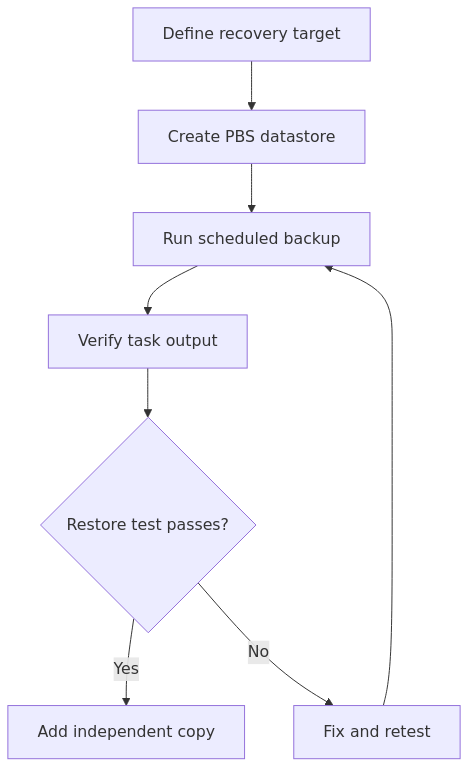
Proxmox Backup Server is most useful when the design is judged by recovery evidence rather than by the number of completed backup jobs. A workable deployment defines the recovery target, places the datastore in a sensible failure domain, verifies task output, and rehearses restores before an incident.
This workflow keeps the scope narrow: install PBS, create a datastore, connect it to Proxmox VE, schedule backups, understand retention and garbage collection, and validate both local restores and an independent copy. Each step has an observable check and a rollback or remediation path.
Recovery-focused sequence for deploying and validating a PBS workflow.
Key Takeaways
Choose datastore placement and retention around the failures you need to survive.
Read backup task output and perform restore tests; green schedules alone do not prove recoverability.
Add an independent copy and document the restore sequence before treating the setup as complete.
Recovery gate before calling PBS ready
A successful backup task is only the first check. Treat the workflow as ready when the task log is readable, a representative guest can be restored to a separate target or temporary identifier, the restored service starts, and the restore steps are recorded. If the restore fails, keep the original backup set unchanged, capture the task output, and correct the datastore, permissions, or retention design before relying on the next scheduled run.
Keep at least one independent copy in a different failure domain and document which copy is authoritative during a host, datastore, or encryption-key incident.
Why PBS is worth the trouble
PBS exists for the moment when your restore expectations get higher than your tolerance for hand-wavy backups.
A plain vzdump workflow to NFS can still be useful. It is not worthless, but it gets clumsy fast once you keep multiple restore points, run a few similar VMs, or start backing up across several nodes.
What PBS does better:
incremental transfers after the first backup
deduplicated storage on the server side
native Proxmox VE integration
verification workflows
retention policies that are easier to manage cleanly
remote sync for offsite copies
client-side encryption support for less-trusted remote targets
The official PBS FAQ is also clear about the model: backups are sent incrementally, deduplicated on the server, and each backup still behaves like a full restore point from the operator side. That is the right tradeoff for a homelab. Less wasted storage, less network churn, fewer excuses not to keep useful history.
When is a practical choice PBS - and when is usually not
is a practical choice PBS if:
you run more than a couple of important VMs or LXCs
you want several restore points without wasting storage
you want faster, more repeatable restores
you want an offsite sync story that is cleaner than random shell scripts
you care about verification and retention instead of just "copy the file somewhere"
is usually not force PBS if:
you have one throwaway test node and no important workloads
you are still proving whether you even like Proxmox
you cannot spare separate storage yet and are better served by a simple short-term vzdump job while you sort out hardware
PBS is not mandatory on day one. But once your homelab starts carrying DNS, media metadata, automation, family backups, or anything else annoying to rebuild, the argument gets very short.
Deployment recommendation: bare metal first, VM second, LXC only if you know why
This is the point where a direct recommendation is more useful.
For a real homelab, A separate PBS machine is the safer default. A low-power mini PC, small tower, or recycled business desktop is enough for a lot of labs. If the production node dies, your backup server should ideally still be standing.
If you cannot do that yet, a VM is the next-best compromise for learning and short-term operations. the decision should still keep its backup datastore separate from the main production pool if possible.
An LXC install is possible, but it is not the right default for most readers. It is the kind of optimization an optimization to postpone until restore checks are defined.
transmission signup
article_topic // Proxmox Backup Server Setup for Homelabs
Don't leave without the setup notes.
Get practical homelab guides, failure logs, and beginner-friendly build notes in your inbox.
Enter your email address to receive the Homelab Addiction newsletter.
Weekly only. No spam. Unsubscribe anytime.
Deployment option
When is a practical choice it
Why it works
What the guide dislike
Separate bare-metal PBS box
Best default for serious homelabs
Clear failure-domain separation, easier maintenance, no hypervisor dependency
Needs another box and another disk plan
PBS in a VM
Acceptable if hardware is tight
Easy snapshots, portable, simple to learn with
Same-node deployments create false confidence
PBS in an LXC
Only if you already understand the tradeoffs
Lower overhead
More edge cases, less beginner-friendly, easier to overcomplicate
A common mistake is treating same-chassis backups as if they were true disaster recovery. They are not. They were convenient local recovery. Useful, yes. Sufficient, no.
Hardware and sizing: keep it boring
The official installation docs say the evaluation minimum is 2+ CPU cores, 2 GB RAM, and more than 8 GB of disk space, but those numbers are for evaluation only. For a real deployment, Proxmox recommends at least 4 CPU cores, 4 GiB minimum for the OS, filesystem cache, and PBS daemons, plus another GiB per TiB of backup storage, 32 GiB or more for OS storage, and ideally redundant multi-gig networking.
That lines up with operational considerations. PBS is not hard to run, but a backup box gets miserable fast if you starve RAM and then ask it to manage a growing datastore on slow disks.
A practical homelab sizing rule looks like this:
Lab size
Suggested PBS box
Backup storage idea
Notes
Small lab - 3 to 8 VMs/LXCs
4 cores, 8 GB RAM
mirrored HDDs or a modest ZFS pool
Good default starting point
Growing lab - 8 to 20 workloads
4 to 8 cores, 16 GB RAM
larger mirrored disks or RAIDZ / mirrored datasets
For most homelabbers, A practical default is the official ISO installer. It is cleaner than trying to get clever on day one.
Download the current ISO from the official Proxmox download page.
Install it on a dedicated OS disk.
Give the box a static IP.
Sign in to the web UI at https://:8007.
If you specifically need a Debian-based install because you standardize on Debian, the docs support that too. But if your goal is "get a trustworthy backup server online without drama," the ISO is still the shortest path.
Step 2: Create a datastore you will not regret later
A PBS datastore is where the backups actually live. Treat it like a real storage design choice, not an afterthought.
put the datastore on storage that is not also your production VM disk pool
use redundancy if the data matters
do not burn your nicest SSDs on a backup target unless restore speed is the actual bottleneck
if you use large HDDs, be honest about verify and garbage-collection windows
The official docs also note that if you use HDDs, a metadata cache or better random the guide/O characteristics help a lot. That matters more as your datastore grows.
Step 3: Add PBS to Proxmox VE properly
This is where the integration starts paying off.
From the PBS side, get the certificate fingerprint:
proxmox-backup-manager cert info | grep Fingerprint
Then add PBS to Proxmox VE. The official documentation shows the basic shape with pvesm add pbs and then pvesm set for credentials. The command shape can be expressed in one block:
pvesm set pbs-main \\n --fingerprint 64:d3:ff:3a:50:38:53:5a:9b:f7:50:aa:bb:cc:dd:ee:ff:11:22:33
If you prefer the web UI, use Datacenter -> Storage -> Add -> Proxmox Backup Server.
What A practical default is operationally:
use a dedicated backup user or token, not your daily admin habit account
keep permissions narrow
do not hand clients delete powers they do not need
The PBS storage docs are very explicit here: least-privilege backup access is part of the ransomware story. Let clients write backups. Let the server own pruning and retention.
Step 4: Build backup jobs around recovery, not calendar aesthetics
A nice schedule on a whiteboard means nothing if the jobs collide, saturate storage, or produce restore points nobody can reason about.
A sane starting point for a small homelab is:
daily snapshot backups for important VMs
daily or alternate-day backups for lower-value guests
longer retention for identity, DNS, router-controller, automation, and storage-controller workloads
Step 5: Understand prune vs garbage collection before it bites you
This confusion causes a lot of bad assumptions.
Prune decides which snapshots should still exist.
Garbage collection reclaims the unreferenced chunks later.
Those are not interchangeable.
The official maintenance docs spell it out clearly: pruning removes snapshot metadata and references, but the underlying chunks stay around until garbage collection runs. That is why your storage graph does not instantly shrink the moment a prune policy removes old snapshots.
If you remember one thing from this section, remember this:
prune shapes retention
garbage collection reclaims space
That is also why the guide schedule them deliberately instead of assuming "PBS will sort it out somehow."
From the lab
Step 6: Verify jobs are not optional
This is where most backup guides get too casual.
Proxmox recommends regular reverification, and the maintenance docs explicitly say you should reverify all backups at least monthly because physical media degrades over time. The storage docs also tie verification directly to ransomware detection and restore confidence.
Run a verify job. Then keep running it.
The docs show a manual verification pattern like this:
do not schedule heavy verification on top of your busiest backup window
If your lab has enough churn that verify jobs hurt, that is not a reason to skip them. It is a reason to tune schedule, storage, or hardware.
Step 7: Restore-test like a skeptic
A verify job tells you that chunks and metadata still match. That is good. It does not replace an actual restore drill.
The official docs recommend restoring to a new guest instead of overwriting the current one, and that is the safer recovery path. That is the safest way to prove the workflow end to end.
A quarterly restore drill can follow this sequence:
1. Pick one critical VM and one ordinary VM.
2. Restore each to a new VMID.
3. Boot them on an isolated network if needed.
4. Confirm services start, IP configuration looks sane, and core apps are actually usable.
5. Delete the test restore only after documenting the result.
Step 8: Add offsite sync before you congratulate yourself
Local PBS is already better than raw backup dumps. It is still not the full story.
The PBS storage docs lean into the 3-2-1 model for a reason: three copies, two storage media, one offsite. PBS gives you remote sync jobs for exactly that problem.
The model is useful because:
local restores stay fast
offsite copies protect you from fire, theft, and some ransomware blast-radius problems
you can keep deletion rights away from the client side and let the backup servers handle lifecycle properly
Who should skip this article and just use something simpler?
If you have one tiny node, one disposable VM, and no real data, a temporary vzdump schedule to basic storage may be enough while you learn the platform.
But once the lab has family services, infrastructure dependencies, or anything you would hate to rebuild on a Sunday night, PBS stops being overkill. It becomes the boring answer. And boring is exactly what you want from backups.
Is Proxmox Backup Server better than vzdump to NFS?
For most real homelabs, yes. PBS gives you incremental transfers, deduplication, verification, retention controls, and cleaner Proxmox VE integration. A plain vzdump target can still work for a tiny lab, but it gets clumsy once you want multiple restore points and predictable storage use.
Can the guide run Proxmox Backup Server in a VM?
Yes. It is a valid learning and short-term deployment option. a separate machine remains the safer default because same-node backups help with convenience and local recovery, but they do not buy you much if the host, chassis, or primary storage stack fails together.
What is the difference between pruning and garbage collection in PBS?
Pruning decides which snapshots stay in retention. Garbage collection reclaims the underlying chunks once nothing references them anymore. That is why space is not always returned immediately after a prune policy removes old restore points.
Do the guide still need restore tests if verify jobs pass?
Absolutely. Verify jobs confirm backup integrity. Restore tests confirm recovery reality. Both matter. A practical default is restoring into a new VMID on a recurring schedule so you can prove the process without risking the production guest.
Final verdict
If you run Proxmox often enough to care about recovery time, retention, and offsite copies, PBS is not the fancy option. It is the sensible option.
Set it up once. Scope permissions tightly. Verify aggressively. Test restores like you expect hardware to betray you eventually.