Disclosure: This article is an evidence-led guide. Recommendations are matched to documented requirements and do not claim private testing or first-hand operation.
Homelab Maintenance Checklist: Weekly, Monthly, and Quarterly Checks is best treated as a decision about documented responsibilities, not a universal winner. Start with the operating requirement, then choose the option whose maintenance and recovery obligations fit the homelab.
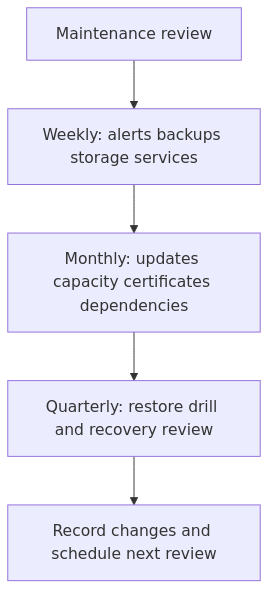
The workflow below turns the choice into explicit review points so future changes remain understandable and recoverable.
Decision flow based on the cited primary documentation.
Key Takeaways
Use the documented requirements as the first filter.
Separate convenience, control, maintenance, and recovery responsibilities.
Verify version-specific behavior against the primary sources before deployment.
Key Takeaways
Weekly checks should surface failed jobs, alerts, storage pressure, and unexpected changes.
Monthly checks should cover updates, capacity, dependencies, certificates, and documentation debt.
Quarterly checks should include a restore or recovery drill, not just a dashboard review.
Perform checks in an order that avoids creating an outage during maintenance.
Why a homelab needs maintenance even if it feels "small"
A lot of homelabs become production environments by accident.
You start with one node. Then it runs your DNS, a couple of Docker services, maybe a reverse proxy, maybe a backup target, maybe a VPN or tunnel. Suddenly the lab is not a toy anymore. It is the thing that keeps your family dashboards, file shares, password manager, media stack, and remote access alive.
That changes the standard.
The right question is no longer, "Does this service start?" The right question is, "How fast do I notice a problem, and how confidently can I recover from it?"
That is why this checklist matters. It keeps your stack boring.
Boring is good. Boring means fewer surprise outages, fewer 1 AM repair sessions, and fewer weird half-fixes that live forever because you never documented them. If you still need a cleanup pass on the documentation side, read How to Document Your Homelab So Future You Stops Guessing after this.
A maintenance cadence that stays repeatable
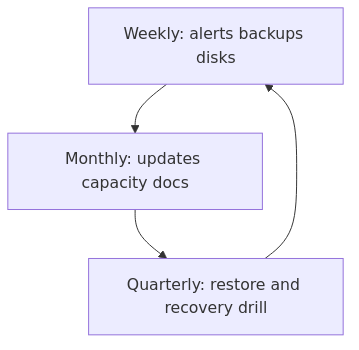
Do not overcomplicate this. Most homelabs do fine with three layers of routine.
You can absolutely automate parts of this, but automation does not replace review. It only makes review faster.
Weekly homelab maintenance checklist
This is the weekly pass A practical checklist should not skip this step.
1. Verify backups actually completed
A useful check is to confirm the last successful backup run I mean check the last successful run and confirm the destination still looks sane.
transmission signup
article_topic // Homelab Maintenance Checklist
Don't leave without the setup notes.
Get practical homelab guides, failure logs, and beginner-friendly build notes in your inbox.
Enter your email address to receive the Homelab Addiction newsletter.
Weekly only. No spam. Unsubscribe anytime.
If you run Proxmox backups, start there. If you run file-level backups with Restic or another tool, check those next. Look for failed jobs, unusually small backup sizes, and storage targets that quietly filled up.
If you need backup baselines, these two articles should already be in your orbit:
That second command is the part people avoid because it takes longer. That is also why it catches the lies.
2. Look for unhealthy containers and dead services
A homelab can look fine from the dashboard and still be quietly broken.
Check Docker container health and restart loops. If you use Compose, make sure the containers that should be healthy actually are healthy.
docker ps --format 'table {{.Names}}\t{{.Status}}\t{{.Ports}}'\ndocker compose ls
If a container has a restart policy, confirm it is the policy you intended. Docker's own documentation on restart policies is worth bookmarking because it explains the edge cases people get wrong after reboots.
This does not need to become a full SIEM workflow every Sunday.
You want the operator version:
did monitoring fire and get ignored?
did a service start failing certificate renewals?
did a volume mount disappear after a reboot?
did a node log storage or SMART warnings?
For Linux hosts and containers, I usually scan:
journalctl -p warning..alert --since "7 days ago"\ndmesg --level=err,warn
The point is not to read every line. The point is to catch the two or three weird things that are becoming future outages.
4. Check disk space and storage health
Low disk space is the most boring avoidable outage in self-hosting.
Look at host filesystems, backup storage, and the volumes that grow quietly - logs, media metadata, thumbnails, package caches, old images, and stale snapshots.
df -h\npvesm status\ndocker system df
If you have disks that matter, check SMART data too. The smartmontools project documentation is still one of the better references for deeper disk-health work: .
A weekly glance is enough to catch the trend before a pool or SSD makes the decision for you.
5. Confirm network basics still match reality
This one is less dramatic, but it saves time constantly.
pvecm status\napt update\napt list --upgradable\napt dist-upgrade\nreboot\npveversion -v
If you have multiple nodes, do not be a hero. Move workloads, update one node, confirm it rejoins cleanly, then continue.
The mistake I made: I once stacked host updates, container image pulls, and a network change into the same Saturday window because it felt "efficient." It was efficient right up until I had to figure out which of the three caused the breakage. Since then, I change one layer at a time.
2. Review Docker image drift and cleanup debt
Docker hosts collect junk when nobody is watching.
Old images, stopped containers, unused networks, and forgotten bind mounts all add friction. Monthly, I want to know:
which services are outdated on purpose
which services are outdated by accident
whether I can still restart everything cleanly
whether I am carrying image and volume junk I no longer need
Useful checks:
docker compose pull\ndocker compose up -d\ndocker image ls\ndocker system df\ndocker system prune --volumes
That last command is powerful and occasionally rude. Do not run it blindly on a host you have not documented.
3. Review monitoring and alert coverage
If a service disappears, how do you know?
A monthly review of your monitoring is where you notice blind spots. Make sure the things you claim are monitored are actually being monitored: hypervisors, Docker hosts, storage targets, UPS state, certificate expiry, and Internet reachability if you depend on tunnels or VPN.
A backup that has never been restored is just a theory with timestamps.
Pick one VM, container, database dump, or application config and restore it somewhere safe. Not the whole environment. Just enough to prove your procedure still works.
That restore test should answer:
can I find the backup quickly?
do I know the restore order?
are the credentials and keys available?
does the restored service actually start?
how long did it take?
If the process feels messy, your maintenance notes need work.
2. Review hardware health and power assumptions
Quarterly is the right time to stop pretending the UPS is magic.
Check battery age, self-test status, cable sanity, and whether your shutdown automation still behaves the way you think it does. If you run NUT or other power-failure automation, test the path in a controlled way.
Likewise, review:
SSD wear indicators
noisy fans
heat buildup
failing cables
weird NIC behavior
end-of-life hardware you are still trusting too much
3. Re-evaluate capacity and role placement
A homelab that grew over time often has services in silly places.
Quarterly, ask whether the current layout still makes sense:
should this service still run on this node?
is your backup storage too close to the source data?
are your critical apps sharing the wrong failure domain?
Drop tasks that no longer matter. Add tasks for the new risks your lab actually has. The right checklist is not the longest one. It is the one that matches reality.
A safe order for a real maintenance window
This matters more than people think.
When you batch random checks together, you create your own confusion. My maintenance windows usually follow this order:
1. Confirm backup health
2. Confirm monitoring and alert visibility
3. Check storage and host health
4. Review network and remote-access baseline
5. Patch Proxmox or host OS
6. Patch containerized services
7. Reboot only when I know what I am verifying after the reboot
8. Update documentation and change log
That order is deliberate.
You verify recoverability before you make changes. You verify observability before you reboot things. You update docs after reality changes, not before.
A simple checklist template you can steal
If you want a dead-simple runbook, use this.
Weekly\n- [ ] verify Proxmox backups completed\n- [ ] verify offsite/file-level backups completed\n- [ ] check unhealthy containers and failed services\n- [ ] scan warnings in journal and host logs\n- [ ] review disk space and SMART alerts\n- [ ] confirm DNS, DHCP, and IP notes still match reality\n\nMonthly\n- [ ] patch Proxmox nodes or Linux hosts in a maintenance window\n- [ ] update Docker services and remove stale image debt\n- [ ] review monitoring coverage and alert routing\n- [ ] update docs and change log\n- [ ] remove stale users, keys, and exposed ports\n\nQuarterly\n- [ ] perform one real restore test\n- [ ] test UPS and graceful-shutdown assumptions\n- [ ] review hardware health and capacity trends\n- [ ] re-check service placement and dependency sprawl\n- [ ] revise the checklist itself
Keep it somewhere boring and accessible. Markdown in Git is still a great default.
Recommended gear and tools that make maintenance easier
I try not to turn a maintenance article into a shopping list, but a few things genuinely reduce friction.
UPS with USB monitoring support - if your lab matters during power cuts, start with an APC UPS search on Amazon
Drive dock or USB enclosure for recovery work - useful for cloning, checks, and emergencies, like this USB SATA enclosure search
Label maker - not exciting, but it saves time when cables and power bricks multiply, like this label maker search
Power meter - handy when one mini PC somehow turns into three, like this Kill A Watt search
None of this replaces process. It just makes the process less annoying.
The real goal: a lab you can trust when you are tired
That is the standard Operators can use now.
Not "Did I build something clever?" Not "Can I automate one more thing?" The useful question is, "If something breaks on a bad day, do I already know what to check first?"
That is what a good maintenance checklist gives you.
It gives you confidence that backups are real, alerts are not imaginary, updates happen on purpose, and your environment is documented well enough that future you does not have to rediscover the whole stack from scratch.
That is not glamorous. It is also how you keep a homelab useful long enough to matter.
Frequently Asked Questions
How often should you maintain a homelab?
Do a lightweight review every week, a real maintenance window every month, and at least one restore-focused review every quarter. The exact schedule matters less than making it repeatable.
What is the most important homelab maintenance task?
Backup verification and restore testing. Disk space checks and updates matter, but the most painful failures are the ones where you discover your recovery plan was mostly optimism.
What should you check before updating Proxmox or Docker services?
Check that backups completed, confirm monitoring is working, verify storage health, and change one layer at a time. If you patch the hypervisor, containers, and networking in one shot, troubleshooting gets stupid fast.
Sources and verification
This article is documentation-led. Verify current behavior against the linked primary sources before making production changes.