Disclosure: This article may contain affiliate links. If you purchase through a link, HomelabAddiction may earn a commission at no additional cost to you.
Use a simple homelab IP plan template to track VLANs, DHCP scopes, reservations, and static assignments before address sprawl makes changes risky.
The framework below turns primary documentation into practical choices, with explicit attention to maintenance, failure boundaries, and recovery rather than anecdotal recommendations.
Key Takeaways
Start with documented requirements and the actual operating model.
Separate configuration from verification and record the recovery path.
Prefer the smallest maintainable design that fits the workload.
Key Takeaways
A homelab IP plan is not about making a spreadsheet for the sake of it. It is about preventing DHCP overlap, stale DNS records, and mystery addresses six months later.
If you already use VLANs, the cleanest default is to make the VLAN ID visible in the subnet when you can. It cuts down on mental overhead fast.
True static IPs belong on a short list of infrastructure boxes. Most other long-lived services are easier to manage with DHCP reservations.
Your template should track more than IP and hostname. Add VLAN, gateway, DHCP range, reservation owner, DNS name, and notes or you will outgrow the sheet immediately.
A common planning mistake was waiting too long to document. Once services sprawl across Proxmox, Docker, Wi-Fi gear, and IoT junk, cleanup is much slower than starting clean.
A homelab becomes harder to change once addresses are assigned in three different places and nobody remembers which device owns which reservation. An IP plan fixes that by turning VLANs, DHCP scopes, static assignments, and infrastructure names into one reference before growth makes every change riskier.
This template is designed for the common homelab pattern: a router or firewall defining VLANs, DHCP reservations handling most stable endpoints, Proxmox or Docker hosts needing predictable addresses, and a handful of services that should not move without a clear record.
Use this page to decide what columns belong in your sheet, which addresses should stay dynamic, and where to document gateway, DNS, VLAN, and hostname details so future troubleshooting starts with facts instead of memory.
Most homelab networking articles explain subnets, DHCP, and private IP ranges correctly. That is not usually the real problem.
The real problem is operational drift.
You know the theory. Then the lab grows.
A Proxmox node gets a management IP set directly in /etc/network/interfaces
Pi-hole gets a DHCP reservation because that was quicker
Home Assistant moves to a new VM but keeps the old DNS note in your head only
Your IoT VLAN uses one address plan on the firewall and another in the spreadsheet you stopped updating
The network still works - mostly. But it stops being predictable.
A good IP plan restores predictability. It should answer these questions in under 30 seconds:
1. Which subnet belongs to this VLAN?
2. What range is safe for DHCP?
3. What addresses are reserved for infrastructure?
4. Which services use DHCP reservations instead of true static IPs?
5. What hostname and DNS name should this device own?
6. Who breaks if I move this host?
If your current documentation cannot answer those, the network is already harder to operate than it needs to be.
the recommended rule set before the documented workflow can a single IP
Before we get to the template, here are rules operators can use.
Rule 1 - Pick one private address family and stay consistent
The private IPv4 ranges are documented by IANA here: Private-use IP addresses. For most homelabs, either 192.168.x.x or 10.x.x.x is fine.
I usually recommend this split:
Use 192.168.x.0/24 if your lab is small, flat, and unlikely to grow beyond a few segments
Use 10.x.x.x if you already know VLANs, labs, guest segments, and infrastructure tiers are coming
There is no medal for choosing the fanciest address space. The win is consistency.
Rule 2 - Make VLAN IDs visible in subnet numbering when possible
This is one of those tiny choices that saves a stupid amount of time later.
If you use VLAN 10 for management, VLAN 20 for servers, and VLAN 30 for IoT, the documented workflow can a scheme like this:
VLAN
Purpose
Subnet
10
Management
10.10.10.0/24
20
Servers
10.20.20.0/24
30
IoT
10.30.30.0/24
40
Guest
10.40.40.0/24
50
Lab/Test
10.50.50.0/24
No, it is not mathematically required.
Yes, it is easier to remember at 11:40 PM when you are tracing a firewall rule and trying not to hate your past self.
Rule 3 - Separate true statics from DHCP reservations on purpose
I do not treat these as interchangeable.
Use true static IPs for a short list of things that should be understandable even if DHCP is unavailable:
firewall or router interfaces
managed switch management IPs
access points when I want predictable management access
Proxmox hosts
NAS platforms
a few core DNS or monitoring boxes when there is a strong operational reason
Use DHCP reservations for most long-lived services and appliances:
transmission signup
article_topic // Homelab IP Plan Template
Don't leave without the setup notes.
Get practical homelab guides, failure logs, and beginner-friendly build notes in your inbox.
Enter your email address to receive the Homelab Addiction newsletter.
Weekly only. No spam. Unsubscribe anytime.
Pi-hole or AdGuard when central lease visibility is useful
Home Assistant
Docker hosts
printers
cameras
smart TVs
random appliances that should stay stable but are easier to manage centrally
The OPNsense DHCP documentation is excellent on reservations and pool behavior: OPNsense DHCP docs. If you run pfSense instead, their DHCPv4 reference is here: pfSense DHCPv4 Server.
Rule 4 - Never let the DHCP pool overlap your manual plan
This sounds obvious. It is also one of the easiest mistakes to make when you are moving quickly.
If your server VLAN is 10.20.20.0/24, do not lazily leave DHCP at 10.20.20.100-10.20.20.254 and then hand out reservations and static IPs from that exact same range without thinking through the backend behavior.
A boring, clear split is better:
.1-.19 network gear and gateways
.20-.79 true statics and critical reservations
.80-.199 general reservations and stable services
.200-.239 dynamic DHCP pool
.240-.254 scratch or future reserved space
You do not have to copy those exact numbers. You do need visible boundaries.
The homelab IP plan template that fits this use case
Here is the core sheet. This is a table that can be pasted into Google Sheets, Excel, Obsidian, or a markdown note on day one.
VLAN
Name
CIDR
Gateway
DHCP Pool
Reserved / Static Block
DNS Zone / Naming
Critical Hosts
Notes
10
mgmt
10.10.10.0/24
10.10.10.1
10.10.10.200-239
10.10.10.2-79
*.home.arpa
router, switch, APs, Proxmox
keep infra here only
20
servers
10.20.20.0/24
10.20.20.1
10.20.20.200-239
10.20.20.10-149
*.home.arpa
NAS, Docker, apps
main service zone
30
iot
10.30.30.0/24
10.30.30.1
10.30.30.50-220
10.30.30.2-49
optional local names
cameras, plugs, sensors
keep east-west limited
40
guest
10.40.40.0/24
10.40.40.1
10.40.40.50-240
10.40.40.2-49
none or minimal
none
internet only
50
lab
10.50.50.0/24
10.50.50.1
10.50.50.150-230
10.50.50.2-149
lab.home.arpa
test VMs
safe place to break things
That is the subnet sheet.
Then I keep a second table for actual hosts.
Hostname
Device / Service
VLAN
IP
Method
MAC / Interface
DNS Name
Platform
Owner / Role
Notes
pve01
Proxmox node 1
10
10.10.10.11
static
eno1
pve01.home.arpa
Proxmox VE
virtualization
mgmt bridge on vmbr0
pve02
Proxmox node 2
10
10.10.10.12
static
eno1
pve02.home.arpa
Proxmox VE
virtualization
same layout as node 1
nas01
TrueNAS
20
10.20.20.20
static
igc0
nas01.home.arpa
TrueNAS
storage
backup target
docker01
Docker host
20
10.20.20.30
reservation
52:54:00:aa:bb:30
docker01.home.arpa
Debian
containers
reserve in firewall DHCP
pihole01
Pi-hole
20
10.20.20.53
reservation
52:54:00:aa:bb:53
dns.home.arpa
Debian
DNS
primary local DNS
ha01
Home Assistant
20
10.20.20.60
reservation
52:54:00:aa:bb:60
ha.home.arpa
HAOS
automation
keep stable for integrations
cam-front
Front camera
30
10.30.30.21
reservation
dc:a6:32:xx:xx:21
optional
camera
IoT
blocked from server VLAN
That second sheet is where the value really shows up.
It tells you not just what network exists, but what actually lives on it.
From the lab
The columns people skip - and regret later
If you only track hostname and IP, the sheet will go stale fast.
These are the columns I think matter most.
Method
Use one of three values only:
static
reservation
dynamic
Do not invent cute status labels. Keep it blunt.
When I scan the sheet, I want to know immediately whether I should change the IP in the guest OS, on the firewall DHCP page, or nowhere at all.
MAC / Interface
For DHCP reservations, this is non-negotiable.
If you do not store the MAC or interface detail, you are turning the sheet into a half-memory aid instead of a source of truth.
Platform
This matters more than people think.
A reservation for a Proxmox VM, a Docker host, a camera, and a Wi-Fi AP are all managed differently. Writing down the platform makes migrations and troubleshooting cleaner.
Owner / Role
This can be as simple as:
storage
dns
reverse-proxy
automation
monitoring
lab
Now your spreadsheet is searchable by function, not just by address.
Notes
Use this sparingly but honestly.
Good notes look like this:
depends on VLAN-aware trunk to switch-01
keep fixed for NFS exports
used in reverse proxy upstreams
migrated from old VM 2026-07-01
Bad notes look like this:
server
important
works
If a note would not help you during a change window, it is not a note.
the recommended numbering pattern inside each subnet
This is a predictable layout because it keeps new services from landing randomly.
Range
Purpose
.1
gateway / firewall interface
.2-.9
switch, AP, controller, out-of-band gear
.10-.29
hypervisors, NAS, core infra
.30-.79
service hosts and stable infrastructure
.80-.149
reserved growth space
.150-.199
optional service expansion
.200-.239
DHCP dynamic pool
.240-.254
temporary testing / future use
This is not holy scripture.
It is just predictable. Predictable is good.
A common planning mistake years ago was assigning addresses in the order I deployed things. That feels fine until the network becomes a diary of your impulsive decisions.
The static vs reservation call the documented workflow can in a documented deployment
If you are wondering what should get a true static IP versus a DHCP reservation, this is the practical practical decision tree.
Use a true static IP when:
the device is foundational network infrastructure
you want the interface config visible on the box itself
it may need to come up before the rest of your management stack
it is a Proxmox host, firewall, switch, or NAS I treat as infrastructure
the service must stay stable but is easier to manage centrally
you may migrate it between VMs or NICs and want the DHCP server view
the platform is more appliance-like than infrastructure-like
you want your firewall or DHCP server to remain the single reservation authority
That is why I usually reserve addresses for Docker hosts, Pi-hole, Home Assistant, printers, cameras, and a lot of IoT gear.
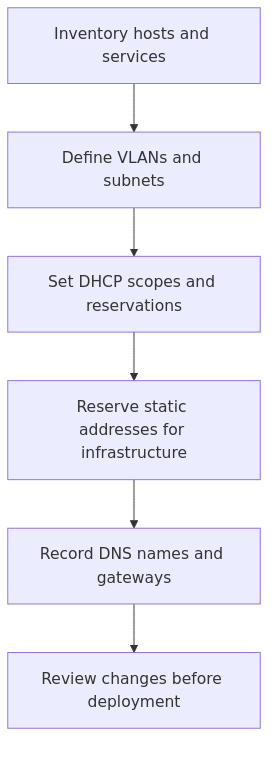
A simple workflow for filling the template the first time
Do not start by typing random hosts into the spreadsheet.
Start with the network design first.
Step 1 - Define VLANs and subnets
Decide what zones actually exist.
A sane starter list for many labs is:
management
servers
IoT
guest
lab/test
If you do not need five zones, do not invent them. But if you know IoT junk and guest devices should not mingle with core services, separate them now.
Step 2 - Set DHCP pool boundaries per subnet
Write the planned DHCP pool into the sheet before touching the firewall.
That step alone prevents a lot of overlap mistakes.
Step 3 - Add infrastructure hosts first
Enter:
firewall
switches
access points
Proxmox nodes
NAS
DNS servers
These are the anchors. Everything else gets easier once the anchors exist.
Step 4 - Add service hosts and reservations
Now add the stable services that people actually use:
reverse proxy
DNS
Home Assistant
media server
monitoring
backup services
Step 5 - Add DNS names beside the IPs
Do not tell yourself you will remember that later.
If the service should be reached as grafana.home.arpa, put that in the sheet the same day you assign the address.
If you want a full DNS hygiene pass, my Homelab DNS guide covers the naming side in more depth.
When a spreadsheet stops being enough
For most homelabs, a spreadsheet is still the right answer.
It is fast. Searchable. Easy to share. Easy to keep beside a network diagram.
But if your lab starts behaving like a small production network - multiple sites, overlapping prefixes, a lot of service-to-device mapping, or frequent changes - then it may be worth moving the same logic into an IPAM tool. NetBox is the cleanest serious option here, and their IPAM model is documented well: NetBox IP Address Management.
Do not push NetBox onto a tiny lab just to feel sophisticated.
Consider it when your spreadsheet starts needing workarounds instead of rows.
Common mistakes to avoid
1. I reused the consumer-router default subnet for too long
192.168.1.0/24 is not wrong. But keeping the same totally generic default while adding more network segments made the lab harder to reason about, especially over VPN and while troubleshooting old notes.
If you are still early, pick something cleaner now.
2. I mixed static IPs and reservations without documenting which was which
This is how you get one host whose address lives in the firewall, another in a guest OS config, and a third in both because past-you was improvising.
Track the method column religiously.
3. I left no buffer space for growth
If every range is packed tightly on day one, your next VLAN or service block becomes a negotiation. Leave empty space on purpose.
4. I documented IPs but not dependencies
Knowing that 10.20.20.53 is Pi-hole is useful.
Knowing that a dozen internal services and DHCP clients depend on it is more useful.
5. I treated the IP plan like a one-time project
It is not.
It is part of the change process.
If you deploy a new service and do not update the sheet, you are creating debt immediately.
The copy-paste starter template
If you want the shortest path, copy this into a sheet right now and start filling it in.
Hostname,Service,VLAN,CIDR/IP,Gateway,Method,MAC_or_Interface,DNS_Name,Platform,Owner,Notes\npve01,Proxmox Node 1,10,10.10.10.11/24,10.10.10.1,static,eno1,pve01.home.arpa,Proxmox,virtualization,Primary hypervisor\nnas01,TrueNAS,20,10.20.20.20/24,10.20.20.1,static,igc0,nas01.home.arpa,TrueNAS,storage,Main storage box\ndocker01,Docker Host,20,10.20.20.30,10.20.20.1,reservation,52:54:00:aa:bb:30,docker01.home.arpa,Debian,containers,Reserve in DHCP\npihole01,Pi-hole,20,10.20.20.53,10.20.20.1,reservation,52:54:00:aa:bb:53,dns.home.arpa,Debian,dns,Primary local DNS\nha01,Home Assistant,20,10.20.20.60,10.20.20.1,reservation,52:54:00:aa:bb:60,ha.home.arpa,HAOS,automation,Core smart home service\ncam-front,Front Camera,30,10.30.30.21,10.30.30.1,reservation,dc:a6:32:xx:xx:21,,Camera,iot,Restrict east-west traffic
That is enough to start.
You can always get fancier later. Starting clean matters more than starting fancy.
Frequently Asked Questions
Should operators use static IPs or DHCP reservations in a homelab?
Use true static IPs for core infrastructure like firewalls, switches, Proxmox hosts, and NAS systems. Use DHCP reservations for most stable services, appliances, and IoT devices so management stays centralized.
What is the best subnet size for a homelab VLAN?
A /24 is the safest default for most homelab VLANs because it is easy to remember, gives you room to grow, and keeps firewall and DHCP planning simple.
Do I need NetBox or another IPAM tool for a small homelab?
No. A spreadsheet or markdown table is enough for many homelabs. Move to NetBox or another IPAM tool only when changes, prefixes, or device counts start making the sheet hard to trust.
How should I split DHCP ranges and static ranges in a homelab?
Pick visible boundaries. Keep gateways and infrastructure low in the subnet, reserve a clear static or reservation block for services, and keep the dynamic DHCP pool in a separate high range so overlap is obvious.
Final call
If you are already asking what your homelab IP address scheme should be, the answer is not another clever subnetting trick.
The answer is a simple plan you will actually maintain.
Use one naming convention. Make VLAN IDs obvious when you can. Keep DHCP boundaries visible. Write down whether each stable host is static or reserved. Update the sheet every time the lab changes.
That is the boring discipline that keeps a homelab from turning into archaeology.
Sources and verification
Primary documentation checked before this revision: