Disclosure: This article may contain affiliate links. If links are added or updated on this page, HomelabAddiction may earn a commission at no additional cost to the reader. No personal testing claim is made by this disclosure.
Documentation basis: This guide is grounded in the Proxmox network-configuration and SDN documentation plus current OPNsense VLAN/LAGG guidance for the surrounding firewall design. The examples below are organized around documented behavior and recoverable host layouts rather than war stories.
Proxmox networking becomes easier to reason about when the host bridge, VLAN plan, and management path are treated as one design problem instead of a pile of one-off interface changes.
The main decision is usually whether a simple bridge is enough, whether a VLAN-aware trunk is cleaner, and whether bonding is being added for the right reason. Those choices affect how recoverable the host remains when a switch port, tag, or uplink changes.
This guide is organized around documented network behavior so the resulting layout stays understandable when new VMs, additional VLANs, or SDN features are introduced later.
Key Takeaways
In Proxmox, the bridge usually holds the host IP while the physical NIC behaves like a port feeding that bridge.
VLAN-aware bridges are the cleanest default for many small labs because they reduce per-VLAN bridge sprawl.
Bonding should be chosen for resilience or multi-flow distribution, not because one TCP stream is expected to double in speed.
Clear management-path design matters as much as guest VLAN design when the goal is safe change control.
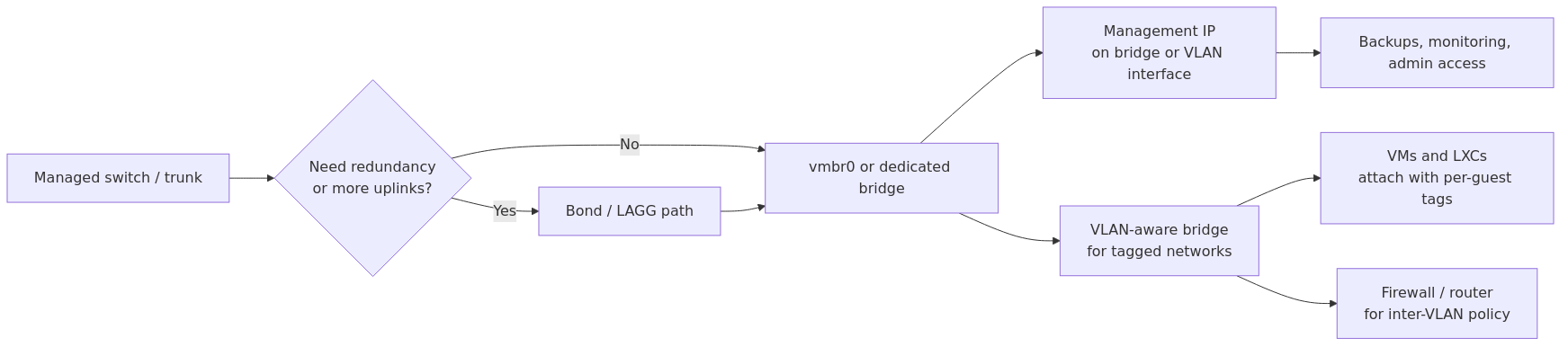
Starter Proxmox network layout: one or more NICs feed a bridge or bond, VLAN-aware switching carries tagged traffic, and management access stays on a clearly defined path.
How Proxmox networking is built
Proxmox VE uses the Linux network stack. Full stop. Every bridge, bond, and VLAN interface you create in the web interface ends up in /etc/network/interfaces as standard Debian-style config.
The web interface is nice for simple changes. But if you want to understand what is really happening, you need to understand three things: bridges, bonds, and VLANs. That is it. SDN in Proxmox 8.x+ adds a fourth layer, but it is still built on these primitives.
Linux Bridges
A Linux bridge is a virtual switch inside your Proxmox host. You attach your physical NIC to it, and your VMs connect to it. Traffic flows between VMs on the same bridge at wire speed (no physical network hop). Traffic to the outside world goes through the physical NIC.
When you install Proxmox, the installer creates your first bridge automatically:
auto lo
iface lo inet loopback

iface eno1 inet manual

auto vmbr0
iface vmbr0 inet static
    address 192.168.1.100/24
    gateway 192.168.1.1
    bridge-ports eno1
    bridge-stp off
    bridge-fd 0
Key observations:
- eno1 has no IP address (inet manual). The bridge gets the IP. This is normal -- the physical NIC is just a port on the virtual switch.
- bridge-stp off is safe because you (probably) do not have redundant paths to your switch. If you have multiple bridges with the same physical NIC, you need STP. Most homelabbers do not.
- bridge-fd 0 sets forward delay to zero. Your bridge comes up instantly instead of waiting 15 seconds. Leave it at zero.
A common early misunderstanding is assuming the physical NIC keeps the host IP while the bridge is only an overlay. In Proxmox, the bridge usually becomes the real Layer 3 interface and the physical NIC behaves like a port feeding that bridge.
When You Need More Than One Bridge
A single bridge on one NIC works fine until it does not. Here is when you need additional bridges:
transmission signup
article_topic // Proxmox Networking Guide
Don't leave without the setup notes.
Get practical homelab guides, failure logs, and beginner-friendly build notes in your inbox.
Enter your email address to receive the Homelab Addiction newsletter.
Weekly only. No spam. Unsubscribe anytime.
You have a second physical NIC. Attach it to vmbr1 for a dedicated storage network or DMZ.
You want an internal-only network. Create vmbr2 with bridge-ports none. VMs on this bridge can talk to each other but have no physical network access. Great for isolated dev environments.
You are running a router VM (OPNsense, pfSense). The WAN bridge attaches to your modem NIC, the LAN bridge attaches to your switch NIC. This is how virtual firewalls work.
# Internal-only bridge (no physical NIC)
auto vmbr2
iface vmbr2 inet static
    address 10.10.10.1/24
    bridge-ports none
    bridge-stp off
    bridge-fd 0
VLANs: The Right Way
VLANs are where most homelabbers get stuck. Proxmox gives you two approaches, and picking the wrong one leads to unnecessary complexity.
Approach 1: VLAN-Aware Bridge (Recommended)
Enable VLAN awareness on your bridge, and every VM connected to that bridge can specify a VLAN tag. One bridge. Many VLANs. Minimal config.
What these extra lines do:
- bridge-vlan-aware yes -- tells the bridge to honor VLAN tags on its ports
- bridge-vids 2-4094 -- which VLANs are allowed through this bridge
- bridge-pvid 1 -- the native VLAN (untagged traffic goes to VLAN 1)
Once this is set, configuring a VM is simple. In the VM's network settings, set the bridge to vmbr0 and the VLAN tag to whatever VLAN you want (say, 20). The VM is now on VLAN 20. No additional bridges needed.
Approach 2: Dedicated Bridge Per VLAN
Some guides recommend creating a separate bridge for each VLAN:
auto vmbr0
iface vmbr0 inet static
    address 192.168.1.100/24
    gateway 192.168.1.1
    bridge-ports eno1
    bridge-stp off
    bridge-fd 0

auto vmbr100
iface vmbr100 inet static
    address 10.100.0.1/24
    bridge-ports eno1.100
    bridge-stp off
    bridge-fd 0
Creating one bridge per VLAN works, but it increases maintenance overhead quickly. A VLAN-aware bridge is usually simpler because the host keeps one main bridge while guests receive tags where needed.
Use this approach ONLY if:
- You need the Proxmox host itself to have an IP on that VLAN (management access on a specific VLAN)
- You are using different physical NICs per VLAN
In every other case, use a VLAN-aware bridge. It is cleaner, scales better, and does not require network restarts when you add a VLAN.
VLAN-aware bridges have been stable for years and are usually the cleaner default for small and mid-sized labs. Separate per-VLAN bridges still make sense in a few special cases, but they should be chosen intentionally rather than as a default habit.
Network Bonding: Redundancy vs Throughput
Bonding combines multiple physical NICs into one logical interface. Proxmox supports all 7 Linux bonding modes, but for homelab use, you really only need two.
Mode 1: Active-Backup (Redundancy)
One NIC active, one on standby. If the active NIC fails, the standby takes over. No switch configuration required.
When to use: You have two NICs and an unmanaged switch. You want fault tolerance without buying managed hardware. This is the right choice for most homelabs.
Mode 4: 802.3ad LACP (Throughput + Redundancy)
Both NICs active simultaneously. Traffic is distributed across both links. Requires a managed switch with LACP configured on the port.
auto bond0
iface bond0 inet manual
    bond-slaves eno1 eno2
    bond-miimon 100
    bond-mode 802.3ad
    bond-lacp-rate fast
    bond-xmit-hash-policy layer3+4

auto vmbr0
iface vmbr0 inet static
    address 192.168.1.100/24
    gateway 192.168.1.1
    bridge-ports bond0
    bridge-stp off
    bridge-fd 0
    bridge-vlan-aware yes
When to use: You have a managed switch, multiple VMs with heavy network traffic, and you understand that a single TCP connection still tops out at one NIC's speed. LACP helps with aggregate throughput across multiple connections, not individual connection speed.
LACP should be chosen for link resilience and multi-flow distribution, not because a single TCP stream is expected to double in speed. For many small labs, active-backup bonding or a single reliable uplink is the easier operational choice.
When Proxmox SDN becomes worth using
Proxmox SDN becomes more interesting once multiple nodes, repeatable virtual-network patterns, or EVPN/VXLAN-style segmentation start to matter. On a single node, standard bridges and VLAN-aware switching are often still the simpler answer.
SDN lets you manage VLANs and virtual networks across your entire cluster from a single dashboard. No more configuring the same VLAN on three nodes individually.
Quick SDN Setup
Go to Datacenter > SDN
Create a Zone (choose "VLAN" for simple setups)
Create a vNet inside that zone
Assign a VLAN tag
Apply the changes
Attach VMs to the vNet instead of a bridge directly
The beauty is that when you add a new Proxmox node, SDN automatically propagates the VLAN config. No manual bridge setup on the new node.
When to skip SDN: Single-node setups. If you have one Proxmox host, just use a VLAN-aware bridge. SDN adds overhead without benefit for a single node.
Common Mistakes and How to Fix Them
These are the network failure modes that appear most often in homelab support threads and in routine Proxmox recovery work:
"My VM cannot reach the network"
This is one of the most common issues. A useful troubleshooting sequence is:
# 1. Is the bridge up?
ip link show vmbr0

# 2. Is the physical port connected?
ip link show eno1

# 3. Is the VM's virtual NIC attached to the bridge?
bridge link show

# 4. Can the host itself reach the network?
ping 192.168.1.1

# 5. Check the VM's network config (via console, not SSH)
# The VM should have an IP in the right subnet
If steps 1-4 work but the VM still cannot reach the network, check the VM's virtual NIC driver. VirtIO is the default and works well, but if you migrated from another hypervisor, the VM might be using emulated hardware (e1000, rtl8139). Switch to VirtIO and install the VirtIO drivers.
"I lost access to my Proxmox host after changing network config"
Welcome to the club. This happens to everyone eventually.
Prevention: Always apply network changes through the Proxmox web interface, not by editing /etc/network/interfaces directly. The GUI uses a staging mechanism -- it writes to /etc/network/interfaces.new and only activates when you click "Apply Configuration." If you lose access, you can reboot the server (it uses the old config until the staging file is committed).
If you already lost access: Use the physical console (iDRAC, IPMI, or a monitor + keyboard). Proxmox's pvenetcommit service applies the staging config on boot. To revert:
# At the physical console
cp /etc/network/interfaces.new /root/network-interfaces.bak  # backup
# Restore previous working config by editing /etc/network/interfaces
nano /etc/network/interfaces
# Reboot or restart networking
systemctl restart networking
Better approach: Keep a serial console or out-of-band management setup. A Raspberry Pi with a serial cable connected to your server's serial header has saved me twice.
"VLAN traffic is not working"
Nine times out of ten, the issue is the physical switch port. Your switch port needs to be in trunk mode (tagged) for the VLANs you are using, not access mode (untagged). If your switch is unmanaged, VLANs will NOT work between the Proxmox host and other devices -- you need a managed switch for VLAN segmentation.
The other 10% of the time:
# On the Proxmox host, check VLAN configuration
bridge vlan show

# Verify the VM's config
# The VM should have tag=X in its network device config
# (visible in the web UI or via qm config <VMID>)
"Bonding is not working"
Check the bond status:
cat /proc/net/bonding/bond0
This shows which slave is active (in active-backup mode) or the aggregation state (in LACP mode). Common issues:
- LACP: The switch port is not configured for LACP. Configure a LAG (Link Aggregation Group) on your switch.
- Active-backup: If both NICs show as "down," check your cables and switch ports.
- Balance-rr: This requires EtherChannel on the switch. Most unmanaged switches do not support it.
From the lab
Network Planning for Your Homelab
A practical small-lab layout keeps management access explicit, carries VLANs on a documented trunk, and avoids mixing every service path into one flat bridge without a recovery plan.
Physical Setup:
  Proxmox Node (eno1 + eno2 in active-backup bond)
    -> Managed Switch (LACP capable, but using active-backup)
      -> Router/Firewall (OPNsense VM on Proxmox with PCIe passthrough NIC)

Network Segments (single VLAN-aware bridge):
  VLAN 1 (Native): Management network - Proxmox host, IPMI, switch management
  VLAN 10: Server infrastructure - DNS, monitoring, backup server
  VLAN 20: Internal services - Jellyfin, Home Assistant, file shares
  VLAN 30: IoT devices - isolated from everything
  VLAN 99: Guest/DMZ - reverse proxy, public-facing services

Storage Network:
  vmbr1 attached to dedicated eno3
  10.0.0.0/24 subnet for NFS and Ceph traffic
  MTU 9000 (jumbo frames) enabled end-to-end
This setup gives me complete isolation for IoT devices, a dedicated storage network that does not compete with VM traffic, and the flexibility to add new services without touching the network config.
Recommended Hardware for Proxmox Networking
If the Proxmox network is being built or upgraded now, choose hardware that supports VLAN tagging cleanly, exposes enough NICs for the intended design, and has management features that simplify recovery.
TP-Link TL-SG108E Managed Switch -- low-cost managed switch option for basic VLAN tagging and small-lab trunking when more advanced switching features are not required.
Protectli Vault VP2420 -- compact multi-NIC platform that can fit OPNsense or pfSense firewall duties when the lab needs a dedicated routing boundary and multiple VLAN interfaces.
Cat6 Ethernet Cables (Monoprice) -- Do not use Cat5e for VLAN trunks. Cat6 handles the bandwidth and has better shielding. Cheap cables cause mysterious network drops that you will waste hours debugging.
FAQ
Do I need a managed switch for VLANs in Proxmox?
Yes, if you want actual VLAN segmentation between devices. An unmanaged switch will pass all traffic untagged, which defeats VLAN isolation. If you just want VLANs between VMs on the same Proxmox host, you do not need a managed switch -- the VLAN-aware bridge handles that internally.
What is the difference between a Linux bridge and OVS?
Open vSwitch (OVS) adds advanced features like OpenFlow, SPAN/mirror ports, and traffic shaping. For 95% of homelab setups, standard Linux bridges are simpler and perform just as well. Install OVS only if you need OpenFlow or plan to integrate with a larger SDN deployment.
How many bridges can I create in Proxmox?
Proxmox can host many bridges, but the practical limit is usually readability and change control rather than raw software support. If the bridge count keeps growing, it is often a sign that VLAN-aware design or SDN would be easier to maintain.
Can I change my network config without rebooting?
Yes. Use the "Apply Configuration" button in the Proxmox web interface, or run ifreload -a on the command line. This applies staged changes without a full reboot. Some changes (like switching from a single NIC to a bond) may cause a brief network interruption.
Should I use VLAN-aware bridge or SDN for a single-node setup?
VLAN-aware bridge. SDN adds complexity without benefit on a single node. SDN shines when you have 3+ nodes and want centralized VLAN management.
Before making production network changes, save the current interface config, confirm out-of-band access if available, and schedule changes for a window where rollback is possible without rushing.
Sources and verification
Last verified: 2026-08-01. This article was reviewed against the primary documentation listed below. Unsupported first-person or faux-tested framing was removed unless the claim was backed by a cited primary source.