Homelab DNS Rules for Domains, Split-Horizon DNS, and Local HTTPS
Build a homelab DNS plan that keeps service names stable, uses split-horizon only when needed, and matches local HTTPS to the way clients really reach your services.
Disclosure: This article may contain affiliate links. If you purchase through these links, we may earn a commission at no additional cost to you. We only recommend products and services that can be supported by cited vendor documentation, product specifications, or other primary sources. No hands-on testing is claimed here unless explicitly stated.
Homelab DNS is a naming and reachability problem, not decorative network polish.
Once services move beyond raw IP and port bookmarks, readers need a plan for local names, remote-access paths, and HTTPS that stays consistent between Wi-Fi, VPN, and any public hostname they intentionally expose.
This page helps you choose a naming strategy, decide whether split-horizon DNS is necessary, and match local HTTPS to the way clients actually arrive at each service.
Homelab DNS: the default setup most people should start with
transmission signup
article_topic // Homelab DNS Rules for Domains, Split-Horizon DNS, and Local H…
Don't leave without the setup notes.
Get practical homelab guides, failure logs, and beginner-friendly build notes in your inbox.
Enter your email address to receive the Homelab Addiction newsletter.
Weekly only. No spam. Unsubscribe anytime.
If you want a safe, low-drama default:
Use a real domain you own (or buy a cheap one)
Create a subdomain like home.yourdomain.com or lab.yourdomain.com
Run local DNS (Pi-hole or AdGuard Home is common)
Keep admin UIs behind VPN
Put public apps behind one reverse proxy
This keeps the moving parts small and gives you room to grow.
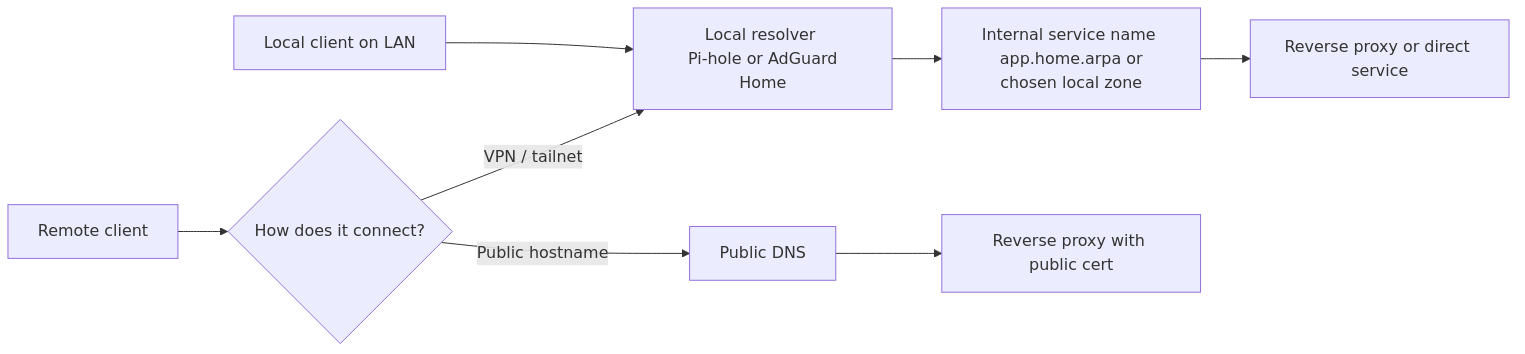
Homelab DNS request path: local clients resolve internal names through the local resolver, remote clients either come in over VPN or use a public hostname path, and HTTPS should match that access pattern.
What problem domains and DNS actually solve
A domain gives you a namespace. DNS gives you consistent mapping from names to IPs.
In homelabs, the outcomes you want are simple:
jellyfin.home.yourdomain.com always points to the right service
you can change servers without changing every bookmark
you can use HTTPS without duct-taping certificates to each app
Rule 8: debugging checklist (what to check when names fail)
When something works on one device but not another, check:
what DNS server the client is using (you’d be surprised how often a device is bypassing your Pi-hole)
whether the A/AAAA record exists in your local DNS
cache and TTL behavior (clear cache before you panic)
whether you are fighting mDNS (common with .local)
whether you are relying on hairpin NAT (public IP from inside)
A practical debug sequence: 1) Resolve the name on the client (does it return the IP you expect?) 2) Try the IP directly (is the service reachable?) 3) If IP works but name does not, it’s DNS. 4) If name resolves but service fails, it’s routing, firewall, or the reverse proxy.
Rule 9: keep admin interfaces private
If you need remote admin access, don’t solve it with DNS tricks. Solve it with a secure access method.
A strong default is WireGuard or a managed WireGuard-based VPN.
If an admin UI is reachable from the internet, treat it like production.
A safer default is:
admin UIs over VPN
public apps behind a reverse proxy with HTTPS and auth
FAQ
What is the best domain choice for homelab DNS?
If you can, use a real domain you own and a subdomain for the lab. If you want internal-only naming, home.arpa is designed for home networks.
Do I need split-horizon DNS?
Only if you want the same service name to work inside and outside without a VPN. If you are VPN-first, split-horizon is often optional.
Why should I avoid .local?
Because .local is used for mDNS and can conflict with your unicast DNS setup.
How do I get HTTPS for internal services?
The simplest approach is putting everything behind a reverse proxy that handles certificates. Another approach is an internal CA for purely internal names.
Why does my service work on Wi-Fi but not on mobile data?
Usually it’s DNS or remote access: split-horizon, NAT behavior, or your service not being exposed outside.
Next steps
Start with one service name and make it work perfectly.
Once one name is stable on all your devices, scale the pattern to the rest of your homelab. That is how homelab DNS becomes boring and reliable.
transmission signupstatus: open channel
article_topic // Homelab DNS Rules for Domains, Split-Horizon DNS, and Local H…
Start building a smarter homelab.
Join readers learning Proxmox, networking, storage, backups, and self-hosting without breaking everything.
Enter your email address to receive the Homelab Addiction newsletter.
Beginner-friendly
No gatekeeping. Just clear, actionable guides.
1 useful email / week
Practical tips, real-world setups, and lessons learned.
Zero hype, practical only
What works, what breaks, and how to fix it.
Reply to any email with what you're building. I read and reply to as many as I can.
— The Homelab Addiction Operator
support // the lab
Found this guide useful?
If it saved you time or a rebuild, you can support more practical homelab guides.