Wazuh vs Security Onion vs CrowdSec for Homelabs: Which Security Layer Fits Your Setup?
Compare Wazuh, Security Onion, and CrowdSec by deployment footprint, signal depth, and response role so you can choose the security layer that fits your homelab.
FTC disclosure: This article contains affiliate links. If you purchase through these links, HomelabAddiction may earn a commission at no additional cost to you.
This page helps a homelab operator choose the right first security-monitoring layer by separating three jobs that often get blended together: host visibility, edge enforcement, and deep network telemetry.
Wazuh, CrowdSec, and Security Onion can all improve security posture, but they solve different operational problems. The useful decision is not which logo wins overall; it is which layer gives the best signal for the hardware budget, network layout, and investigation depth the lab can realistically support.
For most small and mid-size homelabs, the fastest path is to start with the signal you can actually maintain, then expand only when the next layer answers a real gap in detection or response.
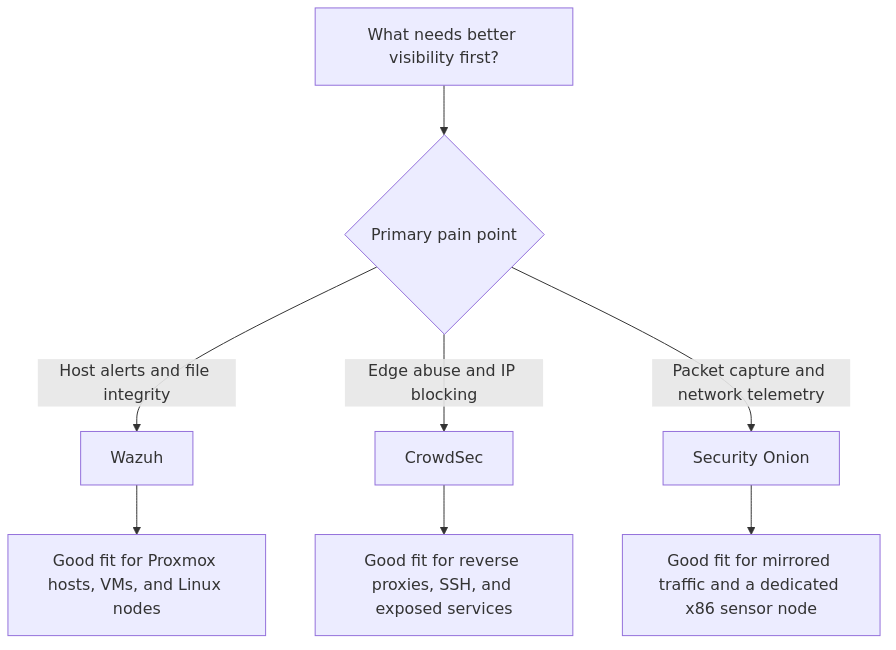
Security monitoring fit map: choose Wazuh for host visibility, CrowdSec for edge enforcement, and Security Onion only when network telemetry is the main project.
Key Takeaways
Wazuh is the strongest default when the main goal is host visibility across Proxmox nodes, VMs, Docker hosts, and general Linux servers.
CrowdSec is the quickest way to add log-driven enforcement to reverse proxies, SSH endpoints, and other exposed services at the edge.
Security Onion only makes sense when packet capture, Zeek, Suricata, and mirrored traffic are intentional parts of the lab design.
The main planning mistake is treating these tools as interchangeable. Wazuh is host-first, CrowdSec is response-first, and Security Onion is network-first.
A layered path is often the most realistic one: host monitoring where visibility matters, edge blocking where exposure exists, and network telemetry only when the lab can support a dedicated sensor role.
Comparison methodology
The comparison below uses six criteria that matter in a homelab more than they do in a generic vendor bake-off:
Time to first useful detection - how long before you are getting signal you can act on.
Hardware footprint - CPU, RAM, storage, and whether ARM is even an option.
Scope of visibility - host telemetry, log analysis, active blocking, packet inspection, and alert correlation.
Operational overhead - patching, tuning, false positives, and day-two maintenance.
Growth path - whether the tool still makes sense once your lab gets bigger or noisier.
Homelab fit - whether it solves a real home-operator problem instead of just looking impressive in a dashboard.
article_topic // Wazuh vs Security Onion vs CrowdSec for Homelabs
Don't leave without the setup notes.
Get practical homelab guides, failure logs, and beginner-friendly build notes in your inbox.
Enter your email address to receive the Homelab Addiction newsletter.
Weekly only. No spam. Unsubscribe anytime.
Because these three tools solve different parts of the problem, raw feature counts do not help much. The more useful benchmark is what it costs to get useful signal into your lab.
Practical metric
Wazuh
CrowdSec
Security Onion
Time to first useful protection
45-90 min
15-30 min
2-4 hr
Minimum documented RAM
8 GiB quickstart for 1-25 agents
100 MB recommended minimum
8 GB for Eval, 24 GB for Standalone
Minimum documented storage
50 GB for 90 days indexed data
1 GB recommended minimum
200 GB minimum
Recommended first deployment model
Single all-in-one VM or dedicated mini PC
Install on reverse proxy or edge host first
Separate x86 box with mirrored traffic
Dashboard / management feel
Full SIEM-style web UI
Light engine plus console and bouncers
Serious NSM stack, heavier operational feel
Best signal type
Host events, auth logs, FIM, vuln visibility
Abuse detection and fast banning
Packets, Zeek, Suricata, network forensics
Those setup-time figures are operator estimates rather than vendor benchmarks, but they match the install surface area pretty well. CrowdSec is small and modular. Wazuh is still manageable, but indexer plus dashboard plus agents adds real complexity. Security Onion is not hard in a conceptual sense, but it asks more from your hardware, your network design, and your patience.
What each tool is actually good at
Wazuh
Wazuh is the best fit for the average homelab because it answers the questions most people eventually care about:
Who failed SSH logins on this box for the last six hours?
Did a config file change when it should not have?
Which host is behind on patching or showing a vulnerable package?
What happened on this Proxmox host, Docker VM, or Ubuntu service node before things got weird?
That is why Wazuh often has the highest practical value in a typical homelab. The official quickstart numbers are also surprisingly reasonable. Wazuh documents 4 vCPU, 8 GiB RAM, and 50 GB as enough for an all-in-one quickstart covering 1-25 agents with 90 days of indexed alert data. For a homelab, that is a very approachable starting point.
It is also more flexible than people give it credit for. You can run it as the full stack with indexer and dashboard, or run a leaner deployment and keep your expectations honest. One homelab writeup I reviewed notes that 4 GB RAM works for a full Wazuh stack with indexer, and 2 GB is possible without the integrated indexer on a dedicated security node. I would still rather give it 8 GB and stop thinking about it, but that field report lines up with the general pattern: Wazuh is heavier than CrowdSec, lighter than Security Onion, and still very doable on decent mini-PC hardware.
If you already care about host context, Wazuh usually becomes your anchor tool.
CrowdSec
CrowdSec wins the lightweight prize by a mile.
The official getting started guide calls it out clearly: 1 CPU core, 100 MB of free RAM, and 1 GB of free disk space as recommended minimums. That is tiny compared with the other two. It also runs on amd64, arm64, and armhf, which matters if you like Raspberry Pi-class boxes or small ARM nodes for edge jobs.
The main operational appeal of CrowdSec is not just footprint. It is how quickly you can get from "I should probably protect this reverse proxy" to "that IP is now banned." CrowdSec reads logs, applies behavior-based scenarios, and hands enforcement to bouncers for firewalls, reverse proxies, or web stacks. In practice, that means it is very good at dealing with the noisy, repetitive junk that shows up the second you expose anything to the internet.
What CrowdSec does not give you is a deep host-centric investigation story. It is not trying to be your whole SIEM. It is not trying to replace file integrity monitoring, vulnerability context, or rich endpoint telemetry. That is why I do not recommend it as a solo answer when someone asks for full security monitoring. I do recommend it when someone asks for the fastest way to cut down abusive traffic on Nginx, Traefik, SSH, or a public app.
Security Onion
Security Onion is a different kind of commitment.
Its value is obvious if you want network security monitoring that goes beyond log scraping. It brings together tools like Zeek, Suricata, and the Elastic stack into a serious platform for network visibility, intrusion detection, hunting, and forensics. If you want to inspect mirrored traffic, keep packet data, correlate events, and learn how a real NSM workflow feels, Security Onion is excellent.
The tradeoff is the hardware bill and operational complexity. The official hardware page is refreshingly blunt. Even the Eval install needs 4 CPU cores, 8 GB RAM, 200 GB storage, and 2 NICs. The full Standalone install jumps to 4 cores, 24 GB RAM, 200 GB storage, and 2 NICs. It also only supports x86-64. No ARM shortcut here.
That documented footprint sets the expectation clearly. Security Onion is best treated as a dedicated network-telemetry project, not as a casual add-on for an already crowded mini PC.
Pros and cons
Wazuh pros
Best all-around visibility for small to mid-size homelabs
Good fit for Proxmox hosts, VMs, Docker nodes, and general Linux servers
Official quickstart sizing is realistic for homelab-scale use
Can become dashboard-heavy if you only wanted basic edge blocking
Tuning rules and noise takes some work
Not a replacement for network packet visibility
CrowdSec pros
Extremely light footprint
Fast time to value
Great at turning noisy logs into automatic bans
Excellent fit for reverse proxies, SSH, and internet-facing services
Easy to pair with existing firewall and proxy workflows
CrowdSec cons
Not a full SIEM
Less useful for deep host investigation
You still need another tool if you want broad endpoint telemetry
Can feel too narrow if your goal is full security observability
Security Onion pros
Best network-centric visibility of the three
Strong threat-hunting and forensic story
Excellent if you actually want Zeek/Suricata-style telemetry in one place
Serious learning platform for anyone building SOC-like skills at home
Security Onion cons
By far the heaviest option
Requires more deliberate network design
200 GB storage minimum is not a joke
x86-64 only
Overkill for many small labs
From the lab
Who should pick Wazuh
Pick Wazuh if your homelab looks like this:
A Proxmox host or two
Several Linux VMs and containers
A NAS you care about
A reverse proxy, maybe some public apps
A desire to know what changed on hosts, not just which IP knocked on the door
Wazuh is also the better pick if you have already started hardening the basics. If you are working through things like Docker security hardening, tightening HTTPS and certificate management, or refining your Proxmox firewall rules, Wazuh complements that work nicely because it tells you whether those hosts are behaving the way you think they are.
My default recommendation for most readers is a dedicated Wazuh VM with enough disk to keep alert history useful. It is the best balance of evidence, context, and day-two practicality.
Who should pick CrowdSec
Pick CrowdSec if your most immediate problem is exposure, not visibility.
That usually means:
You run Traefik, Nginx Proxy Manager, or Caddy publicly
SSH is exposed or reachable from the internet
You are tired of bots hammering login endpoints
You want a low-footprint control that reacts quickly without building a mini SOC
CrowdSec is also a great fit if you already cleaned up your network layout with proper segmentation. If you have gone down the VLAN and network segmentation path, CrowdSec becomes a clean way to add active enforcement at the edges that matter most.
For many exposed homelabs, the smallest useful first step is to install CrowdSec on the edge first, then add Wazuh later if host-level visibility is still missing.
Who should pick Security Onion
Pick Security Onion if the network itself is the project.
That means you want things like:
Mirrored traffic from a managed switch
Zeek logs you can actually hunt through
Suricata alerts you plan to tune
Packet capture for incident review
A home environment that doubles as a security lab
Security Onion makes sense for the reader who is deliberately building analyst skills or wants to understand east-west traffic and lateral movement patterns in a way endpoint tools will never show. It does not make sense if what you really wanted was a smarter Fail2ban replacement or a basic host alerting platform.
The smartest real-world setup for most homelabs
This is where a lot of comparison posts fall short: they act like you must crown exactly one winner and throw the other two away.
In practice, the best small-lab architecture is often:
CrowdSec on the edge or reverse proxy layer for quick blocking
Wazuh on the important hosts for context and history
No Security Onion at all, unless you truly need network forensics
That split matches how the tools are built. CrowdSec is excellent at saying, "this source is behaving badly, ban it now." Wazuh is excellent at saying, "this host changed, this login failed, this file moved, this package is vulnerable, and here is the timeline." Those are complementary strengths.
Security Onion only enters the chat when you want to go beyond host and edge decisions into packet-level network monitoring. If that sentence makes you smile instead of groan, you are the target user. If not, skip it without guilt.
Recommended gear for this kind of deployment
If you are building a small dedicated security node, these are the three hardware categories I would prioritize first:
Samsung 870 EVO 1TB SSD search on Amazon - cheap insurance if you want better endurance and saner alert-history storage than whatever random SATA drive was lying around.
CyberPower UPS search on Amazon - because a security stack that disappears during a power blip is not doing you many favors.
I would also revisit your backup discipline before you go all-in on a logging stack. Security data is useful, but only if the systems generating it survive the boring failures. That is the same reason I keep pushing basic hardening, segmentation, and sane certificates before fancy tooling.
Final verdict
Here is the short version after stripping away marketing language:
Best overall winner: Wazuh
Best lightweight add-on: CrowdSec
Best specialist lab platform: Security Onion
Wazuh wins because it solves the broadest set of real homelab problems without demanding the kind of hardware and network plumbing that Security Onion expects. CrowdSec is easier to deploy and dramatically lighter, but it is narrower. Security Onion is extremely capable, but the documented 200 GB storage floor and much larger RAM requirements tell you exactly where it belongs: in a lab where network security monitoring is a deliberate focus, not a side quest.
If you are unsure, start here:
Pick CrowdSec if you mainly need fast blocking on exposed services.
Pick Wazuh if you want the best single-tool security monitoring platform for a typical homelab.
Pick Security Onion only if you know why packet capture, Zeek, and mirrored traffic matter to you.
That decision tree keeps the first deployment aligned with the part of the stack that most needs visibility or response coverage.
FAQ
Is Wazuh too heavy for a small homelab?
Not usually. The official quickstart targets 1-25 agents on 4 vCPU, 8 GiB RAM, and 50 GB storage, which is very reasonable for a dedicated VM or small mini PC. It is heavier than CrowdSec, but still practical for most labs.
Can I run CrowdSec and Wazuh together?
Yes, and for many labs that is the best answer. CrowdSec can handle fast blocking at the edge while Wazuh gives you host-level context, alert history, and broader security telemetry.
Does Security Onion make sense on a Raspberry Pi or ARM box?
No. Security Onion officially supports x86-64 only. If you want a lightweight ARM-friendly option, CrowdSec is the obvious better fit.
Which tool is best for Proxmox and Docker hosts?
Wazuh is the best single answer because it gives you host visibility across the systems that actually run your workloads. CrowdSec is still excellent alongside it if those services are internet-facing.
Do I need Security Onion if I already have Wazuh?
Only if you want network-centric telemetry that Wazuh does not provide. Wazuh is host-first. Security Onion shines when packet analysis, network hunting, and deeper NSM workflows are part of the goal.
transmission signupstatus: open channel
article_topic // Wazuh vs Security Onion vs CrowdSec for Homelabs
Start building a smarter homelab.
Join readers learning Proxmox, networking, storage, backups, and self-hosting without breaking everything.
Enter your email address to receive the Homelab Addiction newsletter.
Beginner-friendly
No gatekeeping. Just clear, actionable guides.
1 useful email / week
Practical tips, real-world setups, and lessons learned.
Zero hype, practical only
What works, what breaks, and how to fix it.
Reply to any email with what you're building. I read and reply to as many as I can.
— The Homelab Addiction Operator
support // the lab
Found this guide useful?
If it saved you time or a rebuild, you can support more practical homelab guides.