Proxmox Firewall Configuration: Build Datacenter, Node, and VM Rules Without Locking Yourself Out
Configure the Proxmox firewall by separating datacenter, node, and VM rules, protecting management access, and preserving cluster or backup traffic before enforcing defaults.
FTC disclosure: This article contains affiliate links. If you purchase through these links, we may earn a commission at no extra cost to you.
Documentation basis: This guide is grounded in the Proxmox VE firewall documentation, the cluster documentation, and supporting host-network references used here to explain management, storage, and guest traffic boundaries. No first-hand lockout story is claimed as evidence.
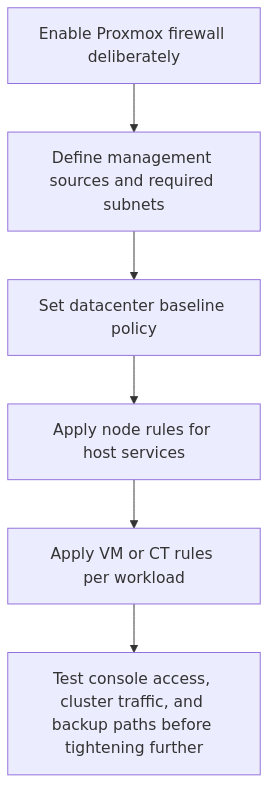
The safe way to approach the Proxmox firewall is to stage rules by layer: define trusted management sources first, apply a datacenter baseline second, and only then narrow node or guest traffic once console access and cluster paths are still verified.
That layered model matters because the Proxmox firewall is literal. It will happily enforce a clean policy that also blocks GUI access, cluster communication, or backups if the required sources and services were never written down first.
This page helps homelab operators protect the hypervisor and guests without losing access by grounding each step in Proxmox documentation and predictable rule order rather than cautionary storytelling.
Firewall layer map: document management sources first, then set a datacenter baseline, add node rules, and narrow VM or container rules only after console and cluster traffic still work.
3. VM or container firewall
VM and container rules protect individual workloads. This is where you allow HTTPS to a reverse proxy VM, SSH to a Linux VM, or DNS to a Pi-hole container.
This is also where people expect datacenter rules to magically trickle down. They do not. Proxmox is many things, but it is not sentimental.
The rule hierarchy I recommend
The safest structure is boring, which is exactly what good firewall policy should be.
Datacenter level
enable the firewall globally
keep output policy at ACCEPT unless you have a very good reason not to
set input policy carefully after management rules exist
define security groups, aliases, and IP sets here
Node level
allow SSH only from your management subnet
allow port 8006 only from your management subnet or VPN range
allow cluster and migration traffic only where required
log drops while you are tuning, then reduce noise later
VM level
allow only the ports the workload actually needs
prefer source-limited rules for internal services
use groups for repeatable patterns like web servers, DNS servers, and monitoring nodes
That split keeps the intent clear. It also makes future troubleshooting far less annoying.
Before you enable anything, map your management sources
A DROP-by-default policy should not be enabled until the management subnets and jump hosts are written down explicitly. Otherwise the host can remain reachable from one admin path while silently blocking another legitimate path.
Write this down first:
Management VLAN: 192.168.10.0/24
Admin laptop: 192.168.10.25
Tailscale subnet or VPN range: 100.64.0.0/10 or your actual VPN subnet
Cluster nodes: 192.168.10.11-13
Storage network: 192.168.20.0/24
Server VLAN: 192.168.30.0/24
If your addressing is still messy, fix that before you harden the firewall. Our DHCP planning guide helps with the boring but important part.
Ports you should care about before enabling the node firewall
Do not guess here. Proxmox documents the important ports, and you should check the official list for your version.
The usual ones I account for are:
8006/tcp - Proxmox web UI
22/tcp - SSH
5900-5999/tcp - VNC consoles
3128/tcp - SPICE proxy
5405-5412/udp - corosync cluster traffic
60000-60050/tcp - live migration
transmission signup
article_topic // Proxmox Firewall Configuration
Don't leave without the setup notes.
Get practical homelab guides, failure logs, and beginner-friendly build notes in your inbox.
Enter your email address to receive the Homelab Addiction newsletter.
Weekly only. No spam. Unsubscribe anytime.
If you run a standalone node, you may not need cluster-related ports. If you run a cluster and forget corosync or migration, Proxmox will remind you in the least relaxing way possible.
Step 1: Create reusable aliases and IP sets first
Write these values down before creating rules so later subnet changes do not force a large cleanup pass.
At the datacenter firewall level, create aliases and sets like these:
Proxmox also supports security groups, which are worth using if you have multiple VMs with similar roles.
Step 2: Build the datacenter baseline
At Datacenter -> Firewall -> Options, enable the firewall only after the basic policy objects exist.
A conservative baseline looks like this conceptually:
A common datacenter baseline is DROP on input and ACCEPT on output. That keeps the cluster strict on inbound traffic without making outbound troubleshooting harder than it needs to be.
If you are nervous about locking yourself out, there is a reasonable transition strategy:
Start with policy_in: ACCEPT
Add explicit allow rules at node and VM level
Verify access from every management path you actually use
Change policy_in to DROP
That is less dramatic than going straight to hard mode on a Tuesday night.
Step 3: Protect the node before you protect the guests
This is the part that should be treated as non-negotiable.
Before enabling the node firewall, create allow rules for management access. For a host called pve1, the effective file path is:
/etc/pve/nodes/pve1/host.fw
A clean starting point looks like this:
[OPTIONS]
enable: 1
policy_in: DROP
policy_out: ACCEPT

[RULES]
IN ACCEPT -source +admin-sources -p tcp -dport 8006 -comment "Allow Proxmox GUI from admin networks"
IN ACCEPT -source +admin-sources -p tcp -dport 22 -comment "Allow SSH from admin networks"
IN ACCEPT -p icmp -comment "Allow ping for troubleshooting"
If the node participates in a cluster, add what the cluster actually needs:
comment every rule like a person who expects to be tired later
if you use Tailscale, WireGuard, or another VPN for admin access, explicitly allow that range too
If SSH will be exposed beyond the management VLAN, pair this guide with the site SSH hardening guide before finalizing the firewall policy.
Step 4: Use security groups for repeatable guest roles
This is where Proxmox gets nice.
Instead of writing one-off rules for every VM, define reusable security groups at the datacenter level.
For example, a simple web-server group:
[group web-server]
IN ACCEPT -p tcp -dport 80 -comment "Allow HTTP"
IN ACCEPT -p tcp -dport 443 -comment "Allow HTTPS"
IN ACCEPT -p icmp -comment "Allow ping"
A DNS-server group:
[group dns-server]
IN ACCEPT -p udp -dport 53 -comment "Allow DNS UDP"
IN ACCEPT -p tcp -dport 53 -comment "Allow DNS TCP"
A Linux-admin group:
[group linux-admin]
IN ACCEPT -source +admin-sources -p tcp -dport 22 -comment "Allow SSH from admin networks"
Apply these groups to VMs based on role. That keeps policy consistent across guests and makes audits much easier.
Step 5: Enable firewalling on the VM NIC too
This trips people up more than it should.
For VM-level rules to work, the VM firewall has to be enabled and the virtual NIC needs firewalling enabled. If you skip the NIC checkbox, you can spend an hour inspecting good rules that are doing absolutely nothing.
So verify all three pieces:
datacenter firewall enabled
VM firewall enabled
VM network interface firewall option enabled
That little checkbox has wasted more human time than it deserves.
Practical VM examples I actually use
Theory is nice. Real rules are better.
Example 1: Reverse proxy VM
If you run Nginx Proxy Manager, Caddy, or Traefik in a VM, the guest usually needs inbound web traffic and maybe SSH from admin networks.
[OPTIONS]
enable: 1
policy_in: DROP
policy_out: ACCEPT

[RULES]
IN ACCEPT -p tcp -dport 80 -comment "Allow HTTP"
IN ACCEPT -p tcp -dport 443 -comment "Allow HTTPS"
IN ACCEPT -source +admin-sources -p tcp -dport 22 -comment "Allow SSH from admin networks"
That is it. Not fifteen extra lines because you got inspired.
If you are also publishing internal apps, pair this with Caddy vs Traefik vs Nginx Proxy Manager so your proxy design and firewall design are not fighting each other.
Example 2: Pi-hole or internal DNS VM
For a DNS service VM on your server VLAN:
[OPTIONS]
enable: 1
policy_in: DROP
policy_out: ACCEPT

[RULES]
IN ACCEPT -source 192.168.10.0/24 -p udp -dport 53 -comment "Allow DNS from management VLAN"
IN ACCEPT -source 192.168.10.0/24 -p tcp -dport 53 -comment "Allow DNS TCP from management VLAN"
IN ACCEPT -source 192.168.30.0/24 -p udp -dport 53 -comment "Allow DNS from server VLAN"
IN ACCEPT -source 192.168.30.0/24 -p tcp -dport 53 -comment "Allow DNS TCP from server VLAN"
IN ACCEPT -source +admin-sources -p tcp -dport 22 -comment "Allow SSH from admin networks"
If you want client devices from several VLANs to use it, add only those VLANs. Do not allow the whole universe because a smart TV somewhere seems needy.
Example 3: Monitoring VM
For tools like Prometheus or Grafana, allow web access only from admin networks or a specifically trusted VLAN.
[OPTIONS]
enable: 1
policy_in: DROP
policy_out: ACCEPT

[RULES]
IN ACCEPT -source +admin-sources -p tcp -dport 3000 -comment "Allow Grafana from admin networks"
IN ACCEPT -source 192.168.30.0/24 -p tcp -dport 9090 -comment "Allow Prometheus from server VLAN"
IN ACCEPT -source +admin-sources -p tcp -dport 22 -comment "Allow SSH from admin networks"
Logging is useful when you are tuning rules. It is less useful when it turns your syslog into abstract art.
A workable guest-rule approach looks like this:
enable logging on suspicious or newly-added deny rules
keep broad allow rules quiet unless you are troubleshooting
review logs after each policy change
reduce noise once the rule set is stable
If everything logs everything, you stop reading it. That is human nature, not a personal failing.
A targeted drop rule can look like this:
IN DROP -source 192.168.40.0/24 -p tcp -dport 8006 -log info -comment "Log guest VLAN attempts to reach Proxmox GUI"
That gives you signal without turning the node into a diary.
The anti-lockout workflow I actually follow
The following sequence helps reduce self-inflicted lockouts and missed service dependencies:
Create aliases, IP sets, and security groups.
Add node-level allow rules for 8006 and 22 from management sources.
If clustered, add corosync and migration allowances.
Keep a console session open before enabling anything.
Enable datacenter firewall.
Enable node firewall.
Verify GUI and SSH from every admin path.
Only then start enabling VM firewalls.
Test each guest from the VLANs that should reach it.
Turn on logging for problem areas, not for the entire solar system.
Yes, it is methodical. No, it is not exciting. That is the point.
Recommended gear for a cleaner Proxmox security setup
You do not need special hardware to use the Proxmox firewall, but a few purchases make a segmented lab easier to manage.
Fanless Intel N100 mini PC with 4x 2.5GbE - a great dedicated box for routing, VPN ingress, or lab edge duties if you want cleaner separation around your Proxmox cluster. Recommended search link
Managed 2.5GbE switch with VLAN support - if your firewall policy is not matched by sane VLAN design, you are mostly decorating. Recommended search link
Raspberry Pi 5 8GB starter kit - a simple out-of-band helper for DNS, monitoring, or backup admin tooling when you do not want every operational dependency living on the same hypervisor. Recommended search link
Common mistakes that break Proxmox firewall setups
Mistake 1: Assuming datacenter rules apply to guests
They do not. Datacenter rules affect hosts and shared objects. Guest traffic needs guest-level firewalling.
Mistake 2: Forgetting the NIC firewall checkbox
If the VM NIC does not have firewalling enabled, your carefully written VM rules may as well be motivational quotes.
Mistake 3: Enabling DROP before writing allow rules
This is how people meet their local console more intimately than planned.
Mistake 4: Blocking cluster or migration traffic
In a cluster, the firewall cannot be treated like a single-node toy. Corosync and migration ports matter.
Mistake 5: Treating every VLAN the same
Your management VLAN, server VLAN, guest VLAN, and IoT VLAN should not all have identical reach. If they do, the firewall is mostly theater.
A sane default design for most homelabs
If you want the short version, this is the model I trust most:
management VLAN can reach Proxmox GUI and SSH
VPN admin range can also reach GUI and SSH
storage network is limited to the storage interfaces and services that actually need it
VM-level rules allow only required ports from required subnets
broad outbound access remains open unless there is a compliance or containment reason to tighten it
noisy deny logging is temporary, not permanent
That gives you meaningful isolation without turning ordinary maintenance into a puzzle game.
Should I use the Proxmox firewall if I already have pfSense or OPNsense?
Yes, in most cases. Your edge firewall controls network boundaries, while the Proxmox firewall protects the host and individual guests. They complement each other.
What is the safest first rule to add on a Proxmox node?
Allow 8006/tcp and 22/tcp from your management subnet before enabling the node firewall. If you manage the host over VPN, allow that subnet too.
Do datacenter rules protect virtual machines automatically?
No. Datacenter rules help with shared host-level policy and reusable objects. VM and container traffic needs VM or container firewall rules.
Why are my VM firewall rules not doing anything?
Check whether the VM firewall is enabled and whether the VM network interface has firewalling enabled. Missing that NIC setting is a very common cause.
Should I set input policy to DROP everywhere?
Eventually, probably yes for most scopes. But do it in stages. First write the allow rules, then verify access, then tighten the policy.
Final recommendation
If you are serious enough to run Proxmox, you are serious enough to use its firewall properly.
Not because it looks enterprise-y. Not because a checklist said so. Because the hypervisor is the blast radius concentrator in your lab. It hosts the management plane, the storage access, the workloads, and often the services you care about most.
My rule is simple: protect the node first, protect the guests second, and keep the policy readable enough that you can still understand it after a bad week.
That last part matters more than people admit.
transmission signupstatus: open channel
article_topic // Proxmox Firewall Configuration
Start building a smarter homelab.
Join readers learning Proxmox, networking, storage, backups, and self-hosting without breaking everything.
Enter your email address to receive the Homelab Addiction newsletter.
Beginner-friendly
No gatekeeping. Just clear, actionable guides.
1 useful email / week
Practical tips, real-world setups, and lessons learned.
Zero hype, practical only
What works, what breaks, and how to fix it.
Reply to any email with what you're building. I read and reply to as many as I can.
— The Homelab Addiction Operator
support // the lab
Found this guide useful?
If it saved you time or a rebuild, you can support more practical homelab guides.