Homelab Firewall Rules: A Starter Inter-VLAN Policy for DNS, Backups, and Admin Access
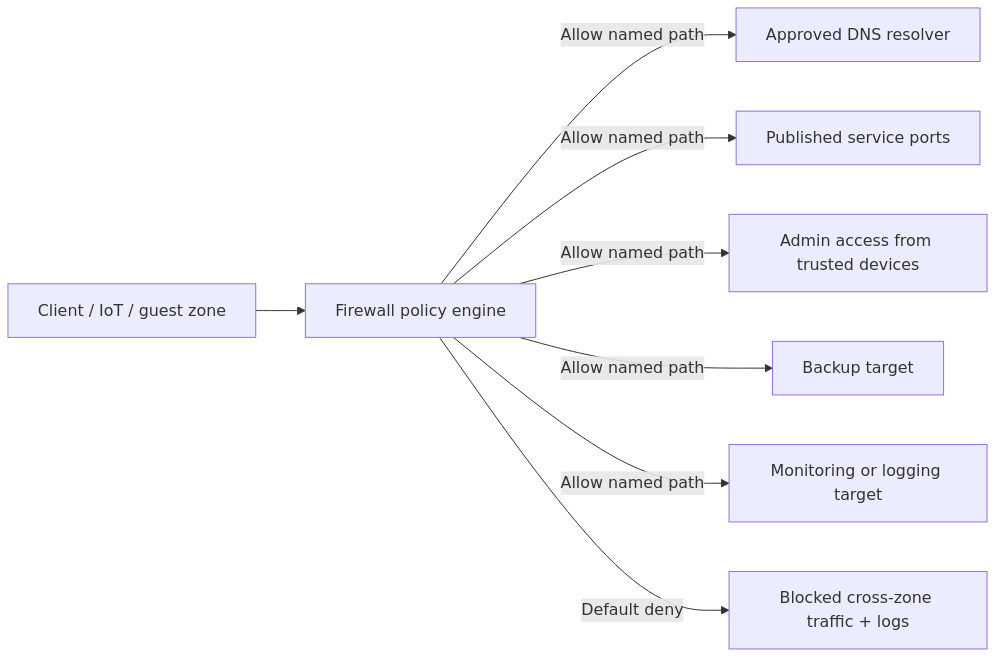
Build homelab firewall rules by starting with a small zone model, blocking inter-VLAN traffic by default, then allowing only named paths for DNS, admin access, backups, monitoring, and published services.
Start with a small zone model - management, servers, clients, IoT, and guests - then write rules for traffic between zones instead of making one-off exceptions forever.
Default deny is still the right answer for inter-VLAN traffic, but you need explicit allows for DNS, NTP, HTTPS, SSH, backups, and monitoring.
Use aliases for subnets, ports, and infrastructure hosts. If your rules read like a crossword puzzle, you will hate yourself in six months.
Logging blocked traffic is not optional. It is how you discover that the "broken app" is actually one sad little DNS request hitting a wall.
Keep hypervisor, NAS, switch, and firewall management interfaces off the general LAN. Temporary flat networks have a suspicious tendency to become permanent.
Firewall policy starts to matter as soon as a homelab has more than one trust zone. VLANs create the boundaries, but the allow and deny rules decide whether DNS, admin access, backups, and internal apps behave predictably or fail in confusing ways.
A good starter policy blocks inter-VLAN traffic by default, then adds only the named flows a service actually needs. That keeps troubleshooting readable and makes later segmentation changes less risky.
This page helps a homelab operator begin with a small zone model and a short ruleset they can verify one service path at a time.
Starter inter-VLAN policy flow: allow named paths like DNS, admin access, backups, and monitoring, then leave all other cross-zone traffic blocked by default.
The starter zone model
Most homelabs do not need 14 VLANs and a laminated diagram worthy of a hospital network. They need enough separation to keep management, core services, users, IoT junk, and guests from tripping over each other.
This five-zone model is a practical starting point for many growing homelabs:
Laptops, desktops, tablets, phones you actually trust
Medium
IoT
10.10.40.0/24
Cameras, TVs, plugs, assistant speakers, random "smart" nonsense
Low
Guests
10.10.50.0/24
Visitor devices
Lowest
That is enough for most people.
You can add a lab VLAN, a storage VLAN, or a DMZ later if you have a reason. If you start with 12 networks because you saw a YouTube rack tour, you are probably optimizing for screenshots instead of reliability.
The baseline policy that keeps troubleshooting sane
A reliable baseline inter-VLAN policy usually looks like this:
1. Allow each VLAN to reach the internet as needed.
2. Block inter-VLAN traffic by default.
3. Add explicit allows only for real service flows.
4. Log blocked inter-VLAN traffic.
5. Use aliases everywhere.
That last point matters more than people think.
transmission signup
article_topic // Homelab Firewall Rules
Don't leave without the setup notes.
Get practical homelab guides, failure logs, and beginner-friendly build notes in your inbox.
Enter your email address to receive the Homelab Addiction newsletter.
Weekly only. No spam. Unsubscribe anytime.
In Proxmox Networking Explained, I talked about how small naming mistakes turn into operational pain. Firewall policy is even less forgiving. 10.10.20.53 means something today. Six months from now, it means "why is production DNS on line 47 and why did I think I would remember this?"
Create aliases for:
subnets like NET_MGMT, NET_SERVERS, NET_CLIENTS, NET_IOT, NET_GUESTS
infrastructure hosts like HOST_DNS_1, HOST_PROXMOX_1, HOST_NAS_1
service ports like PORT_DNS, PORT_NTP, PORT_HTTPS, PORT_SSH
update mirrors or backup targets if you need tight outbound rules later
This is a compact starter policy that keeps core service paths explicit without opening every zone to every other zone.
Source zone
Destination zone
Allow?
Typical ports
Why
Management
All zones
Yes, limited
22, 443, 8006, vendor-specific mgmt ports
Admin access to infrastructure
Servers
Management
Rarely
As needed only
Usually monitoring pull or backup callbacks
Clients
Management
Very limited
443, 8006, 22 to specific hosts
Admin workstations only
Clients
Servers
Yes, limited
53, 80, 443, app-specific ports
Access to dashboards and self-hosted apps
Servers
Clients
Rarely
Monitoring or backup agent ports only
Avoid lateral movement
IoT
Servers
Minimal
53, 123, maybe MQTT/HTTPS to one host
DNS, time sync, narrowly scoped services
Servers
IoT
Sometimes
8123, 1883, vendor-specific ports
Home Assistant, media control, automations
Guests
Servers
No
None
Guests should not touch internal services
Guests
Management
No
None
Obvious, but apparently not obvious enough
IoT
Management
No
None
Your TV does not need to manage your switch
That table is the strategy. The actual rule list depends on the services you run.
Here is the practical translation.
The rules I create first on a new firewall
1) Allow DNS to your chosen resolver
If you run Pi-hole or AdGuard Home, point every zone at those resolvers and allow only that path. Do not allow arbitrary outbound DNS from every client unless you enjoy debugging devices that hardcode external resolvers and ignore your filters.
I covered the resolver tradeoffs already in Pi-hole vs AdGuard Home. Whichever one you use, make it the approved target.
That one rule set fixes a surprising amount of chaos.
2) Allow NTP
Devices with broken clocks break TLS, logs, tokens, and your patience. You can either let VLANs use public NTP directly or centralize time sync through one internal host.
A low-drift default looks like this:
PASS NET_CLIENTS -> any UDP 123\nPASS NET_IOT -> any UDP 123\nPASS NET_GUESTS -> any UDP 123
If you are security-paranoid or bandwidth-obsessed, point them at an internal NTP source instead. Most people do not need to turn NTP into a religion.
3) Allow clients to reach self-hosted services
Users need to hit dashboards, apps, and reverse proxies in the server network. That means HTTP and HTTPS at a minimum, often via a single reverse proxy host.
PASS NET_CLIENTS -> HOST_REVERSE_PROXY TCP 80,443\nPASS NET_CLIENTS -> NET_SERVERS TCP 443 (only if direct app access is needed)
If your apps are behind a reverse proxy, keep the rule pointed there. Do not casually allow NET_CLIENTS -> NET_SERVERS any. That is how rule sets go from tight to decorative.
For proxy design, my current recommendation still leans on Caddy vs Traefik vs Nginx Proxy Manager. The firewall angle is simple: fewer published entry points means fewer rules and fewer regrets.
4) Allow admin access from trusted devices only
This is where people get sloppy.
Do not allow your whole client VLAN to hit Proxmox, your NAS admin panel, switch management, and firewall UI just because it is convenient. Create an alias for trusted admin workstations or a dedicated admin jump host.
If you are running Proxmox, the official firewall and network docs are useful for understanding the difference between what belongs on the hypervisor and what belongs on the perimeter firewall. I strongly prefer keeping the main allow/deny policy on the central firewall and using host firewalls as a second layer, not the primary map.
5) Allow backup traffic one way, on purpose
Backup flows should be explicit.
If your NAS pulls backups from clients, allow the NAS to poll or mount exactly what it needs. If Proxmox Backup Server receives data from hypervisors, allow that path and nothing broader.
I would rather spend ten minutes documenting backup flows than discover during a restore that I never actually allowed the path I assumed was working. The article on Proxmox Backup Strategies gets into the disaster-recovery side of that story.
6) Allow monitoring and logging
Monitoring traffic often gets forgotten because it is invisible right up until you need it.
If Zabbix, LibreNMS, or Uptime Kuma needs to probe services across VLANs, write those rules intentionally:
My bias is to keep monitoring centralized in the server VLAN and let it reach outward on a short leash. That model is easier to reason about and easier to audit later.
Complicated-looking rules that nobody understands are basically ambient technical debt wearing a security costume.
The annoying traffic everyone forgets
This is the section where many clean firewall designs meet reality.
mDNS, AirPlay, Chromecast, and service discovery
Segmentation breaks discovery protocols because they often assume local broadcast or multicast behavior. That is not your firewall being mean. That is the protocol behaving exactly as designed.
You have three options:
1. keep those devices on the same VLAN as the clients that use them
2. use an mDNS repeater or gateway feature on your firewall or router
3. accept that not every smart speaker deserves cross-VLAN convenience
I usually choose option 3 more often than my family would prefer.
Package updates
Some IoT devices and appliances need outbound HTTPS to vendor clouds. Fine. Allow outbound internet access from the IoT VLAN if you must, but still block access to internal networks.
A basic pattern looks like this:
PASS NET_IOT -> any TCP 80,443\nBLOCK NET_IOT -> NET_SERVERS any\nBLOCK NET_IOT -> NET_MGMT any\nBLOCK NET_IOT -> NET_CLIENTS any
That is not perfect zero trust. It is still much better than letting your camera talk to your NAS because nobody wrote a rule.
Remote access
For remote admin, I still prefer VPN over exposed ports for most homelabs. If you need public access to a web app, a tunnel or reverse proxy can make sense, but keep the management plane private.
I already compared the tradeoffs in Cloudflare Tunnel vs VPN vs Port Forwarding. The firewall summary is easy: remote access rules should terminate into the smallest possible surface area, not your entire server subnet.
Recommended gear if you are building this from scratch
You do not need a datacenter budget to write sane firewall rules, but a few hardware choices make segmentation much less miserable.
TP-Link TL-SG108E managed switch - cheap, VLAN-capable, and good enough for small labs that just need tagged uplinks and basic port control.
Protectli-style fanless firewall appliance - excellent if you want a dedicated OPNsense or pfSense box instead of stuffing routing onto some recycled desktop that sounds like a leaf blower.
CyberPower CP1500AVRLCD UPS - because graceful shutdowns and clean firewall boots are more fun than filesystem repair.
I am not claiming hardware will solve a bad rule set. It will not. But a managed switch, a dedicated firewall, and a UPS remove three completely unnecessary ways to ruin your weekend.
A common firewall failure mode
One of the most common firewall mistakes is treating temporary broad allows as if they will be cleaned up automatically later.
In practice, “temporary” broad access often survives for months unless the cleanup is scheduled and verified.
During that time, my client network could talk to far more infrastructure than it needed, my IoT network had more outbound access than I was comfortable with, and my backup flows were so poorly documented that I had to rediscover them through firewall logs like some sort of digital archaeologist.
If you take one thing from this article, make it this: broad temporary rules harden into permanent architecture faster than you think.
A dead-simple validation checklist
After creating or tightening rules, test from each zone.
From a client VLAN:
# DNS should work\nnslookup proxmox.lab.example 10.10.20.53\n\n# Reverse proxy or app access should work\ncurl -I https://app.lab.example\n\n# Firewall admin should fail unless you are on an approved admin client\ncurl -k https://10.10.10.1
From an IoT or restricted host:
# DNS should work only to your approved resolver\nnslookup jellyfin.lab.example 10.10.20.53\n\n# Direct access to management or random servers should fail\nnc -zv 10.10.10.1 443\nnc -zv 10.10.20.11 22
From your monitoring server:
# Service checks should succeed where explicitly allowed\ncurl -I https://10.10.20.20\nping -c 2 10.10.20.90
Then check the firewall logs.
The logs tell you whether the problem is policy, routing, DNS, or an application binding to the wrong interface. Guessing is slower, and less entertaining, than people imagine.
Frequently Asked Questions
Should I block all inter-VLAN traffic by default?
Yes. Start with default deny between VLANs, then add narrow allow rules for DNS, NTP, HTTPS, SSH, backups, and monitoring as needed. That gives you a policy you can reason about instead of a messy web of implicit trust.
How many VLANs does a normal homelab actually need?
Most homelabs are well served by five zones: management, servers, clients, IoT, and guests. Add more only when you have a clear operational reason, not because your switch dropdown makes it look easy.
What traffic should IoT devices be allowed to reach?
Usually DNS, NTP, and limited outbound HTTPS are enough. If you run Home Assistant, MQTT, or a media-control workflow, allow only those specific destinations and ports instead of opening broad access into the server VLAN.
Should Proxmox management live on the same network as user devices?
No. Keep Proxmox, firewall, switch, AP, and NAS management interfaces on a dedicated management VLAN and allow access only from approved admin devices or a jump host.
Final recommendation
If you are staring at a flat LAN right now, do not try to boil the ocean.
Create the five zones. Move management first. Point every network at one approved DNS resolver. Block inter-VLAN traffic by default. Then add only the service flows you can explain in one sentence.
That is enough to take a homelab from "surprisingly functional accident" to "small infrastructure with actual boundaries." Which, in my experience, is the point where it becomes a lot more useful and a lot less chaotic.
transmission signupstatus: open channel
article_topic // Homelab Firewall Rules
Start building a smarter homelab.
Join readers learning Proxmox, networking, storage, backups, and self-hosting without breaking everything.
Enter your email address to receive the Homelab Addiction newsletter.
Beginner-friendly
No gatekeeping. Just clear, actionable guides.
1 useful email / week
Practical tips, real-world setups, and lessons learned.
Zero hype, practical only
What works, what breaks, and how to fix it.
Reply to any email with what you're building. I read and reply to as many as I can.
— The Homelab Addiction Operator
support // the lab
Found this guide useful?
If it saved you time or a rebuild, you can support more practical homelab guides.