Homelab Network Architecture Guide: A Practical VLAN and Firewall Layout for Sustainable Growth
Design a homelab network by separating management, servers, trusted clients, IoT, and guests, then placing DNS, reverse proxy, and monitoring deliberately instead of rebuilding the layout every time the lab grows.
A good homelab network architecture separates management, servers, clients, IoT, and guest traffic before things get messy.
Four to six clearly named networks are enough for most home labs; complexity should come from deliberate policy, not from collecting VLANs for their own sake.
Put your firewall at the center, keep DNS and reverse proxy decisions intentional, and back up network configs like they matter - because they do.
Monitoring should start early. If you wait until the network is broken, congratulations, you now have a mystery instead of observability.
Plan the growth path on day one so adding Proxmox nodes, a NAS, or more containers does not mean rebuilding the whole network on a Sunday.
Most homelab networking pain comes from mixing unlike trust zones on one flat LAN or from adding segments without deciding which services should actually cross between them.
A stable layout starts by separating management devices, servers, trusted clients, and less-trusted endpoints such as IoT or guest devices. From there, the firewall becomes the decision point for DNS, reverse proxy, remote access, monitoring, and backup flows instead of leaving those paths to drift between random hosts.
This page helps a homelab operator design that layout deliberately so future growth adds a VLAN, service, or rule change instead of forcing a full rebuild.
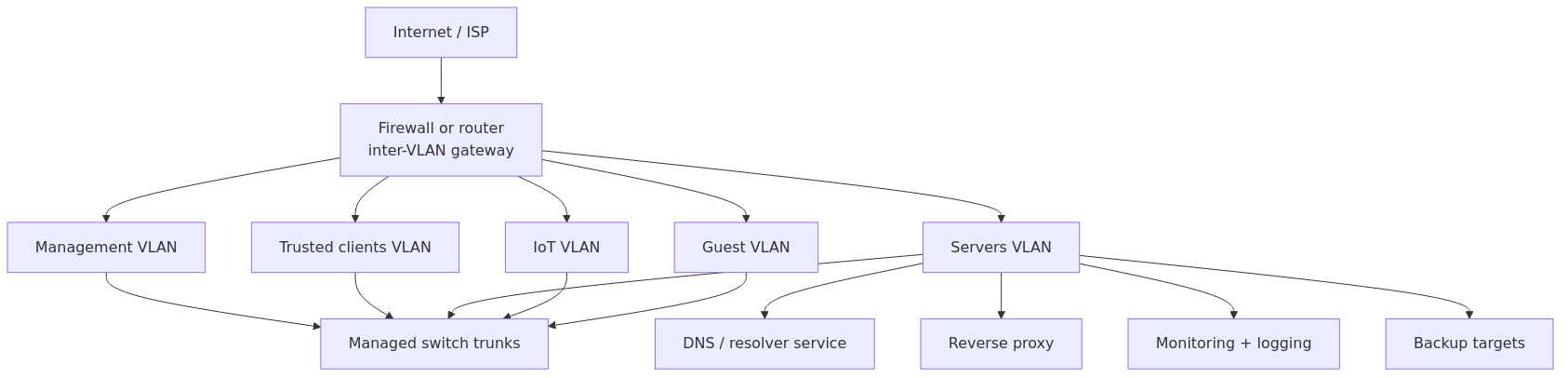
Starter homelab network layout: keep management, trusted clients, servers, IoT, and guests in separate segments, then place DNS, reverse proxy, monitoring, and backups intentionally in the service layer.
What a sane homelab network architecture looks like
At a high level, this layout covers the boundaries most growing homelabs need:
1. Router/firewall at the edge
2. Managed switch doing VLAN tagging and access ports
3. Wireless access points with SSIDs mapped to VLANs
4. Hypervisor and servers on a server VLAN
5. Admin workstations on a trusted client VLAN
6. IoT and guest networks isolated from everything interesting
7. DNS, reverse proxy, monitoring, and backups treated as first-class services, not afterthoughts
If you want the short version, your lab should answer these questions clearly:
Which devices can manage infrastructure?
Which workloads expose services to the LAN?
Which devices should never talk to your hypervisor or NAS?
How do you reach services remotely?
Where do DNS and TLS decisions happen?
If you cannot answer those in thirty seconds, the network is already too fuzzy.
The VLAN blueprint I recommend for most homelabs
A five-segment starting point is usually easier to verify and easier to maintain than an overbuilt first draft.
Cameras, smart plugs, TVs, random gadgets with questionable firmware
50
guest
10.10.50.0/24
Guest Wi-Fi with internet only
That is enough for most people.
If you run a storage-heavy setup, you can add a dedicated storage VLAN later. If you run a lab with multiple clusters or more advanced routing, you can split further. But earn that complexity. Do not start there because Reddit told you to cosplay as a data center.
Why this layout works
The management VLAN keeps infrastructure admin traffic separate.
That means your Proxmox web UI, switch management IPs, AP controllers, and firewall UI do not share a segment with random clients or IoT junk. If you have already read my post on Proxmox networking explained, you know how fast small bridge mistakes become big outages.
The server VLAN gives self-hosted apps room to breathe.
Your reverse proxy, DNS filter, dashboards, monitoring, Git forge, and media stack can live together with predictable east-west traffic. That makes firewall rules easier and keeps service discovery sane.
The client VLAN is where your laptop lives.
That is the device you use to manage things, browse dashboards, and SSH into systems. It is trusted, but it still should not be the same network as your infrastructure control plane.
The IoT VLAN is the adult supervision VLAN.
If a smart plug, TV, or camera gets compromised, it should not be able to wander into your Proxmox host, hit your NAS shares, or discover your backup server out of curiosity. The guest VLAN exists for similar reasons, except the threat model is "friends and family who just want Wi-Fi and should not see your lab at all."
Where the firewall should sit
Your firewall is the policy engine. Treat it like one.
Whether you run OPNsense, pfSense, or a decent prosumer gateway, the job is the same: route between VLANs and deny traffic by default unless there is a reason to allow it. I prefer a small x86 box or an appliance-style platform here because it stays flexible longer than an all-in-one consumer router.
A few sane starter rules:
Allow clients -> management only for admin protocols you actually use
Allow clients -> servers for app access
Block iot -> management
Block iot -> servers unless a service truly requires it
Allow guest -> internet only
Allow servers -> dns resolver
Allow servers -> outbound updates as needed
That last point matters more than people think. If you blindly allow any-any outbound because it is easier, you are not segmenting. You are decorating.
For firewall policy design, the official OPNsense firewall documentation is worth bookmarking. It is less exciting than buying another mini PC, but it is also more useful.
DNS, reverse proxy, and remote access placement
A lot of network diagrams pretend services magically resolve and certificates appear through positive thinking.
In reality, you need to decide where name resolution and ingress happen.
DNS
Put your internal DNS resolver on the server VLAN.
That resolver might be Pi-hole, AdGuard Home, or another DNS service. The brand choice matters less than keeping DNS placement explicit so every VLAN knows where name resolution should terminate.
Use local records for core infrastructure.
Examples:
pve1.home.arpa
nas.home.arpa
grafana.home.arpa
auth.home.arpa
proxy.home.arpa
Do not rely on remembered IP addresses alone; use stable DNS names and documentation so service placement remains understandable later.
Reverse proxy
Your reverse proxy also belongs on the server VLAN.
A dedicated proxy VM or container host is a practical default for TLS termination because it keeps certificates, headers, and published app exposure in one place instead of scattering them across unrelated hosts. If reverse-proxy selection is still open, the site's comparison of Caddy, Traefik, and Nginx Proxy Manager covers the tradeoffs in more detail.
Remote access
My default advice is still boring: prefer VPN first.
Cloudflare Tunnel has real advantages for specific services, and port forwarding still exists because bad ideas are resilient, but for administrative access I want a proper trust boundary. I already broke down the tradeoffs in Cloudflare Tunnel vs VPN vs port forwarding.
Keep management interfaces off the public internet.
That sentence should not be controversial, and yet here we are.
Example implementation on Proxmox and a managed switch
If your hypervisor is Proxmox, make the trunk to the host explicit and keep the bridge VLAN-aware.
You do not need switch syntax perfection here. You need the concept right.
From the lab
A common failure mode: putting Docker everywhere
This is where homelab architecture quietly falls apart.
People start with one Docker host. Then another. Then a Proxmox node gets a few LXCs. Then the NAS starts running apps too because "it had the option." Before long, the service map looks like an archaeological record of your decisions.
A lower-drift service placement pattern looks like this:
infrastructure services together on a stable server segment
experimental workloads isolated from core services
public-facing apps clearly separated from internal-only apps
backup targets not living on the same blast radius as the source data
You can absolutely run Docker across multiple machines. I do. But document what lives where, and do not let placement become accidental.
If you need a refresher on logging and runtime hygiene, my Docker logs guide is useful once those services are actually running.
Monitoring belongs in the architecture, not the cleanup phase
Monitoring is not a phase two concern. It is part of the design.
At minimum, I want these signals from day one:
firewall up/down and WAN status
switch uplink status
Proxmox node reachability
DNS response health
reverse proxy status
disk usage on core service hosts
certificate expiry warnings
That is enough to tell you whether the network is broken, the service is broken, or you broke something yourself five minutes ago and are pretending it was already like that.
For tooling, I compared the main options in Zabbix vs LibreNMS vs Uptime Kuma. The short version is that Uptime Kuma is great for fast visibility, while Zabbix and LibreNMS make more sense once you want deeper device and metrics coverage.
Backups for the network itself
Everyone remembers to back up containers eventually.
Fewer people remember to back up switch configs, firewall configs, AP settings, and DHCP reservations. That is a mistake. The fastest way to turn a small outage into a weekend project is losing the thing that defines how traffic flows.
Back up these items:
firewall config exports
managed switch config backups
controller configs for APs
DNS filter settings and local records
reverse proxy configuration
infrastructure-as-code repos if you use Ansible, Terraform, or Compose
Also protect access. If your admin laptop is the only device with SSH keys and VPN profiles, that is not redundancy. That is a single point of embarrassment.
For server-side baseline security, read my SSH hardening guide. Networking and host security are not separate conversations just because it would make life easier.
Recommended gear for this layout
You do not need enterprise gear to build a solid network. You need equipment that can do VLANs, stay stable, and avoid making you hate firmware updates.
1) Firewall appliance or compact x86 box
If you want to run OPNsense or pfSense properly, I would rather see you use a small dedicated x86 box than overload a disposable consumer router.
A small managed PoE switch solves more problems than people expect. It lets you power APs and cameras cleanly, keeps VLANs practical, and removes the temptation to bolt random unmanaged switches into the design like you are building a haunted house.
3) Wi-Fi access point that supports multiple SSIDs and VLAN mapping
If you plan to separate clients, IoT, and guest traffic, your AP needs to understand that plan. This is not a place for the cheapest anonymous white-plastic router you found in a warehouse clearance bin.
you need storage isolation for a NAS-heavy environment
you are exposing public services and want cleaner policy boundaries
you are running multiple hypervisors or clusters
you want lab-only experimental segments that cannot break the core stack
Bad reasons to add complexity:
someone on a forum had twelve VLANs and a rack photo with blue LEDs
you were bored on a Saturday
the switch UI made it look easy
My default homelab network checklist
If I were building from scratch tomorrow, this is the checklist I would follow:
1. Pick the subnets and VLAN IDs first
2. Name every VLAN based on purpose, not mood
3. Configure the firewall interfaces and DHCP scopes
4. Build switch trunks and access ports intentionally
5. Make Proxmox bridge VLAN-aware
6. Put DNS and reverse proxy on the server VLAN
7. Map SSIDs to the right VLANs
8. Deny IoT to management by default
9. Back up the firewall and switch configs immediately
10. Add monitoring before calling the network "done"
That last item is important because a homelab network is never done. It just reaches a temporary ceasefire.
Final thoughts
The best homelab network architecture is not the most advanced one. It is the one you can understand at 11:30 PM when a DHCP scope is wrong, a bridge tag is missing, and your family would like the internet back.
Keep the layout simple. Separate what matters. Use VLANs with a purpose. Put the firewall in charge. Decide where DNS and ingress live. Monitor the basics. Back up the configuration.
If you do those things early, you can grow the lab without tearing it down every six months. Which is nice. I recommend it.
Frequently Asked Questions
How many VLANs should a homelab have?
For most people, four to six is the sweet spot. Management, servers, clients, IoT, and guest are enough to solve the big problems without turning maintenance into a second job.
Do I need a management VLAN in a small homelab?
Yes. Even a small lab benefits from keeping Proxmox, switch, AP, and firewall admin interfaces off the same segment as clients and smart devices.
Should Docker containers live on their own VLAN?
Usually not. Put the host or VM on a server VLAN and use firewall policy, reverse proxy rules, and service-level authentication before creating a new VLAN for every app stack.
What should be isolated first in a homelab network?
IoT and guest traffic first. After that, protect your management plane. Those two steps reduce risk quickly and make the rest of the design much easier.