Disclosure: This article may contain affiliate links. If you purchase through these links, HomelabAddiction may earn a commission at no additional cost to you.
A managed homelab switch should fit the way you operate the network, not just the number of ports on the faceplate. Controller workflow, PoE budget, uplink path, VLAN ergonomics, and how much low-level tuning you want to own matter more than raw feature-box parity.
This page helps homelab operators choose between UniFi, Omada, and MikroTik by separating three real buyer paths: easiest day-to-day controller experience, strongest value for a mixed PoE and VLAN rack, and the most hands-on control for people who want the network itself to be part of the project.
For many mixed racks with access points, cameras, virtualization hosts, and a NAS, Omada remains the broadest value play, while UniFi favors polish and MikroTik favors flexibility for operators who are happy to trade convenience for deeper control.
Key Takeaways
UniFi is still the easiest answer when controller polish and day-to-day simplicity matter most.
Omada is the strongest balance for many mixed homelabs that need PoE, VLANs, and room to grow without UniFi pricing.
MikroTik makes the most sense when the switch itself is part of what you want to learn and tune.
Pick the ecosystem that matches your management tolerance before comparing every last spec-sheet checkbox.
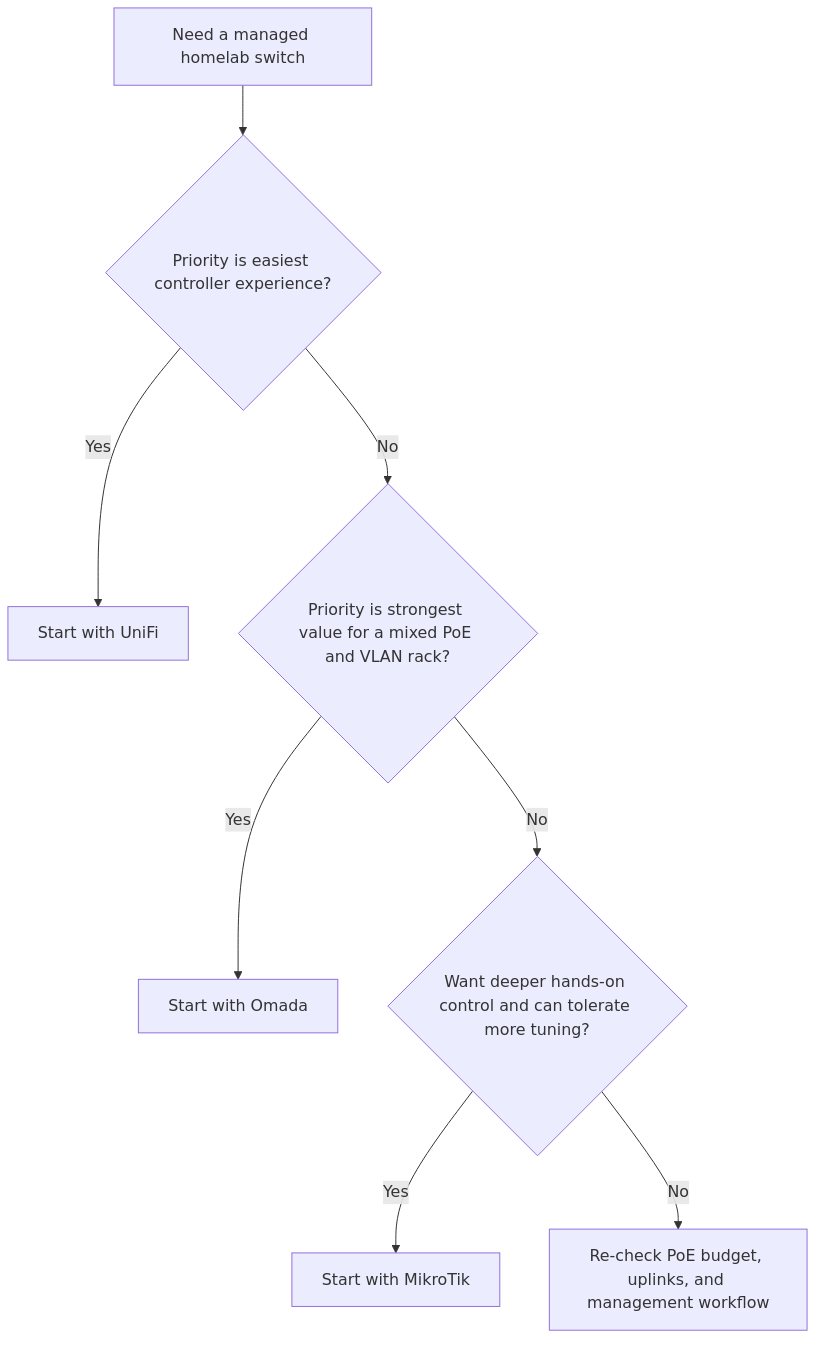
Switch selection flow: start with management style, then balance controller polish, PoE or uplink needs, and tolerance for more hands-on networking control.
Comparison method
This comparison stays focused on representative 24-port PoE-class platforms because that is where many homelabs stop being a few flat-LAN devices and start needing real VLAN, PoE, and uplink planning.
The comparison uses six criteria:
1. Management model - controller-first, standalone, or device-local
2. Switching performance - switching capacity and forwarding rate where published
That matters because most competitor articles copy marketing bullets without explaining which numbers are useful in a homelab. A 128 Gbps switching capacity looks great, but if your actual lab is a couple of APs, a NAS, and two Proxmox nodes, the management experience will affect you more often than the fabric ceiling.
At-a-glance comparison
Platform
Best for
Ports and uplinks
PoE budget
Management style
My take
UniFi Switch Pro 24 PoE
People who want the smoothest GUI and a unified network stack
24x 1GbE + 2x 10G SFP+
400W
Controller-first UniFi ecosystem
Best UX, highest premium
Omada TL-SG3428XMP / SG3428XMP class
Most homelabs that want strong features without UniFi pricing
24x 1GbE + 4x 10G SFP+
384W
Standalone, CLI, or Omada controller
Best balance of price, features, and growth
MikroTik CRS328-24P-4S+RM
Tinkerers who want maximum control and strong 10Gb value
24x 1GbE + 4x 10G SFP+
450W available to devices
Device-local, SwOS or RouterOS dual boot
Most flexible, steepest learning curve
Specification and fit table
transmission signup
article_topic // Best Managed Switch for Homelabs
Don't leave without the setup notes.
Get practical homelab guides, failure logs, and beginner-friendly build notes in your inbox.
Enter your email address to receive the Homelab Addiction newsletter.
Weekly only. No spam. Unsubscribe anytime.
For readers buying a switch soon, a quick coupon-and-cashback check can be worthwhile before placing the order. Coupert is one option for checking whether the retailer has a live offer.
These are the first numbers to check when comparing serious homelab switches, because PoE headroom, uplinks, and management model decide more long-term outcomes than a superficial feature-count contest.
Model
Switching / fabric metric
Forwarding rate
PoE / power envelope
Uplink story
Resource notes
UniFi Switch Pro 24 PoE
88 Gbps switching capacity, 44 Gbps total non-blocking throughput
65 Mpps
400W PoE budget
2x 10G SFP+
Supports up to 1,000 VLANs. Premium hardware with polished controller integration.
UniFi's 88 Gbps fabric is enough for the overwhelming majority of 1GbE homelabs with a couple of 10Gb uplinks.
Omada's 128 Gbps and four SFP+ ports make it more attractive if you already know your rack is headed toward more aggregation, more APs, or storage uplinks.
MikroTik's published performance tables are the most revealing because they tell you more than marketing prose. You can actually see the switching envelope and power budget instead of guessing.
This is also where a lot of buying advice goes off the rails. You are not building a small enterprise core. You are building a homelab. If two platforms are both comfortably above your real traffic needs, the better daily operator experience usually wins.
The winner for most people: Omada
If you want the short answer, Omada is the best managed switch ecosystem for most homelabs in 2026.
Why? Because it lands in the middle of the triangle almost perfectly:
cheaper than comparable UniFi gear
easier than MikroTik for most people
richer and more expandable than the cheap smart-switch class
strong 10Gb uplink story
enough PoE budget for a serious AP and camera rollout
It does not beat UniFi on elegance. It does not beat MikroTik on raw tinkering freedom. What it does better than either is keep the tradeoffs reasonable.
For a homelab with 2-4 access points, a few PoE cameras, one or two Proxmox boxes, a NAS, and multiple VLANs, that balance is usually the right place to be.
UniFi: still the easiest switch platform to live with
UniFi keeps winning the same way it has for years: it makes network administration feel less like network administration.
That sounds trivial until you are the person maintaining the rack at 11:30 p.m. because a guest VLAN cannot reach DNS and one AP did not reprovision cleanly.
Where UniFi is strongest
The GUI is clean and consistent.
Port profiles and VLAN assignments are easy to understand.
The AP, gateway, and switch story is coherent if you stay inside the ecosystem.
It is the least intimidating option for people who want a serious network without living in a CLI.
If you read our best Wi-Fi access point for homelabs comparison, you already know UniFi gets even more appealing once the switch and AP stack live under one roof. That is the real UniFi advantage. The switch is not just a switch. It is a tidy part of a complete control plane.
Where UniFi falls short
You pay for the convenience.
Two 10Gb uplinks are fine, but they are less generous than Omada or MikroTik at this tier.
Feature depth is good enough for most homelabs, but not as open-ended as MikroTik.
If you dislike controller-centric workflows, you may resent the ecosystem rather than enjoy it.
UniFi pros
Best management interface in the group
Strong ecosystem if you already run UniFi APs or gateways
Excellent for VLAN-heavy labs that still want low friction
Good PoE budget for APs and cameras
UniFi cons
Highest effective cost at comparable scale
Less aggressive uplink value than Omada or MikroTik
Best experience depends on buying into the broader platform
Who should pick UniFi
Pick UniFi if your priority is operational smoothness.
That means:
you want to onboard VLANs quickly
you hate fighting inconsistent menus
you are standardizing on UniFi APs and maybe a UniFi gateway
you want a switch that feels polished every time you touch it
If the network is supposed to support your homelab and not become the hobby itself, UniFi is hard to argue against.
Omada: the best value-managed switch ecosystem right now
Omada remains the strongest value path for many mixed homelabs because it balances controller convenience, PoE capacity, and room to grow without pushing as quickly into UniFi-level pricing.
That is not because it is the flashiest platform. It is because TP-Link has been very good at packaging the features homelabbers actually use:
centralized management if you want it
standalone management if you do not
10Gb uplinks where they matter
strong PoE options
VLANs, ACLs, QoS, IGMP snooping, and static routing without needless drama
Why Omada wins on value
The official TL-SG3428XMP page checks the right boxes for a modern rack build: 24 PoE+ ports, 384W power budget, four 10Gb SFP+ uplinks, static routing, Omada SDN integration, and web/CLI/SNMP management.
That is a very good homelab feature mix.
The four 10Gb uplinks matter more than people think. They let you do any of the following without immediate compromise:
dedicate one uplink to a NAS
run one uplink to a Proxmox cluster or core host
leave room for inter-switch uplinks
preserve expansion headroom instead of burning all high-speed ports on day one
Where Omada gives ground
The interface is good, not great.
It feels more practical than polished.
The ecosystem story is stronger than it used to be, but UniFi still feels more cohesive end to end.
The platform is less fun than MikroTik if deep network experimentation is the point.
Omada pros
Best balance of price, features, and scale-up room
Four 10Gb SFP+ uplinks at this class are genuinely useful
Strong PoE budget for AP and camera heavy racks
Flexible management model: controller, web UI, CLI, SNMP
Omada cons
Less refined UI than UniFi
Less low-level flexibility than MikroTik
Brand ecosystem is improving fast, but still not as sticky as UniFi for some buyers
Who should pick Omada
Pick Omada if you want the best overall homelab answer.
That means:
you want to keep budget under control
you still want a serious feature set
you need more than a beginner switch but do not want a networking hobby tax
you know 10Gb uplinks and PoE density will matter within the next 12-24 months
For most self-hosters, that is the sweet spot.
From the lab
MikroTik: the power-user choice that can punish impatience
MikroTik remains one of the most interesting answers in homelab networking because it refuses to hold your hand.
Sometimes that is exactly what you want.
The CRS328-24P-4S+RM is the best example of the tradeoff. The official product page is refreshingly explicit: 24 gigabit ports, four 10Gb SFP+ uplinks, 500W PSU, up to 44W device consumption without attachments, 450W available to PoE devices, 512 MB RAM, and dual boot between RouterOS and SwOS.
That dual-boot story is the entire MikroTik personality in one sentence.
You can run SwOS if you want a simpler switch-focused experience. You can run RouterOS if you want routing and deeper Layer 3 capability. That flexibility is a feature. It is also a responsibility.
Why MikroTik is compelling
Outstanding feature density for the money
Strong 10Gb story
Excellent fit for people who actually want to learn networking deeply
Published performance data is better than what many competitors expose
You are not forced into a controller-first ecosystem
If you care about your switch as a learning platform, MikroTik is the most rewarding choice here.
Why MikroTik is not for everyone
The learning curve is real.
The interface experience is less friendly than UniFi and less approachable than Omada.
You need more intent around design and maintenance.
Two fans may matter if your rack lives somewhere audible.
MikroTik is not hard because the hardware is bad. It is hard because it gives you enough rope to build something excellent or make your own troubleshooting weekend.
MikroTik pros
Deepest control and flexibility of the group
Very strong 10Gb and PoE value
Dual-boot model lets you simplify or go deeper
Best fit for labs where networking itself is part of the project
MikroTik cons
Highest operator skill requirement
UX is weaker than UniFi and Omada
More likely to slow down beginners or casual admins
Who should pick MikroTik
Pick MikroTik if you are the kind of homelabber who enjoys the control surface.
That means:
you already speak basic switching and routing comfortably
you want to experiment with design choices instead of accepting presets
you are optimizing for capability per dollar
you do not need the switch UI to feel consumer-friendly
If you are also building out monitoring and want richer visibility into what the network is doing, pair it with the guidance in Zabbix vs LibreNMS vs Uptime Kuma.
Which switch should you buy for different homelab use cases?
Pick UniFi if...
you already own UniFi APs
you want the cleanest GUI
you care more about low-friction maintenance than maximum tweakability
your lab supports applications, not network experimentation
Pick Omada if...
you want the best all-round value
you need real PoE capacity and multiple 10Gb uplinks
you want something more serious than entry-level smart switches
you do not want to pay a UniFi premium
Pick MikroTik if...
you want the most control for the money
you plan to learn deeper switching and routing concepts
you are comfortable choosing between SwOS and RouterOS
you want a switch that can grow with a more experimental rack
Recommended gear if you are building around a managed switch
You do not need to overdo the shopping list here. A switch decision usually gets better when you also think about the supporting gear that makes the network easier to manage.
TP-Link TL-SG108E Managed Switch - If you are not ready for a 24-port rack switch yet, this is still one of the easiest low-cost ways to start learning VLANs and port tagging without wasting money.
Protectli Vault VP2420 - A great companion firewall box if your switch project also includes proper inter-VLAN routing, VPNs, or lab segmentation.
Monoprice Cat6 Ethernet Cables - The boring purchase that saves you the most time. Once you start using trunks, AP uplinks, and storage links, bad patch cables become fake network mysteries.
If remote access is part of the design, pair the switch choice with the retained remote-access owner guide so VLAN and management decisions line up with how traffic will leave the network.
Final verdict
If the question is which ecosystem fits the broadest number of mixed homelabs, the answer is this:
Buy Omada unless you have a clear reason to buy UniFi or MikroTik instead.
That is not the flashiest answer, but it is the most defensible one.
UniFi is the easiest to live with.
Omada is the best overall value.
MikroTik is the best for power users.
Omada is the strongest all-round pick for many mixed homelabs because it gets closest to the balance between PoE headroom, uplinks, controller workflow, and cost discipline. UniFi still leads on polish, and MikroTik still leads when lower-level control is part of the goal.
That is the whole decision in one line: buy the platform that matches your tolerance for operational friction.
Frequently Asked Questions
Do most homelabs need a managed switch?
You need one as soon as you care about VLANs, PoE planning, link aggregation, or separating storage, management, IoT, and guest traffic. If your lab is still one flat network with a few devices, an unmanaged switch is fine. Once you start segmenting or powering access points and cameras, managed switching becomes the right tool.
Is UniFi worth the extra cost for a homelab?
Yes, if you value operational smoothness and already run UniFi access points or gateways. No, if you are mainly chasing the best feature-per-dollar ratio. UniFi's premium buys you a better day-to-day interface, not necessarily better value.
Is MikroTik too hard for beginners?
For many beginners, yes. That is not a criticism of the hardware. MikroTik simply assumes you are willing to learn. If that sounds fun, it is a great platform. If that sounds exhausting, Omada or UniFi will fit better.
How much PoE budget should a homelab switch have?
Add up every PoE device you plan to power, including access points, cameras, and phones, then leave growth headroom. The common mistake is buying for today's needs and then discovering the switch is tapped out after two APs and a couple of cameras.
Do I need a Layer 3 switch, or can my router handle inter-VLAN traffic?
Most homelabs can let the router handle inter-VLAN traffic just fine at first. A Layer 3 switch becomes more useful when east-west traffic grows, especially between servers, storage, and virtualization hosts. If you are still small, prioritize good management and PoE over advanced routing labels.
This retained rewrite was refreshed against the official product pages so the recommendation is tied to uplinks, PoE budget, and management model instead of unsupported personal test claims.
transmission signupstatus: open channel
article_topic // Best Managed Switch for Homelabs
Start building a smarter homelab.
Join readers learning Proxmox, networking, storage, backups, and self-hosting without breaking everything.
Enter your email address to receive the Homelab Addiction newsletter.
Beginner-friendly
No gatekeeping. Just clear, actionable guides.
1 useful email / week
Practical tips, real-world setups, and lessons learned.
Zero hype, practical only
What works, what breaks, and how to fix it.
Reply to any email with what you're building. I read and reply to as many as I can.
— The Homelab Addiction Operator
support // the lab
Found this guide useful?
If it saved you time or a rebuild, you can support more practical homelab guides.