Docker Security Hardening for Homelabs: Practical Host, Socket, and Container Safeguards
Harden Docker in a homelab by tightening the Linux host, limiting socket exposure, reducing published ports, running containers with less privilege, and keeping image hygiene reviewable.
Disclosure: This article may contain affiliate links. If you purchase through these links, HomelabAddiction may earn a commission at no additional cost to you.
Most Docker security wins in a homelab come from removing unnecessary trust boundaries, not from buying more tooling. Start with the host, the Docker socket, published ports, and container privileges before you worry about more advanced controls.
This page helps homelab operators reduce Docker exposure by turning security hardening into a short operating checklist: patch the Linux host, limit who can control the daemon, publish only the ports a service truly needs, and prefer images and Compose settings that reduce privilege by default.
That approach is grounded in documented Docker behavior. The daemon has broad host access, the Docker group is effectively root-equivalent on Linux, and rootless mode changes the risk profile without eliminating the need for disciplined image, volume, and network choices.
Key Takeaways
Treat the host and the Docker daemon as the first security boundary, because a compromised daemon or broad socket access can become host compromise.
Avoid unnecessary docker.sock mounts and published ports before you reach for more complex security add-ons.
Run containers as non-root where the image supports it, and understand the trade-offs of rootless mode instead of treating it as a magic fix.
Image provenance, patch cadence, and Compose hygiene matter more than vague “secure by default” assumptions.
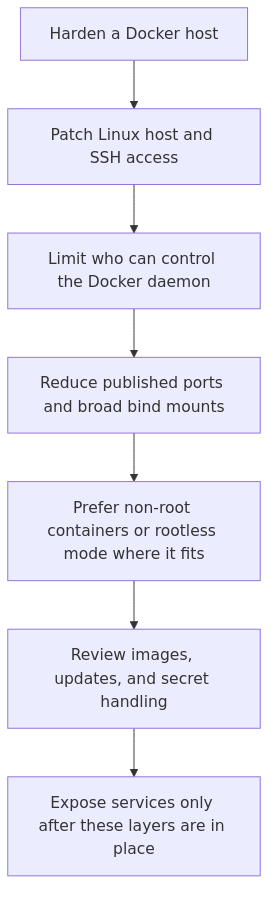
Docker hardening layers: tighten the host first, then reduce socket exposure, published ports, container privileges, and image risk before the service leaves a test network.
Recommended gear for a safer Docker host
If you are building or tightening a Docker box, these are practical upgrades I would actually buy for a homelab security-focused setup:
APC Back-UPS 1500VA - not glamorous, but clean shutdowns beat filesystem repair at 1:00 AM.
YubiKey 5 NFC - useful if your admin accounts, password manager, or VPN support hardware-backed MFA.
Why Docker hardening matters in a homelab
A lot of people hear “homelab” and assume the stakes are low. That is only true until the same box running Jellyfin also holds your VPN endpoint, your backups, your DNS, your reverse proxy, and the little automation script you forgot about six months ago.
Homelab servers tend to become utility closets. You keep stuffing more things into them because they are there and the CPU graph still looks polite.
That makes Docker security less about paranoia and more about blast radius. You are trying to make sure one bad container, weak image, or exposed admin panel does not become a guided tour of your whole network.
For baseline reading, Docker’s own Engine security docs and the OWASP Docker Security Cheat Sheet are both worth bookmarking. I am going to translate the parts that matter most when you are the admin, the operator, and the unfortunate on-call person.
A practical threat model for a normal homelab
I do not harden a Docker host the same way I would harden a public multi-tenant platform. That would be overkill, and overkill is how people end up abandoning the boring but important controls.
For a typical homelab, I care about five things:
A container escaping its lane and touching more of the host than it should.
A public or LAN-exposed admin panel getting brute-forced or exploited.
A compromised image pulling in malware or a known vulnerable package.
Secrets leaking through environment variables, logs, or sloppy bind mounts.
One service compromise turning into “congratulations, now the attacker owns the whole box.”
If your setup is mostly Docker Compose on Debian or Ubuntu, these fixes will handle the bulk of that risk.
1. Harden the host before you touch Docker
Containers are not a substitute for host security. If the host is messy, the containers are living in a messy house.
If you are publishing Docker ports directly, be aware that firewall behavior can get weird depending on how Docker manages iptables. OWASP calls this out for a reason.
The mistake I made: I used to think “the reverse proxy is on the box, so opening a few extra test ports is harmless.” That logic ages badly. Test ports become permanent ports when life gets busy.
2. Stop treating the Docker group like a harmless convenience
This one is boring, which is exactly why people skip it.
Membership in the docker group is effectively root-equivalent on that host. If a user can control Docker, they can usually mount the filesystem, start privileged containers, and work their way to full host access without much drama.
Check who can talk to Docker:
getent group docker
If you see old admin users, random service accounts, or your past self doing “temporary testing,” clean it up:
sudo gpasswd -d username docker
I try to keep Docker access limited to one trusted admin account. More than that and you are not simplifying operations - you are just distributing root access with better branding.
3. Never mount docker.sock unless you have a very specific reason
If you remember only one sentence from this article, make it this one: mounting /var/run/docker.sock into a container is handing that container the keys to Docker.
That means a vulnerable helper service can become a host-control service very quickly. Portainer, CI runners, homegrown dashboards, and “smart” companion containers are the usual places this sneaks in.
If you truly need Docker API access, do it with your eyes open. Better options include a tightly scoped management node, a local-only socket proxy, or simply keeping the management interface off the public network.
What I do in practice: I never expose Portainer publicly, I keep it behind internal-only access, and I treat any socket mount like a privileged exception that needs a written excuse.
4. Run containers as non-root users whenever the image supports it
A depressing number of Compose examples still run everything as root because it “just works.” Yes, and so does leaving your keys in the front door if your goal is pure convenience.
Many modern images already support a non-root user. When they do, use it.
This is not perfect isolation. It is still worth doing because it reduces the damage from a compromised app process and keeps file ownership sane on mapped volumes.
5. Use a hardened Compose pattern instead of the lazy default
This is where most homelab wins live.
You do not need a hundred controls. You need a Compose file that stops granting free privileges to every service you deploy.
Here is a realistic baseline I like for web apps and internal services:
6. Use rootless Docker where it fits - but understand the trade-offs
Rootless Docker is real security value, not marketing wallpaper. Docker’s rootless mode docs are worth reading if you have never used it.
The short version is that the daemon and containers run without root privileges on the host. That lowers the blast radius if something goes wrong.
On a dedicated Docker box for low-portability apps, I still sometimes use regular rootful Docker with tight Compose controls because it is simpler. On a shared Linux machine, a dev box, or a host where I want extra guardrails, rootless is attractive.
Install prerequisites and the rootless setup tool:
internal services that do not need privileged networking tricks
Where it can annoy you:
binding low ports directly
some storage and permission edge cases
apps that expect broad host integration
My opinionated version: if you are new to Docker hardening, do not make rootless your first and only control. Fix the obvious mistakes first.
7. Segment networks and stop publishing every port to the LAN
A lot of homelab Docker setups look like someone got paid per open port.
Not every service needs a host port. In fact, most of them do not.
Use user-defined networks and publish only the front door services that actually need to listen. Your app database, Redis instance, worker, and admin tools should usually stay on internal networks.
Also check that you are not exposing a remote Docker API without TLS. If ss -lntp | grep 2375 returns anything interesting, that is usually bad news.
sudo ss -lntp | grep -E ':2375|:2376'
I almost never recommend exposing the Docker API at all in a homelab. If you need remote control, use SSH or a tightly controlled management path instead.
From the lab
9. Scan images and pin versions like you mean it
“Latest” is not a patch strategy. It is a confidence trick.
Pin image tags, prefer maintained images, and scan what you run. For a homelab, that alone eliminates a lot of silent nonsense.
I like Trivy because it is easy to run and unpleasantly honest:
You can also use Docker Scout if that fits your workflow. The point is not which scanner wins a conference slide deck. The point is that you should know when a container ships with known critical issues.
That matters for reproducibility, especially when you come back in three months and want the same deployment instead of whatever the registry decided “latest” means now.
10. Stop putting secrets directly in Compose files
This is another one I learned the annoying way.
Environment variables are convenient, but they leak into shell history, backups, screenshots, Git repos, and docker inspect output faster than people realize.
Better still for sensitive values on serious stacks: mount secrets from files with tight permissions, or use a proper secret manager if your setup justifies it.
At minimum:
chmod 600 .env
And keep the .env file out of Git:
echo '.env' >> .gitignore
If a service supports Docker secrets natively, use them. If it does not, I usually bind-mount a root-owned file with restricted permissions instead of pretending a plain environment variable is somehow invisible.
11. Log, back up, and rehearse recovery
Yes, this article promised 10 fixes. This is the bonus fix you were going to ignore anyway.
Security without recovery planning is just optimism wearing a tactical vest.
Limit logs so a container cannot fill the disk. Back up Compose files, bind-mounted app data, and any secrets or configuration you would cry about recreating.
docker ps --format 'table {{.Names}}\t{{.Image}}\t{{.Status}}'
docker volume ls
docker network ls
And if you have never restored a backup into a test directory or spare VM, you do not really have a backup. You have a theory.
A practical hardening checklist I would do tonight
If your current Docker host is a little too “temporary” and has somehow been in production for a year (a classic homelab condition), do these in order:
Patch the host and review SSH access.
Remove unnecessary members from the docker group.
Search for docker.sock mounts and eliminate the casual ones.
Stop publishing ports that only need internal access.
Update Compose files with user, read_only, tmpfs, cap_drop, and no-new-privileges where possible.
Add log rotation limits in Compose or daemon.json.
Scan your images and replace stale or sketchy ones.
Move secrets out of inline Compose variables.
Test userns-remap or rootless Docker on a non-critical stack.
Back up the stack and verify restore steps.
That list is not glamorous. It is also the list that materially lowers your risk.
Common mistakes that keep showing up
Publishing admin panels directly to the internet
Portainer, Grafana, databases, NAS dashboards, random “internal” tools - if it has a login page, do not assume that makes it safe to expose.
Put it behind a reverse proxy, VPN, access control layer, or internal-only path. Prefer two of those if the service matters.
Running everything privileged “until later”
Later is where bad defaults go to become permanent architecture.
If a container truly needs elevated access, document why. If you cannot explain why, it probably does not need it.
Using one giant Docker host for everything
I understand the temptation. I have also met the consequences.
If you can separate public-facing services, internal services, and management tools across hosts or at least VLANs, do it. Even lightweight segmentation helps.
Trusting latest
This is not a personality type. It is a deployment risk.
Pinned versions give you repeatability, easier rollbacks, and fewer “what changed?” moments after an image refresh.
FAQ
Is rootless Docker always the best choice for a homelab?
No. It is a strong option, especially on shared or multi-purpose hosts, but it can add friction around ports, volumes, and certain workloads. I like it most when I want extra guardrails and can tolerate a bit of setup complexity.
Is mounting docker.sock always unsafe?
It is not automatically catastrophic, but it is always high trust. Treat it like privileged host access, because that is basically what it is.
Which Compose hardening settings give the biggest security win?
For most stacks: run as a non-root user, make the filesystem read-only when possible, drop capabilities, set no-new-privileges, and avoid unnecessary published ports. Those changes are practical and high value.
Should I use Docker secrets in a small homelab?
If the app supports them, yes. If it does not, file-based secrets with tight permissions are still better than hard-coding sensitive values in Compose files or committing them to Git.
Do I need a separate firewall if I already use Docker networking?
Yes. Docker networking helps with application paths, but host and VLAN firewalls still matter. Container boundaries and network policy are complementary, not interchangeable.
What to learn next
Once your Docker host is no longer running on vibes and optimism, I would study these next:
This retained rewrite was refreshed against Docker documentation so the checklist is tied to documented privilege boundaries and operating practices rather than unsupported personal security-war-story framing.
transmission signupstatus: open channel
article_topic // Docker Security Hardening for Homelabs
Start building a smarter homelab.
Join readers learning Proxmox, networking, storage, backups, and self-hosting without breaking everything.
Enter your email address to receive the Homelab Addiction newsletter.
Beginner-friendly
No gatekeeping. Just clear, actionable guides.
1 useful email / week
Practical tips, real-world setups, and lessons learned.
Zero hype, practical only
What works, what breaks, and how to fix it.
Reply to any email with what you're building. I read and reply to as many as I can.
— The Homelab Addiction Operator
support // the lab
Found this guide useful?
If it saved you time or a rebuild, you can support more practical homelab guides.