Docker Compose Best Practices for Homelabs: A Maintainable Stack Layout and Operations Checklist
Keep Docker Compose maintainable with one readable stack file, deliberate volume choices, clear profile use, preflight config validation, and health checks that support recovery.
Disclosure: This article may contain affiliate links. If you purchase through these links, HomelabAddiction may earn a commission at no additional cost to you.
Good Compose practice is mostly about making recovery and maintenance predictable. A homelab stack stays manageable when one readable file describes the services, persistent data has an obvious home, and validation happens before the next restart or upgrade.
This page helps homelab operators keep Docker Compose boring in the useful way: start with one legible source of truth, add profiles or overrides only when they solve a specific problem, and treat health checks, restart behavior, and image pinning as operating decisions rather than YAML decoration.
That framing matches how Docker documents Compose. The file format, profile system, config rendering, environment handling, and volume model are all built to make a stack understandable and reproducible instead of clever for its own sake.
Key Takeaways
One readable compose.yaml should stay the primary source of truth for a stack.
Use named volumes for durable application data and bind mounts only where a file or directory truly needs to stay tied to the host filesystem.
Profiles, env files, and overrides are useful only when they make the stack clearer, not when they hide basic deployment logic.
docker compose config, health checks, restart policies, and explicit image tags reduce recovery surprises later.
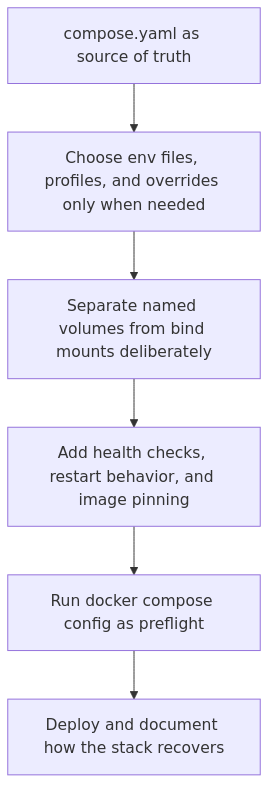
Compose workflow map: keep one readable stack definition, separate persistent data deliberately, validate the merged config, then deploy with health checks and restart expectations in place.
Compose is not Kubernetes - and that is the point
A lot of Docker Compose advice falls into two bad camps.
The first camp treats Compose like a beginner toy. The second tries to turn it into discount Kubernetes with enough YAML layering to qualify as a cry for help.
For homelabs, Compose sits in the useful middle. It is perfect when you want a reliable way to run a handful of connected services, keep them documented, and recover them later without needing a control plane, CRDs, or an evening dedicated to self-inflicted complexity.
That means your goal is not maximum flexibility. Your goal is a stack that another version of you can understand six months later.
1. Start with a boring file structure
My default preference is one compose.yaml file at the project root, plus a small number of adjacent support files:
If your layout needs a diagram before it needs a README, the structure is already drifting. Keep the file tree obvious, because obvious beats elegant when something breaks at 11:40 PM.
Here is a Compose pattern I like for a real service stack:
article_topic // Docker Compose Best Practices for Homelabs
Don't leave without the setup notes.
Get practical homelab guides, failure logs, and beginner-friendly build notes in your inbox.
Enter your email address to receive the Homelab Addiction newsletter.
Weekly only. No spam. Unsubscribe anytime.
You want pinned images, explicit volumes, bounded logs, and dependencies that reflect reality instead of superstition. Compose rewards plain language more than it rewards clever tricks.
2. Use environment variables for configuration, not for every emotion you have
The official Docker guidance on Compose environment variables is worth reading because it clears up precedence and interpolation rules that people routinely get wrong (Docker docs).
My rule is simple: put environment-specific values in .env, keep defaults sane, and avoid turning the file into a junk drawer. If a variable never changes, it can live directly in the Compose file. If it changes by environment or host, promote it to .env.
A clean .env.example is also mandatory if the stack is meant to survive beyond your memory.
Then your real .env can contain host-specific values without forcing you to edit the main YAML every time you move the stack.
What I do not recommend is stuffing actual secrets straight into environment: because that usually ends with them living in shell history, Git, screenshots, or all three. Compose supports secrets, and even in a homelab, that is a better habit.
If you want a deeper pass on running Docker with fewer bad defaults, my earlier guide on Rootless Docker setup pairs nicely with this section.
3. Know when to use bind mounts and when to use named volumes
This is one of the most common Compose mistakes I see.
Named volumes are for persistent application data. Bind mounts are for files on the host that you want to control directly, inspect easily, or version alongside the stack.
That means this is usually the right split:
Database files -> named volume
Application uploads -> named volume
Static config you maintain -> bind mount
Local development source code -> bind mount
Randomly mounting half your filesystem because it worked once -> absolutely not
The reason I prefer named volumes for real data is boring but important. They move better, back up better, and reduce the chance that one messy host path quietly becomes mission critical.
If you want the full backup angle, read my guide on Docker backup strategies. Compose is convenient right up until you discover that convenience is not the same thing as a restore plan.
4. Use profiles and override files sparingly
Compose profiles are useful. They are also easy to abuse.
The official docs cover the feature well (profiles documentation), but the short version is this: use profiles when you occasionally need optional services like debugging tools, backup jobs, or admin utilities. Do not use them as an excuse to split one understandable stack into four secret personalities.
An unhealthy example is when production needs one file, staging needs two, development needs three, and no one can explain why the reverse proxy moved into compose.ops.yaml except that somebody once read a thread and got ideas.
If you need environment-specific adjustments, one base file plus one small override is usually enough:
docker compose -f compose.yaml -f compose.prod.yaml up -d
Anything beyond that deserves suspicion.
5. Health checks are operational contracts, not decorative YAML
A container being "started" does not mean the service is ready. It means a process exists. Those are not the same thing, despite what many dashboards imply.
If the application depends on a database, queue, or API, define health checks that reflect actual readiness. Docker documents startup order and depends_on conditions here (startup order docs). Read it once and save yourself a lot of fake certainty.
This does not make your application immortal. It just stops it from sprinting into a half-awake dependency and then sulking in the logs.
I also recommend making health endpoints meaningful. /health should not just return 200 because the web server can still fog a mirror. It should confirm that the service can reach what it actually needs.
6. Set restart policies, stop grace periods, and resource expectations
If you omit restart policies on a host that may reboot, lose power, or have Docker restarted during maintenance, you are choosing chaos with extra steps.
For most homelab services, restart: unless-stopped is the right default. It survives host reboots without resurrecting containers you intentionally stopped during a maintenance window.
I also like setting explicit stop grace periods for stateful services:
That gives databases and similar services a chance to shut down cleanly instead of being yanked offstage mid-sentence.
Resource control is trickier because classic Compose usage is not Swarm, and some deploy: settings are inconsistently honored depending on context. Still, you should know what your services can consume, especially on small hosts where one noisy container can make the entire box feel haunted.
At minimum, track memory and CPU behavior with docker stats, and build small hosts accordingly. If you are already running Prometheus or Uptime Kuma, this is where articles like my comparison of Docker monitoring tools stop being theory and start paying rent.
7. Pin image tags and update deliberately
latest is not a strategy. It is an optimism problem.
Pin your images to a version or at least a stable minor release whenever possible:
Now your future update process becomes deliberate:
docker compose pull
docker compose up -d
You know what changed, you can read release notes, and you can roll back with less drama. That is a much better deal than waking up to a breaking change because somebody upstream got ambitious.
If you host your own images, a private registry also cleans up update workflows. I covered the basics in this guide to setting up a self-hosted Docker registry.
From the lab
8. Validate the final config before you deploy it
This is the Compose command I trust more than most humans:
docker compose config
Run it before up.
It resolves interpolation, expands anchors, merges overrides, and shows you what Docker will actually read instead of what you think you wrote. Those two things differ more often than people admit publicly.
A typical workflow on my side looks like this:
# Validate and render final config
docker compose config > /tmp/rendered-compose.yaml

# Pull new images first
 docker compose pull

# Recreate services with the new config
 docker compose up -d

# Follow logs for the risky service
 docker compose logs -f app
I also recommend checking specific services directly after an update:
If your stack needs networking adjustments, do not guess your way through it. My Docker networking deep dive explains bridge networking, host mode, and when macvlan is useful instead of merely exciting.
9. Limit logs before they eat your disk
This one sounds small until it is not.
The default json-file logging driver will happily keep growing if you never cap it. On a tiny homelab SSD, that means one chatty container can slowly convert free space into a future troubleshooting session.
That is not enterprise observability. It is basic hygiene.
If you want centralized logs later, great. Until then, at least stop handing infinite disk privileges to your least disciplined container.
10. Backups are part of the Compose design, not an afterthought
If a Compose stack matters, the backup path should be obvious from the day you deploy it.
That means you know where state lives, you know how to stop or snapshot services safely, and you know how to restore onto a different host. If your answer is "the data is in Docker somewhere," that is not a backup plan. That is a confession.
A dead simple backup script for a named volume might look like this:
#!/usr/bin/env bash
set -euo pipefail

BACKUP_DIR=/srv/backups/postgres
mkdir -p "$BACKUP_DIR"

docker compose exec -T db pg_dump -U app app | gzip > "$BACKUP_DIR/app-$(date +%F).sql.gz"
find "$BACKUP_DIR" -type f -mtime +14 -delete
And for file-based application data:
docker run --rm \
  -v media_stack_app_data:/source:ro \
  -v /srv/backups:/backup \
  alpine \
  tar czf /backup/app-data-$(date +%F).tar.gz -C /source .
Notice what is missing: blind faith.
The backup only matters if you restore it somewhere and verify the service comes back. That restore drill is where most "I have backups" claims quietly fall apart.
11. Know when to stop stretching Compose
Compose can run a lot of serious homelab workloads. I use it for reverse proxies, internal apps, databases, dashboards, sync tools, and assorted infrastructure odds and ends.
But Compose starts to show strain when you need cross-host scheduling, self-healing beyond a single Docker host, secrets orchestration at scale, or deployment workflows that involve multiple nodes and strict rollout controls. At that point, stretching Compose further usually creates a pile of custom scripts that function as a homemade warning sign.
The skill is not using the biggest tool. The skill is knowing when the small tool is still the right one.
For most homelabs, the answer is: longer than people think. Just not forever.
Recommended gear for a cleaner Compose homelab
You do not need to buy your way into better YAML. Sadly.
You can, however, make Compose hosting more pleasant with hardware that reduces the usual failure modes.
Beelink S12 Pro Mini PC - a low-power host that is perfectly adequate for small Compose stacks, test environments, monitoring, and a handful of always-on services. Check price on Amazon
Samsung T7 Shield 1TB - useful for off-host backups of volume exports, database dumps, and "I would rather not learn this lesson twice" restore archives. Check price on Amazon
APC BX1500M UPS - if your Compose stack includes databases, power loss should not be left to chance or theology. A small UPS buys you clean shutdowns and fewer corrupted weekends. Check price on Amazon
My practical checklist before I call a Compose stack "done"
Before I trust a stack, I want these answers:
Are image tags pinned?
Are persistent paths obvious?
Are secrets out of the main YAML where possible?
Are health checks meaningful?
Are logs capped?
Can I run docker compose config and like what I see?
Can I restore the important data on another host?
If the answer to several of those is no, the stack is not done. It is merely deployed, which is a very different and much less flattering state.
FAQ
Is Docker Compose still good for production in a homelab?
Yes - if you define production like a serious single-host environment with sane backups, monitoring, updates, and rollback habits. Compose is not the weak point nearly as often as poor operational discipline is.
Should I use multiple Compose files or profiles?
Use profiles for optional services and a small override file for truly environment-specific differences. If you need a map to explain your Compose file layering, you probably need fewer files.
What is the best way to store secrets in Docker Compose?
Use Compose secrets when the image supports them, keep secret files out of version control, and avoid hardcoding passwords in environment: whenever possible. Even in a homelab, building the habit now saves cleanup later.
Should I use bind mounts or named volumes for Docker Compose data?
Use named volumes for application data that needs to persist cleanly across restarts and migrations. Use bind mounts when you intentionally want host-visible files like configs, templates, or development code.
What is the first command I should run before docker compose up?
Run docker compose config. It catches interpolation mistakes, shows the fully rendered file, and is much cheaper than debugging a broken stack after the fact.
Final thought
The best Docker Compose setup is rarely the most sophisticated one. It is the one you can update, back up, explain, and recover without inventing a brand new religion around YAML.
That may not be glamorous. It is, however, how homelabs stay fun instead of becoming unpaid night shifts.
This retained rewrite was refreshed against Docker documentation so the advice is tied to maintainability and recovery behavior instead of unsupported first-person authority framing.
transmission signupstatus: open channel
article_topic // Docker Compose Best Practices for Homelabs
Start building a smarter homelab.
Join readers learning Proxmox, networking, storage, backups, and self-hosting without breaking everything.
Enter your email address to receive the Homelab Addiction newsletter.
Beginner-friendly
No gatekeeping. Just clear, actionable guides.
1 useful email / week
Practical tips, real-world setups, and lessons learned.
Zero hype, practical only
What works, what breaks, and how to fix it.
Reply to any email with what you're building. I read and reply to as many as I can.
— The Homelab Addiction Operator
support // the lab
Found this guide useful?
If it saved you time or a rebuild, you can support more practical homelab guides.