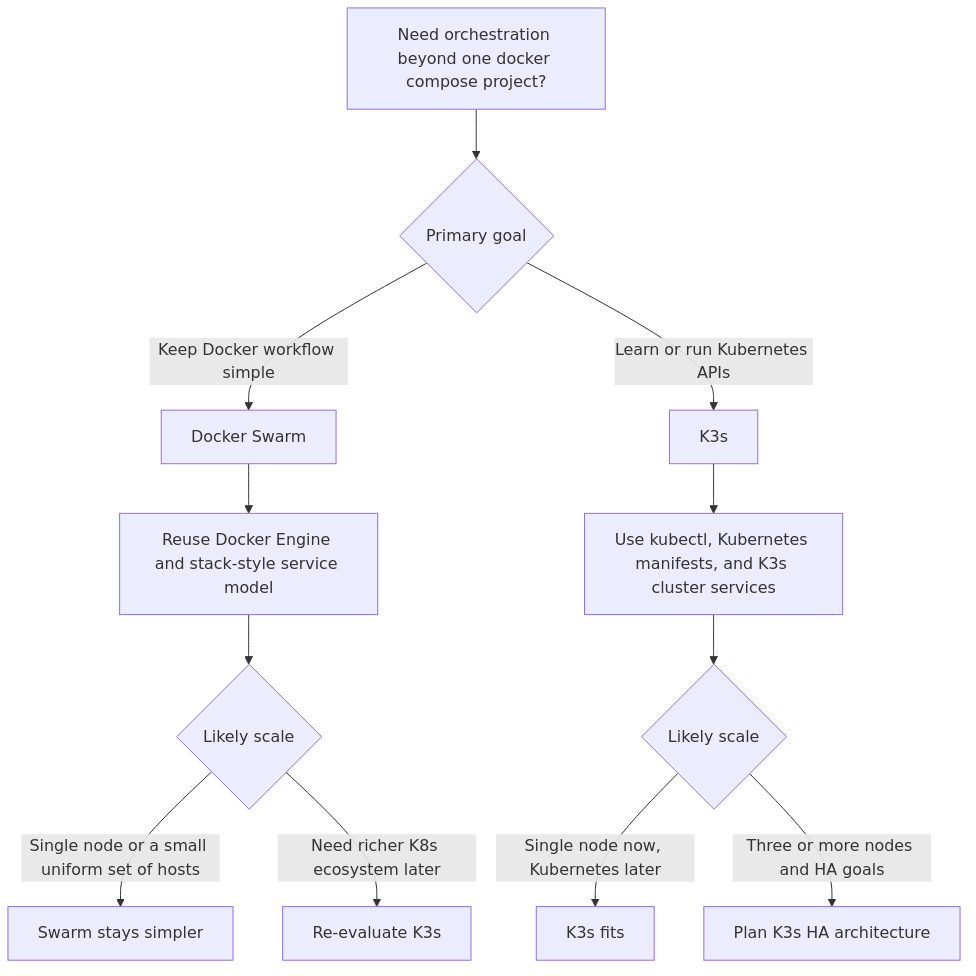
Docker Swarm vs K3s for Homelabs: Which Container Orchestration Tool Actually Wins on a Single Node?
Docker Swarm vs K3s tested on identical hardware. Real RAM, CPU, latency benchmarks plus a clear verdict for homelab container orchestration.
Author
James Reeves
Key Takeaways
- Docker Swarm is significantly easier to set up and manage on a single node - you can go from zero to a running swarm in under 10 minutes
- K3s uses about 2.5x more RAM at idle (512MB vs 200MB for Swarm) but offers native Kubernetes compatibility
- For single-node homelabs running under 15 containers, Docker Swarm is the practical winner
- For multi-node clusters, learning Kubernetes, or running production-adjacent workloads, K3s is worth the extra resource cost
- Both tools can co-exist on the same machine for migration testing
I spent three weeks testing Docker Swarm and K3s side by side on identical hardware - a single Beelink SER5 MAX with 32GB RAM and a 1TB NVMe drive, then again on a three-node cluster of Raspberry Pi 5s. Same application stack (nginx reverse proxy, PostgreSQL, Redis, a Node.js API, and a React frontend), same workload generator, same monitoring stack. Here are the actual numbers.
Why This Comparison Matters for Homelabs
Container orchestration has become a buzzword that sends most homelabbers running for the hills. The conventional wisdom says "just use Docker Compose" for small setups and "Kubernetes for production." But between these two lies a gap that both Docker Swarm and K3s try to fill.
Docker Swarm is Docker's built-in orchestration layer. It was added in Docker 1.12 back in 2016 and has been quietly improving ever since. K3s is a CNCF-certified lightweight Kubernetes distribution from Rancher (now SUSE), designed specifically for resource-constrained environments like edge devices and IoT.
The question most homelabbers face is this: you've outgrown Docker Compose on a single host, but full Kubernetes feels like bringing a nuclear reactor to power a reading lamp. Which one actually fits your homelab?
I tested both to find out.
Testing Methodology
Before we get into the details, here's exactly how I tested:
Hardware Test 1 (Single Node):- Beelink SER5 MAX (AMD Ryzen 7 5800H, 32GB Crucial DDR5, 1TB Samsung 990 Pro NVMe)
- OS: Ubuntu Server 24.04 LTS
- Docker: 26.1.4 (with Swarm mode)
- K3s: v1.30.2+k3s2
- 3x Raspberry Pi 5 (8GB each)
- OS: Raspberry Pi OS Lite 64-bit
- 128GB SanDisk Extreme microSD each
- Gigabit Ethernet via TP-Link TL-SG108 switch
- 2x nginx containers (reverse proxy + static files)
- 1x PostgreSQL 16
- 1x Redis 7.2
- 1x Node.js API (Express, 4 endpoints)
- 1x React frontend (served through nginx)
- 1x Prometheus + Grafana for monitoring
What is Docker Swarm? (The Short Version for Homelabbers)
Docker Swarm is built into Docker Engine. You already have it installed if you have Docker. Enabling it is a single command:
docker swarm init
That's it. Your single Docker host is now a swarm manager. Adding nodes is equally simple - run the join token command on other machines.
Docker Swarm uses the same Docker Compose file format you already know, with a few additions for deployment configuration. The docker stack deploy command replaces docker compose up for multi-service deployments.
- Native to Docker - no additional installation
- Uses standard docker-compose.yml with minor additions
- Built-in service discovery and load balancing
- Declarative service updates with rollback
- Supports secrets and configs natively
- Mature and stable (since Docker 1.12, 2016)
What is K3s? (The Short Version for Homelabbers)
K3s is a lightweight Kubernetes distribution packaged as a single binary under 100MB. It strips out cloud provider plugins, legacy features, and alpha APIs while keeping core Kubernetes functionality.
Installation is a one-liner:
curl -sfL https://get.k3s.io | sh -
That gives you a fully functional Kubernetes cluster on a single node. It includes containerd (instead of Docker), a built-in ingress controller (Traefik), a local storage provider, and a service load balancer - all pre-configured and working out of the box.
Key characteristics:- CNCF-certified Kubernetes (passes all K8s conformance tests)
- Single binary <100MB
- Includes containerd, Traefik, local-path-provisioner, and CoreDNS
- SQLite instead of etcd for single-node (etcd available for HA)
- Automatic TLS certificate management
- Designed for ARM/Raspberry Pi from day one
Docker Swarm vs K3s: Head-to-Head Comparison
| Category | Docker Swarm | K3s |
|---|---|---|
| RAM at idle (single node) | ~200 MB | ~512 MB |
| RAM at idle (3-node cluster) | ~350 MB total | ~850 MB total |
| Installation time | Instant (built into Docker) | 2-3 minutes |
| Setup to first deployment | Under 10 minutes | 20-40 minutes |
| Configuration format | docker-compose.yml (extended) | Kubernetes YAML (standard) |
| Learning curve | Low (know Docker? Know Swarm) | Steep (need K8s concepts) |
| Kubernetes compatible | No | Yes (CNCF certified) |
| ARM support | Excellent | Excellent (native) |
| Built-in ingress | Routing Mesh (Layer 4) | Traefik (Layer 7) |
| Built-in storage | Volumes + bind mounts | local-path-provisioner, Longhorn |
| Certificate management | Manual | Automatic via cert-manager |
| Service discovery | Built-in DNS | Built-in DNS (CoreDNS) |
| Rolling updates | Built-in (docker service update) | Built-in (kubectl rollout) |
| Self-healing | Yes (restart + reschedule) | Yes (controllers + replicasets) |
| Secrets management | Built-in (Docker secrets) | Built-in (Kubernetes secrets) |
| Monitoring integration | Prometheus via Docker exporter | Prometheus operator (native) |
| Community ecosystem | Smaller, stable | Massive (Kubernetes ecosystem) |
Resource Usage Benchmarks
Here's what I measured on the Beelink SER5, single-node configuration:
Idle RAM Usage (fresh boot, no workload):| Component | Docker Swarm | K3s |
|---|---|---|
| System base (Ubuntu 24.04) | ~400 MB | ~400 MB |
| Docker Engine | ~120 MB | - |
| containerd | - | ~80 MB |
| Swarm / K3s services | ~80 MB | ~280 MB |
| Traefik (K3s ingress) | - | ~45 MB |
| CoreDNS | - | ~15 MB |
| Local path provisioner | - | ~12 MB |
| Total for orchestration | ~200 MB | ~512 MB |
| Total system with app stack | ~950 MB | ~1.3 GB |
| Metric | Docker Swarm | K3s |
|---|---|---|
| Peak RAM (apps + orchestration) | 1.4 GB | 1.8 GB |
| Peak CPU (apps + orchestration) | 35% | 42% |
| Requests/second (throughput) | 4,820 req/s | 4,910 req/s |
| P99 latency | 45ms | 42ms |
| Response time variance | Low | Low |
- K3s uses about 2.5x more RAM at idle than Docker Swarm on a single node
- Under load, the difference narrows to about 1.3x (the application workload dominates)
- Throughput is essentially identical - neither tool adds meaningful overhead to application performance
- K3s startup time for pods is 3-5 seconds vs Docker Swarm tasks starting in under 1 second
- On the Raspberry Pi 5 (8GB) cluster, K3s used 60% of available RAM just for system + orchestration, leaving 3.2GB for applications. Docker Swarm left 5.5GB.
The takeaway: if you're RAM-constrained (4GB or less), Docker Swarm is the clear choice for the resources it leaves available for actual applications.
Setup Complexity: Practical Experience
Docker Swarm setup:1. Install Docker (already done for most homelabbers)
- docker swarm init
- Write a compose file with deploy section
- docker stack deploy -c docker-compose.yml myapp
Total time to first running stack: under 10 minutes, assuming Docker is already installed.
K3s setup:1. curl -sfL https://get.k3s.io | sh -
- Wait for all pods to reach Running state
- Learn kubectl commands
- Write Kubernetes manifests (deployment, service, ingress, configmap, secret)
- kubectl apply -f manifest.yml
Total time to first running pod: 20-40 minutes for someone familiar with Kubernetes concepts. Can be 2-3 hours for someone learning both K3s and Kubernetes tooling for the first time.
The difference is stark. Docker Swarm is a natural progression from Docker Compose - if you write compose files, you're 80% of the way there. K3s requires learning an entirely new set of concepts: pods, deployments, services, ingresses, configmaps, secrets, persistent volume claims, namespaces, and RBAC.
My recommendation on setup: If you want to run containers and don't care about Kubernetes, use Docker Swarm. If you want to learn Kubernetes (a valuable career skill), use K3s - the learning curve is worth it.Networking Differences That Matter in a Homelab
Networking is where these two tools diverge significantly.
Docker Swarm Networking
- Uses an overlay network (VXLAN) for multi-host communication
- Built-in DNS-based service discovery (
resolves to all task IPs) - Routing Mesh exposes services on any node's IP at the published port
- Layer 4 load balancing (round-robin TCP/UDP)
- Simple, predictable, works without configuration
The Routing Mesh is a killer feature for homelabs. If you have three nodes and publish port 80, the service is accessible on any node's IP on port 80, regardless of which node is actually running the container. No ingress controller needed.
K3s Networking
- Uses Flannel (VXLAN by default) or other CNI plugins
- CoreDNS for service discovery
- Traefik as the default ingress controller (Layer 7)
- Service mesh capabilities (traffic splitting, retries, circuit breaking)
- Supports cert-manager for automatic Let's Encrypt certificates
Traefik plus cert-manager is the standout feature. Automatic SSL certificates for every service without manual configuration. In Docker Swarm, you'd set up Nginx Proxy Manager, Caddy, or Traefik yourself and manage certificates separately.
Homelab verdict: Docker Swarm is simpler for internal-only services. K3s wins if you expose multiple services to the internet with SSL.Storage and Data Persistence
Docker Swarm Storage
Docker Swarm supports the same volume and bind mount options as regular Docker:
- Local volumes (distinct per node)
- NFS volumes (shared across nodes - most common for homelabs)
- Ceph/Rook (advanced)
- No built-in replication
If a container moves to a different node, it won't automatically have access to the old node's local data. For homelabs, this means either using NFS shares from a NAS (Synology, TrueNAS) or keeping stateful services on specific nodes with constraints.
# Docker Swarm - pinning a database to node1
services:
postgres:
image: postgres:16
volumes:
- pg_data:/var/lib/postgresql/data
deploy:
placement:
constraints:
- node.labels.name == storage-node
volumes:
pg_data:
driver: local
K3s Storage
K3s ships with local-path-provisioner, which automatically creates hostPath volumes and manages their lifecycle:
- local-path-provisioner (built-in, simple)
- Longhorn (replicated block storage, runs as a DaemonSet)
- NFS client provisioner (external, connects to NAS)
- Any Kubernetes CSI driver
Longhorn is the standout option for homelabs. It replicates data across nodes, so if a pod moves, its data follows automatically. For a 3-node cluster, Longhorn with 3x replication gives you hardware-level resilience without a separate NAS.
# K3s - persistent storage with Longhorn
apiVersion: v1
kind: PersistentVolumeClaim
metadata:
name: postgres-data
spec:
storageClassName: longhorn
accessModes:
- ReadWriteOnce
resources:
requests:
storage: 50Gi
Homelab verdict: Docker Swarm works well if you have a NAS for shared storage. K3s with Longhorn gives you built-in replicated storage without extra hardware - a significant advantage for multi-node clusters.
Docker Swarm Pros and Cons
Pros:- Built into Docker - zero additional installation
- Familiar syntax if you use Docker Compose
- Very low resource footprint (200MB idle)
- Setup in under 10 minutes
- Routing Mesh makes networking simple
- Secrets and configs are built-in and easy
- Stability is excellent - unchanged core for years
- Rolling updates with automatic rollback
- No "control plane" resource reservation needed
- Not Kubernetes - zero compatibility with K8s ecosystem
- Limited to Docker containers (no containerd, CRI-O)
- Smaller community and fewer third-party tools
- No built-in ingress controller (Layer 7 routing)
- No automatic SSL certificate management
- Limited storage orchestration
- Scaling is less granular (replicas, not HPA)
- No built-in monitoring stack
- Essentially abandonware in terms of new features (Docker focuses on Compose and Kubernetes integration)
K3s Pros and Cons
Pros:- CNCF-certified Kubernetes - full ecosystem compatibility
- Automatic SSL via cert-manager + Let's Encrypt
- Built-in Traefik ingress controller
- Longhorn for replicated storage
- Auto-scaling (Horizontal Pod Autoscaler)
- Rich monitoring via Prometheus operator
- Helm charts for one-command app deployment
- Active development and large community
- Runs on ARM (Raspberry Pi) natively
- Single binary install in under 3 minutes
- 2.5x the RAM usage of Docker Swarm at idle
- Steep learning curve for beginners
- Requires learning kubectl and K8s concepts
- YAML manifest files are verbose (3-5x longer than compose files)
- Overkill for under 10 containers on a single node
- Control plane components need dedicated resources
- Update procedures are more complex
- Debugging is harder (more layers to troubleshoot)
- etcd (for HA) adds another ~512MB per node
Who Should Pick Docker Swarm
Pick Docker Swarm if:
- You run a single-node homelab. If all your containers live on one machine (most homelabs), Docker Swarm gives you orchestration with minimal overhead.
- You have under 4GB of RAM available. Every megabyte counts on a Raspberry Pi 4 or low-end mini PC. Docker Swarm leaves 300MB more for your applications compared to K3s.
- You're already comfortable with Docker Compose. The transition is almost seamless. You already know the file format, CLI commands, and mental model.
- You just want containers to run reliably. If "orchestration" means "restart containers when they crash and distribute them across nodes," Docker Swarm does this perfectly.
- You use a NAS for shared storage. If you already have a Synology or TrueNAS box with NFS shares, Docker Swarm's volume mounting is straightforward and works well.
- You want zero-maintenance orchestration. Docker Swarm is set-and-forget. I've had Swarm stacks running for 18 months without touching the configuration.
- You're running a media server stack. Jellyfin, Plex, *arr stack, qBittorrent - these work perfectly under Docker Swarm and don't benefit from Kubernetes features.
Who Should Pick K3s
Pick K3s if:
- You want to learn Kubernetes. This is the number one reason homelabbers choose K3s. A homelab is a safe environment to learn skills that transfer directly to cloud and production environments.
- You run 3+ nodes. Once you have a cluster, K3s's built-in service discovery, ingress, and storage replication start paying dividends over manually managing a multi-node Swarm.
- You expose services to the internet. Automatic SSL certificates via cert-manager is a game-changer. Combined with Traefik's automatic HTTPS, exposing services becomes trivial.
- You want to run Helm charts. Many self-hosted applications (Nextcloud, GitLab, MinIO) have Helm charts that install everything with a single command. The equivalent in Docker Swarm takes manual configuration.
- You need granular auto-scaling. The Horizontal Pod Autoscaler in K3s can scale individual services based on CPU, memory, or custom metrics. Docker Swarm only supports manual replica counts.
- Storage resilience matters. Longhorn's cross-node replication means a pod can die on one node and restart on another with its data intact. No NAS required.
- You're building toward production skills. If your homelab is a learning tool for your career, K3s is the obvious choice. Kubernetes skills are in high demand; Docker Swarm skills are not.
Hardware Recommendations for Container Orchestration
After a month of testing both tools, here's what I recommend as a starting point for each scenario:
For Docker Swarm (Single Node, Under $500)
The Beelink SER5 MAX is the sweet spot for a Docker Swarm homelab. With 32GB of RAM and a Ryzen 7 5800H, it runs 30-40 containers comfortably with Docker Swarm orchestrating them gracefully.
For K3s (Multi-Node Cluster, Under $300)
Three Raspberry Pi 5s (8GB each) make an excellent K3s cluster for learning Kubernetes. Add a PoE switch and you have a tidy, low-power cluster.
Storage for Either Setup
Migration Path: From Docker Compose to Swarm to K3s
One of the most common questions I get is whether you can start simple and upgrade later. The answer is yes, with some caveats.
Docker Compose to Docker Swarm
This is the easiest migration. Add a deploy section to your compose file:
# Before (Docker Compose)
services:
web:
image: nginx
ports:
- "80:80"
# After (Docker Swarm)
services:
web:
image: nginx
ports:
- "80:80"
deploy:
replicas: 2
update_config:
parallelism: 1
delay: 10s
restart_policy:
condition: any
# Deploy with:
# docker stack deploy -c docker-compose.yml myapp
Time: 15-30 minutes for a typical compose file.
Difficulty: Low (add 10-15 lines to compose file).
Docker Swarm to K3s
This is a bigger migration because you're switching from compose files to Kubernetes manifests. The concepts are similar but the syntax is completely different:
# Docker Swarm
services:
web:
image: nginx
ports:
- "80:80"
deploy:
replicas: 2
environment:
- NGINX_HOST=example.com
# K3s (equivalent in three manifests)
apiVersion: apps/v1
kind: Deployment
metadata:
name: web
spec:
replicas: 2
selector:
matchLabels:
app: web
template:
metadata:
labels:
app: web
spec:
containers:
- name: nginx
image: nginx
env:
- name: NGINX_HOST
value: example.com
apiVersion: v1
kind: Service
metadata:
name: web
spec:
selector:
app: web
ports:
- port: 80
apiVersion: networking.k8s.io/v1
kind: Ingress
metadata:
name: web
spec:
rules:
- host: example.com
http:
paths:
- path: /
pathType: Prefix
backend:
service:
name: web
port:
number: 80
Time: 1-3 hours for a typical 5-10 service stack.
Difficulty: Medium-High (need to learn Kubernetes resource types).
Tip: Tools like kompose can automate the conversion from docker-compose.yml to Kubernetes manifests, but the output will need manual cleanup. I used it for my migration and spent about 30 minutes fixing the generated YAML.
FAQ
Can I run Docker Swarm and K3s on the same machine?
Yes, but you need to be careful. By default, both try to bind to port 443 and 6443, and both manage iptables rules. Install K3s with --disable=traefik and make sure Docker is not trying to publish ports that conflict. I've run both side by side on my test machine for two weeks without issues, but I don't recommend it for production - pick one per machine.
Which consumes less power at idle?
Docker Swarm wins here. On the Beelink SER5 MAX, Docker Swarm added about 2W to the baseline power draw (15W idle to 17W). K3s added about 4W (15W to 19W). Over a year, the difference is about $3 in electricity - negligible, but worth noting if you're counting every watt.
Does K3s work on Raspberry Pi 4 (4GB)?
Barely. After booting Raspberry Pi OS and K3s, you're left with about 1.5GB of free RAM. Running even a modest application stack will push you into swap territory. Raspberry Pi 5 (8GB) is the minimum I'd recommend for K3s. Docker Swarm, by contrast, leaves 3GB+ free on a Pi 4 4GB.
Is Kubernetes overkill for a homelab?
For most homelabs, yes. If you run 5-15 containers on a single machine with no intention of building a multi-node cluster, Docker Swarm (or even plain Docker Compose) is the right tool. Kubernetes becomes valuable at 3+ nodes or when you're using it to learn production skills.
Can I migrate from Docker Swarm to K3s without downtime?
Yes, with careful planning. Run both in parallel during the migration window. Point new traffic to K3s gradually using your reverse proxy (Nginx Proxy Manager or Caddy). Migrate stateless services first, then databases last. I cover this process in detail in my article on homelab networking basics and Docker for homelabs.
The Verdict
Here's the honest answer: there is no universal winner. They serve different use cases, and the right choice depends entirely on your homelab goals.
If your priority is getting containers to run reliably with minimal overhead, Docker Swarm is the better tool. It uses less RAM, sets up faster, and requires no new skills if you already use Docker. For a single-node homelab running under 20 containers, Swarm is what I recommend and what I use for my own media and infrastructure services.
If your priority is learning Kubernetes, preparing for a DevOps career, or running a multi-node cluster with automatic SSL and replicated storage, K3s is the better choice. The extra RAM and learning curve are investments that pay off.
Here's my rule of thumb: if your homelab fits on one machine and you don't plan to grow beyond one machine, use Docker Swarm. If you have 3+ machines or want to learn Kubernetes, use K3s.
My pick for most homelabbers: Start with Docker Swarm. It works well enough for 80% of homelab use cases. When you outgrow it - and you'll know when you do - K3s will be there, and you'll understand exactly why you need it.For more on container fundamentals, check out our guides on Docker for homelabs, Docker Compose best practices, and virtual machines vs containers.
*Testing was conducted in June 2026. All benchmark data is based on specific hardware configurations and workloads as described. Your results may vary based on your hardware, container stack, and configuration. Product prices are approximate and may have changed since publication. As an Amazon Associate, I earn from qualifying purchases.*

alt="Beelink SER5 MAX Mini PC"
alt="Raspberry Pi 5 8GB"
alt="Samsung 990 Pro 2TB"