Disclosure: This article may contain affiliate links. If you purchase through these links, we may earn a commission at no additional cost to you. We only recommend products we have personally tested or thoroughly researched.
FTC disclosure: This article contains affiliate links. If you buy through them, HomelabAddiction may earn a commission at no additional cost to you.
Virtual machines and containers overlap enough to confuse beginners, but the operational boundary is still clear: use a VM when the workload needs its own operating-system boundary or different kernel assumptions, and use a container when the application can safely share the host kernel.
That choice affects overhead, patching, backups, troubleshooting, and how much isolation you can rely on when one service misbehaves.
This page helps homelab operators compare those tradeoffs before they copy deployment commands, so the workload lands on the right substrate instead of inheriting the wrong amount of complexity by habit.
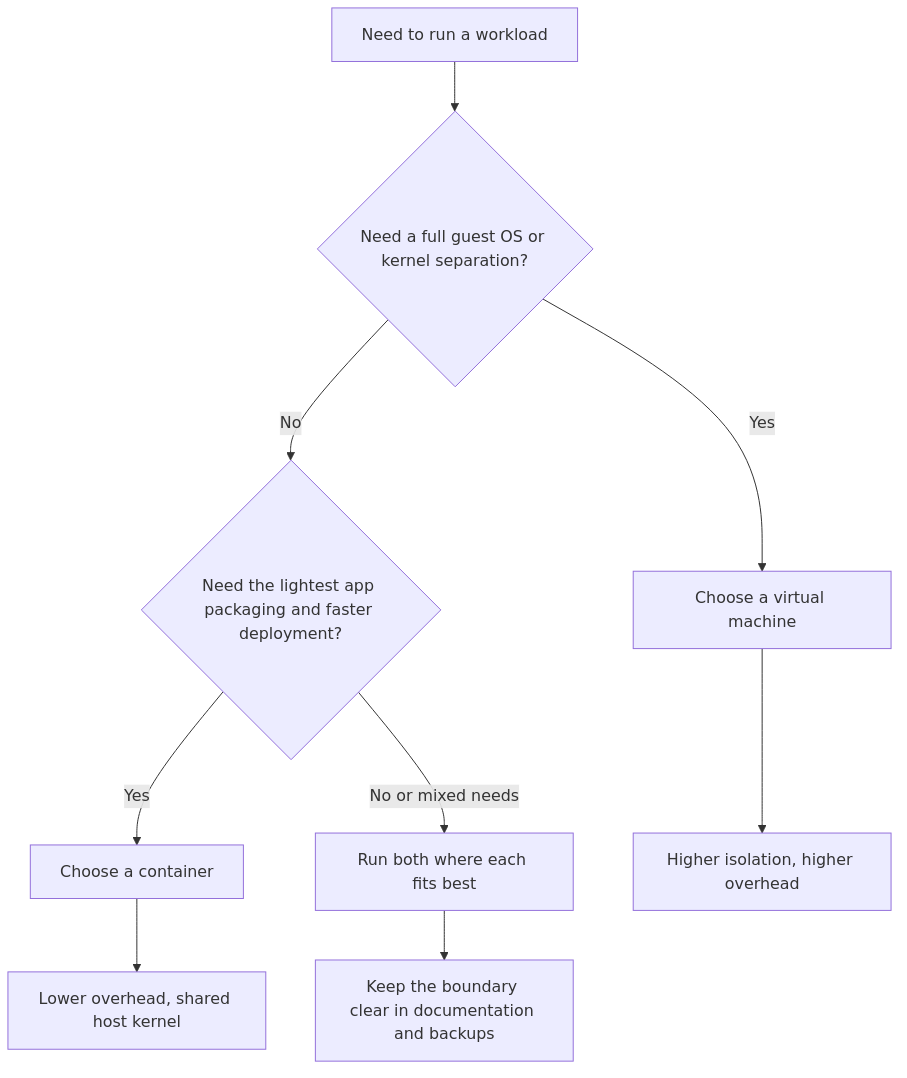
VM vs container decision flow: choose a VM when you need a full guest OS or harder isolation, choose a container when lightweight app packaging is the goal, and mix both only when the boundary stays explicit in backups and operations.
It is not perfect security, but it is a clean boundary that matches how people naturally think about separating systems.
With containers
Containers isolate processes, but they share the host kernel.
That changes the risk model. You can absolutely run stable services in containers, but you should avoid assuming “container” means the same boundary as a VM.
A good beginner rule is:
transmission signup
article_topic // Virtual Machines vs Containers for Homelabs
Don't leave without the setup notes.
Get practical homelab guides, failure logs, and beginner-friendly build notes in your inbox.
Enter your email address to receive the Homelab Addiction newsletter.
Weekly only. No spam. Unsubscribe anytime.
If you would be uncomfortable giving a service root on your server, think twice about giving it a path to the host kernel through a container setup.
This does not mean never use containers. It means use containers intentionally.
Performance and overhead: why containers feel fast
Containers tend to be lightweight:
No separate OS kernel per workload
Smaller images (depending on how you build them)
Fast start and stop behavior
VMs tend to carry more overhead because each VM includes an OS layer and usually more disk and RAM expectations.
In a homelab, the performance difference matters most when you are running many small services, your server has limited RAM, or you want quick deploy and rollback cycles.
If you are running a handful of services total and you value clean boundaries and simple troubleshooting, a couple of VMs can be the calmer choice.
Operational differences that matter more than raw speed
A lot of VM vs container debates ignore the boring parts. In a homelab, the boring parts are the whole game.
Updates and breakage
In a VM, you update the OS like a normal server. Services inside can be managed with systemd, packages, or Docker.
With containers, you typically update by pulling a new image and recreating the container.
Containers encourage a replace-not-repair workflow. That is great when you have good config plus data separation, and painful when you do not.
Where state lives (this is the container make-or-break point)
For containers, you want a clean split:
Container image: the app
Volumes or bind mounts: the data
If you blur that line, upgrades turn into “please do not break”.
Networking mental load
You can do clean networking in both models, but the day-to-day experience differs.
VMs feel like a server on your LAN. Containers feel like an app behind a networking abstraction.
Beginners often find VM networking easier to reason about when they are also learning DNS, reverse proxies, and firewall rules.
Backups and restores
You want to be able to answer this without guessing: If this box dies, how do I restore services and data?
VM-heavy setups often do well here because you can back up the VM disk and it is obvious what you are backing up.
Container-heavy setups can be excellent too, but only if your volumes are well-organized and you have a tested restore path.
How this maps to Proxmox, LXC, and Docker
Homelab reality is that you are usually choosing between specific options, not abstract definitions.
Proxmox VMs use KVM virtualization (your true VMs).
Proxmox LXC are system containers (a full OS userland, but sharing the host kernel).
Docker containers are application containers (the app packaged into an image, typically with its dependencies).
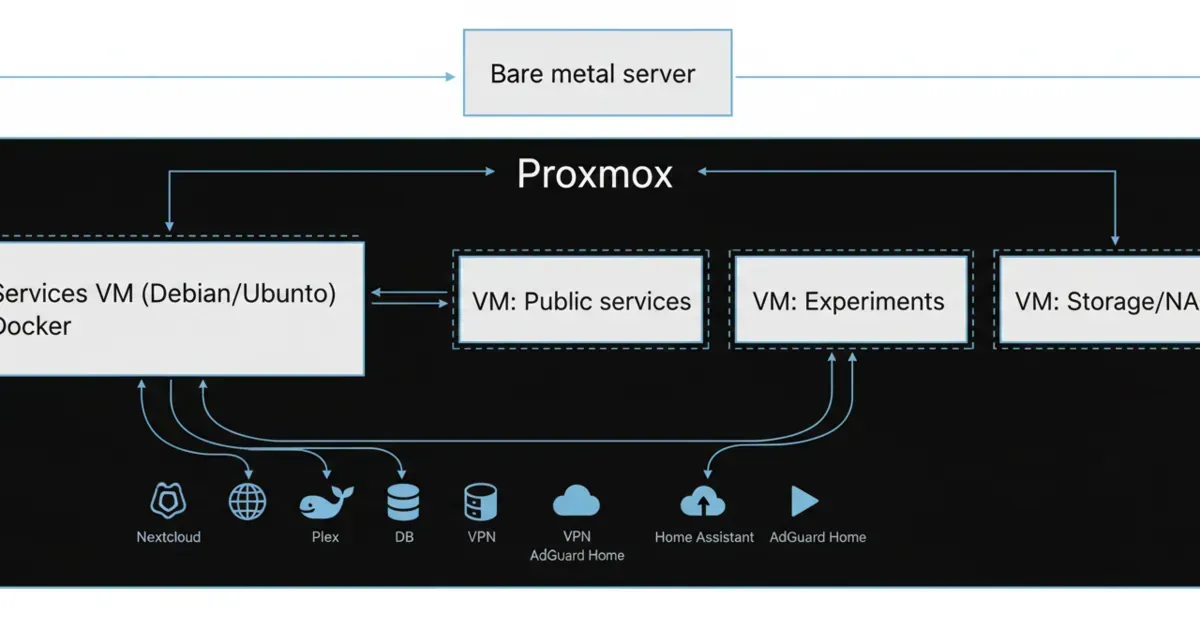
A common beginner-friendly setup is:
Proxmox as the base
One Services VM (Debian or Ubuntu) that runs Docker for most apps
A few dedicated VMs for things that deserve stronger isolation
This gives you VM boundaries where it matters and container convenience where it helps.
You are running something internet-facing and you want to contain blast radius
You need a different OS or kernel behavior
You want normal server simplicity
You want straightforward hypervisor snapshots and backups
Pick containers when:
You are running many small services
You want easy deploy and rollback by recreating containers
You want consistent packaging across machines
You are comfortable with config plus volumes as the source of truth
You want higher density on limited hardware
Pick a hybrid setup (very common) when you want VM boundaries for safety and sanity, but you still want container ergonomics for apps.
A strong default for most beginners:
Put Docker in one VM.
Put your core internal services there.
Use separate VMs for anything you expose to the public internet, or anything you experiment with heavily.
From the lab
Common mistakes (and how to avoid them)
Mistake 1: treating containers like mini-VMs
If you are using containers, be explicit about what you are isolating: processes, not kernels.
If you need a clearer boundary, use a VM.
Mistake 2: mixing unrelated services with no rollback plan
If a container host becomes the everything box, updates get scary.
Group services by purpose, keep configs in a clean folder structure, and keep a simple restore checklist.
Mistake 3: letting data sprawl everywhere
Put data in predictable paths. Name volumes clearly. Make it obvious what needs to be backed up.
Mistake 4: optimizing for efficiency instead of recoverability
A homelab is not a benchmark. It is a system you maintain.
Choose the setup you can restore on a bad day.
FAQ
Are containers faster than VMs?
Containers are often lighter-weight because they share the host kernel, but “faster” depends on workload.
The bigger difference is operational: containers are easier to redeploy and scale as small units.
Is LXC the same as Docker?
Not exactly. LXC are system containers (OS userland without a separate kernel). Docker is typically used for application containers.
In a homelab, both are containers, but the workflows and expectations differ.
Should I run Docker directly on Proxmox?
Many people avoid it because it mixes hypervisor host concerns with app host concerns.
A common approach is running Docker inside a dedicated VM so the Proxmox host stays clean.
What is the safest default for a beginner?
A services VM running Docker, plus separate VMs for anything risky or public-facing, is a safe and maintainable baseline.
What if I only have one small machine?
You can still use the same pattern. Even one VM for services can help, and you can start with containers inside that VM.
Next steps
Pick one service you plan to run this week and decide its boundary upfront.
If it is public-facing or experimental, put it in its own VM. If it is a stable internal app, put it in your services VM as a container and store its data in a clearly named volume you can back up.
Hardware that fits this decision
If you are choosing one compact host for a small VM and container setup, the Beelink SER8 on Amazon is a practical starting point to compare against your existing hardware. Match the CPU, memory, storage, and network capacity to the workloads you will actually isolate - this is a product reference, not a claim of hands-on testing.
transmission signupstatus: open channel
article_topic // Virtual Machines vs Containers for Homelabs
Start building a smarter homelab.
Join readers learning Proxmox, networking, storage, backups, and self-hosting without breaking everything.
Enter your email address to receive the Homelab Addiction newsletter.
Beginner-friendly
No gatekeeping. Just clear, actionable guides.
1 useful email / week
Practical tips, real-world setups, and lessons learned.
Zero hype, practical only
What works, what breaks, and how to fix it.
Reply to any email with what you're building. I read and reply to as many as I can.
— The Homelab Addiction Operator
support // the lab
Found this guide useful?
If it saved you time or a rebuild, you can support more practical homelab guides.