Nextcloud vs Seafile vs Syncthing: Match the Tool to Collaboration, Sync Speed, and Maintenance Load
Choose Nextcloud, Seafile, or Syncthing by matching collaboration needs, sync speed, offline behavior, and maintenance load to the way your homelab actually shares files.
Disclosure: This article may contain affiliate links. If you purchase through these links, we may earn a commission at no additional cost to you. We only recommend products we have thoroughly researched.
FTC disclosure: This article contains affiliate links. If you purchase through these links, HomelabAddiction may earn a commission at no extra cost to you.
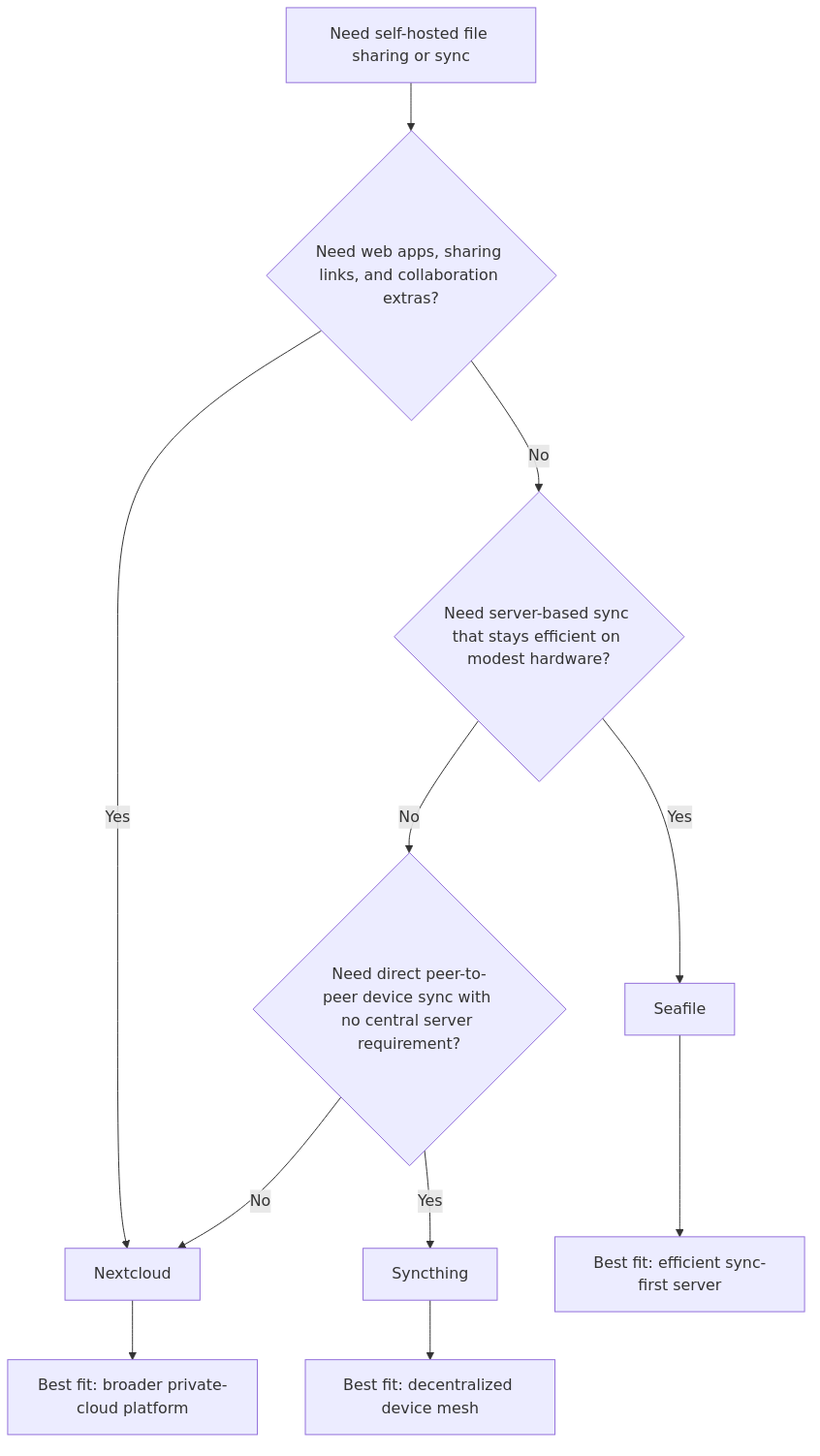
These three tools overlap just enough to confuse the first decision. They can all move files, but they are built for different operating models: a broader private-cloud platform, a sync-first server, or a direct device mesh with no central collaboration layer.
The practical choice usually comes down to what the files need to do after they sync. Shared links, office-style collaboration, and user management pull the decision toward Nextcloud; lightweight library sync on modest hardware pulls it toward Seafile; and always-on peer replication between trusted devices pulls it toward Syncthing.
This page helps a homelab operator choose the right model before committing storage, user onboarding, and backup design to the wrong file-sharing stack.
File-sync selection flow: use Nextcloud for a broader private cloud, Seafile for sync-first efficiency, and Syncthing when direct device-to-device replication matters more than shared web apps.
In simple terms, Seafile is often a sweet spot for people who want:
serious sync performance,
less overhead than a full collaboration suite,
and a stable, focused file platform.
Syncthing: decentralized device mesh
Syncthing is a different category. It is peer to peer synchronization between trusted devices. There is no mandatory central cloud server holding your files. It can use discovery and relay infrastructure for connectivity, but those are not your data store.
If your goal is “keep folders mirrored across devices I control,” Syncthing is excellent.
If your goal is “family cloud with links, permissions, and polished browser UX,” Syncthing is usually not enough by itself.
Setup and Maintenance Reality
Most comparison posts focus on feature grids. Homelab reality is maintenance load.
Nextcloud setup profile
Nextcloud setup can be smooth, but long term quality depends on stack hygiene: DB health, PHP settings, background jobs, and regular updates. If you enjoy full platform administration, that is fine. If you want minimal babysitting, plan for some tuning work.
Seafile setup profile
Seafile is generally simpler to run for its core purpose. You still need backups and update discipline, but there are fewer “suite platform” concerns compared to Nextcloud.
Syncthing setup profile
Syncthing is easy to start and can get complex later if you run many devices with nuanced folder policies. You need a clear model for folder ownership, versioning, and conflict handling. It is excellent when you want explicit control.
A practical rule: if you are still learning service operations, do not run all three at once. Pick one primary platform and make it stable first. That aligns well with growing your homelab in layers rather than chaos: https://homelabaddiction.com/grow-your-homelab/.
Performance and Resource Use
Why Seafile is often called “faster”
When users compare Nextcloud and Seafile, Seafile often feels more responsive for pure file sync workflows. Architecture is the reason. Seafile’s block oriented model reduces unnecessary transfer and storage duplication in many real workloads.
Nextcloud performance expectations
Nextcloud can perform well, but it rewards good infrastructure choices. Underpowered hardware and untuned defaults can make it feel sluggish, then users blame the app. If you run Nextcloud, give it the resources and tuning it asks for.
Syncthing performance behavior
Syncthing can be extremely efficient for direct sync, especially across trusted devices with reliable paths. It avoids the central server bottleneck model entirely. But behavior depends on topology and connectivity quality, so network fundamentals matter: https://homelabaddiction.com/homelab-networking-basics/.
Sharing and Collaboration Features
This is where many people choose incorrectly.
Nextcloud is strongest for browser first sharing, multi user collaboration patterns, and familiar cloud style UX.
Seafile supports sharing workflows well, but it remains more file platform than broad collaboration suite.
Syncthing is best viewed as synchronization plumbing, not a polished sharing portal.
If your household asks for “send me a web link” and “access from browser when I am away,” Nextcloud or Seafile generally fits better than Syncthing alone.
If your workflow is “my laptop, desktop, NAS, and backup node should always match this folder tree,” Syncthing shines.
Security Model Differences
Security is not one checkbox. It is trust boundaries.
Nextcloud and Seafile
Both are centrally hosted models. That means you secure the server perimeter, patch on schedule, and enforce least privilege. Strong hygiene from your homelab security baseline is mandatory: https://homelabaddiction.com/homelab-security/.
Syncthing
Syncthing shifts trust toward device identity and peer relationships. You are not hardening one public cloud portal in the same way, but you are managing a trust mesh between endpoints. That can be safer for some users and riskier for others, depending on device discipline.
No matter which platform you choose, do not skip backup policy. Sync is not backup. You still need retention, restore drills, and a simple plan like 3-2-1 principles: https://homelabaddiction.com/homelab-backups/.
Practical Feature Matrix
Criteria
Nextcloud
Seafile
Syncthing
Core model
Private cloud suite
File sync platform
Peer-to-peer sync
Central web portal
Strong
Strong enough for file workflows
Minimal by design
Collaboration breadth
High
Medium
Low
Raw sync efficiency
Medium to high (depends on tuning)
High
High
Resource footprint
Higher
Lower to medium
Low to medium
Central server required
Yes
Yes
No (optional helper infra)
Best for non technical family users
High
Medium
Low
Best for direct multi-device mirroring
Medium
Medium
High
Admin complexity at scale
Medium to high
Medium
Medium (policy complexity grows with devices)
“All in one private cloud” fit
Excellent
Good
Limited
Decision Playbook: Which One Should You Choose?
transmission signup
article_topic // Nextcloud vs Seafile vs Syncthing
Don't leave without the setup notes.
Get practical homelab guides, failure logs, and beginner-friendly build notes in your inbox.
Enter your email address to receive the Homelab Addiction newsletter.
Weekly only. No spam. Unsubscribe anytime.
Choose Nextcloud if…
You want a single private cloud destination for files, sharing, and web access.
You expect non technical users.
You are comfortable running a fuller application stack.
Choose Seafile if…
You value fast, focused file sync over broad suite features.
You want lower overhead than a large collaboration platform.
Your workload includes many files and frequent updates.
Choose Syncthing if…
You want decentralized, direct synchronization among your own devices.
You do not need a cloud style web portal as the center of the experience.
You prefer explicit device trust and folder replication control.
Hybrid patterns that actually make sense
Some hybrid patterns are useful and not overkill:
Nextcloud for sharing + Syncthing for backend replication between trusted nodes.
Seafile as primary cloud + Syncthing for a small subset of high churn technical folders.
The anti pattern is stacking all three without a reason. Complexity grows faster than value.
From the lab
If You Pick Wrong First, Here Is a Safe Migration Path
Stabilize a clean data layout first
– Separate active documents, media, and archives into predictable top-level folders.
Pilot with one folder class
– Migrate only documents or only photos first.
Keep old platform read only during transition
– Prevent accidental divergence.
Validate from client side, not server side only
– Test mobile, laptop, and remote access behavior.
Cut over in phases
– Do not move everything in one weekend panic session.
This process is slow on purpose. It avoids data confusion and trust loss.
Final Recommendation
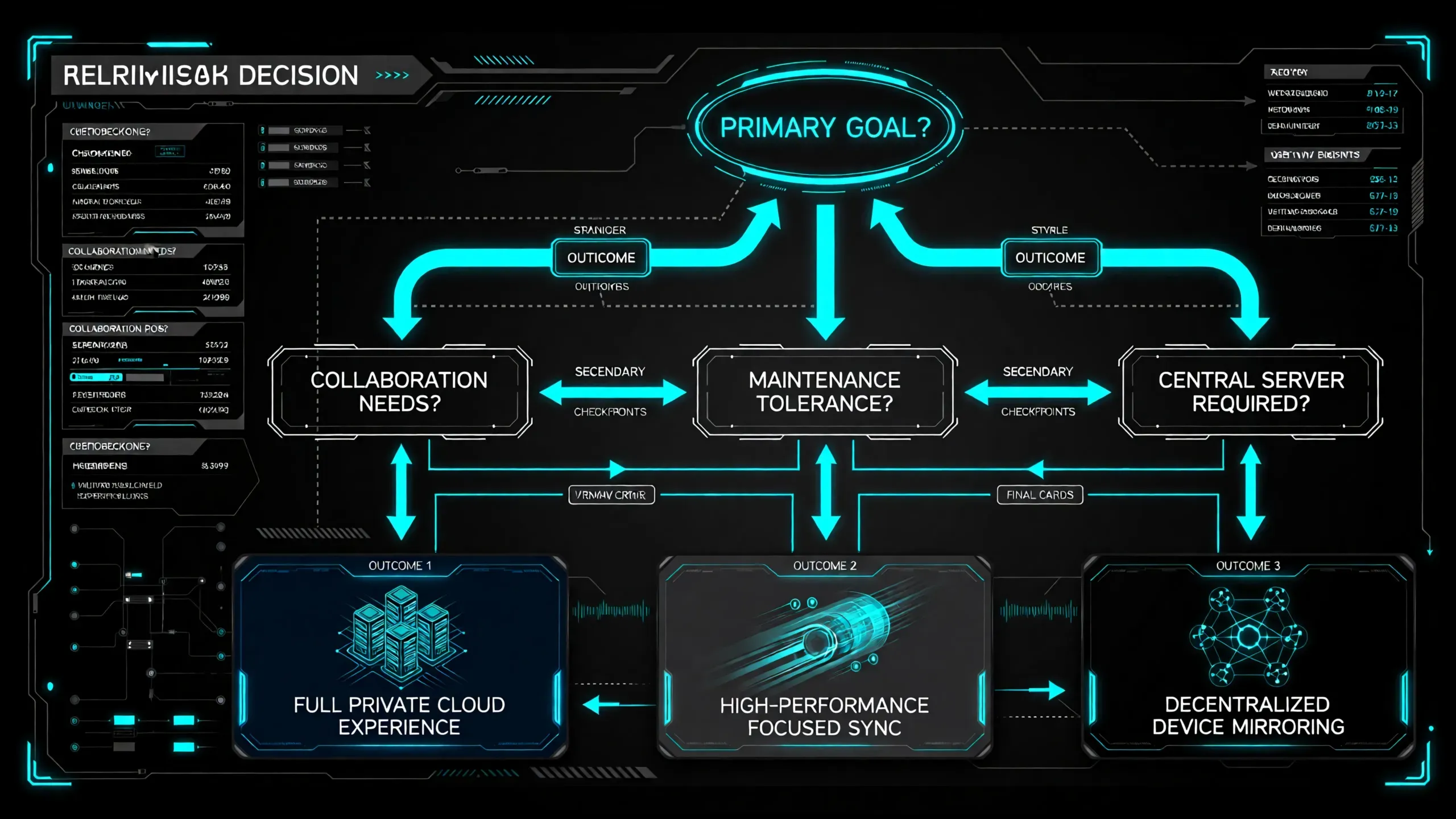
There is no universal winner in nextcloud vs seafile vs syncthing. The right pick depends on your operating model:
pick Nextcloud for full private cloud experience,
pick Seafile for focused high-performance file sync,
pick Syncthing for direct decentralized replication.
If you are a beginner building a practical homelab, start with the tool that matches your primary workflow today, then grow from there. If you are still planning your first few services, this guide will help you sequence that work: https://homelabaddiction.com/what-to-self-host-first/.
FAQ
Is Nextcloud too heavy for a mini PC homelab?
It can run well on modest hardware, but only if you respect its requirements and tune accordingly. If you want lower operational overhead for pure sync, Seafile is often easier.
Can Syncthing replace Nextcloud completely?
For direct folder sync between trusted devices, yes. For cloud-style sharing, browser workflows, and broader collaboration features, usually no.
Why does Seafile often feel faster than Nextcloud for sync?
Architecture. Seafile is optimized around file sync behavior, including block-oriented storage concepts that reduce unnecessary transfer in many workloads.
Which one is best for family photo backup and sharing?
If family members want easy web access and links, Nextcloud is usually the smoother choice. If your primary goal is fast sync with less platform overhead, Seafile is a strong option.
Is sync enough, or do I still need backups?
You still need backups. Sync replicates current state, including accidental changes. Keep versioned backups and test restores regularly.
Should beginners self-host all three?
No. Start with one, run it well, then add a second tool only when you can describe the missing capability in one sentence.
Practical hardware for sync and backup
If you are moving data between a self-hosted sync service and another machine, keep an independent local copy of important files and configuration. A portable SSD is a practical staging or backup device for that job. See Samsung T7 portable SSD options on Amazon and match the capacity to the data you can actually restore.
transmission signupstatus: open channel
article_topic // Nextcloud vs Seafile vs Syncthing
Start building a smarter homelab.
Join readers learning Proxmox, networking, storage, backups, and self-hosting without breaking everything.
Enter your email address to receive the Homelab Addiction newsletter.
Beginner-friendly
No gatekeeping. Just clear, actionable guides.
1 useful email / week
Practical tips, real-world setups, and lessons learned.
Zero hype, practical only
What works, what breaks, and how to fix it.
Reply to any email with what you're building. I read and reply to as many as I can.
— The Homelab Addiction Operator
support // the lab
Found this guide useful?
If it saved you time or a rebuild, you can support more practical homelab guides.