Proxmox LXC vs VM: Choose the Right Isolation Boundary for Each Workload
Choose Proxmox LXC containers or virtual machines by matching each workload to kernel requirements, isolation needs, passthrough limits, and density goals.
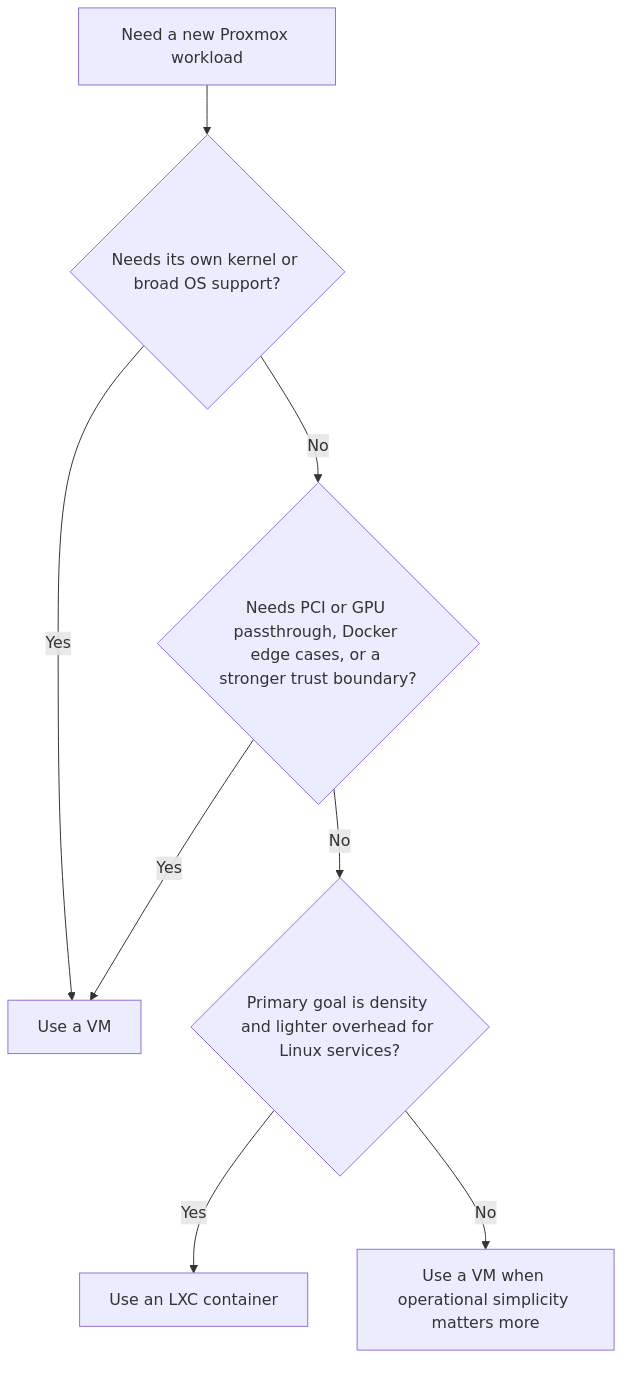
The useful LXC-versus-VM question is not which option is universally better: it is which workload needs lower overhead and which workload needs its own kernel, broader guest compatibility, or a stronger trust boundary.
LXC is usually the cleaner default for lightweight Linux services that benefit from density and faster startup. A VM remains the safer fit when a workload depends on kernel modules, device passthrough, Windows guests, or stronger isolation between the guest and the host.
This page helps homelab operators match each Proxmox workload to the right isolation boundary using vendor documentation, architecture references, and published workload data rather than anecdotal benchmark theater.
Workload-fit decision flow: use LXC when a Linux service benefits from lower overhead, and use a VM when kernel control, passthrough, compatibility, or a stronger isolation boundary matters more.
a separate kernel
a stronger security boundary
support for Windows, BSD, and virtual appliances
cleaner Docker behavior
GPU, USB, and PCI passthrough options
fewer weird edge cases when software expects full machine semantics
That is not glamorous. It is just useful.
Benchmark and resource numbers that matter
The most practical published numbers I found are these:
Metric
LXC
VM
Source / note
Light Debian service idle RAM
~30 MB to ~100 MB on the low end, with 100 MB to 500 MB common in practical setups
~180 MB minimum for a lean guest, with 512 MB+ more realistic
ProxmoxR and PropelRC
Boot time
~1 to 5 seconds
~15 to 60 seconds
ProxmoxR and PropelRC
CPU performance
~99 to 100% of bare metal
~97 to 99% with hardware-assisted virtualization
ProxmoxR benchmark summary
Memory bandwidth
Near bare metal
~2 to 5% penalty
ProxmoxR benchmark summary
Disk I/O
Near native
~3 to 5% from native with virtio, much worse with emulated storage
ProxmoxR plus Proxmox docs
Network throughput
Near line rate
Close with virtio-net, much worse with old emulated adapters
ProxmoxR plus Proxmox docs
Two conclusions matter more than the individual figures.
transmission signup
article_topic // Proxmox LXC vs VM
Don't leave without the setup notes.
Get practical homelab guides, failure logs, and beginner-friendly build notes in your inbox.
Enter your email address to receive the Homelab Addiction newsletter.
Weekly only. No spam. Unsubscribe anytime.
First, LXC really is lighter. That is not marketing. It is visible in RAM, boot speed, and density.
Second, a well-configured VM is not slow. The official Proxmox docs explicitly recommend virtio devices because they materially improve throughput. Proxmox notes that virtio disk can roughly double sequential write throughput versus emulated IDE, and virtio networking can deliver up to three times the throughput of an emulated Intel E1000 adapter. In other words, if your VM feels sluggish, there is a decent chance the problem is your device model, not the fact that it is a VM.
The real winner: LXC for most Linux services
For a fresh Proxmox node that mainly runs trusted internal Linux services, LXC is usually the better starting point.
That includes workloads like:
Pi-hole or AdGuard Home
small Nginx or Caddy reverse proxies for trusted internal traffic
lightweight databases for lab apps
Home page dashboards
Uptime Kuma
small automation tools
utility containers for cron, sync, and internal APIs
Why? Because these workloads benefit more from low overhead and fast lifecycle operations than they do from full-machine isolation.
If the storage layout is still undecided, review the companion Proxmox storage architecture guide first. Container density only helps when the underlying pool, backup path, and snapshot plan are already under control.
Where VMs are still the right answer
This is where people get stubborn.
They see that LXC is faster and lighter, then try to force every workload into a container. That works right up until the first workload expects kernel features, a different OS, hardware passthrough, or a cleaner security boundary.
Use a VM for:
Windows guests
BSD appliances and firewall distributions
Docker hosts you want to keep boring and stable
Plex or Jellyfin boxes that need GPU passthrough
Home Assistant OS or workloads with appliance-like assumptions
anything exposed to the internet that you do not fully trust
labs where you need to swap kernels, test drivers, or reproduce real OS behavior
If passthrough is part of the plan, read the companion Proxmox GPU passthrough guide before finalizing the workload choice, because passthrough requirements usually push the decision toward a VM.
Workload-by-workload recommendation table
Workload
Pick
Why
Pi-hole / AdGuard Home
LXC
Tiny footprint, fast restarts, excellent density
Uptime Kuma / dashboards / small internal apps
LXC
Minimal overhead and easy backup/clone workflow
PostgreSQL or MariaDB for trusted internal apps
LXC
Great performance and efficient RAM use, assuming you trust the workload
Docker host for mixed containers
VM
Cleaner compatibility, fewer nesting surprises
Home Assistant OS
VM
Appliance assumptions and add-on ecosystem fit a VM better
Plex / Jellyfin with hardware transcoding
VM
GPU passthrough and driver behavior are far simpler
OPNsense / pfSense / router VM
VM
Stronger isolation and correct appliance model
Windows Server or Windows lab box
VM
LXC is Linux-only
Security-sensitive public-facing service
VM
Better trust boundary
High-density internal utility stack
LXC
Best services-per-node ratio
Pros and cons
LXC pros
Lowest RAM overhead
Fastest boot and restore times
Best node density
Near-native CPU and storage performance
Easy to template and clone for repeated Linux services
LXC cons
Linux only
Shared kernel means less flexibility
Weaker trust boundary than a VM
Docker, low-level networking, and kernel-module edge cases can get annoying quickly
Some backup, monitoring, or appliance expectations map better to full VMs
VM pros
Stronger isolation
Broadest OS support
Cleaner fit for Docker hosts and appliances
Best choice for GPU and PCI passthrough
Better sandbox for risky or externally exposed workloads
VM cons
Higher idle RAM and disk cost
Slower boots and cold restores
Fewer workloads per node
Bad device choices punish performance harder than many people realize
From the lab
Who should pick LXC
Pick LXC if you are building a dense internal services node
If your main goal is to squeeze more useful services onto modest hardware, LXC is the obvious win.
A compact mini PC with a decent SSD and 32 GB or 64 GB of RAM can host a surprising number of internal containers. If you are shopping for that kind of node, a fanless or low-power mini PC like this Beelink N100 mini PC makes sense for an LXC-heavy stack because the whole point is efficient service density, not brute-force virtualization.
Pick LXC if the workload is boring in a good way
DNS, dashboards, exporters, small databases, Git mirrors, and reverse proxies for trusted traffic do not need a digital moat and a drawbridge. They need to be fast, easy to back up, and cheap to run.
Pick LXC if fast lifecycle operations matter
Fast boot times are not just a benchmark flex. They help with patch windows, quick rollbacks, clone testing, and lab iteration. That matters more than people admit.
Who should pick a VM
Pick a VM if the workload crosses a trust boundary
If a service is internet-facing, processes untrusted input, or simply makes you uneasy, a VM is the right place to spend extra RAM.
Yes, Docker in LXC is possible, but that does not make it the default recommendation for every lab. Operational simplicity and trust boundaries still matter.
If you are running a few disposable lab workloads, nested Docker can be fine. If you want a stable host for Compose stacks, upgrades, and fewer weird permission or kernel-feature detours, run Docker in a VM and move on with your life.
Pick a VM if the workload needs hardware or appliance behavior
GPU passthrough, USB devices, router/firewall appliances, alternate kernels, and Windows guests all point to a VM.
That is not because VMs are more elegant. It is because they fit the workload model instead of fighting it.
My verdict
Here is the cleanest operational answer:
LXC is the better default for most Linux homelab services. It wins on efficiency, startup speed, and density, and the published benchmark data backs that up.
VMs are the better choice when the workload is security-sensitive, hardware-aware, cross-platform, or compatibility-prone. The overhead is real, but it is usually worth paying when the workload actually needs the boundary.
In a fresh Proxmox cluster, a deliberate mix of both approaches usually works best:
LXC for utility services and trusted Linux apps
VMs for Docker hosts, appliances, GPU workloads, firewall roles, and anything exposed to the internet
That mixed strategy also scales better in clustered environments. If HA and failover planning are next, read the companion Proxmox cluster setup guide before standardizing the guest layout.
Recommended gear for each approach
If the surrounding platform design depends on this decision, these are the parts worth prioritizing:
1. Low-power LXC node:Beelink N100 mini PC - a good fit for DNS, dashboards, exporters, and light internal services.
2. Memory for VM-heavy hosts:Crucial 64GB DDR4 SODIMM kit - VMs punish undersized RAM first, and then punish your patience.
3. Fast shared storage:Samsung 990 EVO 2TB NVMe SSD - useful when you want snappier VM storage and quick container clones.
Final answer in one sentence
If the service is a trusted Linux workload and efficiency matters most, use LXC. If the service needs stronger isolation, another OS, passthrough, or fewer compatibility surprises, use a VM.
Frequently Asked Questions
Is LXC faster than a VM in Proxmox?
Usually yes. Published Proxmox comparisons show LXC with lower RAM overhead, much faster boots, and CPU performance that stays very close to bare metal. The gap is largest in startup time and density, not raw compute.
Should I run Docker in Proxmox LXC or a VM?
If you want the fewest surprises, use a VM. Docker in LXC is possible, but kernel-sharing and nesting quirks make it a worse default for long-term homelab stability.
Is LXC secure enough for internet-facing apps?
It can be, especially with unprivileged containers and careful hardening, but a VM still provides the stronger isolation boundary. Public-facing or less-trusted workloads are usually better placed in a VM.
Can I run Windows in a Proxmox LXC container?
No. LXC containers in Proxmox are Linux-only because they share the host kernel. If you need Windows, BSD, or a virtual appliance, use a VM.
transmission signupstatus: open channel
article_topic // Proxmox LXC vs VM
Start building a smarter homelab.
Join readers learning Proxmox, networking, storage, backups, and self-hosting without breaking everything.
Enter your email address to receive the Homelab Addiction newsletter.
Beginner-friendly
No gatekeeping. Just clear, actionable guides.
1 useful email / week
Practical tips, real-world setups, and lessons learned.
Zero hype, practical only
What works, what breaks, and how to fix it.
Reply to any email with what you're building. I read and reply to as many as I can.
— The Homelab Addiction Operator
support // the lab
Found this guide useful?
If it saved you time or a rebuild, you can support more practical homelab guides.