Best Homelab Documentation Tools in 2026: Obsidian vs BookStack vs Wiki.js
Obsidian, BookStack, and Wiki.js solve different documentation problems. See which tool best fits a solo lab, shared wiki, or Markdown-heavy homelab.
Author
James Reeves
This article contains affiliate links. If you purchase through these links, we may earn a commission at no additional cost to you.
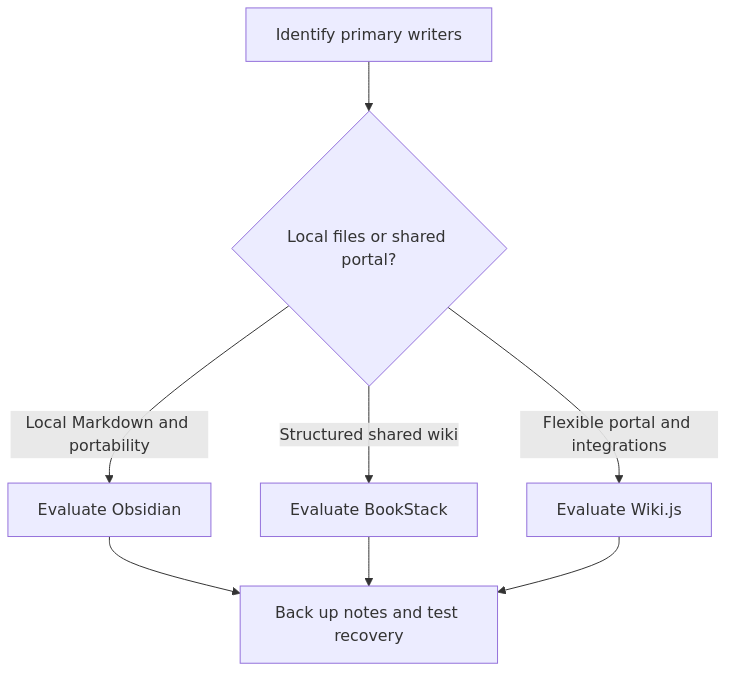
If you want one default answer, pick BookStack.
It is the documentation tool I would recommend to most homelabbers who want a self-hosted wiki that stays organized without needing a lot of design work. It has the cleanest structure, it is easy to hand to another person later, and it does not ask you to build your own system from scratch.
That said, Obsidian is better if the homelab docs mostly live with you, not on a shared server. Wiki.js is better if you want more editor flexibility, broader authentication options, and a platform that feels closer to a lightweight internal developer portal.
That is the short version. The useful version is understanding why each tool wins in a different situation.
If you want a dead-simple baseline to compare these tools against, this is the kind of documentation structure I think every homelab should be able to support:
homelab-docs/\n├── README.md\n├── network.md\n├── services.md\n├── runbooks.md\n└── changes.md
Key Takeaways
- Best default self-hosted wiki for most homelabs: BookStack
- Best solo, local-first note vault: Obsidian
- Best option for Markdown-heavy shared docs and broader integrations: Wiki.js
- If your docs must still be accessible when part of the lab is down, Obsidian or plain Markdown files still have a major advantage
- If you want structure without much thinking, BookStack is the easiest tool here to keep tidy over time
- If you treat documentation more like a living engineering system than a personal notebook, Wiki.js has more headroom
My evaluation criteria
I am not going to pretend I ran fake benchmark charts just to make this look more scientific.
This comparison is based on the current official product pages and docs for Obsidian, BookStack, and Wiki.js, plus current community comparisons that align with what homelabbers usually care about in practice:
1. How quickly can you get useful docs in place?
2. How well does the structure hold up after six months of changes?
3. How good is the Markdown and writing workflow?
4. How painful is sharing, permissions, and authentication?
5. How much does the tool depend on the rest of your lab being healthy?
6. How likely are you to keep using it?
That last point matters more than feature count. The best documentation tool is not the most powerful one. It is the one you still update after the third router change, the fourth Docker migration, and the first ugly restore weekend.
Quick comparison table
| Tool | Best for | Hosting model | Biggest strength | Biggest weakness | My verdict |
|---|---|---|---|---|---|
| Obsidian | Solo homelabbers, local-first workflows, Markdown vaults | Local app, optional paid Sync/Publish | Fastest personal note workflow, plain Markdown files, plugins, graph and Canvas views | Not naturally a shared self-hosted wiki, collaboration is less elegant | Best for one primary operator |
| BookStack | Most self-hosted homelab wikis | Self-hosted web app | Clean structure, low friction, strong sharing and permissions, easier to keep tidy | Less flexible than Wiki.js, more opinionated hierarchy | Best overall default |
| Wiki.js | Team docs, Markdown-first shared docs, integration-heavy setups | Self-hosted web app | Flexible editors, auth choices, Git/storage integrations, stronger extensibility | Slightly more moving parts, easier to overbuild | Best for more advanced shared documentation |
Why this decision is different from the broader documentation guide
article_topic // Best Homelab Documentation Tools in 2026
Don't leave without the setup notes.
Get practical homelab guides, failure logs, and beginner-friendly build notes in your inbox.
Enter your email address to receive the Homelab Addiction newsletter.
A few days ago the site published How to Document Your Homelab So Future You Stops Guessing. That article answers the first question most people should solve: what exactly should you document?
This article answers the next question: where should those notes live once you start taking documentation seriously?
That distinction matters because many homelabbers do the second step before the first. They spend a weekend picking a tool, then never build a service inventory, a network map, or a backup runbook. The tool was not the bottleneck. The workflow was.
So read this page as a tool-choice layer on top of the foundations work - not a replacement for it.
Obsidian: the best solo documentation tool if your lab mostly serves one operator
Obsidian is not a self-hosted wiki in the usual sense. That is also part of why it works so well.
The core Obsidian model is simple:
- your notes live locally as plain text Markdown files
- links between notes are first-class
- plugins let you tailor the workflow heavily
- Canvas gives you a visual workspace for diagrams and planning
- Sync and Publish are optional paid add-ons, not requirements
For a solo homelabber, that is a compelling combination.
Where Obsidian wins
1. Local-first reliability
If your NAS is down, your reverse proxy is broken, or you just disconnected from your home network, Obsidian still works because your notes live on your device. That is a real advantage over a browser-only internal wiki.
2. Markdown is the source of truth
This matters more than it sounds.
When your documentation is plain Markdown files, it is easy to:
- back it up with the rest of your files
- version it with Git
- search it with normal tools
- move it somewhere else later
- avoid tool lock-in
That fits the same mindset behind practical homelab backups. You want durable, boring, portable data formats whenever possible.
3. It is fast enough that you will actually write things down
Obsidian is one of the few tools that disappears quickly enough for quick notes, migration logs, port mappings, and “why did I do this?” entries. That matters in real life.
A documentation platform with perfect ACLs is still worse than a fast notes app if the fast notes app is the one you actually open during maintenance.
Where Obsidian falls short
1. Sharing is not its native personality
Yes, you can sync vaults. Yes, you can publish notes. Yes, teams do use it. But Obsidian still feels most natural as a personal or small-group knowledge space, not as the default shared internal wiki for a household, team, or club.
2. Permissions are not the reason to choose it
If you need clean read-only areas, role-based visibility, guest access, and browser-first collaboration, Obsidian is not the strongest tool in this comparison.
3. Plugin freedom can become plugin sprawl
This is the familiar homelab problem in a different costume. The tool is flexible enough that you can spend too much time building a system instead of documenting your infrastructure.
Who should choose Obsidian
Pick Obsidian if:
- you are the main operator of the homelab
- you want docs to live locally first and sync second
- you prefer Markdown files over a web UI database app
- you think in linked notes, checklists, and scratch pages
- you want the lowest-friction place to capture ideas fast
If that is you, Obsidian is excellent. I would still keep the vault backed up and avoid making your documentation depend entirely on a maze of plugins.
BookStack: the best overall self-hosted documentation tool for most homelabs
If you want a real answer instead of a diplomat's answer, BookStack is the winner for most homelabs.
The reason is not that it has the most features. It does not. The reason is that it gets the balance right.
BookStack gives you:
- a clean browser UI
- a structure that is obvious immediately
- search that works well enough
- Markdown support when you want it
- OIDC, SAML2, LDAP, and MFA support
- built-in diagrams.net integration
- straightforward self-hosting paths, including Docker-based options
Most importantly, it gives your documentation a shape.
Why structure matters more than people admit
BookStack uses a fixed hierarchy: Books -> Chapters -> Pages.
If you are documenting a homelab, that structure is usually an advantage, not a limitation.
For example:
- Book: Network
- Chapter: VLANs
- Chapter: DNS
- Chapter: Firewall rules
- Book: Services
- Chapter: Media
- Chapter: Backups
- Chapter: Authentication
- Book: Runbooks
- Chapter: Restore steps
- Chapter: Migrations
- Chapter: Hardware replacement
That sounds basic. It is also exactly why BookStack ages well. A lot of documentation systems get messy because they let everything become a tag soup or a pile of disconnected pages. BookStack makes you keep a shelf.
Where BookStack wins
1. It is the easiest shared wiki to keep organized
This is the headline reason it wins.
You do not need to invent your own taxonomy before you can be productive. You can start using it right away and the structure remains readable months later.
2. It is friendly to both technical and not-so-technical users
That matters if your homelab is no longer just for you.
Maybe your partner needs the “what to do when internet is weird” page. Maybe you want to hand a restore checklist to a friend helping during maintenance. Maybe you want household service notes in one place that do not require a local Markdown workflow.
BookStack handles that better than Obsidian.
3. It has enough enterprise-style auth without feeling like an enterprise product
This is a sweet spot. If your lab already has an identity provider, BookStack can plug into it. If not, it still stays approachable.
4. The built-in diagrams.net support is genuinely useful
This matters more in homelabs than in generic note-taking.
Network maps, backup flow diagrams, VLAN sketches, and service relationships all show up sooner or later. A tool that reduces friction around diagrams is worth extra points.
Where BookStack falls short
1. The hierarchy is opinionated
That is mostly a strength, but not always.
If you prefer freer linking across notes, a web-of-pages model, or a more fluid Markdown-first knowledge graph, BookStack can feel a bit rigid.
2. It is still another service to operate
You need the app, the database, backups, and maintenance. If your lab is very small and you just want personal notes, a self-hosted wiki can be unnecessary overhead.
3. It does not try to be the most extensible platform here
If your goal is deep integrations, more rendering options, or a documentation platform that behaves like a larger internal portal, Wiki.js has more headroom.
Who should choose BookStack
Pick BookStack if:
- you want a self-hosted documentation tool that is easy to recommend without caveats
- you care about structure and readability more than plugin depth
- you want to share docs in a browser without teaching everyone your note workflow
- you want a wiki that stays useful even when your lab grows beyond one operator
For most homelabbers who say, “I want a documentation platform,” this is the right answer.
Wiki.js: the best fit when your docs behave more like a platform than a notebook
Wiki.js is the most flexible web-based tool in this comparison.
Its strengths are clear from the official product pages and docs:
- multiple editor types including Markdown, WYSIWYG, and HTML
- many authentication choices including LDAP, OAuth2, OIDC, and SAML
- Git and external storage integrations
- broader module model for search, rendering, comments, storage, and more
- stronger “developer docs” personality than BookStack
If BookStack is the disciplined lab binder, Wiki.js is the documentation platform that wants to grow with your systems.
Where Wiki.js wins
1. Better flexibility for Markdown-heavy operators
If your documentation workflow already leans toward Markdown, code blocks, richer rendering, and developer-style content, Wiki.js feels more natural than BookStack.
2. Better long-term extensibility
This matters when your homelab documentation is no longer just pages and diagrams. Maybe you want Git-backed storage, broader search backends, more auth provider choices, or more control over how content is rendered.
3. Better fit for mixed audiences
If your documentation starts to serve both operators and developers, or needs more modular behavior than BookStack provides, Wiki.js is easier to stretch.
Where Wiki.js falls short
1. More power means more choices
That is the same trade-off you see everywhere else in a homelab.
A tool with more options often asks more of you upfront. For some people, that is fine. For others, that is how a documentation project quietly dies before the first useful runbook is written.
2. It is easier to overbuild
If you do not actually need Git sync, modular search engines, or richer editor paths, those features can become distractions instead of advantages.
3. It is not the cleanest default answer for most people
That is why it does not win overall.
Wiki.js is excellent. It is just slightly less obvious as the default recommendation for the average homelabber who wants one shareable docs system that stays tidy with minimal fuss.
Who should choose Wiki.js
Pick Wiki.js if:
- you want a self-hosted docs platform with more flexibility than BookStack
- you care about Markdown-first workflows and broader integrations
- you want room to grow into team-style docs, richer auth, or Git-adjacent content management
- you are comfortable operating a slightly more involved documentation stack
If your homelab docs are starting to feel closer to an internal engineering wiki than a personal notebook, Wiki.js becomes much more attractive.
Resource expectations and hosting reality
I am careful with synthetic resource claims, but the current comparison space is directionally consistent here.
Community comparisons place both BookStack and Wiki.js in the “small homelab friendly” category, with BookStack often described as the lighter and simpler operating model, while Wiki.js tends to need a bit more headroom once you lean into its broader feature set.
The more important operating difference is not a 100 MB swing in RAM. It is this:
- Obsidian puts almost no server burden on your homelab unless you bolt on sync or publish workflows around it
- BookStack gives you a clean self-hosted wiki without too much operational ceremony
- Wiki.js gives you the most platform surface area, which is both its benefit and its cost
If you already document infrastructure decisions like IP planning and network layout, think about your documentation tool the same way. Simpler infrastructure is usually easier to trust.
Which tool wins for real homelab situations?
If you are the only serious operator
Winner: Obsidian
You will move faster with local Markdown notes, backlinks, and a tool that opens instantly.
If you want one self-hosted wiki for the whole lab
Winner: BookStack
This is the best default balance of structure, sharing, and operational sanity.
If your docs need richer auth and more extensibility
Winner: Wiki.js
The broader integrations and editor choices make sense once your documentation starts serving a larger or more technical audience.
If you want the safest long-term ownership of raw notes
Winner: Obsidian
Plain Markdown files remain hard to beat for durability and portability.
If you want the tool you are least likely to outgrow in a browser-first setup
Winner: Wiki.js
It has the most runway, even if that runway is more than many homelabs need.
If you want the strongest overall recommendation without a long personality quiz
Winner: BookStack
That is why it wins the article.
The tool I would actually recommend, in order
If you asked me what to use tomorrow, my answer would be:
1. BookStack for most homelabs
2. Obsidian if you are mostly documenting for yourself
3. Wiki.js if you already know you want a more extensible shared documentation platform
That order is not about raw capability. It is about likely success.
BookStack is the easiest tool here to recommend with the fewest “yes, but” footnotes.
Optional gear that genuinely helps a documentation-heavy homelab
Documentation is mostly software, but there are a few cheap physical upgrades that make it easier to stay organized.
- Label maker for cables, ports, and hosts - browse label makers on Amazon
- Portable SSD for vault exports, runbooks, and backup copies - browse external SSD options on Amazon
- Small UPS for the box that hosts your wiki or password manager - browse APC UPS options on Amazon
A small power cut is an annoying time to learn that your documentation, your password vault, and your reverse proxy were all riding on the same unprotected host.
Final verdict
If you want the cleanest default answer, BookStack wins.
It is the best homelab documentation tool for most people because it gives you a proper self-hosted wiki, a structure that stays readable, enough authentication depth for more serious setups, and a gentler learning curve than Wiki.js.
If the homelab is basically your personal lab notebook, Obsidian is still the better tool.
If you want broader integrations, more editor flexibility, and a documentation system that can grow into something closer to an internal engineering portal, Wiki.js is the better long-term bet.
The wrong move is not picking the second-best tool. The wrong move is waiting for the perfect tool while your firewall rules, restore steps, service locations, and VPN decisions stay trapped in your head.
If you have not already, pair this comparison with How to Document Your Homelab So Future You Stops Guessing and then pick one tool this week. A good-enough documentation system you actually maintain will beat a theoretically perfect one every time.
Frequently Asked Questions
What is the best documentation tool for most homelabs?
For most homelabs, BookStack is the best default self-hosted documentation tool because it balances structure, sharing, and low-friction operation better than the alternatives.
Is Obsidian better than BookStack for homelab documentation?
Obsidian is better when one person mainly operates the homelab and wants local-first Markdown notes. BookStack is better when the documentation should live in a shared self-hosted wiki.
When should I choose Wiki.js over BookStack?
Choose Wiki.js when you want more editor flexibility, broader authentication options, and a documentation platform that can grow into a more developer-oriented internal portal.
article_topic // Best Homelab Documentation Tools in 2026
Start building a smarter homelab.
Join readers learning Proxmox, networking, storage, backups, and self-hosting without breaking everything.
Enter your email address to receive the Homelab Addiction newsletter.
Beginner-friendly
No gatekeeping. Just clear, actionable guides.
1 useful email / week
Practical tips, real-world setups, and lessons learned.
Zero hype, practical only
What works, what breaks, and how to fix it.
Reply to any email with what you're building.
I read and reply to as many as I can.
— The Homelab Addiction Operator