We’re excited to launch our first HomelabAddiction printable 🎉 Become an early supporter and get 20% off withEARLY20GET NOW

Homelab Addiction
Self-Hosting

Grow Your Homelab Without Breaking It: 10 Habits That Scale

Scale a homelab safely with documentation, one-change deployments, backup-first workflows, and rollback habits that keep growth predictable.

HomelabAddiction Research Desk8 min read
Disclosure: This article may contain affiliate links. If you purchase through these links, we may earn a commission at no additional cost to you. We only recommend products and services that can be supported by cited vendor documentation, product specifications, or other primary sources. No hands-on testing is claimed here unless explicitly stated.
Documentation basis: This workflow is grounded in the Docker Compose documentation, the Proxmox Backup Server documentation, the NetBox documentation, and the Git documentation. No claim is made here that every habit was field-tested across large production labs unless explicitly stated.

Homelabs usually become fragile when networking, application, and exposure changes pile up faster than documentation and rollback plans.

The safer goal is repeatability: keep a stable baseline, change one layer at a time, verify what changed, and leave a paper trail that makes the next restore or upgrade boring instead of stressful.

This page helps readers adopt ten operational habits before they add more services, subdomains, or hardware than they can comfortably explain and recover.

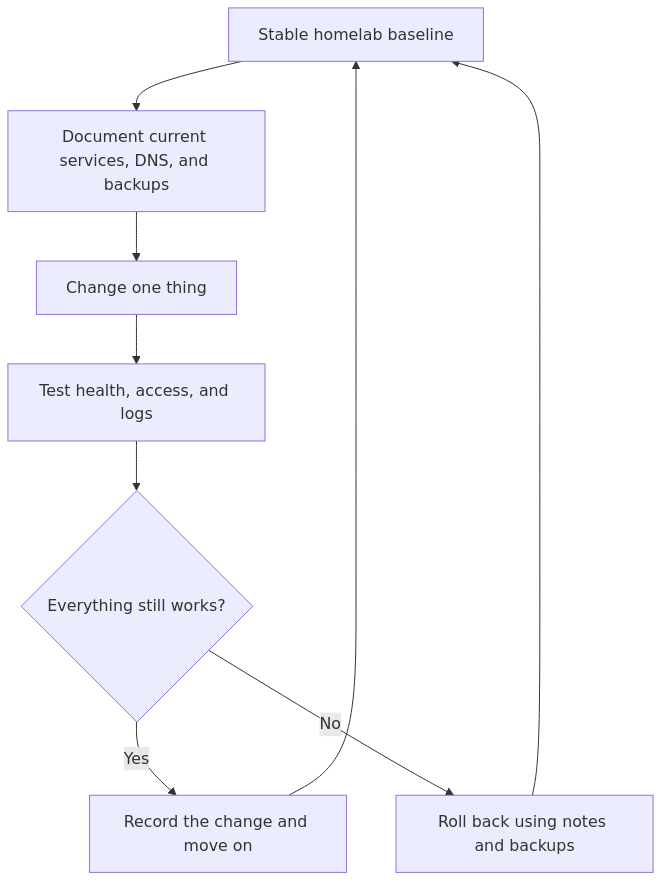
Operational change loop for growing a homelab safely
Safe growth loop: document the baseline, change one layer, verify it, and either keep the change or roll back before stacking the next dependency.

If you are following the beginner series, this builds on earlier foundations in the Self-Hosting category.

Grow your homelab: keep a stable baseline and change one thing at a time

The fastest way to break a homelab is changing three variables at once.

When something stops working, you do not know which change caused it.

A safer approach:

  • keep a stable baseline
  • change one thing
  • verify it
  • write down what you did

This also helps you avoid the most common scaling trap: mixing “new service” changes with “network change” changes.

If you add a new app and a new DNS rule and a new firewall rule in the same hour, you are guaranteed a long night.

Operational change loop for growing a homelab safely
Safe growth loop: document the baseline, change one layer, verify it, and either keep the change or roll back before stacking the next dependency.

Habit 1: write it down (what you wish you knew earlier)

If you read homelab forums for long enough, you see the same regret: “I should have documented this sooner.”

Most outages are not mysterious. They are forgotten decisions.

Habit 2: write it down (your homelab is a system, not a vibe)

transmission signup

article_topic // Grow Your Homelab Without Breaking It

Don't leave without the setup notes.

Get practical homelab guides, failure logs, and beginner-friendly build notes in your inbox.

Enter your email address to receive the Homelab Addiction newsletter.

Weekly only. No spam. Unsubscribe anytime.

If you cannot explain your setup in a simple note, it will not scale.

You do not need a wiki. A single repo or folder is enough:

  • network map
  • IPs and DNS names
  • what runs where
  • how backups work
  • how remote access works

Documentation is a multiplier because it prevents repeated troubleshooting.

If you want a simple starter system for notes, inventories, and recovery steps, read How to Document Your Homelab So Future You Stops Guessing.

A simple rule for when to document:

  • If a future you would ask “why is it like this?”, write one sentence now.

Habit 2: keep an inventory (hardware, services, dependencies)

As soon as you have more than one machine, your biggest risk is forgetting what depends on what.

Track three lists:

  • Hardware: server model, disks, NICs, IPMI/iDRAC address, warranty notes
  • Services: what runs, where it runs, and how you access it
  • Dependencies: DNS, reverse proxy, storage mounts, certificates, VPN

This makes troubleshooting faster because you can follow the chain when something fails.

Habit 3: standardize naming and folders

Chaos starts with inconsistency.

Pick conventions:

  • hostnames
  • service URLs
  • folder structure for compose stacks

This makes maintenance boring, which is what you want.

A practical default:

  • one folder per stack
  • one docker-compose.yml per stack
  • a config/ folder you can back up
  • a data/ folder or named volumes for state

Habit 4: separate “core” from “experiments”

You will always have experiments.

The trick is keeping experiments from breaking the things you rely on.

Beginner-friendly approach:

  • one services VM or host for core apps
  • one sandbox VM for experiments

If the sandbox breaks, your life does not.

Habit 5: reduce the number of public entry points

As you grow your homelab, you will be tempted to expose more services.

Do the opposite.

Prefer:

  • VPN for your own access
  • one reverse proxy for anything public

This keeps your risk small and auditable.

Habit 6: treat backups and restores as part of every change

A backup you never restore is a hope, not a plan.

Before major changes, do a tiny restore test:

  • restore one folder
  • confirm you can start one service from restored data

If you cannot restore, do not add complexity.

Reference:

Habit 7: make changes reproducible (Compose files, scripts, and notes)

As you grow your homelab, manual setup becomes your enemy.

Your goal is not automation for its own sake. Your goal is that you can rebuild when something breaks.

A practical baseline:

  • keep docker-compose.yml for every stack
  • keep a short README with access URLs and ports
  • keep backup and restore notes per app

This is the boring foundation behind “it survived the reboot.”

Habit 8: version-control your configs (lightweight GitOps)

You do not need full automation.

But you should keep:

  • compose files
  • reverse proxy configs
  • firewall notes

in version control.

This makes rollbacks possible and changes reviewable.

A simple approach:

  • one private repo
  • one folder per stack
  • commit messages like “upgrade jellyfin” or “add new DNS record”

If you want to see what a more advanced approach looks like, GitOps-style homelabs manage everything from a repo.

References:

Habit 9: upgrade on purpose (pin versions)

Random upgrades are how stable services become surprise downtime.

Good default:

  • pin versions for important services
  • upgrade during a planned window
  • keep a rollback path

Habit 10: monitor the boring signals

As you grow your homelab, you need early warning.

Start with:

  • disk space alerts
  • uptime checks
  • backup success monitoring

Reference:

From the lab

Habit 11: keep cables and power boring (label it early)

A lot of “my homelab broke” stories are not software. They are power and cabling.

Two small habits save hours:

  • label both ends of cables
  • document what is plugged into what (switch ports and power strips)

This matters even more when you add a second machine or a switch.

Habit 12: add segmentation only when you can explain it

VLANs and multiple subnets are useful.

But they can also turn your weekend into “why can’t my phone see the server.”

Add them when:

  • your baseline network is stable
  • you have a reason (IoT isolation, guest devices, lab separation)

Habit 13: keep a rollback plan for every risky change

Rollback does not need to be fancy.

It can be:

  • a snapshot
  • a config backup
  • a known-good compose file

The point is that you are never stuck.

A good rollback plan answers two questions:

  • What is the fastest way to get back to “working enough”?
  • What is the clean way to fix it properly after the outage is over?

If you keep those separate, you stop making panicked changes that compound the problem.

Habit 14: separate storage growth from service growth

One of the most common scaling pain points is mixing two big changes:

  • migrating storage
  • migrating services

If you are adding a NAS, a new disk pool, or a new server, treat that as its own project.

Move one dataset first, validate performance and permissions, then move services.

This is how you grow your homelab without turning “storage night” into “everything is down” night.

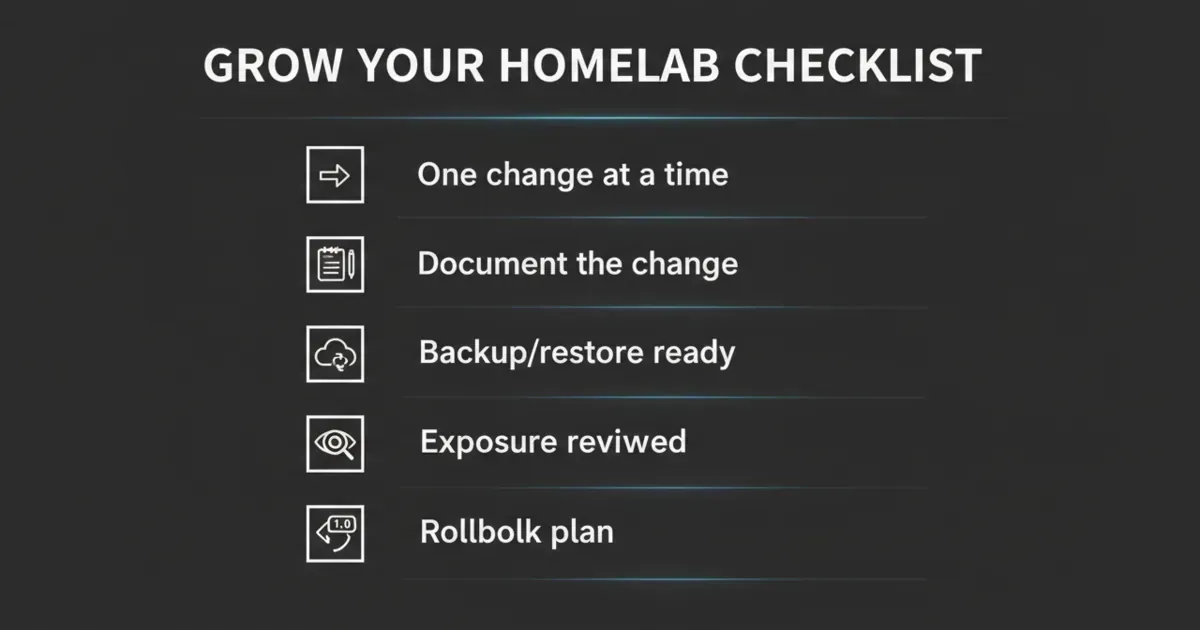
A pre-change checklist (run this every time)

Before you touch your lab:

  • What is changing?
  • What could break?
  • How do I roll back?
  • Do I have a recent backup?
  • Is the change affecting networking or exposure?
A one-page checklist graphic for growing a homelab safely: baseline, backups, one-change rule, exposure review, and rollback plan.

FAQ

How do I grow my homelab without breaking everything?

Grow slowly. Keep a stable baseline, document changes, and make rollback normal.

What should I document first?

Document the network map, IPs, DNS names, and what runs where. Those are the details you need when something fails.

Do I need Kubernetes to scale a homelab?

Not for most people. A consistent Compose setup plus backups and monitoring scales surprisingly far.

How do I avoid losing data as my homelab grows?

Make backups and restore tests part of your routine. If you cannot restore, stop adding complexity.

What is the best way to keep configs organized?

Use a consistent folder structure and put configs in version control.

What is the most common mistake when scaling a homelab?

Changing too many things at once. Make one change, verify it, then move to the next.

What should I label in a rack or cabinet setup?

At minimum, label power and network cables on both ends, and note which switch ports matter. It prevents “mystery unplug” downtime.

Next steps

Pick one habit from this list and implement it this week.

The easiest high-impact pair:

  • put your configs in a repo
  • set a monthly upgrade window

If you want a third:

  • label your power and network cables before you forget what is what

If your lab becomes predictable, you will be able to grow it without fear.

transmission signupstatus: open channel

article_topic // Grow Your Homelab Without Breaking It

Start building a smarter homelab.

Join readers learning Proxmox, networking, storage, backups, and self-hosting without breaking everything.

Enter your email address to receive the Homelab Addiction newsletter.

Beginner-friendly

No gatekeeping. Just clear, actionable guides.

1 useful email / week

Practical tips, real-world setups, and lessons learned.

Zero hype, practical only

What works, what breaks, and how to fix it.

Reply to any email with what you're building.
I read and reply to as many as I can.

— The Homelab Addiction Operator

support // the lab

Found this guide useful?

If it saved you time or a rebuild, you can support more practical homelab guides.

Support the lab