RAID 5 vs RAID 6 vs RAID 10 for Homelab NAS: Capacity, Rebuild Risk, and Workload Fit
Compare RAID 5, RAID 6, and RAID 10 for a homelab NAS by usable capacity, rebuild exposure, and workload fit so the storage layout matches your risk tolerance.
This page helps a homelab operator decide whether RAID 5, RAID 6, or RAID 10 fits the workload by framing the choice around usable capacity, rebuild exposure, and the difference between bulk storage and active VM or database traffic.
The practical question is not which RAID level sounds smartest in the abstract. The practical question is which tradeoff hurts least after a disk failure, during a rebuild, and while the array is serving the workloads that actually live on it.
For many HDD-heavy NAS builds, larger drive sizes make rebuild time and second-failure tolerance more important than they used to be. For write-heavy application storage, mirrored layouts often matter more than raw capacity efficiency.
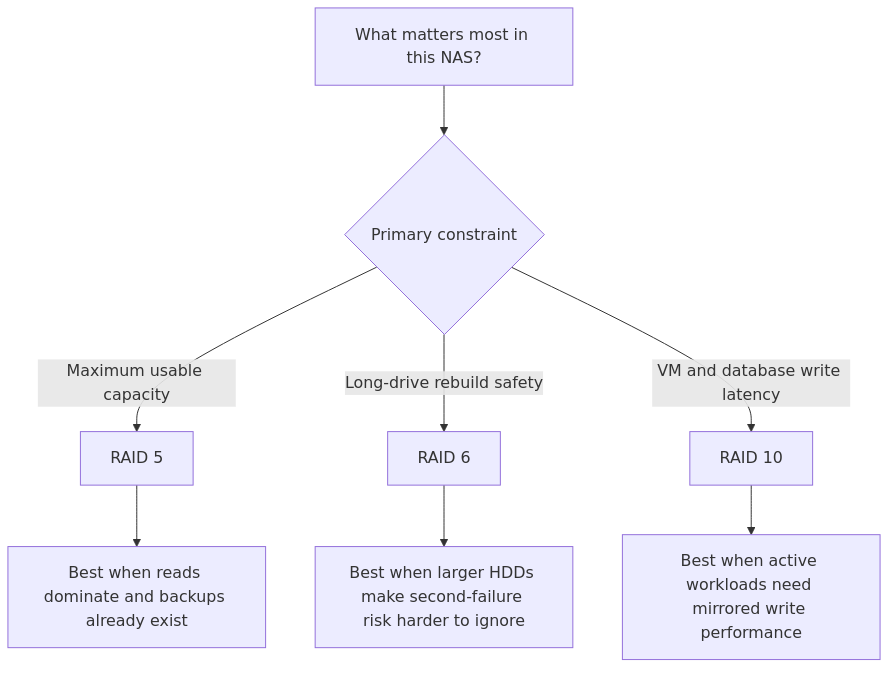
RAID choice flow: prioritize RAID 5 for capacity, RAID 6 for larger-drive rebuild safety, and RAID 10 for write-heavy VM or database workloads.
Key Takeaways
Key Takeaways
RAID 5 wins on capacity efficiency for smaller 3 to 5 drive arrays, but it only tolerates one failed drive.
RAID 6 is the better all-around pick for 4-bay and 6-bay NAS builds using 12 TB, 16 TB, or 18 TB class drives.
RAID 10 is the performance winner for VMs, Docker app data, databases, and any workload that cares about random write speed.
On 1GbE, sequential performance is often network-limited anyway, so the parity penalty matters less for Plex and file shares than people assume.
RAID is not backup. If you skip a second copy, parity will not save you from deletion, ransomware, controller failure, or fire.
This article is based on three practical homelab scenarios rather than vendor marketing slides.
Scenario 1: 4 x 12 TB HDD media NAS on 2.5GbE
Scenario 2: 6 x 12 TB HDD backup and archive NAS
Scenario 3: 4-drive SSD-backed VM and container datastore
For the numbers below, I used standard RAID capacity math, line-rate network ceilings, and rebuild-window estimates based on sustained rebuild throughput between 150 MB/s and 250 MB/s per drive. That gives a realistic range for homelab hardware instead of the fantasy figures vendors love to print in giant type.
The practical network ceilings matter too: 1GbE is about 118 MB/s in practice, 2.5GbE is about 294 MB/s, and 10GbE is about 1175 MB/s. That is why parity often feels fine on a 1GbE media NAS but much less fine once the same box starts serving VMs.
Capacity, rebuild windows, and the numbers that matter
Here is the first table I care about when someone says they are choosing a RAID layout for a NAS.
transmission signup
article_topic // RAID 5 vs RAID 6 vs RAID 10 for Homelab NAS
Don't leave without the setup notes.
Get practical homelab guides, failure logs, and beginner-friendly build notes in your inbox.
Enter your email address to receive the Homelab Addiction newsletter.
Weekly only. No spam. Unsubscribe anytime.
Scenario
Raw Capacity
RAID 5
RAID 6
RAID 10
4 x 12 TB
48 TB
36 TB usable
24 TB usable
24 TB usable
6 x 12 TB
72 TB
60 TB usable
48 TB usable
36 TB usable
4 x 18 TB
72 TB
54 TB usable
36 TB usable
36 TB usable
Now the rebuild side of the story.
A 12 TB drive rebuilding at 250 MB/s is roughly 13.3 hours of raw copy time. At 180 MB/s, it becomes 18.5 hours. At 150 MB/s, you are already at 22.2 hours before accounting for parity overhead, competing I/O, scrubs, or a box that is also serving users.
An 18 TB drive takes around 20 hours at 250 MB/s, 27.8 hours at 180 MB/s, and 33.3 hours at 150 MB/s. That is why the phrase "I will just rebuild it" starts sounding less confident once you stop using 4 TB disks from the recycling pile.
RAID 10 usually wins the rebuild story because it is copying a mirror, not recalculating parity across the entire array. RAID 5 and RAID 6 make you pay for their capacity efficiency during failure recovery.
RAID 5: the capacity-efficient old favorite
RAID 5 still makes sense in a homelab, just in a narrower set of situations than it used to.
The appeal is obvious. You lose only one drive's worth of capacity, reads are decent, and on a small 4-bay NAS the math looks attractive. A 4 x 12 TB set gives you 36 TB usable, which is a lot easier to justify than the 24 TB you get from RAID 6 or RAID 10.
That makes RAID 5 a reasonable pick for a media library, backup repository, or general file-serving NAS where the workload is mostly large sequential reads and writes. If your clients are on 1GbE, the network will often cap throughput before parity overhead becomes the main problem.
The problem is failure-day behavior. RAID 5 only gives you one drive of fault tolerance, and long rebuild windows on modern disks make that trade-off harder to ignore.
RAID 5 pros
Best usable capacity of the three options here
Good fit for media, archives, and read-heavy NAS workloads
Fine on smaller arrays where every TB matters
Easier to justify when the NAS is not also your VM host
RAID 5 cons
Only one failed drive tolerated
Parity write penalty hurts random-write workloads
Rebuilds are slow on modern large drives
Failure during rebuild is the exact kind of story people post after the damage is done
RAID 6: the smarter default for modern HDD NAS builds
For a 4-bay or 6-bay HDD NAS without a strong performance reason to use mirrors, RAID 6 is often the safer default because it gives larger drives more room for an ugly rebuild week.
You give up another drive's worth of usable capacity compared with RAID 5, but you also stop pretending that only one bad thing can happen during a long rebuild window. When drives are 12 TB, 16 TB, or 18 TB, that extra safety margin is planning, not paranoia.
On a 6 x 12 TB array, RAID 6 still leaves you 48 TB usable, which is plenty for a homelab. That is why RAID 6 feels like the right compromise for backup targets, family file shares, photo archives, and mixed-use NAS boxes.
Write performance is worse than RAID 5 because double parity is extra work. That matters for databases, heavy VM usage, and small random writes. It matters far less for cold storage, media, backups, and normal SMB/NFS serving.
If you are running a NAS OS that nudges you toward parity-based layouts, this is where the ecosystem guidance also starts lining up. TrueNAS's ZFS Capacity Calculator positions RAIDZ2 as the balanced capacity-and-redundancy option, and the SUSE software RAID guide also reinforces the classic trade-off that software RAID buys flexibility at the cost of some CPU and memory overhead.
RAID 6 pros
Survives two drive failures
Better fit for large-capacity HDD arrays
Strong compromise between usable space and safety
Great for backup targets and primary household NAS builds
RAID 6 cons
Slower writes than RAID 5 and RAID 10
Still slower to rebuild than mirrored layouts
Gives up more raw capacity than RAID 5
Less ideal for write-heavy VM or container storage
RAID 10: the strongest fit for VMs and app storage
RAID 10 is the easiest RAID level to recommend when performance matters and the easiest one to reject when capacity matters.
The upside is straightforward. You get the best random-write behavior of the three, rebuilds are simpler, and the array stays much more comfortable under mixed workloads. If you are storing Proxmox VMs, Docker volumes, a database, or anything that constantly updates small blocks, RAID 10 feels better in day-to-day use.
The downside is just as straightforward. You lose half your raw capacity.
That is the tax. On a 4 x 12 TB array, you get 24 TB usable. On a 6 x 12 TB array, you get 36 TB usable. If your main requirement is "I need a lot of cheap bulk storage," RAID 10 is not the right answer.
But when the NAS is really a storage appliance for virtualization, the story changes. Random writes, metadata churn, snapshots, VM boot storms, and database journals all make parity arrays feel heavier. That is exactly where RAID 10 earns its keep.
RAID 10 pros
Best random-read and random-write behavior
Faster rebuilds than parity arrays
Better fit for VM and container storage
Easier to live with under mixed workloads
RAID 10 cons
Worst capacity efficiency of the three
Requires an even number of drives
Can feel wasteful for media libraries and cold storage
Still not a backup, despite how emotionally reassuring mirrors can be
Benchmark-style comparison: where each layout wins
Metric
RAID 5
RAID 6
RAID 10
4 x 12 TB usable capacity
36 TB
24 TB
24 TB
6 x 12 TB usable capacity
60 TB
48 TB
36 TB
Typical 1GbE file-serving ceiling
~118 MB/s
~118 MB/s
~118 MB/s
12 TB rebuild window at 180 MB/s
~18.5h raw, often longer in practice
~18.5h raw, often longer in practice
Mirror copy, usually the least painful
18 TB rebuild window at 180 MB/s
~27.8h raw, riskier exposure
~27.8h raw, but dual parity helps
Mirror copy, still long but simpler
Write penalty feel
Noticeable on small writes
Most noticeable of the three
Best responsiveness
Best use case
Bulk storage
Primary HDD NAS
VM and app storage
Who should pick RAID 5
Pick RAID 5 if most of these are true:
You are building a 3 to 5 drive HDD array
Usable capacity matters more than absolute redundancy
The NAS is mostly serving media, backups, or large files
You already have a separate backup plan and you actually use it
You are not storing your busiest VMs or app databases here
For a home media server, RAID 5 can still fit. It stops being a safe default once larger drives, mixed workloads, or limited backup discipline push rebuild risk higher on the list of concerns.
From the lab
Who should pick RAID 6
Pick RAID 6 if most of these are true:
You are using 12 TB or larger drives
You want a NAS that stays calm during failure events
The box is your main storage pool for photos, backups, documents, and media
You are using 4-bay or 6-bay hardware and do not want to roll the dice on single-parity rebuild exposure
You can afford the loss of another drive's worth of usable capacity
For most people building a serious HDD NAS in 2026, RAID 6 is the best default. It is not the fastest. It is not the cheapest in terms of raw capacity. It is the most sensible.
Who should pick RAID 10
Pick RAID 10 if most of these are true:
You care about VM performance
You run containers, databases, or small-block write-heavy workloads
You are okay paying the 50% capacity tax
You value simpler rebuild behavior
You are willing to keep bulk media elsewhere if needed
If your NAS doubles as a small virtualization platform, RAID 10 is usually the least regrettable answer.
1) 4-bay Plex and family file NAS
I would choose RAID 5 if backups are solid and the box is mostly read-heavy. The network is often the bottleneck, and the extra 12 TB over RAID 6 is meaningful.
2) 6-bay backup and archive NAS
I would choose RAID 6. Backups are supposed to reduce anxiety, not create a new category of anxiety during rebuild week.
3) Proxmox ISO store plus active VM disks
I would choose RAID 10, or better yet mirrors in a ZFS-oriented stack. This is where write latency matters and parity arrays feel clumsy.
4) One-box everything homelab
If you insist on running media, backups, Docker, and a few VMs all on one system, I still lean RAID 6 for HDD bulk storage and a separate SSD pool for apps. The Best NAS Hardware in 2026 article explains why splitting workloads often beats forcing one array to do everything badly.
Recommended gear
If you are planning a new RAID build, these are the kinds of parts I would start with:
If you have already narrowed down your drives or chassis, one easy way to reduce the final cost is to check for coupons or cashback before checkout. Coupert can help surface both while you shop.
2) Optimizing for capacity and ignoring rebuild pain
This is the classic RAID 5 trap. The array feels great right up until the day it does not.
3) Using parity arrays for the wrong workload
If your storage holds app data, databases, and active VMs, stop acting surprised when mirrors feel better. This is not a personality flaw in RAID 10. It is physics.
4) Ignoring the network bottleneck
If your clients are all on 1GbE, do not expect a dramatic media-streaming difference between RAID 5 and RAID 10. Your switch may be more relevant than your parity math.
5) Mixing NAS design and filesystem design into one confused decision
RAID layout is only part of the stack. Your filesystem and sharing protocol matter too. For that side of the decision, see ZFS vs Btrfs vs ext4 and NFS vs SMB vs iSCSI.
The winner
For a modern HDD-heavy homelab NAS, RAID 6 is the default choice when rebuild exposure matters more than squeezing out the last chunk of usable capacity.
The reason is straightforward: larger drives, mixed household data, and limited spare bays make second-failure tolerance more valuable than the extra capacity RAID 5 can save on paper.
If you care most about raw capacity, RAID 5 still has a place.
If you care most about VM and app performance, RAID 10 is the right answer.
But if you want the least regrettable middle ground for a serious HDD NAS, RAID 6 wins.
FAQ
Is RAID 5 still safe in 2026?
Yes, but only in the right context. It is still reasonable on smaller arrays where capacity matters and you have real backups. It is a lot harder to recommend blindly once you start talking about 12 TB to 20 TB drives and long rebuild windows.
Is RAID 10 faster than RAID 6 for Plex?
Usually not in a way you will notice over 1GbE for simple media streaming. Plex is mostly sequential reads. RAID 10 matters much more for VM disks, databases, and other random-write-heavy workloads.
Why does RAID 6 make more sense on large drives?
Because dual parity gives you a second layer of protection during the long rebuild windows that come with modern high-capacity HDDs. That extra margin is exactly what makes RAID 6 attractive on 4-bay and 6-bay NAS builds.
Should I use RAID 10 instead of RAID 5 for Docker volumes?
If those Docker volumes back databases, active apps, or anything latency-sensitive, yes, I would strongly consider RAID 10 or a dedicated SSD pool. Parity arrays are better at bulk storage than they are at pretending to be low-latency app storage.
What if I use TrueNAS or Unraid instead of classic RAID?
The same trade-offs still apply. In TrueNAS, mirrors map to the RAID 10-style performance argument while RAIDZ2 maps to the RAID 6-style safety argument. In Unraid, parity plus cache pools shifts the design, but the rule is similar: bulk HDD storage and app/VM storage should not be treated as identical workloads.
What to learn next
If this article helped you settle the RAID question, these are the next decisions that actually matter:
That is the order I would tackle it in. Pick the hardware, pick the drives, pick the filesystem, then build the backup plan you were hoping to postpone.
transmission signupstatus: open channel
article_topic // RAID 5 vs RAID 6 vs RAID 10 for Homelab NAS
Start building a smarter homelab.
Join readers learning Proxmox, networking, storage, backups, and self-hosting without breaking everything.
Enter your email address to receive the Homelab Addiction newsletter.
Beginner-friendly
No gatekeeping. Just clear, actionable guides.
1 useful email / week
Practical tips, real-world setups, and lessons learned.
Zero hype, practical only
What works, what breaks, and how to fix it.
Reply to any email with what you're building. I read and reply to as many as I can.
— The Homelab Addiction Operator
support // the lab
Found this guide useful?
If it saved you time or a rebuild, you can support more practical homelab guides.