Immich is easy to like when uploads, search, and browsing work. The harder question is what happens after a bad upgrade, a failed disk, or a restore day.
This page helps self-hosters protect an Immich photo library by backing up the database, upload storage, and any external-library mounts in the right order, with a restore-first checklist that the broader Immich cluster on HomelabAddiction did not already cover.
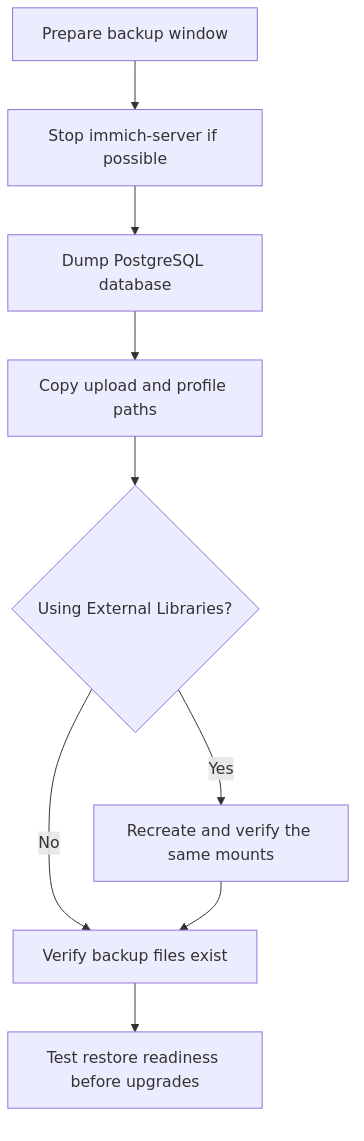
Backup flow: database first, filesystem second, then confirm external-library mounts and restore readiness.
Key takeaways
Back up both the Immich database and the file storage. One without the other is an incomplete recovery.
Immich's built-in database backups do not include your actual photo and video files.
If you use External Libraries, your restore must recreate the same mount layout before you trust the library.
The safest routine is either to stop immich-server during backup or, if that is not practical, back up the database first and the filesystem second.
A backup plan is not complete until you know how you would restore it.
What you need to back up
Immich stores the parts that matter in more than one place.
The PostgreSQL database holds file paths, albums, user metadata, sharing state, face assignments, and the rest of the library intelligence.
The upload storage holds the actual photo and video files plus folders like upload, library, thumbs, encoded-video, profile, and backups under UPLOAD_LOCATION.
Any external-library source paths still matter if you mounted existing folders into Immich instead of importing everything into Immich-managed storage.
If only the media files survive, the photos may still exist but the organized library does not. If only the database survives, Immich can point to files that are gone.
transmission signup
article_topic // Immich Backup Strategy
Don't leave without the setup notes.
Get practical homelab guides, failure logs, and beginner-friendly build notes in your inbox.
Enter your email address to receive the Homelab Addiction newsletter.
Weekly only. No spam. Unsubscribe anytime.
The simplest safe backup design
For most homelabs, the practical baseline is:
keep Immich on storage that makes sense for a database and a growing media library
produce a database dump on a schedule
copy the Immich file storage to a second location
keep an offsite copy or a second physical system
document the restore path before you need it
Immich recommends a 3-2-1 backup approach. The official backup page also points to a template script that combines a database dump with versioned file backups through Borg.
Built-in Immich backups: useful, but not enough on their own
Immich can create automatic database backups for disaster recovery. By default, it keeps the last 14 backups and creates one daily at 2:00 AM in UPLOAD_LOCATION/backups.
That helps, but it is only the metadata layer. The official docs are explicit that those backups do not contain photos or videos. If the storage holding your uploads dies and you only kept the built-in SQL dumps, the restore will still be incomplete.
That is why the backup question should be framed as database + files + restore plan, not just "Does Immich already back itself up?"
The backup order that avoids broken restores
The best case is to stop immich-server while the backup runs so nothing changes mid-copy.
If that is not realistic, Immich's docs still give a safer order:
back up the database first
back up the filesystem second
That order reduces the worst failure mode. In the bad case, you end up with extra files on disk that the restored database does not know about yet. That is easier to recover from than a restored database that points to missing assets.
External Libraries change the restore checklist
External Libraries are the key detail many generic backup articles skip.
If your Immich instance scans a Synology share, a NAS folder, or another mounted media path through External Libraries, the restore is not just about UPLOAD_LOCATION. You also need the same mount structure to exist again when the new instance comes up.
Immich's External Library guide assumes you mount those folders into the container explicitly, and the backup/restore docs warn that a restore should reflect the same structure if External Libraries were part of the old instance.
That means the restore checklist should include:
recreate the same bind mounts in docker-compose.yml
confirm permissions on those mounts before the scan runs
keep a note of which library paths were read-only versus writable
verify that Immich can still see the external folders after the restore
This is one reason migration-led photo stacks need a more careful plan than a simple all-in-one app volume backup.
A practical backup workflow for a homelab
Option 1: use Immich's own database backup plus file backups
This is the smaller starting point:
keep automatic database backups enabled in Immich
copy UPLOAD_LOCATION to another disk, NAS, or backup target
separately document any External Library source paths
before upgrades, trigger a fresh manual database dump and confirm the file copy target is healthy
This works best when you already have a backup platform elsewhere and just need to make sure the correct Immich paths are included.
Option 2: use the official Borg template pattern
Immich also publishes a template backup script built around Borg. The point is not that Borg is the only valid tool. The point is that the script versions the data and keeps the database dump synchronized with the library backup in the same snapshot set.
That pattern is strong for homelabs because it reduces the chance that your SQL dump and your file backup drift apart silently.
Option 3: split local and offsite protection
A practical 3-2-1 pattern for an Immich homelab often looks like this:
live Immich storage on the main host
local backup copy on another disk, DAS, or NAS share
offsite copy through Borg, Restic, rclone, or another backup platform
The exact tool can vary. The important part is preserving both the metadata layer and the files, then making sure the external-library mounts are not forgotten in the restore notes.
From the lab
Storage and host planning still matter
Immich's requirements page recommends at least 6 GB RAM and 2 CPU cores, with 8 GB and 4 cores preferred. It also warns that PostgreSQL should ideally stay on local SSD storage and never on a network share.
That matters for backups too. A fragile database location makes the backup strategy worse before the first backup even runs. If the database is the brain of the library, it should live on storage you trust during both normal operation and restore work.
If you are still deciding how to deploy the stack itself, the existing guide on How to Self-Host Immich on Docker is the right setup companion. If you are still choosing the app, the comparison page Immich vs Synology Photos covers the broader platform tradeoffs.
Restore-first checklist
A backup routine is only real if the restore path is clear.
Before calling the backup plan done, document these checks:
where the latest database dump lives
where the latest file backup lives
what UPLOAD_LOCATION was on the old system
whether External Libraries were used and which paths were mounted
whether the new compose file recreates the same mounts
whether the restored instance can read the upload folders and external folders
how you would confirm albums, users, and search metadata after restore
For a broader site-wide recovery mindset, the existing guide on NAS Backup Strategies is the natural next read.
When this article is most useful
This backup workflow matters most when one of these is true:
Immich is becoming the family's main photo archive
the library includes a large upload history plus albums and named faces you do not want to rebuild
you are using Synology or another NAS as an External Library source during a staged migration
you update often enough that rollback risk is real
That is the moment when Immich stops being just another container and starts being an archive you need to defend properly.
FAQ
Does Immich back up the actual photo files automatically?
No. Immich can create automatic database backups, but the official docs say those backups do not include the uploaded photos and videos. You still need filesystem backups.
Should you stop Immich before a backup?
Yes, if you can stop immich-server during the backup window. If you cannot, Immich recommends backing up the database first and the filesystem second.
What changes if you use External Libraries?
Your restore needs to recreate the same mounted library paths and permissions, not just the main Immich upload folder. Otherwise the restored instance may come back without access to the external files it expects.
Is the built-in backup tool enough for a homelab?
It is useful, but not enough on its own. It covers database recovery, not full library recovery.
What is the best next step after reading this?
Treat this article as the backup layer of the existing Immich cluster: first size and deploy the app cleanly, then define the backup target, then write down the restore path before you trust the stack with irreplaceable media.
transmission signupstatus: open channel
article_topic // Immich Backup Strategy
Start building a smarter homelab.
Join readers learning Proxmox, networking, storage, backups, and self-hosting without breaking everything.
Enter your email address to receive the Homelab Addiction newsletter.
Beginner-friendly
No gatekeeping. Just clear, actionable guides.
1 useful email / week
Practical tips, real-world setups, and lessons learned.
Zero hype, practical only
What works, what breaks, and how to fix it.
Reply to any email with what you're building. I read and reply to as many as I can.
— The Homelab Addiction Operator
support // the lab
Found this guide useful?
If it saved you time or a rebuild, you can support more practical homelab guides.