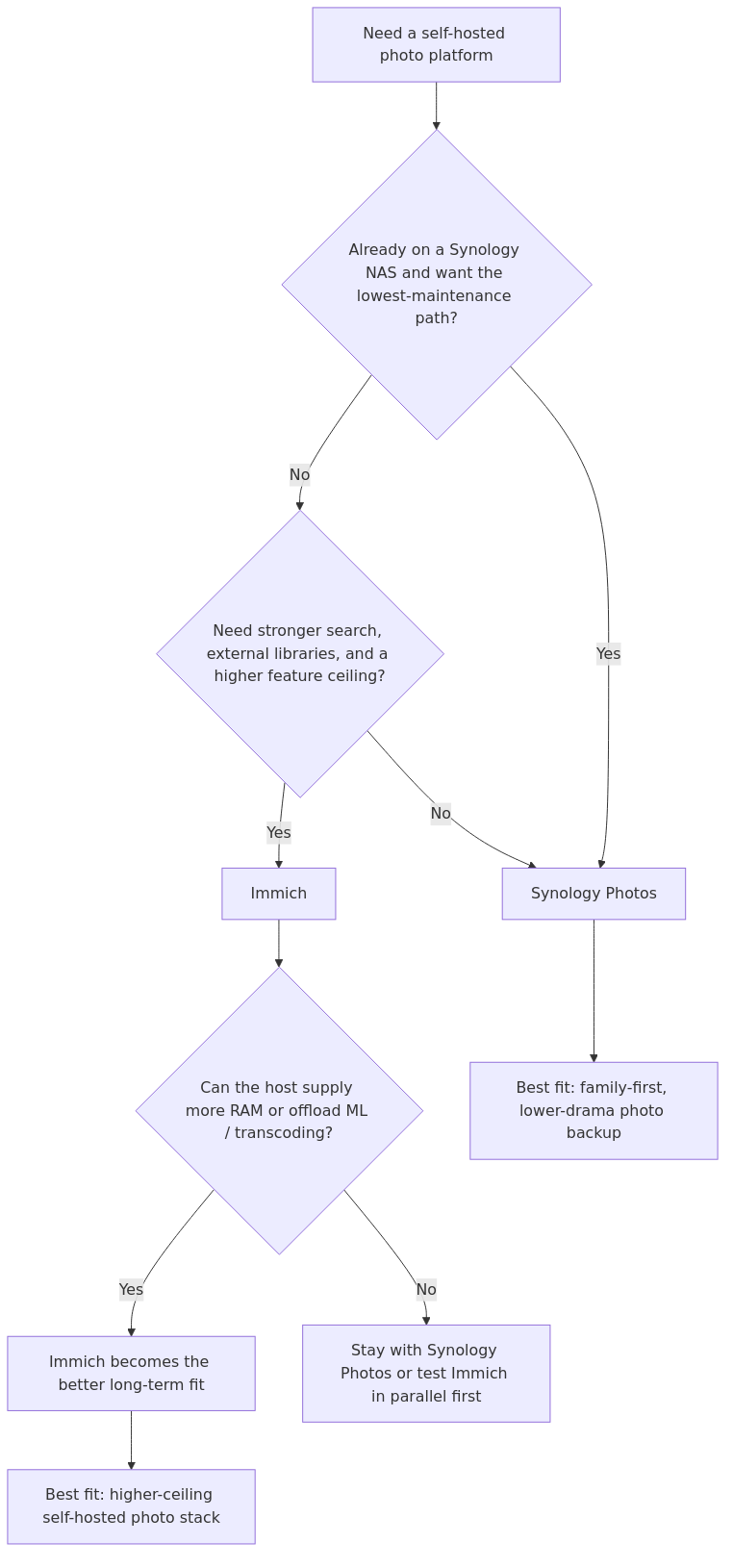
The decision is usually less about which photo app is universally better and more about which operating style fits the lab: lower-drama family backups on hardware already in place, or a higher-ceiling stack that asks for more resources and more operator attention.
Synology Photos fits readers who want the appliance-like path that comes with DSM integration and easier family handoff. Immich fits readers who want stronger search, external-library flexibility, and a more ambitious long-term product direction, even if that means running a heavier stack.
This page helps homelab operators match those tradeoffs to migration risk, RAM headroom, and maintenance appetite using vendor documentation and published migration evidence rather than first-person testing theater.
Photo stack selection flow: Synology Photos fits lower-drama family backups, while Immich fits readers willing to trade more resources and setup work for a higher feature ceiling.
You are running Docker, a database, the main application, and the machine-learning service. You also need to care about storage locations, permissions, backups, and version compatibility. None of that is outrageous. It is just more adult supervision than Synology Photos requires.
For a lot of readers, this is the point where the answer reveals itself.
Readers comfortable running a database, Redis, and supporting services will usually be more willing to absorb Immich's setup and maintenance overhead. Readers who want the photo stack to disappear into the NAS will usually prefer Synology Photos.
Feature depth: where Immich pulls ahead
Synology Photos is competent. Immich is more ambitious.
That is the cleanest way I can put it.
Synology's official feature page highlights automatic albums, facial and object recognition, conditional albums, folder and timeline views, backup from mobile, Shared Space collaboration, and sharing with passwords or expiration dates. For many households, that is already enough.
Immich aims higher. It wants to feel like the self-hosted answer to Google Photos, not just a NAS gallery.
The big Immich advantages are:
stronger Google Photos-style UX
smarter search and discovery direction
better flexibility for mixed storage layouts
more willingness to let you compose a system around your homelab rather than around a single vendor appliance
I do not say that lightly. Immich is one of the few self-hosted photo tools that consistently makes people say, "This is the first one that feels close enough to switch."
That does not mean Synology Photos is obsolete. It means Synology Photos is more conservative.
The one Synology Photos feature people underrate
I think too many Immich fans gloss over conditional albums.
Synology explicitly supports conditions like person, object, location, and even camera lens for automatically compiled albums. That sounds like a small thing until you are managing family events, sports photos, drone shots, or client folders and want live, shareable collections that update automatically.
Several published comparisons treat this as a genuine point in Synology's favor, because maintenance tolerance often matters more than a raw feature checklist.
Immich is excellent at discovery and browsing, but if your workflow depends on these rule-driven, automatically updating albums in a very polished appliance workflow, Synology Photos still has a real edge.
This is exactly why the right answer is not "Immich better, full stop."
The better answer is "Immich better for most tinkerers, Synology better for some real-world family and photographer workflows."
Load times, browsing feel, and day-2 performance
Exact apples-to-apples UI timing benchmarks are surprisingly rare in the public material. That is one of the biggest weaknesses in the current SERP.
What we do have is enough to draw a practical conclusion.
Synology Photos generally feels fast because it is tightly integrated into a controlled NAS environment. Timeline browsing, folder browsing, and sharing are all part of a relatively opinionated system. You are not layering extra containers and services on top just to get to the first scroll.
Immich often feels faster and more modern once it is healthy, especially when the host has enough RAM and either hardware acceleration or remote ML available. In the Synology migration thread I reviewed, a user reported importing 300k photos and videos into Immich as an external library and having everything analyzed in one night by offloading machine learning to a GPU-equipped Windows PC. The same report described mobile and web access as very fast afterward.
That is not the same thing as saying Immich always has lower UI latency. It is saying Immich has a higher performance ceiling when you give it enough hardware or smart offload.
My practical read:
On weak NAS-only hardware, Synology Photos usually delivers the smoother out-of-box experience.
On stronger hardware or hybrid NAS + mini PC setups, Immich often becomes the more satisfying app to actually use.
Resource usage: this is where many migrations succeed or fail
This is the most important section in the article.
Immich's official requirements are plain: 6 GB RAM minimum, 8 GB recommended, 2 CPU cores minimum, 4 recommended. The docs also warn that thumbnails and transcoded videos can add 10-20% to library size on average.
That is not absurd for a modern homelab. But it is absolutely material on older or smaller Synology boxes.
A 2-bay NAS that already handles backups, SMB, media serving, and maybe Surveillance Station is not the same as a lightly loaded dedicated Docker host. The difference between "Immich technically runs" and "Immich runs comfortably" is often the difference between a pleasant project and a support ticket you created for yourself.
Synology Photos avoids that problem by being purpose-built for the box it lives on. It still does real work, especially on first indexing, but the integration story is simply cleaner.
Synology also offers Image Assistant to offload HEIC and HEVC thumbnail work to a desktop client, which is a quietly clever way to reduce server strain.
Immich's answer is more homelabby, and frankly more interesting:
That is a great design if you have an N100 mini PC, a spare workstation, or any box with better GPU support than the NAS itself.
It is a less great design if you wanted one quiet appliance and no more homework.
Migration: Immich is better than most people think
This is where the article cluster online is weaker than it should be.
A lot of readers assume moving from Synology Photos to Immich means physically relocating the library and committing to a hard cutover. That is not necessarily true.
Immich's External Library guide is the real unlock. It lets you mount an existing photo path into Immich and scan those assets without first moving the originals into Immich-managed storage.
That means the smartest migration path is often this:
keep Synology Photos running
mount the same library into Immich as an external library
let Immich scan and index it
evaluate search, mobile backup, faces, and browsing side by side
only cut over once you are confident
That is a much safer workflow than the all-or-nothing migration some comparison articles imply.
That is also why Immich fits the migration-first use case well.
Pros and cons
Synology Photos
Pros
- Easiest setup if you already own a Synology NAS
- Polished, family-friendly mobile backup flow
- Strong sharing model with passwords and expiration dates
- Conditional albums remain a real advantage
- Lower operational burden than a separate Docker app stack
- Free as part of the Synology ecosystem
Cons
- Tied to Synology hardware and ecosystem decisions
- Less flexible if you want to split compute and storage across different machines
- Lower ceiling for homelab experimentation
- Innovation pace feels slower than Immich
- Can start to feel limiting if you want the closest thing to self-hosted Google Photos
Immich
Pros
- Best Google Photos-style experience in self-hosting right now
- External Libraries make cautious migrations much easier
- Better long-term flexibility and composability
- Stronger feature ambition around search and ML
- Remote ML and hardware acceleration give you escape hatches on weaker NAS hardware
- Better fit for mixed environments beyond pure Synology
Cons
- Heavier stack with more moving parts
- Official requirements are noticeably higher than many NAS-only users expect
- Storage overhead for thumbnails/transcodes needs planning
- More maintenance responsibility lands on you
- Can be overkill if all you want is simple family backup and sharing
Who should pick Synology Photos
Pick Synology Photos if these sound like you:
You already own a Synology NAS and want the easiest good answer.
Your household includes non-technical users who will absolutely blame you for every hiccup.
You care more about reliability and simplicity than about pushing the feature ceiling.
You value conditional albums and the existing Synology sharing workflow.
You do not want to think about database backups for your photo app.
In plain English, Synology Photos is the better pick for the person building a family appliance.
From the lab
Who should pick Immich
Pick Immich if these sound like you:
You want the most capable self-hosted photo app, not merely the easiest one.
You are comfortable running Docker and backing up application state properly.
You want to keep your photos on a NAS but let another machine handle heavy ML or transcoding work.
You care about modern search, discovery, and the closest self-hosted alternative to Google Photos.
You want a platform with a higher ceiling than the Synology ecosystem typically offers.
In plain English, Immich is the better pick for the person who treats the homelab as a platform, not an appliance.
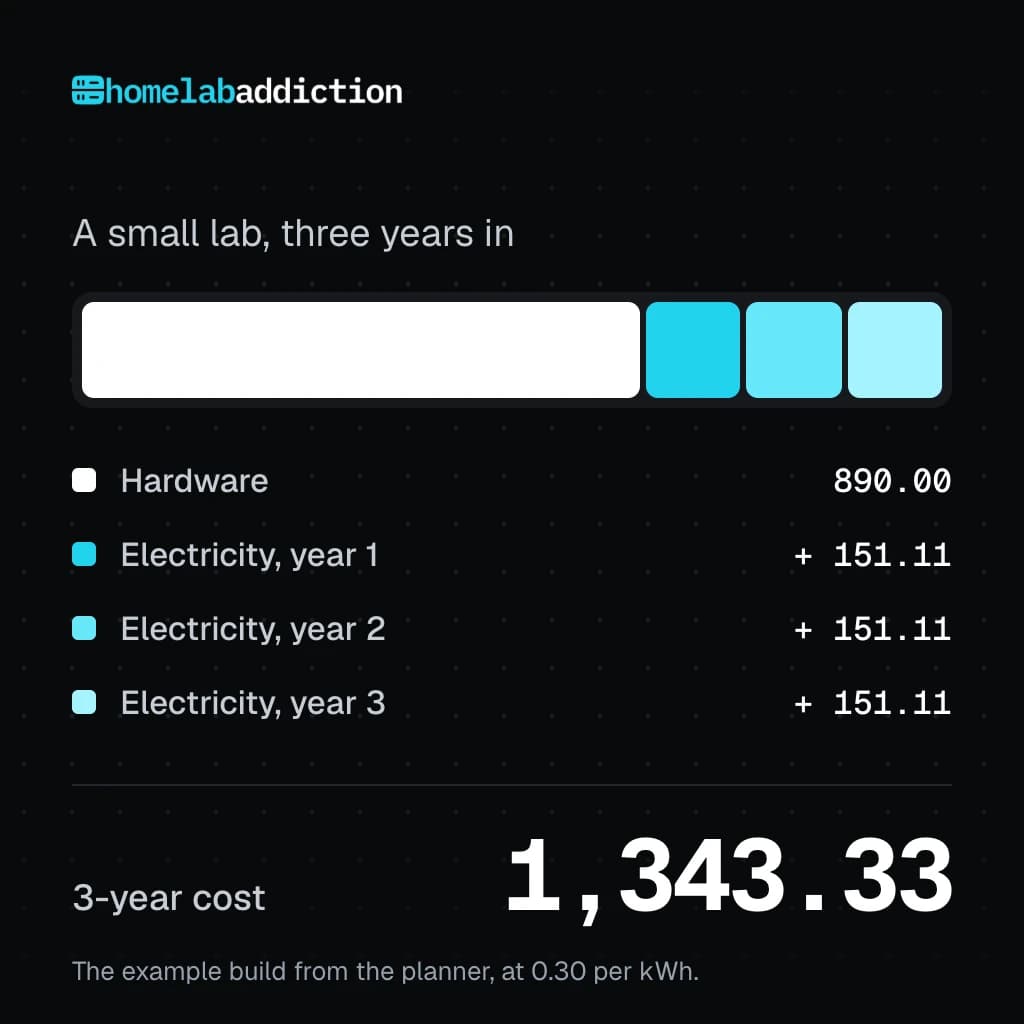
Planning a photo-storage homelab? The Homelab Planning Bundle combines a rack planner with a build cost and power planner, so you can map the hardware, space, and running-cost decisions before you commit. It is $19.99.
The gear I would buy for either path
If the build or upgrade path depends on this decision, these are the three purchases worth prioritizing first:
If you have already settled on the Synology route or the mini-PC-plus-NAS path, a quick coupon-and-cashback check is worth doing before checkout. Coupert is one option for checking whether the retailer has a live offer.
Synology DS923+ - still one of the safest family-NAS buys if you want the Synology Photos route: check current options on Amazon
Intel N100 mini PC - the sweet spot for running Immich, remote ML, or companion Docker workloads next to your NAS: check current options on Amazon
Samsung 990 Pro NVMe SSD - ideal when you want fast metadata, cache, or VM/container storage for the Immich side of the stack: check current options on Amazon
The data shows that it has the better long-term upside, the more compelling app experience for serious self-hosters, and the more flexible migration story thanks to External Libraries and remote ML options.
That answer still needs to be adjusted to the reader's operating style.
If your homelab philosophy is "make it powerful," Immich is the answer.
If your homelab philosophy is "make it disappear so the family never notices it," Synology Photos may still be the smarter decision.
A more grounded recommendation looks like this:
Best overall for homelab tinkerers: Immich
Best low-drama choice for current Synology owners: Synology Photos
Best migration strategy: run both in parallel first, then decide
That last point matters more than any headline. You do not have to choose blind.
Moving from Synology Photos to Immich without unnecessary drama
Many migrations go better when Immich is evaluated alongside the existing library first instead of turning the move into a same-day cutover. That reduces family disruption and gives the operator time to validate storage paths, backups, and the machine-learning side of the stack before fully switching habits.
Is Immich better than Synology Photos?
Immich is better when stronger search, external-library flexibility, and a faster-moving feature ceiling matter enough to justify the extra stack weight. Synology Photos is better when the lab values the lower-drama appliance path, easier handoff, and fewer moving pieces.
For the hands-on deployment path, continue with the Immich on Docker setup guide. It covers the first install, Compose layout, storage choices, and the operational decisions that sit underneath this comparison.
If Immich is the better fit after this comparison, the next operational decision is backup discipline. The dedicated Immich backup strategy guide covers database dumps, file backups, and the external-library restore cautions that matter before upgrades or larger migrations.
FAQ
Can Immich run alongside Synology Photos on the same library?
Yes, often very effectively. Immich's External Libraries feature lets you scan files that already exist on disk, which makes parallel evaluation much safer than a hard migration.
Does Immich need more RAM than Synology Photos?
Yes. Immich's official requirements call for 6 GB minimum and 8 GB recommended, plus 2 to 4 CPU cores depending on how comfortably you want it to run. Synology Photos does not publish the same kind of standalone app requirement because it is part of DSM.
Is Synology Photos better for families?
Usually, yes. If your priority is low maintenance, predictable sharing, and a setup that feels native to the NAS, Synology Photos is easier to hand off to non-technical users.
What is the biggest reason to choose Immich anyway?
The ceiling. Better flexibility, better Google Photos-style ambition, stronger self-hosting appeal, and a much more interesting path if you want to split storage and compute intelligently.
Do I need to move all my files before testing Immich?
No, and that is one of the biggest advantages in its favor. Use an External Library first, validate the experience, and only then decide whether you want a deeper migration.
transmission signupstatus: open channel
article_topic // Immich vs Synology Photos
Start building a smarter homelab.
Join readers learning Proxmox, networking, storage, backups, and self-hosting without breaking everything.
Enter your email address to receive the Homelab Addiction newsletter.
Beginner-friendly
No gatekeeping. Just clear, actionable guides.
1 useful email / week
Practical tips, real-world setups, and lessons learned.
Zero hype, practical only
What works, what breaks, and how to fix it.
Reply to any email with what you're building. I read and reply to as many as I can.
— The Homelab Addiction Operator
support // the lab
Found this guide useful?
If it saved you time or a rebuild, you can support more practical homelab guides.