Self-HostingNetworking

Caddy vs Nginx Proxy Manager for Homelabs in 2026: Which Reverse Proxy Ages Better?

Caddy vs Nginx Proxy Manager for homelabs: direct verdict, backup tradeoffs, HTTPS workflow, and which reverse proxy ages better in 2026.

AU

Author

James Reeves

Key Takeaways

  • Caddy is the better default for most homelabs once you care about readable config, easy backups, and less GUI-only state.
  • Nginx Proxy Manager is still the easiest day-1 pick if you want working HTTPS with the fewest moving parts in your own brain.
  • The real decision is not raw speed. It is how you want to operate routes, certificates, and recovery six months from now.
  • If your lab is highly dynamic and route definitions should follow containers automatically, skip this pairwise debate and read the broader Nginx Proxy Manager vs Caddy vs Traefik comparison.
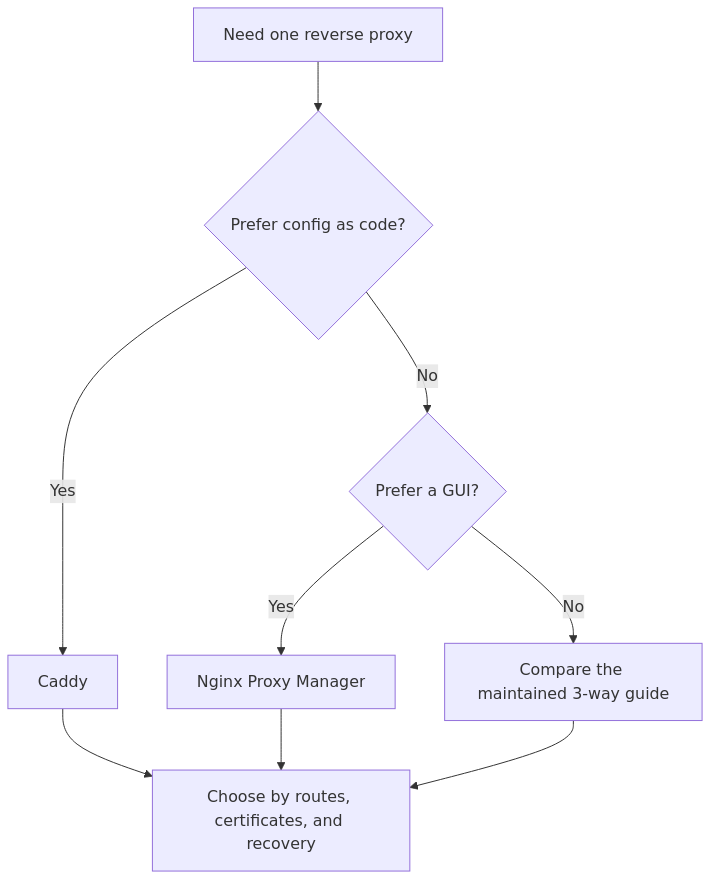
  • If you are still learning reverse proxies and just want one service online today, start with Nginx Proxy Manager on Docker. If you already know you want config-as-code, start with Caddy and do not look back.

If you want the short answer, here it is: use Caddy if you want the reverse proxy you are least likely to outgrow; use Nginx Proxy Manager if you want the reverse proxy you are least likely to bounce off on day 1.

That sounds simple, but the difference matters because reverse proxies sit on your blast radius boundary. They terminate TLS, route traffic, and become the place you debug when a service works on :8080 but not at app.example.com.

So this article is not about vanity benchmarks. It is about which tool is easier to live with in a real homelab after certificates renew, IPs change, and you need to rebuild a host without guessing what you clicked three months ago.

My evaluation criteria

I am judging Caddy and Nginx Proxy Manager on the things that actually matter in a homelab:

1. How fast you can publish one service correctly

2. How portable the configuration is

3. How much state you must back up

4. How painful recovery is after a host failure

5. How well the tool scales from 3 services to 15

6. How likely the tool is to create hidden complexity

That frame matters more than squeezing out a few extra requests per second. For homelab traffic, both are fast enough. The operational model is the real differentiator.

Quick comparison table

Category Caddy Nginx Proxy Manager
Best fit Operators who want readable config and easy recovery Beginners who want a GUI and minimal setup friction
Config surface Caddyfile or JSON Web UI with generated NGINX config
HTTPS behavior Automatic by default when hostname is valid Request certificate per host in the UI
Backup model Config file plus Caddy data directory /data plus /etc/letsencrypt and whatever database backend you use
Docker workflow Manual config by default GUI-driven, good for static Docker services
Learning curve Low to moderate Very low
Long-term maintainability Strong Fine for small labs, weaker once you want versioned changes
Best winner case You want a proxy that ages well You want a proxy that gets you unstuck fast

What Caddy gets right

transmission signup

article_topic // Caddy vs Nginx Proxy Manager for Homelabs in 2026

Don't leave without the setup notes.

Get practical homelab guides, failure logs, and beginner-friendly build notes in your inbox.

Enter your email address to receive the Homelab Addiction newsletter.

Weekly only. No spam. Unsubscribe anytime.

Caddy's biggest advantage is not marketing hype about automatic HTTPS. It is that the entire setup stays understandable.

Per the official Caddy reverse proxy quick-start, the simplest working reverse proxy can be expressed in a few lines:

example.com\nreverse_proxy :9000

That is the whole appeal. Your routes live in a file. You can read them, diff them, copy them to a new host, and put them in version control. If you come back six months later, your future self does not need to reconstruct a click path from memory.

Caddy also handles HTTPS the way most homelabbers wish everything handled HTTPS. If the hostname is valid and your DNS and ports are correct, Caddy will attempt certificate issuance automatically. For internal-only setups, it can also work with local certificates when public ACME is not the right fit.

In practice, Caddy wins in four situations:

  • you want config-as-code
  • you rebuild hosts often and want clean recovery
  • you care about readable routing rules
  • you prefer a tool that starts simple without trapping you in the UI later

What Nginx Proxy Manager gets right

Nginx Proxy Manager wins because it reduces fear.

Its official guide is honest about the value proposition: it is meant to make reverse proxying and free SSL easy for people who do not want to know much about raw NGINX or Let's Encrypt. That is not a small benefit. A lot of homelab projects die because the owner gets stuck on the first TLS or redirect problem and walks away.

NPM's day-1 flow is still hard to beat:

1. deploy the container

2. open the admin UI on port 81

3. add a proxy host

4. point to backend IP and port

5. request a certificate

6. test the hostname

That is why I still recommend it to true beginners, especially if they are following a setup walkthrough like How to Set Up Nginx Proxy Manager on Docker.

NPM also makes handoff easier in households or shared labs where the next person is more comfortable with forms than config files. If someone else might need to add a proxy host and they panic when they see a text config, a GUI has real value.

NPM wins in four situations:

  • you want the lowest-friction first deployment
  • you are managing a small, mostly static set of services
  • you prefer point-and-click SSL issuance
  • you need a beginner-friendly admin surface for yourself or someone else

Where the decision flips from NPM to Caddy

This is the point most comparisons skip.

Nginx Proxy Manager is easiest at the beginning, but Caddy usually becomes easier once your lab matures even a little.

That flip happens when you start asking questions like:

  • How do I rebuild this cleanly on a new host?
  • Which routes changed last month?
  • Can I review this before I apply it?
  • What exactly do I need to back up?
  • Why does this one host behave differently from the others?

With Caddy, the answers are usually in the file.

With NPM, the answers are split across the UI state, generated config, certificate data, and the backing storage under /data and /etc/letsencrypt. That is still manageable, but it is not as legible. The tool is doing more for you, which also means more of the truth lives behind the panel.

That is why Caddy ages better. It asks slightly more from you at the start, then pays you back every time you need to migrate, audit, or recover.

Backup and recovery: the most underrated difference

This is the section that should decide the winner for a lot of homelabs.

Backing up Caddy

At minimum, you care about:

  • your Caddyfile or JSON config
  • Caddy's data directory, which stores certificate state and related assets

That is conceptually simple. You know where the declarative config lives, and you know what runtime state must follow it.

Backing up Nginx Proxy Manager

Per the official docs, a minimal deployment mounts:

  • ./data:/data
  • ./letsencrypt:/etc/letsencrypt

That means your reverse proxy definition lives inside a stateful app directory rather than a clean human-edited config. Again, this is not a deal-breaker. It is just less elegant when you have to recover it under pressure.

My verdict on recovery

If your homelab is the sort that gets rebuilt, moved to new hardware, or restored from backups more than once a year, Caddy is the safer long-term choice.

If your homelab is stable, small, and mainly exists so you can expose a handful of services without learning a config language yet, NPM is completely reasonable.

HTTPS and DNS behavior

Both tools can get you to a proper HTTPS endpoint, but the workflow feels different.

Caddy

  • HTTPS is automatic when Caddy knows the hostname and your public setup is valid.
  • For internal names or private access models, you can use local certificates or adapt your DNS/ACME approach.
  • The behavior is closer to "declare intent and let the tool do the boring part."

Nginx Proxy Manager

  • HTTPS is still easy, but it is host-by-host UI work.
  • You add the proxy host, then request the cert from inside the panel.
  • The workflow is more explicit, which helps beginners, but is slower when you start making repeated changes.

For public exposure, either way you should still understand the higher-level access model. If you are not sure whether a service should even be internet-facing, read Cloudflare Tunnel vs Port Forwarding vs VPN: Which Is Safer? and How to Replace Port Forwarding with Tailscale or Cloudflare Tunnel before you assume a reverse proxy is the whole security plan.

Day-2 operations: this is where Caddy pulls ahead

Once you stop treating the proxy as a one-time setup task, Caddy becomes the cleaner system.

Why Caddy ages better

  • route definitions are readable
  • changes are easy to review
  • copy and restore workflows are cleaner
  • the tool nudges you toward declaring state instead of remembering clicks

Why NPM can feel sticky later

  • the UI is great until you want versioned change history
  • advanced customizations can become hidden complexity
  • rebuild confidence depends on how well you preserved app state, not just whether you remember what hostnames existed

This does not mean NPM is bad. It means NPM is best when the lab is still small enough that convenience outweighs the long-term shape of the state.

Who should pick Caddy

Choose Caddy if most of these are true:

  • you are comfortable editing a small config file
  • you want one source of truth you can diff and back up cleanly
  • you prefer infrastructure that stays readable as it grows
  • you care more about maintainability than about having a GUI
  • you expect to migrate hosts, restore backups, or automate deploys later

Caddy pros

  • readable config
  • automatic HTTPS is excellent
  • cleaner long-term portability
  • easy to reason about during incidents

Caddy cons

  • no built-in beginner GUI
  • first setup feels less friendly if you have never touched reverse proxy config
  • not the best fit if you specifically want every change to happen through a browser

Who should pick Nginx Proxy Manager

Choose Nginx Proxy Manager if most of these are true:

  • you want a service online today with minimal reverse proxy knowledge
  • you strongly prefer a browser-based admin surface
  • your lab changes infrequently
  • you are supporting family members or teammates who need a GUI
  • you are still learning what a reverse proxy actually does

NPM pros

  • easiest setup path for beginners
  • GUI lowers the barrier to entry
  • simple SSL flow per host
  • good fit for a small static stack

NPM cons

  • less elegant backup and restore story
  • weaker as a version-controlled system
  • can become opaque when you revisit old changes later
  • easier to outgrow if your lab becomes more systematic

What about performance?

For a homelab, performance is mostly noise in this decision.

You will find community articles and benchmarks arguing about whether NGINX, Caddy, or Traefik is faster. That matters in production edge environments. It usually does not matter for a household media stack, dashboard, password manager, wiki, and a few admin tools.

The better question is this: which proxy are you less likely to misconfigure, neglect, or fear migrating?

That is why my winner is Caddy. Reliability in a homelab is often just operational clarity wearing a boring hat.

When neither one is the right answer

If your routing should follow containers dynamically, or if you are already label-heavy and Docker-first, the real comparison may not be Caddy vs NPM at all.

In that case, go read Tailscale vs WireGuard vs Cloudflare Tunnel for Homelabs for broader access context and the site's main reverse proxy comparison for the Traefik branch of the decision tree.

Traefik is not better for everyone. It is just better when services are dynamic enough that labels and auto-discovery outweigh the extra complexity.

Frequently Asked Questions

Is Caddy better than Nginx Proxy Manager for a homelab?

For most homelabs, yes. Caddy ages better because the config is portable, readable, and easier to back up. Nginx Proxy Manager is still better for day-1 ease if you want a GUI and the smallest learning curve.

Is Nginx Proxy Manager easier than Caddy?

Yes. Nginx Proxy Manager is easier at the start because you create hosts and SSL certificates through a web UI. Caddy is still simple, but it expects you to be comfortable editing a config file.

Should I switch from Nginx Proxy Manager to Caddy?

Switch if your lab has grown past a handful of static services and you want cleaner backups, easier migrations, and versionable config. Stay on Nginx Proxy Manager if the GUI is still saving you time and your setup rarely changes.

Do Caddy and Nginx Proxy Manager both support HTTPS?

Yes. Both can issue and renew certificates for public hostnames. Caddy automates more of the process by default, while Nginx Proxy Manager handles it through the admin UI on a host-by-host basis.

Final verdict

If you want the reverse proxy that will feel best after a rebuild, a migration, or a few months of gradual sprawl, pick Caddy.

If you want the reverse proxy that will get you from zero to a clean hostname fastest, pick Nginx Proxy Manager.

My recommendation for most HomelabAddiction readers is simple:

  • Start with NPM if you are a beginner and need confidence.
  • Move to Caddy once you want cleaner, more portable operations.
  • Start with Caddy immediately if you already know you prefer config files over admin panels.
transmission signupstatus: open channel

article_topic // Caddy vs Nginx Proxy Manager for Homelabs in 2026

Start building a smarter homelab.

Join readers learning Proxmox, networking, storage, backups, and self-hosting without breaking everything.

Enter your email address to receive the Homelab Addiction newsletter.

Beginner-friendly

No gatekeeping. Just clear, actionable guides.

1 useful email / week

Practical tips, real-world setups, and lessons learned.

Zero hype, practical only

What works, what breaks, and how to fix it.

Reply to any email with what you're building.
I read and reply to as many as I can.

— The Homelab Addiction Operator