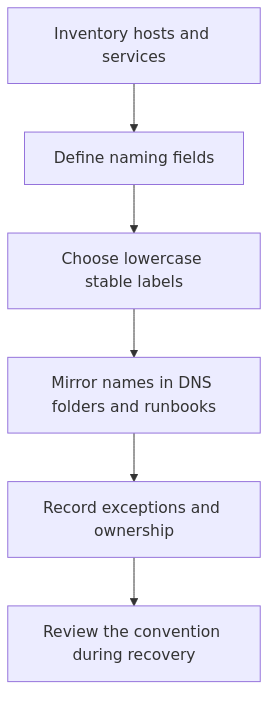
Homelab Naming Conventions and Folder Layout for Hosts, Services, and Notes
Build a homelab naming convention and folder layout that keeps hosts, services, network records, and recovery notes understandable as the environment grows.
Disclosure: This article may contain affiliate links. If you purchase through a link, HomelabAddiction may earn a commission at no additional cost to you.
Build a homelab naming convention and folder layout that keeps hosts, services, network records, and recovery notes understandable as the environment grows.
The framework below turns primary documentation into practical choices, with explicit attention to maintenance, failure boundaries, and recovery rather than anecdotal recommendations.
Key Takeaways
Start with documented requirements and the actual operating model.
Separate configuration from verification and record the recovery path.
Prefer the smallest maintainable design that fits the workload.
Why naming matters before your lab gets bigger
A naming convention is just a repeatable way to name things.
That sounds small, but it fixes a real beginner problem: once a lab has more than one machine and more than one service, memory stops being a reliable system.
You are no longer trying to remember one Raspberry Pi. You are trying to remember:
which host runs which workloads
which IP belongs to which machine
which folder has the current Compose file
which note explains the DNS setup
which screenshot belongs to which service
This is why practical file-organization guides like Data Carpentry's file naming lesson keep repeating the same advice: choose a convention early, put important information first, avoid special characters, and document the rule in a README. The same logic works perfectly in a homelab.
The naming rule A practical default is for most homelabs
If you are a beginner, do not start with a clever theme.
You can absolutely name physical hosts after planets, ships, Pokémon, or coffee drinks if that makes you happy. Plenty of homelabbers do. Reddit threads about homelab naming schemes are full of fun examples. The problem is that fun names stop helping once the lab has enough moving parts that you need to know purpose at a glance.
Start practical first. Add fun later if you still want it.
A practical default is:
--
Examples:
docker-office-01
proxmox-rack-01
nas-office-01
pi-lab-01
vm-app-01
vm-monitoring-01
This works because each part answers a different question:
role - what the thing does
location - where it physically or logically lives
number - which instance it is
For a tiny lab, you can simplify it to:
-
Examples:
docker-01
nas-01
proxy-01
That is enough for a one-room or one-rack beginner setup.
Why A practical default is lowercase and hyphens
Use these defaults unless you have a strong reason not to:
lowercase letters
numbers
hyphens
Avoid:
spaces
underscores unless a specific tool requires them
punctuation like @, #, /, :
vague words like new, temp, misc, final-final
There are three reasons for this:
1. They read cleanly.
2. They behave better across DNS, URLs, scripts, and dashboards.
3. They stay portable if your lab grows into Docker, reverse proxies, or Kubernetes-style tooling.
transmission signup
article_topic // Homelab Naming Conventions and Folder Layout for Hosts, Servi…
Don't leave without the setup notes.
Get practical homelab guides, failure logs, and beginner-friendly build notes in your inbox.
Enter your email address to receive the Homelab Addiction newsletter.
Weekly only. No spam. Unsubscribe anytime.
The GitHub homelab-k8s naming-conventions example the cited example makes this same point clearly: lowercase plus hyphens keeps names predictable for automation and DNS. Community discussions also lean toward hyphens because they are easier to read than smashed-together words or underscores.
What to name each type of thing
This is where many naming guides get too abstract. Here is the practical breakdown.
1. Physical hosts
Physical machines should usually get the clearest, most stable names because they anchor everything else.
Good examples:
proxmox-office-01
nas-rack-01
mini-lab-01
router-core-01
Bad examples:
server
ubuntu-box
newpc
apollo if nothing else tells you what it is
If you really want themed names, keep them in a secondary field in your notes. Let the operational name stay descriptive.
2. VMs and containers
VMs and containers should emphasize purpose more than hardware.
Good examples:
vm-auth-01
vm-dns-01
vm-grafana-01
ctr-homepage-01
ctr-dozzle-01
If you only run one instance of a service, you can still keep the -01. It helps later if you ever clone or replace it.
3. Service hostnames and subdomains
For web apps, use names a human can guess without a cheat sheet.
Good examples:
grafana.lab.example.com
books.lab.example.com
immich.lab.example.com
proxmox.lab.example.com
Shorter is not always better.
One of the better points from AKora's homelab naming write-up is that very short abbreviations feel clever at first, then become less useful than readable service names. pt.l4n.io may save a few keystrokes, but portainer.example.com is easier to recognize six months later.
A simple rule is:
if you type it every day and it is obvious, a short name is fine
if another person might use it, prefer the readable name
if it is an admin tool, keep it private and predictable
The starter naming system is a practical choice today
A beginner homelab can start with this clear system.
Hostnames
proxmox-office-01
nas-office-01
mini-office-01
pi-office-01
VMs
vm-dns-01
vm-monitoring-01
vm-files-01
vm-auth-01
Containers
ctr-homepage-01
ctr-dozzle-01
ctr-immich-01
ctr-jellyfin-01
Subdomains
proxmox.lab.example.com
grafana.lab.example.com
books.lab.example.com
status.lab.example.com
Documentation files
2026-07-18-network-map-v1.md
2026-07-18-service-inventory-v1.csv
2026-07-18-backup-restore-notes-v1.md
This system is boring, which is exactly why it works.
From the lab
Common mistakes that make naming systems fall apart
Mistake 1: making names too clever
If a name needs explanation every time, it is not helping.
Mistake 2: abbreviating everything
A little shortening is fine. Too much shortening turns your lab into alphabet soup.
grafana-office-01 is clearer than grf-ofc-01.
Mistake 3: using one-off exceptions
The moment you tell yourself, "this one can use an exception," the convention starts to rot.
Mistake 4: storing docs by tool instead of by purpose
If screenshots are in Downloads, configs are in GitHub, notes are in Obsidian, and IP addresses are in your router comments, you do not have a system. You have four partial systems.
Mistake 5: never documenting the naming rule itself
A naming convention that only lives in your head is not a naming convention. It is a habit waiting to be forgotten.
When to upgrade from folders to a real tool
A simple folder tree and CSV files are enough for most early homelabs.
Upgrade when one of these becomes true:
you have enough devices that DHCP reservations are hard to track manually
more than one person needs to use the documentation
you are managing many services across several hosts
you want change history, permissions, or richer relationships between devices and services
That is where a documentation tool or inventory platform starts making sense. But do not let tool shopping delay the simple system.
A clean folder, a naming rule, and one inventory file will beat an empty documentation platform every time.
What could go wrong if you skip this
This is not about aesthetics.
Poor naming creates real operational friction:
wrong host gets rebooted
old config gets edited instead of the current one
screenshots and exports become useless because no one knows what they belong to
IP plan drifts away from reality
troubleshooting takes longer because nothing is easy to find
That is why broader network-planning articles like Mapping & Naming Your Network keep tying naming to trust zones, readability, and troubleshooting. If your network is not understandable, it is harder to secure and harder to maintain.
A recommended first 30-minute cleanup
If your current lab is already messy, do this in order:
1. Create a top-level homelab/ folder.
2. Add README.md, devices.csv, and services.csv.
3. Pick one naming rule for hosts.
4. Pick one naming rule for documents.
5. Rename only the most important current files first.
6. Create folders for hosts, services, and network.
7. Write down the rule in naming-rules.md so you stop renegotiating it later.
Do not try to clean everything in one night.
Get the system in place first. Then let new work follow the rule.
What to learn next
Once your naming and folder layout are stable, the next useful steps are:
What is the best naming convention for a beginner homelab?
For most beginners, a simple lowercase pattern like role-location-number works best because it stays readable and scales without much effort.
Should homelab hostnames be descriptive or fun?
Descriptive names are the safer default because they reduce guessing during troubleshooting. Fun names can still work if you document them clearly.
How should I organize homelab documentation folders?
Keep one top-level homelab/ folder with stable sections for inventory, hosts, services, network, automation, backups, and archive so files stop drifting into random places.
Is a documentation tool required before fixing a naming system?
No. A README, a small inventory sheet, and a predictable folder layout are enough to start. Tools help later, but the naming rule matters first.
Final verdict
A good homelab naming system is not the one that looks smartest. It is the one that lets you find the right file, the right host, and the right service quickly when you are tired.
Start simple.
Use readable hostnames. Use sortable document names. Keep one predictable folder tree. Write the rule down once so you can stop thinking about it every time you create something new.
That is how a small lab stays usable as it grows.
Sources and verification
Primary documentation checked before this revision: