

Jellyfin vs Plex vs Emby is one of the most common “what should I run?” questions because a media server is the first self-hosted app that most people actually use every day.
If you pick the wrong one, you don’t just lose a weekend. You lose weeks of small annoyances: family playback issues, confusing logins, broken remote access, or a server that only works when you’re on Wi‑Fi.
In this guide you’ll get:
- A quick recommendation for most homelabs
- A decision tree based on your real goal (private, family sharing, remote access)
- The few differences that matter more than a 30-row feature matrix
Jellyfin vs Plex vs Emby: the 30-second recommendation
If you want the simplest default with strong client support and you don’t mind a commercial ecosystem, Plex is often the easiest for households.
If you want full control, no paywalls, and a fully free software server, Jellyfin is the cleanest “my media, my rules” option.
If you want something Jellyfin-like with a more commercial polish in some areas, Emby can be a middle path.
If you’re new and you want a safe start: pick one, run it for a week, then decide based on *client experience*, not server screenshots.
If you’re still building fundamentals, What to Self-Host First is the earlier step, and Homelab Networking Basics explains why remote playback often fails.
What to decide before you compare anything
The highest-impact questions are boring:
- Are you streaming only inside your LAN, or remotely?
- Is this just for you, or for family and friends?
- Do you care more about “works everywhere” or “fully open and self-controlled”?
Those three answers will decide your best pick faster than a feature list.
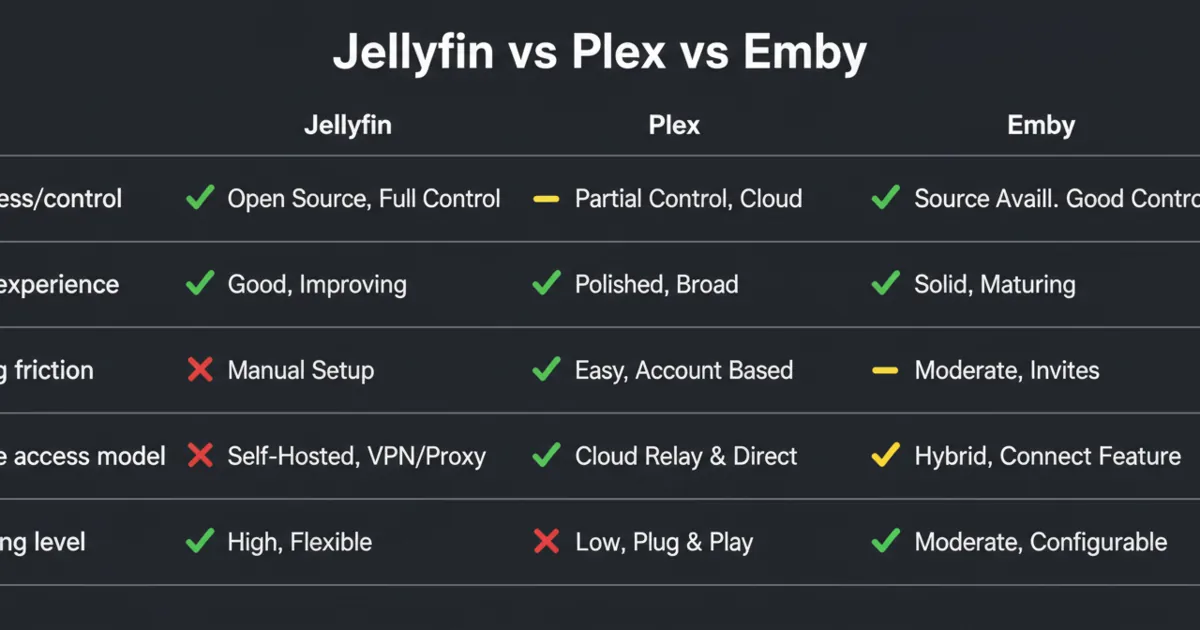
Difference 1: openness and control
Jellyfin is positioned as free software and describes itself as an alternative to proprietary options like Emby and Plex.
Reference:
- Jellyfin docs: https://jellyfin.org/docs/
- Plex quick start: https://support.plex.tv/articles/200264746-quick-start-step-by-step-guides/
- Emby support docs: https://emby.media/support/
Plex and Emby are commercial products with ecosystems built around convenience. That does not make them bad. It just changes the trade-off.
A practical way to think about it:
- If your primary goal is control and self-reliance, Jellyfin aligns naturally.
- If your primary goal is “household friendly” convenience, Plex is usually the default people try first.
Difference 2: client apps and “household success rate”
The server is only half the product. The other half is:
- TV apps
- mobile apps
- browser playback
In real homes, the win condition is simple:
- family members can open the app and play something without calling you
This is the main reason Plex stays popular. If you plan to share with non-technical users, prioritize client experience.
Difference 3: accounts, sharing, and friction
Sharing is where media servers stop being a solo project.
The friction you want to avoid:
- confusing logins
- users needing special setup
- “it works on my phone but not on the TV”
If you’re exposing anything outside your LAN, re-read Homelab Security before you default to “open a port and hope.”
Difference 4: remote access model (VPN-first vs public exposure)
There are two sane ways to do remote media:
1) VPN-first: you connect to your home network, then stream like you’re at home. 2) Public exposure with a hardened entry point: reverse proxy, HTTPS, auth, monitoring.
If you want the trade-offs clearly, Cloudflare Tunnel vs VPN vs Port Forwarding is the overview.
A beginner-friendly default is VPN-first. It keeps your admin surfaces private and reduces risk.
Difference 5: transcoding expectations (what beginners misunderstand)
Transcoding is not a “media server feature.” It’s a hardware and bandwidth reality.
If you stream:
- to older TVs
- to mobile on poor networks
- to friends outside your home
…you will eventually hit transcoding.
The practical advice:
- treat “hardware transcoding” as a nice-to-have, not a guarantee
- test your real clients early
- keep your first setup simple
Difference 6: libraries, metadata, and daily UX
All three can present libraries nicely. What matters in a homelab is:
- how much you trust the UX for non-technical users
- whether the UI stays consistent across devices
- whether you can fix issues without spending your weekends in settings
Difference 7: updates, backups, and restore drills
A media server becomes a real system when you care about your watch history, user accounts, and metadata.
Your restore plan should answer:
- where is the server config?
- where is the database/state?
- where is the media?
If you’re using containers, build this with Docker Compose Best Practices and keep your state obvious.
For the bigger mindset, Homelab Backups is the baseline.
Difference 8: where each one fits best (honest use cases)
Jellyfin fits best when
- you want a fully self-managed, open approach
- you care about avoiding feature paywalls
- you don’t mind a bit more tinkering to match your environment
Plex fits best when
- you want a high “works on the first try” probability
- you want a smoother household experience across devices
- you value ecosystem convenience
Emby fits best when
- you like the Jellyfin-style model but want a more commercial product path
- you want a middle ground between open-ish feel and polished experience
Difference 9: the best pick depends on who the server is for
If the server is for you, you can tolerate tinkering.
If the server is for your household, “tinkering” becomes “support tickets.”
A simple rule:
- if 3+ non-technical users will use it, default to what gives the best client experience
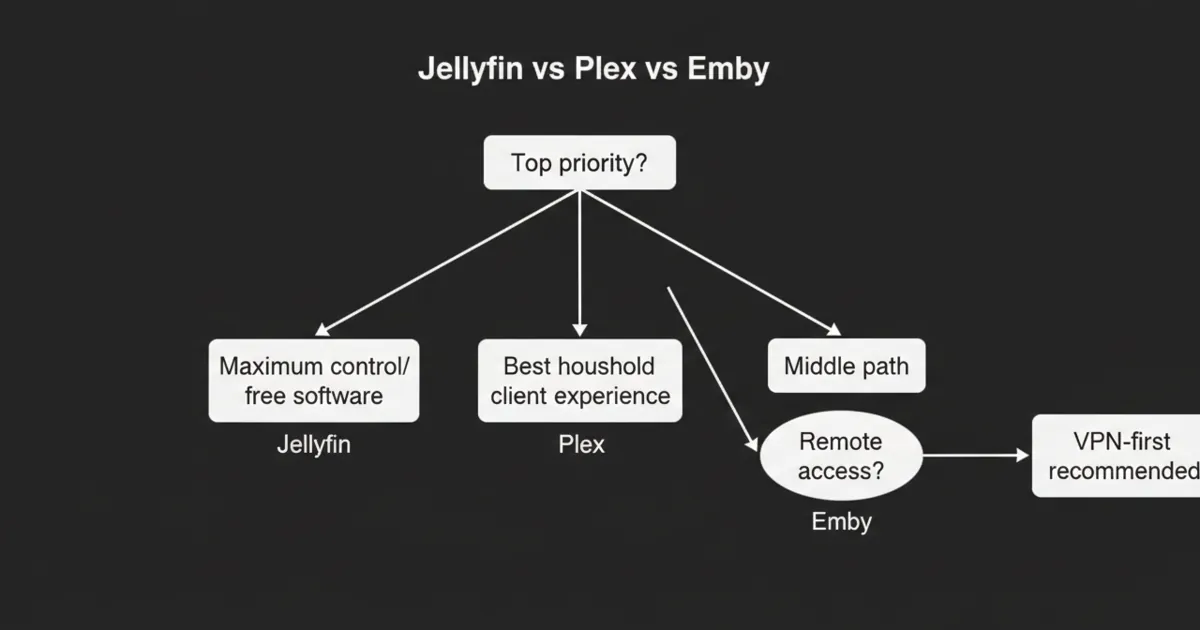
A simple decision tree (pick your default)
Start here:
- If you want fully free software and maximum control: Jellyfin.
- If you want the highest household success rate: Plex.
- If you want a middle path: Emby.
Then sanity-check:
- Are you doing remote access? Prefer VPN-first.
- Are you sharing with friends? Plan for transcoding and bandwidth.
- Do you have a restore plan? If not, you’re not done.
Practical setup defaults (what I’d do first)
A stable first setup:
- Run the server on a dedicated “services” box or VM.
- Put it behind a local DNS name.
- Keep it LAN-only for the first week.
- Add VPN for remote access before you expose anything publicly.
If you want the domain and DNS model, Homelab DNS shows the pattern.
Common mistakes (that ruin the experience)
Most “media server sucks” complaints come from a few avoidable problems:
- Exposing the admin UI to the internet because you wanted remote access quickly.
- No bandwidth plan for remote streaming, then blaming the server.
- No restore plan for metadata and config, then losing watch history during upgrades.
- Changing three things at once (new proxy + new DNS + new server) and not knowing what broke.
If you want the boring mindset that prevents this, Grow Your Homelab is the bigger pattern.
FAQ
Is Jellyfin better than Plex?
It depends on your priority. Jellyfin is great when you want maximum control and an open approach. Plex often wins when you want the easiest household client experience.
Is Emby worth using?
It can be, especially if you want a middle ground between Jellyfin-style self-hosting and a commercial ecosystem. The best test is whether your devices and users have fewer playback issues.
What is the safest way to stream remotely?
VPN-first is the safest default. Public exposure should be deliberate, hardened, and monitored.
Do I need to transcode?
Only if your clients can’t direct play your media, or your bandwidth is limited. Test your real devices early.
What should I back up for a media server?
Back up your server config and metadata/state. Your media library may be too large to back up fully, but your watch history and user config are usually small and very worth protecting.
Next steps
Pick one server and test it with the exact devices your household uses.
If playback is smooth for a week and you can restore the server state from backup, you have the right media server for your homelab.
