

Docker Compose best practices matter the moment your homelab grows past “one container.”
At first, Compose feels like a convenient launcher. Later, it becomes your infrastructure documentation. If your Compose files are messy, restores are messy. If your Compose files are clean, rebuilds are boring.
In this guide you’ll get:
- A default folder layout you can copy
- Rules for volumes, networks, and updates
- Practical secrets handling for a homelab
Docker Compose best practices: the default layout that scales
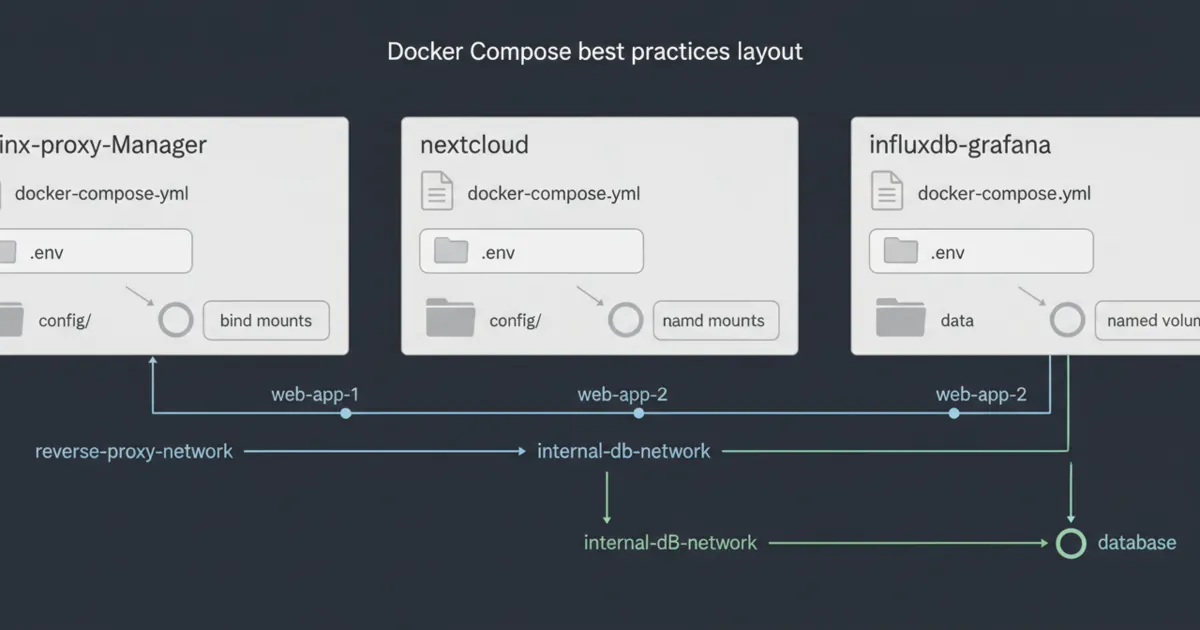
If you only copy one thing from this post, copy this structure:
- One folder per stack
- One
docker-compose.ymlper stack - A
config/folder (bind mounts) - Named volumes for app data
- A short README with URLs and backup notes
It makes backups and migrations drastically easier.
If you’re still early, Docker for Homelabs gives the core concepts (images, containers, volumes, networks) that Compose is built on.
Rule 1: treat compose as “source of truth”
If you need to SSH in and run random commands to restore a service, your setup is not reproducible yet.
The goal is:
docker compose up -dshould bring a service back- your data comes from volumes/bind mounts
- your config is versioned
A good test is the “blank host drill”:
- imagine your server died
- you provision a new VM
- you clone your configs
- you restore volumes/backups
- the stack comes back
If that drill feels impossible, your Compose setup needs simplification.
Rule 2: separate config (bind mounts) from data (volumes)
Docker’s own docs recommend volumes as a preferred mechanism for persisting container data, because volumes are managed by Docker and easier to back up or migrate than bind mounts.
Reference:
- Docker volumes docs: https://docs.docker.com/engine/storage/volumes/
A practical homelab split:
./configas bind mounts for human-edited config- named volumes for databases and app state
Rule 3: name your volumes and networks explicitly
Unnamed resources are easy to forget and hard to migrate.
Use:
volumes:with explicit namesnetworks:with explicit names
It prevents surprises when you split stacks into multiple projects.
Rule 4: don’t publish ports for everything
Publishing every port turns your homelab into a random collection of URLs.
A calmer approach:
- expose only the reverse proxy publicly
- keep internal services on internal networks
If you need help choosing exposure models, Cloudflare Tunnel vs VPN vs Port Forwarding is the decision breakdown.
Rule 5: use a reverse-proxy network for web apps
Most homelabs eventually put web apps behind one reverse proxy.
The pattern:
- proxy container lives on a
proxynetwork - web apps that need routing join the same network
- databases stay on a separate
internalnetwork
If you want to pick a proxy stack, Nginx Proxy Manager vs Caddy vs Traefik is the comparison.
Rule 6: keep secrets out of git (and out of the compose file when possible)
The hard truth: .env files are still plain text.
For many homelabs, file permissions are the real boundary. Keep secrets in files with strict permissions and keep them out of your public repos.
If you use Docker Swarm, Docker secrets are designed for sensitive values and are encrypted at rest and in transit for swarm services.
Reference:
- Docker secrets docs: https://docs.docker.com/engine/swarm/secrets/
- Docker Compose file reference: https://docs.docker.com/reference/compose-file/
If you’re not using Swarm, a common practical approach is:
.envfor non-sensitive defaults- a separate
secrets.env(not committed) - mount secret files where apps support them
Rule 7: pin image versions for anything you care about
latest is convenient until it breaks you.
For stable homelabs:
- pin major/minor versions
- upgrade in a planned window
- keep a rollback plan
A simple habit that prevents chaos:
- upgrade one stack at a time
- if it breaks, roll back immediately
- write down what changed
Rule 8: add healthchecks (so you know what’s actually broken)
Uptime checks catch “is it reachable.” Health checks catch “is it healthy.”
Start simple: if the app has an HTTP endpoint, check it.
The reason this matters in a homelab is reboot and update recovery.
If a database starts slowly and your app starts fast, the app may crash loop unless you plan for readiness.
A practical approach:
- add a healthcheck to databases and core services
- alert on failing health, not just container up/down
- keep checks cheap so they don’t become the load
Rule 9: use restart policies intentionally
A restart policy is not a fix, but it is a stability tool.
If you do not set one, a temporary failure can turn into a permanent outage until you notice.
A simple default for most homelab services is “restart unless stopped,” but the real best practice is to pick a policy and document why.
Also decide what *should not* restart automatically. For example, one-off migration containers or manual maintenance jobs should not loop forever.
Rule 10: log rotation and disk limits are part of stability
A lot of Compose problems are actually disk problems.
If logs grow forever, your host dies slowly.
Add reasonable log limits so one noisy container cannot consume your entire disk.
Also budget disk for:
- images
- build cache
- volumes
- backups
If your server only has one small SSD, this matters earlier than you think.
Rule 11: make backups part of the stack
Write down:
- where the data lives
- what to back up
- how to restore
For the restore mindset, Homelab Backups is the baseline. If you also care about keeping admin surfaces private, Homelab Security pairs well with it.
Rule 12: keep one “golden” example stack you reuse
The fastest way to scale cleanly is having a template.
A small template should include:
- service
- volumes
- networks
- update notes
- backup notes
That is how Docker Compose best practices become muscle memory.
A good differentiator here is to maintain a tiny “template repo” for your lab. When you create a new stack, you copy the template, fill in the app-specific parts, and your defaults stay consistent.
Here’s a minimal checklist for a “golden stack” before you consider it done:
- It starts with one command.
- It survives a reboot.
- It survives an image upgrade.
- It has one obvious backup location.
- You can restore it to a blank VM.
If you can do that for one stack, you can do it for twenty.
Common pitfalls (that break restores)
A few mistakes show up repeatedly in homelabs:
- Mixing data and config in random bind mounts, then forgetting what to back up.
- Relying on unnamed volumes that are hard to identify when migrating.
- Publishing ports everywhere and losing track of what is exposed.
- Using
latestfor everything and upgrading by accident.
If you want a sanity check, run your own “blank host drill” once a quarter.
FAQ
What folder structure should I use for Docker Compose in a homelab?
One folder per stack, a config folder you can back up, and named volumes for data is a good default. The goal is that you can move one stack without moving everything.
How do I manage secrets in docker-compose?
Keep secrets out of git. Use strict file permissions, secret files where apps support them, and avoid putting passwords directly in the compose file.
What are the most important Docker Compose best practices for a homelab?
Consistent folders, explicit volumes, a reverse proxy pattern, and secrets kept out of git are the top four.
Should I split my Compose files or keep one huge file?
For most homelabs, separate stacks are easier to maintain and reduce blast radius. One huge file is harder to debug and migrate.
Is it okay to use .env for secrets?
It works, but treat it as plain text. Keep it out of git and lock down permissions. Use secret files where possible.
Do I need Swarm secrets?
Not necessarily. Swarm secrets are great if you run Swarm. Otherwise, permissioned files and secret mounts are common in homelabs.
Why is my homelab “randomly down” after a few weeks?
Often it’s disk space (logs, backups, images) or unplanned upgrades. Add monitoring and upgrade intentionally.
Next steps
Pick one existing stack and refactor it into the default layout from this post.
If you can rebuild that one stack from scratch and it comes back with data intact, you’ve implemented the most important Compose habit.

1 Comment
Pingback: Immich vs PhotoPrism: Best Self-Hosted Photo Backup for Beginners - HomeLabAddiction