Disclosure: This article may contain affiliate links. If you purchase through a link, HomelabAddiction may earn a commission at no additional cost to you.
Documentation basis: This guide is grounded in the official documentation for Homepage, Homarr, and Dashy. It explains documented behavior and planning trade-offs rather than claiming private testing, personal ownership, or measured performance.
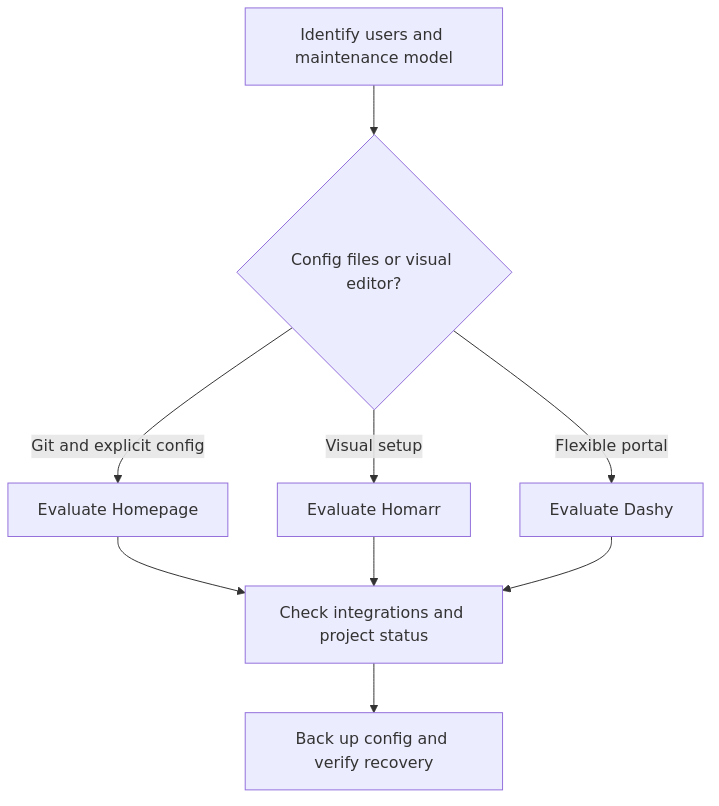
Evidence-led decision flow for this topic.
Compare Homepage, Homarr, and Dashy for a homelab by balancing configuration style, maintenance path, resource overhead, and project direction.
The framework below turns primary documentation into practical choices, with explicit attention to maintenance, failure boundaries, and recovery rather than anecdotal recommendations.
Which is the best homelab dashboard for most people?
For most homelabs, Homepage is the best default because it stays clean, predictable, and easy to keep in the same Git-backed workflow as the rest of the stack. Homarr is easier to like on day one if you want a more visual setup experience. Dashy makes sense when lighter resource use and broad customization matter more than polish.
That distinction matters because many people searching for the best homelab dashboard are really deciding how much operational friction they want after the first install, not just which screenshot looks nicest.
Key Takeaways
Start with documented requirements and the actual operating model.
Separate configuration from verification and record the recovery path.
Prefer the smallest maintainable design that fits the workload.
Homepage: the best long-term pick for most homelabs
Homepage's official docs describe it as a fast, fully static dashboard with integrations for 100+ services. That matches a key operator concern: it behaves like something built for operators, not just for screenshots.
Homepage's core strength is that the dashboard lives happily inside the same habits you already use for the rest of your lab. You can keep config files in Git. You can diff changes. You can rebuild the container and know exactly what comes back. If you already treat Docker Compose as source of truth, Homepage fits that workflow cleanly.
The other big win is integration depth. A lot of dashboards can show tiles. Fewer can show genuinely useful widgets without feeling bolted together. Homepage does a good job here, especially for people running mixed workloads like media services, monitoring, DNS, and container stacks.
Homepage strengths
YAML config is clean and predictable
Docker label discovery is useful when you already label services carefully
Performance should be measured in the target environment
Strong fit for Git-backed and reproducible homelabs
Large ecosystem and active development signal
Homepage trade-offs
First setup is less friendly than Homarr's visual editor
It is not the lightest option here
If you hate editing config files, it will feel like homework
Where Homepage wins
Homepage is a strong choice if the dashboard has to survive six months of real change instead of six minutes of setup. That matters more than flashy onboarding.
Get practical homelab guides, failure logs, and beginner-friendly build notes in your inbox.
Enter your email address to receive the Homelab Addiction newsletter.
Weekly only. No spam. Unsubscribe anytime.
Homarr's official site still does a very good job selling the experience. Drag and drop works. The visual editor is approachable. Built-in auth and app integrations make it feel more like a polished product than a config file with a web face bolted on.
And to be fair, that polish is real. If you want a dashboard that looks good quickly, Homarr is still the easiest recommendation on pure setup experience. It is an approachable choice for a new operator who wants something pleasant this afternoon and does not want to learn another YAML format.
But this is where the recommendation gets complicated.
The public GitHub repository for ajnart/homarr currently shows as archived. That does not instantly make the software useless. Archived software can keep running just fine in a homelab for a long time. But it does change the risk profile. For a current buyer's guide, long-term project status is part of the decision, not a footnote.
Homarr strengths
Best visual setup experience of the three
Drag-and-drop editing is genuinely nice
Built-in auth and integrations make it feel polished fast
Strong fit for people who want a family-friendly shared homepage
Homarr trade-offs
Heaviest image and highest sampled memory usage in this comparison
Slowest first-run numbers in this comparison
JSON / app-state style configuration is less pleasant to version than Homepage YAML
Archived public repo makes long-term confidence harder
Where Homarr still makes sense
Homarr still works as a convenience-first dashboard for people who care more about UI comfort than deep reproducibility. If you run a small family dashboard that mainly links to Jellyfin, your NAS, a download app, and a few utility services, I get the appeal.
If you do go this route, treat it as a nice interface choice, not a forever platform bet. Back it up carefully. Keep expectations realistic. Do not pick it because someone told you it was the obvious safe default. In mid-2026, it is not.
Dashy: faster, lighter, and more customizable than most people expect
Dashy's docs are still some of the clearest in this category, and the product itself feels like it was built by someone who enjoys giving you knobs to turn.
That can cut both ways.
If you want your dashboard to look exactly right, Dashy is the most fun option here. Themes, alternate views, status indicators, widgets, API access, and the built-in editor all give you room to tinker. Its documented feature set makes it a practical option for constrained hosts, but resource use should be measured in the target environment rather than assumed from the product description. That matters if your "dashboard host" is really just a mini PC already doing five other jobs.
The reason Dashy did not win overall is simpler than the numbers: it can become a little too much dashboard. For some people, that is the point. For some operators, it can nudge closer to a hobby inside the hobby.
Dashy strengths
Fastest cold start and warm loads in this test
Lowest sampled memory usage in this comparison
Excellent theming and customization
UI editor plus YAML gives you more flexibility than either extreme
Good choice for low-resource hosts and people who like to tweak
Dashy trade-offs
Easy to over-customize into clutter
The flexibility can be a distraction if you only want a clean front page
Long-term config discipline is still not as tidy as Homepage in practice
Where Dashy wins
Dashy is the best pick if your priorities are speed, lightness, and customization. It is also a tool to consider if I were building a dashboard on a Raspberry Pi class box or a shared N100 mini PC where every container should justify itself.
That makes it a sensible companion to lower-cost homelab hardware decisions too. If you are already leaning toward compact hosts, you will probably like the same style of tradeoff I talked about in Best NAS Hardware in 2026: 2-Bay vs 4-Bay vs Mini PC + DAS.
Affiliate picks that fit this setup
If you are spinning up a dedicated dashboard host or rebuilding the front door to your homelab, these are the kinds of purchases that make sense around the project:
If you are buying a small host, backup SSD, or UPS for this dashboard setup, one easy way to reduce the final cost is to check for coupons or cashback before checkout. Coupert can help surface both while you shop.
Do not build a whole article around those products, but they are relevant, practical add-ons for this kind of project.
Who should pick Homepage
Pick Homepage if:
you already keep Docker Compose or infra config in Git
you want the dashboard to be easy to reproduce after a rebuild
you care more about long-term maintainability than first-run friendliness
you want a strong balance of integrations and sane overhead
Avoid Homepage if:
you strongly prefer point-and-click setup
you know you will resent touching YAML every time you add a service
From the lab
Who should pick Homarr
Pick Homarr if:
you want the smoothest visual setup experience
you are building a shared family dashboard and care about polish first
you do not mind accepting more project-risk and heavier overhead
Avoid Homarr if:
you want the safest long-term bet
you care about current maintenance signals
you are running on constrained hardware and every container matters
Who should pick Dashy
Pick Dashy if:
you want the fastest and lightest option from this comparison
you like theming, custom views, and a dashboard that can be shaped to your taste
you want a middle ground between pure YAML and pure GUI
Avoid Dashy if:
you just want the cleanest operator workflow and zero temptation to over-tune the UI
you prefer a stricter config-as-code experience than Dashy usually encourages
The clear winner
Homepage wins this comparison.
Not because it topped every single metric. It did not.
Dashy was lighter. Homarr was friendlier. But Homepage is the tool many operators may choose to live with, which is the part that matters. It gives you strong integrations, fast warm performance, a sane operational model, and the least buyer regret if your homelab keeps growing.
For most HomelabAddiction readers, Homepage is the strongest default recommendation.
Dashy is the better second choice when lower resource use and customization matter more.
Homarr remains the prettiest day-one experience, but its long-term maintenance story deserves more caution.
the recommended recommendation by scenario
If your lab is Git-heavy and boring in the best way
Pick Homepage.
If your lab runs on a small box and you love tweaking the interface
Pick Dashy.
If you want a visual editor and can live with more uncertainty
Pick Homarr.
If you mostly want a front page for other self-hosted apps
Start with Homepage, then only move if you discover a real gap.
That last point matters. Dashboard migrations are not the end of the world, but they are still annoying. It is better to start with the tool that is least likely to make you redo everything later.
If you are also deciding where to keep service notes, recovery steps, and configuration references, compare self-hosted homelab documentation tools before you build the dashboard navigation around scattered bookmarks.
Which self-hosted dashboard is best for most homelabs?
Homepage is the best overall pick for most homelabs because it balances integrations, maintainability, and reproducible configuration better than the others.
Which dashboard is easiest to set up?
Homarr is the easiest to like on day one because the drag-and-drop editor removes most of the setup friction.
Which self-hosted dashboard uses the fewest resources?
Public documentation and project positioning support Dashy as the lightweight, highly customizable option; confirm memory use and startup behavior in your own environment before treating that as a benchmark.
Is Homarr still worth using in 2026?
It can still make sense if you value the visual editor above everything else, but the archived public GitHub repo is a real caution flag for long-term maintainability.
Should operators use a dashboard instead of bookmarks?
Once your homelab grows past a handful of apps, yes. A good dashboard gives you service grouping, quicker navigation, and often status or widget data that plain bookmarks cannot match.
Final verdict
For a fresh deployment, Homepage is a sensible first option, keep Dashy in mind for lower-resource boxes or highly customized setups, and only choose Homarr if the visual editing experience mattered enough to justify the current maintenance risk.
That is the boring answer, but boring is usually what ages best in a homelab.
What are the best Homarr alternatives?
If you like Homarr’s idea but want a different maintenance model, Homepage is the strongest configuration-first alternative and Dashy is the better lightweight customization-first alternative.
Sources and verification
Primary documentation checked before this revision: