Self-Hosted Cloud Storage for Homelabs: Nextcloud vs Seafile vs ownCloud Infinite Scale
Compare Nextcloud, Seafile, and ownCloud Infinite Scale by sync speed, ecosystem depth, hardware appetite, and maintenance load so a homelab cloud stack fits the job instead of the hype.
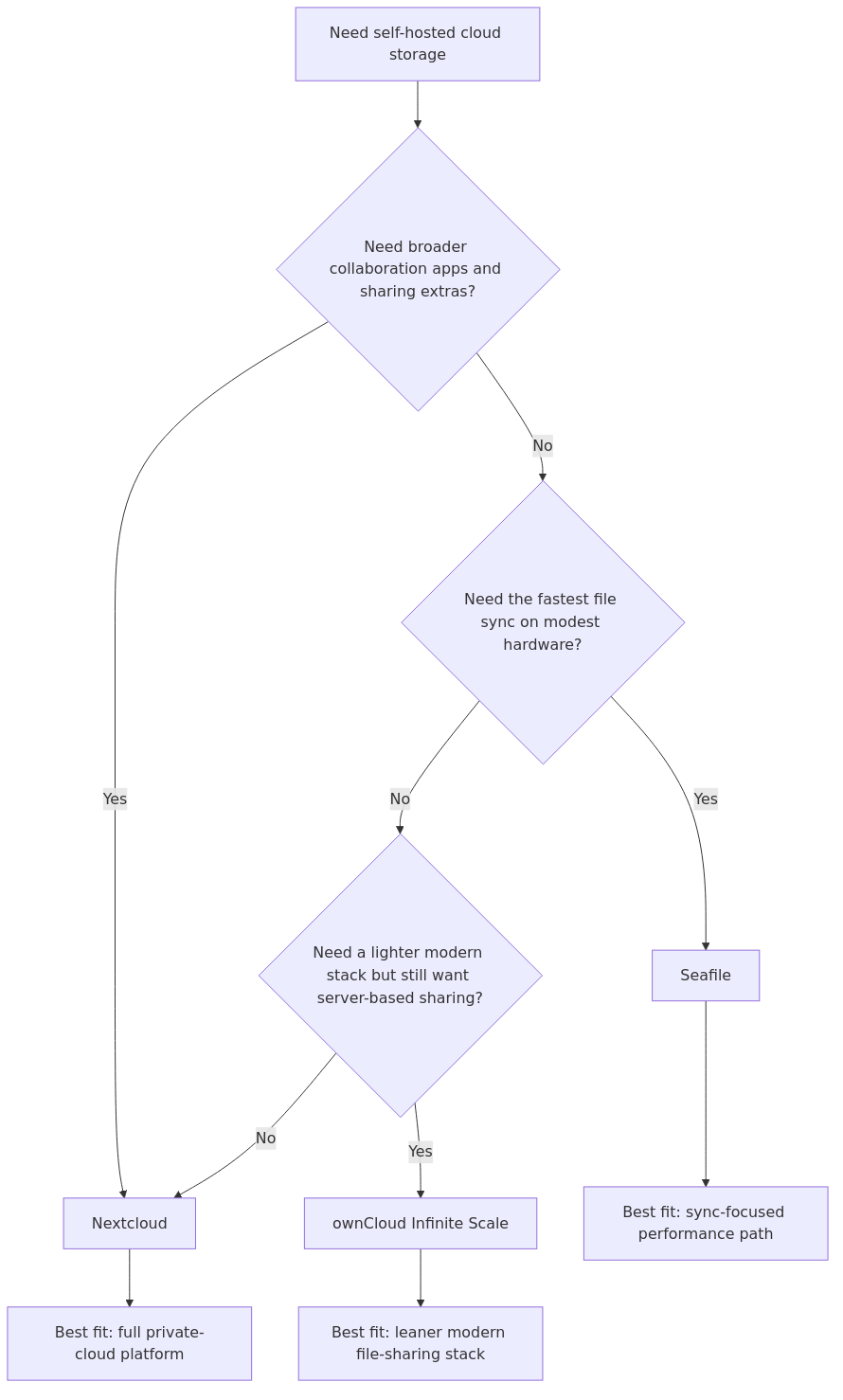
A useful cloud-storage comparison starts by separating three jobs: a full private-cloud platform, a sync-focused engine, and a lighter modern sharing stack. Those jobs overlap, but they do not reward the same hardware or maintenance choices.
Nextcloud remains the broadest fit when readers need sharing, mobile backup, collaboration extras, and a larger ecosystem. Seafile stays compelling when sync efficiency and lower overhead matter most. ownCloud Infinite Scale makes more sense when a lighter server profile matters more than deep app breadth.
This page helps homelab operators match those tradeoffs to host size, feature expectations, and maintenance appetite using primary documentation and published comparison data rather than personal lore.
Cloud platform selection flow: pick Nextcloud for the broadest private-cloud feature set, Seafile for sync-focused efficiency, and ownCloud Infinite Scale for a lighter modern sharing stack.
Nextcloud wins when capability is the primary question.
ownCloud Infinite Scale wins when you want a cleaner, lighter stack than Nextcloud without going all the way to a sync-only mindset.
Why Nextcloud is still the best overall pick
Nextcloud is heavier and more demanding than the other two, but it still fits readers who need a broader private-cloud platform instead of a sync-only tool.
You are not just getting file sync. You are getting a real platform.
That means:
shared links
browser-based file management
photo handling
calendar and contacts options
document editing integrations
a much larger app ecosystem
better odds of finding guides, fixes, and community support when something breaks
For a family cloud, a small team, or a serious personal replacement for Google Drive, that matters more than shaving a second or two off an upload.
Nextcloud pros
Best all-in-one feature set
Mature mobile and desktop clients
Deep collaboration integrations with OnlyOffice and Collabora
Large community, better documentation depth, more tutorials
Easier to extend once your homelab grows
Nextcloud cons
Heaviest resource footprint of the three
Performance can feel mediocre if you do not tune caching and background jobs
More moving parts means more update and maintenance overhead
Easy to overload on a low-end NAS if you also run other services there
Who should pick Nextcloud
Pick Nextcloud if:
transmission signup
article_topic // Self-Hosted Cloud Storage for Homelabs
Don't leave without the setup notes.
Get practical homelab guides, failure logs, and beginner-friendly build notes in your inbox.
Enter your email address to receive the Homelab Addiction newsletter.
Weekly only. No spam. Unsubscribe anytime.
you want a true private Google Drive alternative
you need file sharing plus light collaboration
you care about the app ecosystem
you want the most documentation and community coverage
multiple family members or users will depend on the service
If you care mostly about files moving quickly and consistently, Seafile is the one that keeps earning the performance crown.
The architectural reason is straightforward: Seafile is built around efficient sync, block-level transfers, and lower overhead. In comparison sources that actually put numbers to the claim, Seafile is described as 5-10x faster than Nextcloud on many small files. That is not a rounding error. That is the difference between a sync job feeling tolerable and a sync job feeling like a chore.
That matters most when your library looks like real homelab data instead of a polished demo:
photo folders with thousands of files
documentation repos
mixed workstation backups
project folders with lots of small changes
large media collections where partial changes should not force full re-transfers
Seafile pros
Best sync performance in this comparison
Lower CPU and RAM overhead than Nextcloud
Better fit for mini PCs, low-power boxes, and modest VMs
Lower maintenance burden than Nextcloud
Strong choice for large libraries and performance-sensitive remote access
Seafile cons
Much smaller ecosystem
Weaker all-in-one collaboration story
If you want the service to do everything, Seafile will feel narrow
Fewer community integrations and extension paths than Nextcloud
Who should pick Seafile
Pick Seafile if:
your main job is syncing files quickly and reliably
you run a lower-power host and want the best performance-per-watt result
you do not care much about calendars, Talk, or a huge app catalog
you have large media or archival libraries
you want the easiest long-term maintenance profile of the three
For storage-heavy builds, you should also think about your disk layout. If you are still deciding on media, WD Red Plus vs Seagate IronWolf vs Toshiba N300 is worth reading before you size the box.
Why ownCloud Infinite Scale is the sleeper option
ownCloud Infinite Scale is worth shortlisting when a lighter modern stack matters more than ecosystem depth.
A lot of older comparisons muddle classic PHP-based ownCloud with Infinite Scale. That makes the product look older and heavier than it is. The modern ownCloud Infinite Scale stack is a different conversation. It is much more interesting to homelabbers who want a cleaner, leaner server-side platform than Nextcloud without giving up the browser-based cloud model entirely.
One of the clearer published snapshots in this comparison set came from Pi Stack's Nextcloud-versus-ownCloud testing:
first load: ~1s for ownCloud vs ~3s for Nextcloud
100MB upload: ~5s for ownCloud vs ~10s for Nextcloud
RAM usage: ~128MB for ownCloud vs ~512MB for Nextcloud
Even if you treat those as directional rather than universal lab results, the pattern is consistent across the rest of the SERP: ownCloud Infinite Scale is lighter and quicker than Nextcloud, but it gives up ecosystem breadth to get there.
ownCloud Infinite Scale pros
Leaner modern architecture than Nextcloud
Lower RAM footprint in published comparisons
Faster page load and upload responsiveness in the available test set
Good fit for users who want a traditional cloud UI without full-suite overhead
ownCloud Infinite Scale cons
Much smaller ecosystem than Nextcloud
Less community gravity in the homelab world
Fewer tutorials, fewer community fixes, fewer plugins
Harder to recommend blindly because fewer homelabbers already know it well
Who should pick ownCloud Infinite Scale
Pick ownCloud Infinite Scale if:
you want a hosted private cloud, not just file sync
Nextcloud feels too heavy for your hardware or patience
you care more about clean architecture and lower overhead than app sprawl
you are comfortable with a smaller ecosystem
Setup complexity and host selection
This is where a lot of generic comparison pages stop being useful. Homelabbers are not buying software in a vacuum. You are deciding where it lives.
If you have a 2-bay or 4-bay NAS
A NAS is usually the easiest long-term home for Nextcloud or Seafile if:
it has enough RAM headroom
you are not trying to run ten other heavy containers alongside it
you already trust its storage and backup workflow
For a lighter NAS or an appliance-oriented setup, Seafile makes more sense than Nextcloud. Nextcloud is absolutely workable on stronger NAS hardware, but it is also the one most likely to make a small box feel older than it is.
If you have a mini PC
A mini PC is the sweet spot for this category.
If you are serious about self-hosted cloud storage, a modest x86 mini PC plus external or network-attached storage gives you more freedom than trying to overload a small consumer NAS. That is especially true if you want Nextcloud with office integrations, photo features, and additional services.
If you are still comparing hosts, our Best Mini PC for Proxmox in 2026 guide is a good companion read because the same boxes make excellent self-hosted cloud backends.
If you already have a Proxmox cluster
Run any of the three in a VM or container and keep storage planning separate from the application choice. In that setup:
Nextcloud benefits from more deliberate CPU, RAM, and cache planning
Seafile is easiest to fit onto existing infrastructure
ownCloud Infinite Scale is attractive if you want a lean service with less PHP baggage
From the lab
Affiliate-friendly hardware I would actually pair with this setup
These are the kinds of hardware picks that make sense for this category without turning the article into a shopping page.
Synology DS923+ - good fit if you want an appliance-style host with room to grow
WD Red Plus NAS drives - sensible baseline drives if you are building a dedicated storage box
Those recommendations are not mandatory to run any of this software. They are just the hardware profiles that line up well with the three software paths.
The winner by use case
Best overall winner - Nextcloud
Nextcloud wins because the feature gap is still real. Even when Seafile or ownCloud are faster, Nextcloud does more of what most people actually want from a private cloud.
If you are building one service for yourself, a partner, a family, or a small team, Nextcloud is the most complete answer.
Best performance winner - Seafile
Seafile wins if your real question is not "which private cloud does the most?" but "which one moves files best without wasting hardware?"
That is a different question, and Seafile has the best answer.
Best lightweight alternative - ownCloud Infinite Scale
ownCloud Infinite Scale wins for readers who want something more cloud-like than Seafile but leaner than Nextcloud. It is not the universal pick, but it is an increasingly respectable middle path.
Final recommendation by reader fit
If you want one answer, here it is:
Pick Nextcloud unless you already know performance is your top priority.
That is still the cleanest recommendation for most homelabbers in 2026.
Pick Seafile instead if you care more about sync speed, lower overhead, and large-file or small-file churn performance than you care about ecosystem breadth.
Pick ownCloud Infinite Scale if you want a modern lighter platform than Nextcloud and you are comfortable trading ecosystem depth for efficiency.
A practical way to apply the comparison looks like this:
family cloud / shared docs / mobile backups: Nextcloud
fast personal sync / media-heavy libraries / lighter host: Seafile
lean private cloud on smaller infrastructure: ownCloud Infinite Scale
Frequently Asked Questions
Is Nextcloud or Seafile better for a homelab?
If you want a complete private cloud, Nextcloud is better. If you only care about fast and efficient file sync, Seafile is better.
Is ownCloud Infinite Scale faster than Nextcloud?
In the comparison data I reviewed, yes. Pi Stack published faster first-load and 100MB upload times plus lower RAM usage for ownCloud Infinite Scale than Nextcloud. The tradeoff is a smaller ecosystem.
What is the best self-hosted Dropbox alternative in 2026?
For most homelab users, Nextcloud is the best overall Dropbox-style replacement because it adds more than basic file sync. If you want the fastest sync experience, Seafile is the stronger Dropbox alternative.
Can I run these on a NAS?
Yes. All three can run on suitable NAS hardware, but Seafile is usually the friendliest option for lower-power systems. Nextcloud benefits most from stronger CPU, more RAM, and faster storage.
Which option uses the least RAM?
From the current comparison set, ownCloud Infinite Scale and Seafile are both lighter than Nextcloud. ownCloud posted the lowest published example RAM figure in the material I reviewed, while Seafile consistently appears as the lower-overhead sync-focused option.
transmission signupstatus: open channel
article_topic // Self-Hosted Cloud Storage for Homelabs
Start building a smarter homelab.
Join readers learning Proxmox, networking, storage, backups, and self-hosting without breaking everything.
Enter your email address to receive the Homelab Addiction newsletter.
Beginner-friendly
No gatekeeping. Just clear, actionable guides.
1 useful email / week
Practical tips, real-world setups, and lessons learned.
Zero hype, practical only
What works, what breaks, and how to fix it.
Reply to any email with what you're building. I read and reply to as many as I can.
— The Homelab Addiction Operator
support // the lab
Found this guide useful?
If it saved you time or a rebuild, you can support more practical homelab guides.