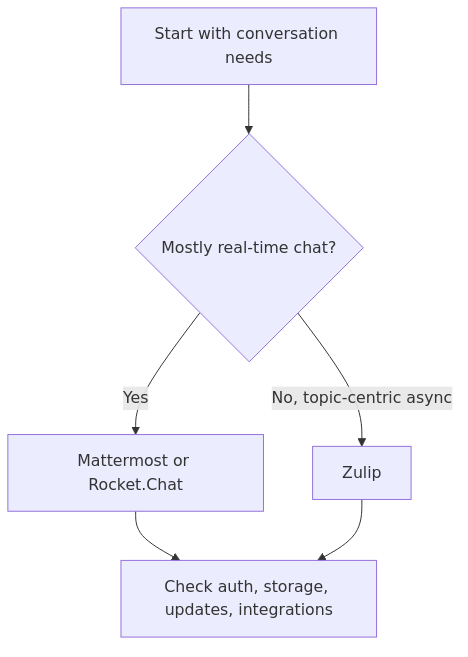
Mattermost, Rocket.Chat, and Zulip solve overlapping communication needs but impose different operational choices. The official installation documentation for each project is the reliable baseline for supported deployment requirements; feature fit should be evaluated separately from installation convenience.
For a homelab, the strongest choice is usually the one whose storage, update, notification, and authentication requirements match the people who will actually use it. A tool with more features is not automatically the lower-maintenance choice.
Decision flow grounded in the cited documentation.
Key Takeaways
Choose Mattermost when a conventional team-chat workflow and broad integrations are the priority.
Consider Rocket.Chat when its integration and administration model fits the existing stack.
Choose Zulip when topic-based, asynchronous conversations are more valuable than a Slack-like channel flow.
Rocket.Chat
Rocket.Chat is the one you pick when plain team chat is not the whole job.
This is the broadest platform here. If Mattermost is a straightforward internal work chat, Rocket.Chat wants to be more of a communications hub. It stretches into support use cases, external communication workflows, richer integration surfaces, and a generally more expansive platform identity.
That can be a huge upside.
It can also be exactly how a simple homelab need turns into a larger admin commitment than you intended.
Rocket.Chat’s current system requirements doc starts its smaller deployment table at 2 vCPU and 4 GiB for Rocket.Chat itself, plus 2 vCPU and 4 GiB for MongoDB, with 3 MongoDB replicas in the documented baseline table. Official doc: Rocket.Chat system requirements
Now, that does not mean every hobby deployment must look enterprise-grade. But it does tell you something about the platform’s center of gravity. Rocket.Chat is not pretending to be a tiny sidecar app. It expects a more deliberate infrastructure story.
That is the trade you make in exchange for more platform breadth.
If you want chat plus support-style workflows, more integration-heavy operations, or a more ambitious all-in-one communications stack, Rocket.Chat starts to look justified. If you just need a private place for alerts, a few channels, quick file drops, and team coordination, it is easier to overbuy here.
Rocket.Chat pros
broadest out-of-the-box feature surface in this comparison
strong fit if you want more than internal chat
2-service Compose deployment on paper, which still looks clean at first glance
good choice for teams that care about feature breadth more than absolute simplicity
Rocket.Chat cons
MongoDB raises the day-two operations cost compared with Mattermost’s simpler baseline story
easier to over-deploy for a small lab
the platform’s broader ambition can be wasted if all you need is dependable internal messaging
official baseline reads heavier than a typical “just run chat on the side” deployment
transmission signup
article_topic // Self-Hosted Team Chat for Homelabs
Don't leave without the setup notes.
Get practical homelab guides, failure logs, and beginner-friendly build notes in your inbox.
Enter your email address to receive the Homelab Addiction newsletter.
Weekly only. No spam. Unsubscribe anytime.
Zulip
Zulip is the smartest option here for the right team and the most annoying option for the wrong one.
If your team constantly loses context in channel chat, Zulip’s streams-and-topics model is excellent. It solves a real problem. Instead of a channel becoming one long rope of interruptions, every message belongs to a topic. That sounds like a small UX choice until you have multiple overlapping discussions, remote contributors, and people catching up hours later.
For async work, it is genuinely better organized.
But Zulip makes you pay for that in two ways.
First, it asks more of your users. If somebody wants the Slack-style mental model they already know, Zulip feels opinionated.
Second, it asks more of the operator. Zulip’s current Docker stack uses 5 services. Its production requirements page says you need at least 2 GB RAM, recommends 2 GB of swap if you have under 5 GB RAM, and explicitly says the installer expects Zulip to be the only thing running on the system, recommending a fresh machine, fresh VM, Docker image, or dedicated machine. Official doc: Zulip requirements and scalability
That is not outrageous. It is just a different class of commitment.
If your homelab style is “put this on the same shared Docker host as a dozen small services and forget it,” Zulip is the least natural fit of the three. If your style is “this is a real internal system and I want the conversation model to be better than Slack,” Zulip becomes much more compelling.
Zulip pros
best conversation model for async-heavy teams
topics keep long-running discussion readable
excellent fit for engineering, research, and community-style discussion
all-in on structured conversations instead of hoping users thread carefully
Zulip cons
5-service stack is the heaviest in this comparison
expects a more dedicated deployment posture
steeper adoption curve for users who just want Slack-like chat
easiest tool here to reject if your team values familiarity over structure
The resource discussion that actually matters in a homelab
A lot of comparison posts stop at feature lists. That is how people end up deploying the wrong thing.
In a homelab, the better question is this:
Which one gives me the collaboration I need without creating a permanent maintenance tax?
That answer changes by use case.
If your hardware budget is tight
Pick Mattermost.
The official baseline is the lightest of the three, the deployment is clean, and the familiar UX means you do not spend your first month explaining why conversation structure changed.
It is the same reason I usually prefer the simplest stack that cleanly solves the problem in other categories too. The logic is not that different from how I approached Best Self-Hosted Analytics Tools for Homelabs in 2026 or Self-Hosted Note-Taking Apps. The best answer is usually not the most feature-complete one. It is the one that still feels reasonable after backups, updates, and actual human usage enter the picture.
If you want one platform to do more than internal chat
Pick Rocket.Chat.
This is where Rocket.Chat earns its keep. If you expect your private chat platform to expand into a broader customer-facing or operations-facing comms surface, the extra heft becomes easier to justify. That broader ambition is the whole point of the product.
Just be honest with yourself about whether you will use that breadth. A lot of homelabs are better served by clean internal coordination than by installing a communications suite that mostly sits half-unused.
If your team works asynchronously and hates channel noise
Pick Zulip.
Zulip is the best answer when discussion structure is the actual problem you are trying to solve. If people are constantly losing track of important threads, topic-based conversation is not a gimmick. It is the reason to choose the tool.
But if your team will never fully buy into that model, the theoretical advantage disappears fast.
Who should pick Mattermost
Choose Mattermost if:
you want the easiest default answer
your users already understand Slack-style chat
you want a light deployment on a mini PC, VM, or small VPS
you care more about fast adoption than about maximizing features
you want private internal chat that fits into an already-busy homelab cleanly
Mattermost is also the right pick if your communication layer will sit beside the rest of your private services instead of trying to become the center of the universe. If that sounds like your stack, you may also want Vaultwarden and Authentik in the same environment so access and credentials stay tidy.
From the lab
Who should pick Rocket.Chat
Choose Rocket.Chat if:
you want the most feature-complete communications platform here
you expect internal chat to expand into support or broader workflow territory
you are comfortable with a heavier baseline and MongoDB in the stack
you want more platform breadth than Mattermost gives you out of the box
Rocket.Chat makes more sense when the chat layer is part of a bigger internal tooling story. If your homelab already includes private dashboards, internal docs, and app monitoring, it fits naturally alongside things like self-hosted email solutions and admin tooling rather than living as a tiny isolated app.
Who should pick Zulip
Choose Zulip if:
your team is async-first
channel chaos is already hurting you
you want durable, searchable topic organization
you are willing to dedicate more deployment attention to the platform
you have users who will actually appreciate structured conversation instead of resisting it
Zulip is the most opinionated choice here, and I mean that as praise. The problem is that opinionated tools only work when the opinion matches the team.
Recommended gear for running these stacks
If you are building or upgrading the host for a private communications stack, these are the product categories that fit naturally:
Samsung T7 portable SSD - useful for backups, snapshots, and quick off-host copies of chat data
YubiKey 5 NFC - a good fit if you pair the platform with stronger admin auth and SSO controls
The clear winner
Mattermost wins for most HomelabAddiction readers.
That is the answer I would give if a friend asked me what to install this weekend without a long requirements doc attached.
Here is the reasoning:
it has the simplest official baseline
it stays easy to explain to other users
it avoids the heavier infrastructure story attached to Rocket.Chat
it avoids the cultural retraining cost attached to Zulip
it solves the most common small-team homelab chat problem without demanding an entire new architecture conversation
That does not make it universally best.
Rocket.Chat is the runner-up if your real requirement is broader than team chat and you know you will use the extra feature surface.
Zulip is the specialist winner for async-first teams that need structured, topic-based communication enough to justify the heavier stack and different UX model.
If you want the practical rule:
start with Mattermost
choose Rocket.Chat only if you know why you need the extra platform breadth
choose Zulip only if your team will genuinely benefit from topic-based discussion every day
That rule will be right most of the time.
FAQ
Is Mattermost really lighter than Rocket.Chat for homelabs?
For most small-lab scenarios, yes. Mattermost’s official small-team baseline is lighter, and the operational story is simpler. Rocket.Chat’s documented baseline plus MongoDB expectations make it easier to overbuild if all you need is internal team chat.
Is Zulip too heavy for a homelab?
Not inherently. It is just the least casual deployment of the three. If you value structured async discussion enough, the extra complexity is justified. If you only want familiar private chat, it is usually more stack than necessary.
Which one is easiest for non-technical users to adopt?
Mattermost. It feels the most familiar immediately, which reduces rollout friction for family members, coworkers, or less technical collaborators.
Can these run on a small mini PC or VPS?
Yes, but the fit differs. Mattermost is the easiest recommendation on modest hardware. Rocket.Chat wants more breathing room once you respect its documented stack. Zulip can run on small infrastructure too, but it is a better fit when you are willing to treat it like a dedicated service instead of a casual add-on.
What if I also need identity, password, and other private collaboration tools?
Then think in terms of an ecosystem, not just chat. Chat often sits beside SSO, password management, notes, analytics, and internal mail. If you are building that private stack deliberately, start with stable foundations and only then add the communication layer that matches how your users actually work.
Sources and verification
Primary documentation was checked before this update. Recheck the linked vendor documentation for version-specific changes before deployment.
transmission signupstatus: open channel
article_topic // Self-Hosted Team Chat for Homelabs
Start building a smarter homelab.
Join readers learning Proxmox, networking, storage, backups, and self-hosting without breaking everything.
Enter your email address to receive the Homelab Addiction newsletter.
Beginner-friendly
No gatekeeping. Just clear, actionable guides.
1 useful email / week
Practical tips, real-world setups, and lessons learned.
Zero hype, practical only
What works, what breaks, and how to fix it.
Reply to any email with what you're building. I read and reply to as many as I can.
— The Homelab Addiction Operator
support // the lab
Found this guide useful?
If it saved you time or a rebuild, you can support more practical homelab guides.