

Homelab DNS is not about being fancy. It’s about having service names that keep working.
Once you run more than a couple apps, IP:port access turns into friction. You forget ports, bookmarks drift, and mobile devices behave differently. A good DNS setup makes your homelab feel like a real system.
In this post:
- A decision tree to pick a naming strategy
- When split-horizon DNS is worth it (and when it’s not)
- Three HTTPS patterns that work for homelabs
Table of Contents
Homelab DNS: the default setup most people should start with
If you want a safe, low-drama default:
- Use a real domain you own (or buy a cheap one)
- Create a subdomain like
home.yourdomain.comorlab.yourdomain.com - Run local DNS (Pi-hole or AdGuard Home is common)
- Keep admin UIs behind VPN
- Put public apps behind one reverse proxy
This keeps the moving parts small and gives you room to grow.
What problem domains and DNS actually solve
A domain gives you a namespace. DNS gives you consistent mapping from names to IPs.
In homelabs, the outcomes you want are simple:
jellyfin.home.yourdomain.comalways points to the right service- you can change servers without changing every bookmark
- you can use HTTPS without duct-taping certificates to each app
If you haven’t covered basics yet, Homelab Networking Basics and Homelab Security provide the background that makes the rest of this easier.
Rule 1: don’t use .local for your homelab domain
Many people try something.local. It often works until it doesn’t.
.local is used by mDNS (multicast DNS), which is a different name resolution system that can override or conflict with your unicast DNS.
If you want the technical reference, mDNS is described in RFC 6762:
Rule 2: pick one of these naming strategies
You have three sane options. Pick one.
Option A (recommended): a real domain you own
Buy a domain and use a subdomain for your lab.
Examples:
home.example.comlab.example.com
This keeps compatibility high with DNS tools and certificates.
Option B: home.arpa for internal-only naming
home.arpa is a special-use domain intended for home networks.
Reference:
- RFC 8375: https://www.rfc-editor.org/rfc/rfc8375
This can be a clean internal namespace if you truly do not want anything public.
Option C: random fake TLDs (avoid)
Short TLDs like .lan or .home look convenient, but they can create conflicts and weird leakage to public resolvers.
If you insist on something like this, treat it as a trade-off, not a best practice.
Rule 3: make server IPs stable before you do DNS
DNS records are only useful if the target stays put.
Before you create a bunch of A records:
- give your server a static IP, or
- set DHCP reservations
This prevents “DNS is broken” events that are actually “your server IP changed.”
Rule 4: keep local DNS authoritative for your homelab zone
Your local DNS server should be able to answer for your homelab names.
A simple approach is:
- local DNS answers
*.home.yourdomain.com(or*.home.arpa) - everything else forwards to an upstream resolver
This is where tools like Pi-hole or AdGuard Home help because they give you a place to put local records.
Rule 5: understand split-horizon DNS before you reach for it
A quick decision tree (pick your model first)
Pick the model that matches your goal:
- If remote access is only for you: use VPN-first and keep everything private.
- If you need to share one web app publicly: use a reverse proxy plus either a tunnel or a carefully limited port forward.
- If you want the same hostname to work everywhere (Wi-Fi and mobile data) without thinking: you will end up with split-horizon DNS or a VPN.
If you want the full trade-off breakdown between methods, see Cloudflare Tunnel vs VPN vs Port Forwarding.
Split-horizon DNS means the same name resolves differently depending on where you are.
Example:
- inside LAN:
app.home.example.com-> 192.168.1.50 - outside:
app.home.example.com-> your public IP
You usually need split-horizon when:
- you want the same name to work on Wi-Fi and on mobile data
- you are exposing one or two apps publicly through a reverse proxy
If you are VPN-first and you never want to expose apps publicly, split-horizon is often optional.
Rule 6: pick one HTTPS pattern and apply it consistently
Related reference for certificates:
- Let’s Encrypt: https://letsencrypt.org/
HTTPS is where homelab DNS projects go off the rails.
The mistake is trying to do everything at once: domain, DNS, remote access, and TLS.
Pick one pattern:
Pattern 1: VPN-first, HTTPS optional on LAN
This is the simplest and safest for beginners.
- remote access via VPN
- services stay private
- you can use HTTPS internally, but you don’t have to solve every certificate edge case on day one
Pattern 2: reverse proxy terminates HTTPS for everything
Put all web apps behind one reverse proxy and terminate HTTPS there.
This reduces complexity because you manage certificates in one place.
Pattern 3: internal CA for internal-only services
If you want HTTPS everywhere on LAN with an internal namespace, an internal CA can work.
It requires installing the CA trust on your devices. That’s the trade-off.
Rule 7: use a reverse proxy to reduce DNS and TLS sprawl
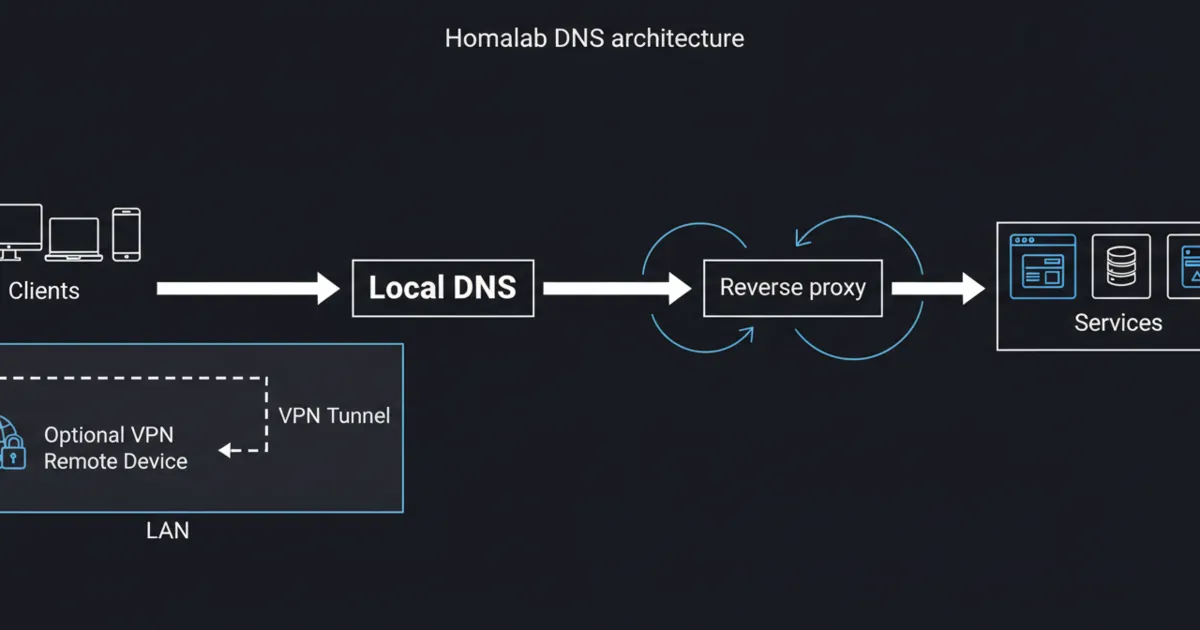
A reverse proxy is the glue between DNS names and services.
Instead of making every app handle TLS, redirects, and headers, you centralize that in one place.
A good beginner pattern is:
- DNS points many hostnames to one reverse proxy IP
- reverse proxy routes by hostname to the correct backend
If you want to choose a proxy stack, start with Nginx Proxy Manager vs Caddy vs Traefik.
Rule 8: debugging checklist (what to check when names fail)
When something works on one device but not another, check:
- what DNS server the client is using (you’d be surprised how often a device is bypassing your Pi-hole)
- whether the A/AAAA record exists in your local DNS
- cache and TTL behavior (clear cache before you panic)
- whether you are fighting mDNS (common with .local)
- whether you are relying on hairpin NAT (public IP from inside)
A practical debug sequence: 1) Resolve the name on the client (does it return the IP you expect?) 2) Try the IP directly (is the service reachable?) 3) If IP works but name does not, it’s DNS. 4) If name resolves but service fails, it’s routing, firewall, or the reverse proxy.
Rule 9: keep admin interfaces private
If you need remote admin access, don’t solve it with DNS tricks. Solve it with a secure access method.
A strong default is WireGuard or a managed WireGuard-based VPN.
Related reading: https://www.wireguard.com/
DNS does not make something safe.
If an admin UI is reachable from the internet, treat it like production.
A safer default is:
- admin UIs over VPN
- public apps behind a reverse proxy with HTTPS and auth
FAQ
What is the best domain choice for homelab DNS?
If you can, use a real domain you own and a subdomain for the lab. If you want internal-only naming, home.arpa is designed for home networks.
Do I need split-horizon DNS?
Only if you want the same service name to work inside and outside without a VPN. If you are VPN-first, split-horizon is often optional.
Why should I avoid .local?
Because .local is used for mDNS and can conflict with your unicast DNS setup.
How do I get HTTPS for internal services?
The simplest approach is putting everything behind a reverse proxy that handles certificates. Another approach is an internal CA for purely internal names.
Why does my service work on Wi-Fi but not on mobile data?
Usually it’s DNS or remote access: split-horizon, NAT behavior, or your service not being exposed outside.
Next steps
Start with one service name and make it work perfectly.
Once one name is stable on all your devices, scale the pattern to the rest of your homelab. That is how homelab DNS becomes boring and reliable.