Proxmox Cluster Networking is most useful when the design turns a repeated operational task into a predictable workflow. The safest choice depends on the failure boundary, the amount of state you need to manage, and what the upstream documentation actually supports.
The practical goal is not maximum complexity. It is a setup that can be reproduced, inspected, and recovered without relying on undocumented assumptions.
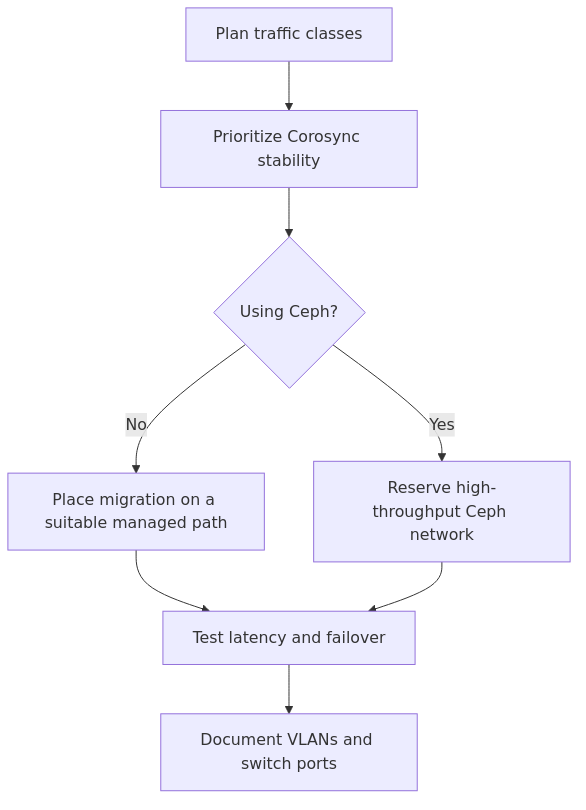
Proxmox cluster traffic separation decision flow.
Key Takeaways
Start with the supported default and add complexity only when a documented requirement justifies it.
Separate configuration from verification: a successful command is not proof that the resulting service or host is ready.
Document the recovery path before treating the workflow as production-ready.
Recommended Gear for a Stable Cluster Network
You do not need to buy your way out of bad design, but a few pieces of gear make life easier:
Managed 2.5GbE switch with VLAN support - useful when you want separate cluster and migration VLANs without burning a switch per traffic class: Amazon search
Intel i350-based multi-port NIC - a reliable way to add dedicated interfaces for Corosync and migration on older mini PCs or small servers: Amazon search
UPS for cluster nodes and switches - because quorum problems during a dirty shutdown are a stupid way to spend a weekend: Amazon search
I am not telling you to buy all three today. I am telling you that a cluster with stable power and predictable interfaces behaves a lot less like an improv exercise.
What Traffic Actually Exists in a Proxmox Cluster?
This is where a lot of homelab guides get fuzzy.
People say "use a separate network for the cluster" and leave it there, as if every packet in Proxmox has the same personality. It does not.
In practice, you are dealing with at least five traffic classes:
Management traffic - the web UI, API calls, SSH, package updates, backups, and general admin work.
Corosync traffic - cluster messaging, quorum, membership changes, and the stuff that decides whether nodes trust each other.
Guest and service traffic - what your VMs and containers actually serve to users.
Migration traffic - large bursts when VMs or containers move between nodes.
Ceph traffic - if you run Ceph, you are dealing with public traffic and often a separate cluster or replication path as well.
My interpretation is simple: Corosync gets first dibs on clean, predictable links. Everything else negotiates from there.
The Three Designs I Actually Recommend
You can absolutely overbuild this.
You can also underbuild it so badly that the cluster only behaves when nothing interesting is happening. The trick is matching the design to your lab size.
Option 1 - Small 2-node or 3-node 1GbE lab
This is a budget-friendly layout when you have limited ports and modest workloads:
Management and UI on vmbr0
Dedicated VLAN or dedicated NIC for Corosync
Migration traffic shares management at first
No Ceph
This works surprisingly well if your nodes are not constantly shuffling big VMs around.
transmission signup
article_topic // Proxmox Cluster Networking
Don't leave without the setup notes.
Get practical homelab guides, failure logs, and beginner-friendly build notes in your inbox.
Enter your email address to receive the Homelab Addiction newsletter.
Weekly only. No spam. Unsubscribe anytime.
If you only remember one rule, remember this one: do not let Corosync share a congested path with guest traffic or storage replication.
Option 2 - Serious homelab with regular migrations
This is where things start feeling civilized:
Management on one interface or bridge
Corosync on its own dedicated NIC or dedicated VLAN on a quiet switch path
Migration traffic on a separate 2.5GbE, 10GbE, or direct host-to-host link
Guest traffic on a bridge that stays out of the cluster's emotional problems
This is my favorite sweet spot.
You are not building an enterprise fabric. You are just acknowledging that live migration moves enough data to create real contention.
Option 3 - Ceph-capable cluster
The moment Ceph enters the chat, you need to stop pretending one shared uplink is fine.
For a Ceph-backed Proxmox cluster, a practical layout is:
Management on one network
Corosync on a dedicated low-latency path
Ceph public network on a high-throughput path
Ceph cluster or replication network on another high-throughput path if your scale justifies it
Migration traffic either sharing Ceph-capable fast links or on its own path, depending on hardware
Ceph is where people discover that "I have 10GbE" is not the same as "I designed 10GbE well." One noisy bond or mismatched MTU later and your replication graph starts looking like a lie detector.
My Default Network Plan for a 3-node Homelab Cluster
If someone handed me three mini PCs or small rack servers today, this is a reasonable baseline is:
vmbr0 - management and light admin traffic on 192.168.10.0/24
eno2 - dedicated Corosync network on 10.10.10.0/24
eno3 or a faster NIC - migration network on 10.20.20.0/24
optional vmbr1 or VLAN trunk for guest networks
no gateway on Corosync or migration networks
Here is a trimmed example from /etc/network/interfaces:
auto lo
iface lo inet loopback

iface eno1 inet manual
iface eno2 inet manual
iface eno3 inet manual

auto vmbr0
iface vmbr0 inet static
    address 192.168.10.11/24
    gateway 192.168.10.1
    bridge-ports eno1
    bridge-stp off
    bridge-fd 0

auto eno2
iface eno2 inet static
    address 10.10.10.11/24
    mtu 1500
    # Corosync only

auto eno3
iface eno3 inet static
    address 10.20.20.11/24
    mtu 9000
    # Migration traffic only
On the other nodes, I keep the layout identical and only change the host IPs.
That symmetry matters.
The more your nodes behave like matching appliances, the less likely you are to forget that one host has the oddball MTU, mystery VLAN tag, or bargain-bin NIC driver issue. Homelabs drift fast when every box is "special."
Creating the Cluster with a Dedicated Corosync Network
If you can separate Corosync at cluster creation time, do it then.
That is much cleaner than reworking a busy cluster later.
On your first node, create the cluster with the Corosync link bound to the dedicated network:
pvecm create lab-cluster --link0 10.10.10.11
Then join the other nodes with their dedicated Corosync addresses:
You want to see quorum intact and the Corosync link healthy.
If you are building a two-node cluster, this is where I strongly recommend planning for qdevice instead of rationalizing that you will fix it later. Later is usually after the cluster does something dramatic. The docs cover Corosync external vote support, and yes, it is worth understanding before you need it.
When Should You Add a Separate Migration Network?
Here is my blunt answer: add a separate migration network when migrations are large enough to affect cluster responsiveness or normal admin traffic.
If your lab runs a few tiny utility VMs, you can get away with shared management links for a while.
If you migrate multi-gigabyte memory footprints, move storage-heavy guests, or replicate often, stop being cheap with the path design. A separate migration network is one of those changes that feels optional until the first time it clearly is not.
Set it explicitly in Proxmox with a datacenter migration network, or from the shell:
pvesh set /cluster/options --migration unsecure,network=10.20.20.0/24
Then test a real migration during a busy window.
I do not mean a ceremonial migration of a sleepy Debian VM at 2 AM when nothing else is happening. I mean a real workload while backups, updates, or guest traffic exist on the network. That is when bad designs introduce themselves.
Ceph Changes the Answer Immediately
People love the idea of Ceph in a homelab.
People love it slightly less when they realize the network has to carry the consequences.
If you are running Ceph on the same Proxmox nodes, treat Corosync and Ceph as separate concerns from the start:
Corosync wants low latency and consistency.
Ceph wants throughput and stable replication paths.
VM guest traffic wants whatever users always want - bandwidth, low latency, and zero excuses.
Trying to mash all three onto the same modest 1GbE links is a good way to create a cluster that works beautifully until it does anything useful.
A simple mental model:
Corosync - tiny but critical
Migration - bursty and disruptive
Ceph - hungry and constant once loaded
If you cannot physically separate every traffic class, prioritize in this order:
Corosync gets its own path first.
Ceph gets the fastest links next.
Migration gets separated when live moves become painful.
Management stays boring and predictable.
That order has saved me more time than any clever bonding scheme.
Latency, MTU, and the Stuff That Quietly Hurts You
A lot of Proxmox cluster trouble is not dramatic. It is cumulative.
The cluster survives, but it starts acting slightly cursed under load. That is usually a network quality problem, not a supernatural event.
Latency checks
Test dedicated paths between nodes:
ping -c 20 10.10.10.12
ping -c 20 10.10.10.13
For Corosync, you care about consistency more than raw hero numbers.
A low average with ugly spikes is still ugly.
Bandwidth checks
For migration or Ceph-capable paths, use iperf3:
# node 2
iperf3 -s

# node 1
iperf3 -c 10.20.20.12
If a 2.5GbE or 10GbE path performs like a sick 1GbE link, do not assume Proxmox is the problem. Check offloads, cables, switch ports, and whether one node quietly fell back to a worse NIC.
MTU consistency
If you use jumbo frames, use them deliberately.
That means every device on the path agrees. Switches, NICs, bonds, bridges, and peer nodes all need the same expectation.
Test with a do-not-fragment ping:
ping -M do -s 8972 10.20.20.12
If that fails, do not shrug and carry on. Fix it or go back to MTU 1500.
Half-configured jumbo frames are one of my favorite ways to waste an evening with zero personal growth.
From the lab
Firewall Ports You Cannot Forget
If you use the Proxmox firewall, or any external host firewall between nodes, open what the cluster actually needs.
At minimum, validate:
UDP 5405-5412 for Corosync node communication
TCP 22 for SSH-based cluster operations
TCP 8006 for the Proxmox web UI and API
any additional storage or Ceph ports your design requires
If you want the full node and datacenter firewall picture, read my guide to Proxmox firewall rules.
And yes, test the rules after you write them.
I continue to be amazed by how many outages are caused by confident people who never ran one verification command.
The Mistake I Made
The mistake I made: I once treated a bonded pair of interfaces as a universal answer.
It looked clean on paper.
Management, migration, and cluster traffic all had redundancy. Very professional. Very grown-up. Then real traffic showed up, failover behavior was not as graceful as I imagined, and latency spikes on the shared bond caused cluster weirdness that was hard to reproduce and even harder to trust.
The lesson was simple: redundancy is not the same thing as isolation.
A single bond carrying too many critical traffic classes can fail in ways that are technically alive and operationally terrible.
That is why I now prefer a boring dedicated Corosync path and a separately planned migration or storage path whenever the hardware allows it.
A Practical Decision Matrix
If you are staring at your pile of NICs and regretting your life choices, use this:
Homelab size
Corosync
Migration
Ceph
My recommendation
2 nodes, no shared storage
Dedicated VLAN or NIC
Shared with management
None
Add qdevice and keep Corosync isolated
3 nodes, 1GbE only
Dedicated VLAN or NIC
Shared at first
None
Works fine for light clusters
3 nodes, 2.5GbE or 10GbE available
Dedicated NIC
Dedicated fast link
None
Best price-to-stability ratio
3+ nodes with Ceph
Dedicated NIC
Separate if possible
Separate fast path
Design the network before enabling Ceph
This is also a good place to think about storage layout and failure domains. If you are still deciding how the nodes should handle local storage, my Proxmox ZFS setup guide and Proxmox backup strategies guide will save you from a few predictable mistakes.
Verification Checklist Before You Trust the Cluster
Before I call a new Proxmox cluster network "done," I check all of this:
pvecm status shows quorum and the expected node count
corosync-cfgtool -s shows healthy links
ping between Corosync IPs is stable with no weird spikes
iperf3 confirms the migration or Ceph path is performing as expected
firewall rules are tested between all nodes
one real VM migration succeeds during normal traffic
a node reboot does not produce cluster panic or mystery rejoin issues
That last item matters.
A cluster that only behaves after a perfect clean boot is not stable. It is just polite during demonstrations.
FAQ
Do I need a dedicated NIC for Proxmox cluster traffic?
Not always.
A dedicated NIC is the cleanest answer, but a dedicated VLAN on a quiet and reliable path can work well in small homelabs. Avoid let Corosync compete with noisy guest, backup, or Ceph traffic on the same congested uplink.
Can I share Corosync and migration traffic on the same network?
You can, especially in smaller labs.
I still prefer separating them once migrations become regular or large enough to create latency spikes. Shared links are acceptable until they are not, and the transition usually happens during the least convenient moment possible.
Can I run a two-node Proxmox cluster without qdevice?
You can, but I do not recommend it if you care about predictable quorum behavior.
A qdevice gives you a tie-breaker. Without it, two-node clusters are much easier to knock into awkward states after link loss or node failure.
Does Ceph require a separate network in Proxmox?
Ceph can technically run without a separate network in tiny environments, but performance and predictability improve when you give it dedicated bandwidth.
At minimum, do not let Ceph bully Corosync. If you are serious enough to run Ceph, you are serious enough to think about network separation.
What is the best Proxmox cluster network speed?
For Corosync alone, 1GbE is usually enough if latency is low and stable.
For migration and Ceph, faster links help a lot. I think 2.5GbE is a very sensible homelab upgrade point, while 10GbE starts making even more sense once shared storage or heavier VM movement enters the picture.
Final Verdict
If you want a simple rule for Proxmox cluster networking, use this one: separate Corosync first, then separate whatever traffic causes pain next.
That usually means migration second.
If Ceph is involved, it often means Ceph gets the fast lane and Corosync gets the quiet lane. Either way, the cluster stays saner when you stop treating every packet as equal.
The operational trade-off is clear.
A slightly overplanned network is safer than a minimal one that lets backup traffic create congestion. Proxmox is extremely forgiving about a lot of things. Cluster latency is not one of them.
Build the boring path first. Your future self will have fewer stories, which in infrastructure is usually a compliment.