Docker Log Rotation for Homelabs is most useful when the design turns a repeated operational task into a predictable workflow. The safest choice depends on the failure boundary, the amount of state you need to manage, and what the upstream documentation actually supports.
The practical goal is not maximum complexity. It is a setup that can be reproduced, inspected, and recovered without relying on undocumented assumptions.
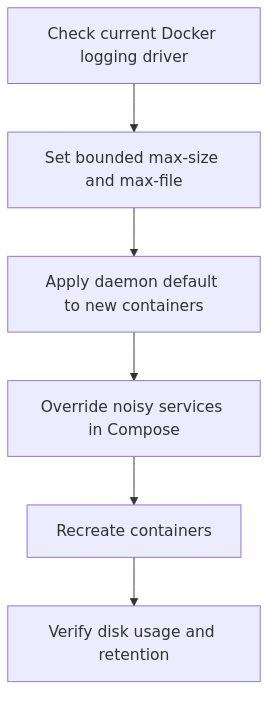
Docker log rotation workflow for a homelab.
Key Takeaways
Start with the supported default and add complexity only when a documented requirement justifies it.
Separate configuration from verification: a successful command is not proof that the resulting service or host is ready.
Document the recovery path before treating the workflow as production-ready.
Why Docker log rotation matters more in a homelab than people admit
A lab box is usually small, quiet, and always on. That is part of the appeal. It is also why bad logging defaults hurt more than they would on a larger production platform with aggressive monitoring and dedicated log infrastructure.
A mini PC with a single NVMe drive does not care that your container only emits "a little" debug output every second. It cares about math. And math is famously unsentimental.
By default, Docker uses the json-file logging driver and does not impose rotation unless you configure it. That means the log file keeps growing until you do something about it.
The failure mode is annoying because it sneaks up on you:
Everything looks normal.
One container gets noisy.
The host disk slowly fills.
Pulls, writes, backups, or updates start failing in weird ways.
You spend half an hour investigating the wrong thing before remembering to check disk usage.
If this sounds oddly specific, it reflects a common failure mode: log growth is easy to ignore until it affects ordinary host operations.
Where Docker logs live on the host
When Docker uses json-file, container logs usually end up under a path like this:
This is the safest upgrade if you want minimal behavioral change. You keep the default driver, but set a size limit and a file count.
That usually means adding:
max-size
max-file
For many homelabs, something like 10 MB per file and 3 to 5 files per container is a decent starting point. Not sacred. Just sane.
Option 2: Switch the host default to local
This is a practical option for many standalone Docker hosts.
Docker's own docs now explicitly note that the local logging driver performs rotation by default and is generally better at preventing disk exhaustion outside compatibility-sensitive situations. In other words, Docker is politely telling you that old defaults are old defaults, not a badge of wisdom.
A practical default
transmission signup
article_topic // Docker Log Rotation for Homelabs
Don't leave without the setup notes.
Get practical homelab guides, failure logs, and beginner-friendly build notes in your inbox.
Enter your email address to receive the Homelab Addiction newsletter.
Weekly only. No spam. Unsubscribe anytime.
For plain Docker or Docker Compose on a normal Linux host, local is a strong default. If you want maximum familiarity or you rely on json-file behavior for something specific, keep json-file but set explicit limits.
If you are running Docker as part of something with stricter compatibility assumptions, read the official docs first and stay conservative.
Built-in rotation, more efficient local storage for many homelab use cases
Less commonly covered in older tutorials
Best default for many self-hosted Docker boxes
This is also a good example of why copying old Compose examples from random blog posts is risky. Plenty of those posts are still useful, but many were written when "works at all" counted as best practice. We can aim higher now.
If the command returns local, the daemon default changed successfully.
Per-service Docker Compose overrides
Even if you set a host-wide default, I still like explicit logging config for especially noisy services. It documents intent, helps future maintenance, and prevents one copy-pasted service from ignoring the standards you thought everyone understood.
Here is a Compose example using json-file rotation:
A common mistake is changing the daemon and assuming old containers were fixed
Here is the thing nobody tells you loudly enough: changing the daemon logging config does not retrofit existing containers.
I am going to repeat that because it causes real confusion.
New default logging settings apply to newly created containers. Existing containers keep the logging configuration they were created with.
So if you edit daemon.json, restart Docker, and then assume the old container from fourteen months ago is now magically rotating logs, that assumption is doing no useful work.
You need to recreate the container.
For Compose-managed services, that usually means:
docker compose up -d --force-recreate
Or, if you want to be slightly more deliberate:
docker compose pull
docker compose up -d --force-recreate
I prefer doing this during a small maintenance window rather than discovering at 11:40 PM that the settings changed cleanly for every service except the one actually causing the problem.
How to verify the new logging config is really active
Do not stop after editing config files. Verify.
Check the daemon default
docker info --format '{{.LoggingDriver}}'
Expected output should match your intended host default, such as json-file or local.
If you changed the daemon default but the container still shows old values, you have your answer. The container was not recreated.
Watch disk usage before and after
sudo du -sh /var/lib/docker/containers
sudo df -h /
Check for log spam at the source
Sometimes rotation is working, but the application is still shouting into the void. That is not a rotation problem. That is an application-behaving-like-an-application problem.
Use:
docker logs --tail 200 <container_name>
If the service is producing the same warning every second, fix the app, not just the bucket it is filling.
A practical baseline for most homelabs
If you want one copy-paste-safe default and do not want to overthink it, here is a baseline for a small Docker host that runs normal self-hosted services.
Then add per-service overrides only when a workload genuinely needs them.
That is the part people skip. They either over-tune every container immediately, or they tune nothing. Both approaches waste time. Start with a sane host default and only customize the loud exceptions.
From the lab
When rotation is not enough
Rotation protects the host. It does not replace observability.
If you actually need to retain logs for troubleshooting, search, or historical context, you should move beyond local files and centralize what matters. Otherwise you are using your Docker host as a reluctant log archive, which is a bit like using a step stool as a data center rack. Technically possible. Spiritually wrong.
You do not need expensive hardware for log rotation. You do need hardware that is not already losing an argument with basic disk pressure.
Fanless N100 mini PC for a dedicated Docker host - plenty for Compose stacks, quiet enough to forget it exists, which is exactly the point: Recommended N100 mini PCs on Amazon
1TB NVMe SSD for container data and retained logs - a cheap way to stop pretending a tiny boot disk will age gracefully: 1TB NVMe SSD options
APC Back-UPS 1500VA - because repairing corrupted services after a power cut is a terrible way to spend a Saturday: APC Back-UPS 1500VA options
Lessons learned from doing this the lazy way first
The first time I fixed Docker log rotation, I focused on the config file and ignored the workflow around it. That was the wrong priority.
The actual durable fix was not just daemon.json. It was documenting a repeatable maintenance pattern: change the host default, recreate old containers, verify with docker inspect, then add a simple disk-usage check to my normal review routine.
That sounds boring because it is boring. Infrastructure that survives is often just a collection of boring habits you finally stopped arguing with.
My simple operating rule
A practical operating rule is:
Set a host-wide logging default.
Recreate old containers after changing it.
Override only the noisy services.
Monitor disk usage.
Centralize important logs somewhere else.
That is enough for most homelabs. You do not need a grand observability manifesto before you stop a chatty container from chewing through local storage.
Common mistakes
1) Assuming Docker rotates logs by default
It does not for json-file. This is the root of the whole problem.
2) Editing daemon.json and forgetting to recreate containers
The daemon changed. Your old containers did not. That is the trap.
3) Setting enormous retention values "just in case"
If you need unlimited local logs on a small homelab server, what you actually need is a different architecture.
4) Ignoring the application itself
Rotation controls damage. It does not cure a broken app that emits the same error forever.
5) Treating local rotation like a full logging strategy
It is a safety control, not an observability platform.
FAQ
Should I use json-file or local for Docker log rotation?
For many self-hosted Docker boxes, start with local unless compatibility requires json-file. If you already use json-file, keeping it is fine as long as you explicitly set max-size and max-file.
Why did my Docker log rotation config not apply to an existing container?
Because Docker applies daemon-level logging changes to newly created containers, not existing ones. Recreate the container and verify its LogConfig with docker inspect.
What are good starter values for max-size and max-file?
For a typical homelab service, max-size: "10m" and max-file: "3" is a sensible starting point. Increase it only for containers that genuinely need more local retention.
Is Docker Compose log rotation different from daemon-level rotation?
It uses the same underlying Docker logging concepts, but you define them per service under logging: in your Compose file. I like daemon defaults for consistency and Compose overrides for the loud edge cases.
Do I still need centralized logging if I enable rotation?
Yes, if you care about searching, retention, or cross-service troubleshooting. Rotation protects the host. Centralized logging helps you investigate real problems later.
Final recommendation
If you want the short version, here it is: stop leaving Docker logging at the defaults.
For an existing homelab, set a safe host-wide policy today, recreate the containers that matter, and verify the result with docker inspect. For a fresh Docker host, defaulting to local is a reasonable low-maintenance choice.
That is not the most glamorous Docker improvement you will make this year. It might be the one that saves your next weekend.