Disclosure: This article may contain affiliate links. If you purchase through these links, HomelabAddiction may earn a commission at no additional cost to you.
The right Ethernet cable is usually the one that matches the run you do not want to replace twice. Distance, 10GbE plans, PoE density, bend radius, and re-cabling difficulty matter more than buying the highest category number on the box.
This page helps homelab operators choose between Cat6, Cat6A, and Cat8 by matching cable category to realistic home and rack scenarios: short patch leads, permanent in-wall runs, access-point uplinks, and future 10GbE upgrades that need more headroom.
For most serious permanent runs, Cat6A remains the safer default because it keeps full-length 10GbE on the table without the thickness, shielding, and shorter practical use case that make Cat8 a niche choice in residential labs.
Key Takeaways
Cat6 still fits short patch runs, 1GbE links, and many 2.5GbE or 5GbE upgrades where the cable path is easy to replace later.
Cat6A is the safest default for new permanent runs when 10GbE, denser PoE, or longer replacement cycles matter.
Cat8 only makes sense when you already have a short, specialized copper use case that justifies the extra stiffness and shielding overhead.
Choose cable by run length, upgrade path, and installation constraints before chasing category marketing.
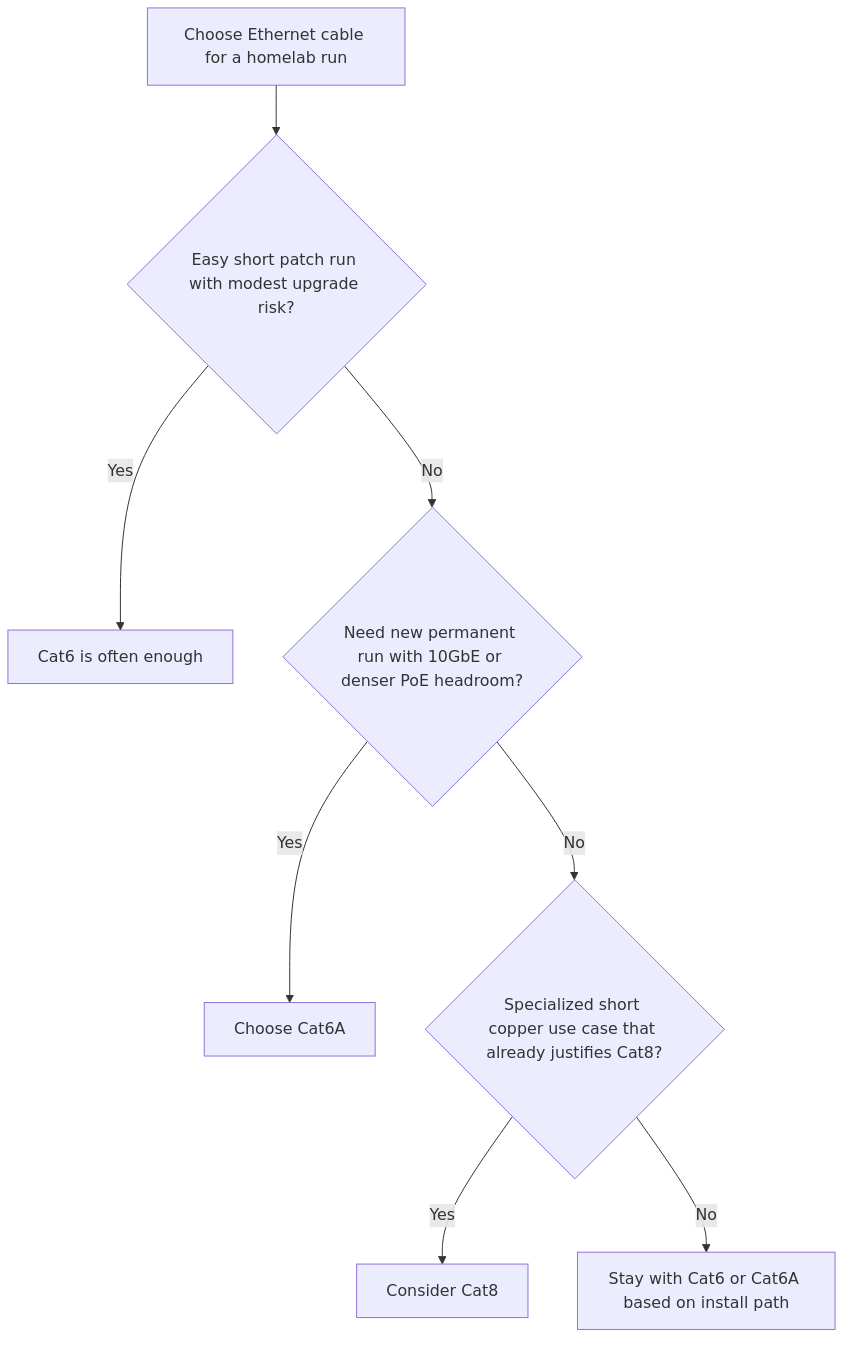
Cable-fit decision flow: keep Cat6 for short simple runs, step up to Cat6A for new permanent 10GbE-ready cabling, and reserve Cat8 for short specialty cases that already justify it.
Comparison method
This comparison uses published category limits, installation tradeoffs, and workload-fit math instead of pretending that a one-off home test can redefine established cabling behavior.
The comparison uses six criteria:
Speed and distance - what each category reliably supports and at what length
Homelab relevance - whether the category makes sense for 1GbE, 2.5GbE, 10GbE, and beyond
Installation friction - cable thickness, flexibility, shielding, and termination difficulty
PoE friendliness - how well the category fits access points, cameras, and powered edge gear
Upgrade path - whether the cable lets you grow into faster switching without recabling
Cost-to-benefit - not just cable price, but the extra tax from shielded jacks, grounding, and labor
For the hard numbers, the article relies on published category and vendor references including:
The workload examples also use practical transfer-time math for common homelab jobs. Those examples assume roughly 94% line efficiency so link speed maps to something readers can use, like how long a 50 GB transfer or backup window takes.
At-a-glance comparison
Category
Best for
Rated bandwidth
Practical Ethernet story
Biggest drawback
My take
Cat6
Short patch runs, 1GbE and 2.5GbE networks, modest 10GbE experiments
250 MHz
1GbE to 100m, 10GbE to roughly 37-55m depending on environment
Limited full-distance 10GbE headroom
Still a good budget choice for short, simple runs
Cat6A
Most new homelab installs, 10GbE-ready structured cabling, PoE APs and cameras
500 MHz
10GbE to 100m
More bulk and cost than Cat6
Best overall answer for most readers
Cat8
Very short, very high-speed copper links where 25/40GbE over copper is intentional
2000 MHz
25/40GbE to 30m, always shielded
Expensive, stiff, overkill, short range for its target speeds
Niche tool, not the default homelab buy
Specification and fit table
transmission signup
article_topic // Cat6 vs Cat6A vs Cat8 for Homelabs
Don't leave without the setup notes.
Get practical homelab guides, failure logs, and beginner-friendly build notes in your inbox.
Enter your email address to receive the Homelab Addiction newsletter.
Weekly only. No spam. Unsubscribe anytime.
These are the numbers that actually matter when you are buying cable for a NAS rack or a ceiling run.
Category
Frequency / bandwidth
Distance support that matters
Transfer time for a 50 GB move*
Installation profile
Resource / operational notes
Cat6
250 MHz
1GbE to 100m, 10GbE usually 37-55m
7m 6s at 1GbE, 43s at 10GbE
Easier to pull and terminate
Lower cost, lighter cable, fewer complaints in tight pathways
Cat6A
500 MHz
10GbE to 100m
43s at 10GbE
Thicker and less flexible than Cat6, but still manageable
Better long-run 10GbE safety margin, stronger fit for PoE-heavy installs
Cat8
2000 MHz
25/40GbE to 30m
17s at 25GbE, 11s at 40GbE
Thick, stiff, shielded-only, fussier termination
Often requires a more disciplined shielded ecosystem and adds cost where most homelabs gain little
* Practical file-transfer examples were calculated from link-rate math for common lab jobs, not synthetic iPerf claims. For reference, a 100 GB move works out to about 14m 11s on 1GbE, 5m 40s on 2.5GbE, 1m 25s on 10GbE, 34s on 25GbE, and 21s on 40GbE.
What those numbers mean in practice
Cat6 is not slow. It is more than enough for ordinary 1GbE switching, camera drops, and most patch-cable jobs.
Cat6A is the first category where long-distance 10GbE stops being a gamble. That matters if your NAS, workstation, or Proxmox hosts are not all living in the same tiny rack.
Cat8 only pays off when the rest of your stack is already expensive enough to justify it. If you do not own 25GbE or 40GbE gear, the cable is not your bottleneck. Your switches and NICs are.
That last point is the one too many buying guides dance around. A lot of people shopping Cat8 are not solving a Cat6 problem. They are shopping for peace of mind by purchasing a bigger number.
If you are buying cable in bulk or adding patch panels and keystones at the same time, a quick coupon-and-cashback check can be worthwhile before you place the order. Coupert is one option for checking whether the retailer has a live offer.
The winner for most people: Cat6A
If you want the short version, Cat6A is the best Ethernet cable category for most serious homelabs in 2026.
Why? Because it lands in the middle of the decision almost perfectly:
it supports full-distance 10GbE
it is far more realistic than Cat8 for wall and ceiling runs
it handles PoE access points and camera drops well
it is expensive enough to feel intentional, but not so overbuilt that you regret every termination
it gives you a real future-proofing story instead of a fake one
This is the part many competitor articles underplay. Future-proofing is not about buying the highest category you can find. It is about buying the category that matches the fastest thing you are realistically going to deploy over the life of the cable.
For a homelab, that usually means some mix of:
1GbE clients that are not going anywhere soon
2.5GbE access points and desktop uplinks
10GbE between a NAS, switch, and one or two high-value hosts
PoE devices in ceilings or awkward spots you do not want to reopen later
That is Cat6A territory all day.
Cat6: still the right answer more often than cable snobs admit
Cat6 keeps getting treated like the old compromise cable. That is unfair.
For a lot of homelabs, Cat6 remains a completely rational buy because most networks are still dominated by 1GbE edges, a few 2.5GbE uplinks, and short patch runs inside a rack. If that is your actual topology, Cat6 is not a downgrade. It is a sane fit.
Where Cat6 is strongest
It is easier to work with than Cat6A or Cat8.
It is cheaper to buy in bulk and cheaper to terminate.
It is perfectly fine for patch leads between nearby gear.
It is more than enough for 1GbE and 2.5GbE networks.
It can still do 10GbE at shorter distances when the run and noise environment cooperate.
That last part matters. If your "long run" is a 5-meter rack jump between a 10GbE switch and a NAS, Cat6 is not going to suddenly embarrass itself.
Where Cat6 falls short
The moment your 10GbE run lengths start growing, Cat6 becomes a planning gamble.
It gives you less cushion for noisy bundles and high-density pathways.
If you are opening walls today and want to avoid doing it again, Cat6 can become the classic false economy.
Cat6 pros
Lowest cost of the three
Easiest handling and termination
Ideal for short patch cables and modest home-network distances
Usually enough for 1GbE and 2.5GbE everywhere
Cat6 cons
No full-distance 10GbE guarantee like Cat6A
Weaker long-term hedge if you are wiring the house once
Easier to outgrow if your NAS and switching plan gets ambitious
Who should pick Cat6
Pick Cat6 if your priority is cost control and practical simplicity.
That means:
you are mostly running 1GbE or 2.5GbE gear
your 10GbE links, if any, are short and local
you are buying patch cables, not rewiring a building
you want the easiest cable to route through a small rack or cabinet
If that sounds like your setup, Cat6 is still a good answer. Do not let premium-category marketing talk you out of a perfectly fine cable.
Cat6A: the best long-term homelab cable
Cat6A wins because it fixes the exact pain points that show up once a homelab starts growing.
You add a 10GbE NAS. Then you add a second host that wants fast storage. Then an access point gets upgraded. Then the patch panel turns into a real patch panel instead of a nest of patch leads and good intentions. At that point, the extra margin from Cat6A stops feeling theoretical.
Why Cat6A is so compelling
The practical default remains simple: Cat6A is the safer long-run answer when full-length 10GbE, denser PoE, or hard-to-replace cable paths matter more than the lowest purchase price.
The better part is what comes with that in practice:
more confidence on long structured runs
a better fit for modern PoE deployments
less anxiety about whether your 10GbE upgrade will force recabling later
a much stronger ceiling for real-world homelab growth than Cat6
Termination is not impossible, but it is less forgiving.
If you are only ever going to run 1GbE, you can absolutely spend money here you did not need to spend.
Cat6A pros
Best all-round fit for long-term homelab builds
Full-distance 10GbE support
Strong choice for PoE APs and camera runs
The most sensible balance of capability and practicality
Cat6A cons
More expensive than Cat6
Bulkier and a little more annoying to install
Overkill for simple all-1GbE networks
Who should pick Cat6A
Pick Cat6A if you want the best overall answer.
That means:
you are wiring walls, ceilings, or a patch panel from scratch
you expect at least some 10GbE during the life of the cable
you want one cable standard across APs, rack drops, and workstation runs
you would rather spend a bit more now than reopen pathways later
For most serious self-hosters, that is the right move.
From the lab
Cat8: impressive on paper, niche in a real homelab
Cat8 is the cable everyone wants to ask about because it looks like the endgame option.
The trouble is that Cat8 solves a problem most homelabs do not have.
It is built for very high-speed copper Ethernet over short distances. That means 25GbE and 40GbE over runs up to about 30 meters. It is also fully shielded, physically bulkier, and generally much less pleasant to treat like normal residential structured cabling.
Why Cat8 sounds better than it usually is
On a spec sheet, Cat8 is hard to ignore:
2000 MHz rating
25GbE and 40GbE support
premium positioning everywhere you shop
But the first question is not "how fast is Cat8?" It is "what in your homelab can actually use Cat8 the way Cat8 was designed to be used?"
If the answer is "nothing yet," then Cat8 is not future-proofing. It is cosplay.
Where Cat8 actually makes sense
very short copper links inside or near a rack
intentionally high-speed links with 25GbE or 40GbE gear already selected
unusual labs where DACs or fiber are not the preferred answer for those short high-speed uplinks
Where Cat8 falls apart for most readers
It adds cost with little return in a 1GbE/2.5GbE/10GbE world.
The 30-meter limit for its headline use case makes it less flexible than people assume.
Shielding can turn into ecosystem tax: shielded keystones, shielded connectors, and more care around termination.
It is harder to justify for APs, cameras, or ordinary room drops when Cat6A already handles the meaningful upgrade path.
Cat8 pros
Highest ceiling on paper
Viable for short 25GbE/40GbE copper links
Strong niche option for specialized high-speed patches
Cat8 cons
Overkill for nearly every normal homelab run
Thicker, stiffer, and less pleasant to install
Shielded-only expectations raise cost and complexity
Weak value if your network will top out at 10GbE for years
Who should pick Cat8
Pick Cat8 only if your priority is short-distance very-high-speed copper and you already know your switch and NIC roadmap justifies it.
That means:
you are building around 25GbE or 40GbE now, not maybe someday
the run is short
you accept the extra installation and termination overhead
you have already ruled out DAC or fiber for that link
That is a valid use case. It is just not the default homelab use case.
Which cable should you buy for each homelab scenario?
Scenario
Best pick
Why
Cheap patch cables between router, switch, and a few endpoints
Cat6
Lowest fuss, lowest cost, plenty of headroom for 1GbE and 2.5GbE
New in-wall or ceiling runs for APs, cameras, and room drops
Cat6A
Best long-term value and much stronger 10GbE future-proofing
10GbE NAS and workstation links across meaningful distance
Cat6A
Full-distance 10GbE support is the whole point
Very short, very high-speed copper inside a specialty rack
Cat8
Only if 25/40GbE is real and intentional
Most people reading this article
Cat6A
It avoids both underbuying and overbuying
Affiliate recommendations
If you are buying for a real homelab rather than a one-off patch cable, these are the kinds of products worth pricing out:
Cat6A patch cables or bulk riser cable - the safest default if you are wiring a rack, office, or ceiling run for long-term 10GbE headroom Recommended search link
Shielded Cat6A keystone jacks and patch-panel parts - useful if you are doing a cleaner structured install instead of throwing patch leads everywhere Recommended search link
RJ45 cable tester and punch-down tool kit - one of those purchases that feels boring until it saves you an hour of tracing a bad termination Recommended search link
Final verdict
If you want the blunt answer, Cat6A is the winner for most homelabs in 2026.
Cat6 is still a good cable for short patch runs and easier replacement paths. For ceilings, walls, patch panels, or any run that should stay in place through later 10GbE upgrades, Cat6A remains the safer install-and-forget choice.
Cat8 is not bad. It is just too specialized to be the default recommendation. Most homelabbers shopping Cat8 would get more real benefit from putting that extra money into a better switch, cleaner patch-panel work, or a 10GbE NIC upgrade.
The data shows this pretty clearly:
Cat6 remains cost-effective when your network is simple
Cat6A is the best balance of speed ceiling, distance, and practicality
Cat8 only wins when the rest of the network is already built around genuinely faster copper Ethernet
So if you want one sentence to carry out of this article, here it is:
Buy Cat6A for permanent homelab runs, buy Cat6 for short and simple links, and buy Cat8 only when you can explain exactly why Cat6A is not enough.
FAQ
Is Cat6 enough for 10GbE in a homelab?
Sometimes, yes. Cat6 can support 10GbE at shorter distances, typically in the roughly 37-55 meter range depending on installation quality and crosstalk conditions. For short rack or room-to-rack runs, that can be completely fine. For long permanent structured cabling, Cat6A is the safer bet.
Is Cat8 worth it for a home network?
Usually no. If your network is mostly 1GbE, 2.5GbE, or even 10GbE, Cat8 is normally overkill. It makes more sense for short, intentional 25GbE or 40GbE copper links than for everyday homelab runs.
Should I use Cat6A for PoE access points and cameras?
Yes, in many cases that is the sweet spot. Cat6A gives you stronger long-run performance and better future-proofing for powered edge devices, especially if you are cabling once and do not want to revisit the run later.
Does Cat8 reduce latency compared with Cat6A?
Not in the way most buyers hope. If the link speed and the rest of the hardware stay the same, Cat8 does not magically make a normal homelab network feel faster. The gain only matters when the entire link is designed to run at the higher speeds Cat8 targets.
What should most rack builders buy today?
For most racks, buy Cat6A for anything permanent and use Cat6 where a short patch cable is enough. If you are running a specialized ultra-high-speed copper link and have the gear to justify it, then consider Cat8 as a niche tool rather than a blanket default.
This retained rewrite was refreshed against published cabling guidance so the recommendation is tied to category limits, upgrade path, and install friction instead of unsupported personal lab narratives.
transmission signupstatus: open channel
article_topic // Cat6 vs Cat6A vs Cat8 for Homelabs
Start building a smarter homelab.
Join readers learning Proxmox, networking, storage, backups, and self-hosting without breaking everything.
Enter your email address to receive the Homelab Addiction newsletter.
Beginner-friendly
No gatekeeping. Just clear, actionable guides.
1 useful email / week
Practical tips, real-world setups, and lessons learned.
Zero hype, practical only
What works, what breaks, and how to fix it.
Reply to any email with what you're building. I read and reply to as many as I can.
— The Homelab Addiction Operator
support // the lab
Found this guide useful?
If it saved you time or a rebuild, you can support more practical homelab guides.