FTC disclosure: This article contains affiliate links. If you purchase through these links, we may earn a commission at no additional cost to you.
Documentation basis: This comparison is grounded in QNAP guidance on 2.5GbE upgrades, vendor documentation for multi-gig and 10GbE NAS upgrade paths, and published transfer-time examples used to illustrate how network speed interacts with storage throughput. No fresh in-house throughput lab is claimed here unless explicitly stated.
The useful question is not whether 10GbE is faster on paper: it is whether the storage pool, workload pattern, switch budget, and cabling path can keep a faster link meaningfully busy.
2.5GbE remains the safer default when a NAS is built around two to four hard drives, general backups, and mixed household devices. 10GbE becomes easier to justify when the lab serves SSD-backed storage, larger arrays, or multiple heavy clients that can exceed what 2.5GbE can feed.
This page helps homelab operators match link speed to storage ceilings, thermals, and upgrade scope using documented capabilities and published transfer examples rather than shiny-spec-sheet logic.
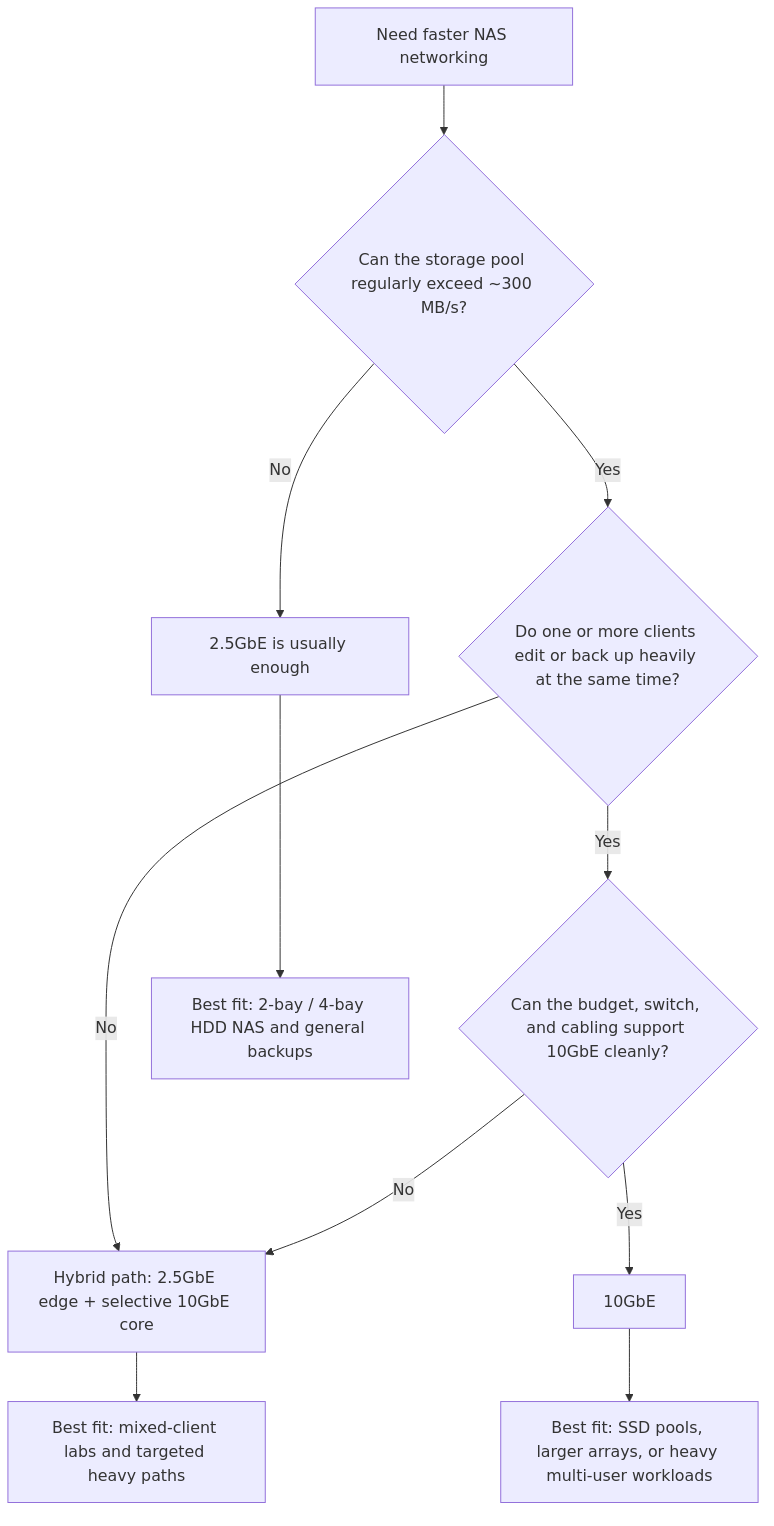
Multi-gig NAS upgrade flow: stay with 2.5GbE when the disks cannot justify more, use a hybrid path for mixed clients, and move to 10GbE when the storage pool and workflow can keep it busy.
Cabling Is a Bigger Deal Than Most Buyers Expect
QNAP's official 2.5GbE solution page makes the obvious but important point: 2.5GbE usually works over existing Cat5e. That is a huge reason it has become the default prosumer upgrade. You can move to multi-gig without tearing into walls, replacing every patch cable, or explaining to yourself why a networking project suddenly became a house project.
10GbE is less forgiving.
Cat6 can work for shorter copper runs.
Cat6a is the safer full-fat 10GbE choice for permanent links.
10G copper transceivers and RJ45 modules run hot.
SFP+ DAC or fiber is usually the cleaner 10GbE backbone option if your gear supports it.
If your rack is quiet today and you want it to stay quiet, this point matters more than benchmark tables do.
Cost, Heat, and Power: The Unsexy Reasons 2.5GbE Keeps Winning
This is where the practical case for 2.5GbE gets strong.
At the time of writing, entry-level 2.5GbE adapters and switches are cheap enough that you can upgrade a NAS, desktop, and small switch without feeling reckless. 10GbE has become much more affordable than it used to be, but the total cost still stacks up fast once you include:
a 10GbE-capable NAS or add-in card
a real 10GbE switch or at least a multi-gig hybrid switch
compatible NICs for clients
better cabling, DACs, or SFP+ modules
extra airflow if you choose 10GBase-T copper gear
iFeeltech also points out something buyers often learn the annoying way: 10G copper adapters and modules tend to run warmer and louder, while 2.5GbE hardware is usually far easier to live with in a quiet office or small rack.
That is why 10GbE can be the right answer on paper and still be the wrong answer in an apartment, bedroom office, or low-noise homelab.
Pros and Cons
2.5GbE Pros
Cheap to adopt
Usually works with existing Cat5e
Low power and low thermal overhead
Enough for most backup jobs, Plex libraries, photo archives, and general NAS use
Great match for 2-bay and 4-bay HDD NAS appliances
2.5GbE Cons
Taps out at about 312.5 MB/s theoretical
Can bottleneck larger RAID groups and SSD pools
Less attractive if several fast clients hit the same NAS at once
Easy to outgrow if you start editing directly from network storage
10GbE Pros
Massive headroom for SSD pools and fast HDD arrays
Ideal for workstation-to-NAS media workflows
Much better for multiple simultaneous heavy users
Great backbone choice between core switch, NAS, and virtualization hosts
Multi-gig 10/5/2.5/1 support on modern hardware reduces compatibility risk
10GbE Cons
Higher total cost
Higher heat, especially 10GBase-T copper gear
Cabling requirements are less forgiving
Easier to overbuy if your storage pool cannot feed the link
Switch and client upgrades often snowball into a bigger project than planned
Who Should Pick 2.5GbE
Pick 2.5GbE if any of these sound like you:
You run a 2-bay or 4-bay HDD NAS.
Your main jobs are backups, media serving, family file shares, and general homelab storage.
You want a clear win over 1GbE without replacing your cabling.
Your NAS sits in a quiet room and you do not want more fan noise or hotter modules.
You want the best price-to-benefit upgrade today, not the most future-proof port in theory.
In plain English, 2.5GbE is the right answer for most readers who are building a sensible home NAS rather than a compact datacenter.
Who Should Pick 10GbE
Pick 10GbE if most of these are true:
Your NAS uses SSDs, NVMe cache aggressively, or a larger RAID group that can sustain well above 300 MB/s.
You edit large photos, RAW video, VM images, or container datasets directly over the network.
More than one heavy client hits the NAS at the same time.
You are already buying a new switch and can plan a proper core-path upgrade.
You are comfortable dealing with thermals, cable quality, and a bigger parts list.
This is also where the rest of your stack matters. If you are already tuning storage layout, cache behavior, and network file sharing, pieces like your RAID layout decision, your NAS hardware choice, and your NVMe cache strategy start to matter more than the port speed alone.
The SMB Multichannel Question
This is the most common objection to the simple 2.5GbE vs 10GbE framing.
If your NAS and clients support SMB Multichannel, multiple links can help. In the right setup, dual 2.5GbE links can make a mid-tier NAS much more capable than its spec sheet suggests. That does not magically turn 2.5GbE into 10GbE, but it can delay or eliminate the need for a full 10GbE jump.
That matters most if you are also choosing between NFS and SMB for shared storage. Protocol choice, client support, and the number of active users all affect whether your network upgrade pays off.
The Best Answer for Most Readers: Hybrid, Not Pure
This setup solves the common bottleneck without overspending:
Keep general clients and edge devices on 1GbE or 2.5GbE.
Put the NAS on 2.5GbE if it is HDD-based and lightly used.
Move only the high-impact path to 10GbE when the workloads justify it.
Prefer SFP+ DAC or fiber for 10GbE backbone links if your hardware supports it.
That means your core switch, your main workstation, and your NAS can run faster without forcing every desktop, access point, and smart-home box into the same upgrade cycle.
The same planning rule applies here: instrument or upgrade the paths that materially limit the workload instead of paying for capacity the system cannot use.
If you already know you are buying a switch, NIC, or transceiver for this upgrade, it can be worth checking for a coupon or cashback offer before checkout. Coupert can help surface both while you shop.
Recommended Gear
If you want a practical upgrade path without pretending there is one universal winner, these are the kinds of parts that make sense:
Selective 10GbE NIC:Intel X550-T2 search on Amazon - still one of the more practical ways to add 10GbE to a workstation or DIY NAS.
Hybrid switch for mixed environments:QNAP QSW-M2108-2C search on Amazon - useful if you want 2.5GbE at the edge and a couple of 10GbE uplinks for the storage path.
This mix works because it matches how many homelabs actually grow: selective fast paths first, broad edge upgrades second.
From the lab
Official Docs Worth Reading Before You Buy
QNAP 2.5GbE Solutions - good overview of why 2.5GbE took off so quickly in homes and small offices.
Synology E10G22-T1-Mini - useful if you are looking at compact Synology upgrade paths and want to confirm multi-gig auto-negotiation support.
It wins because the price is lower, the heat is lower, the wiring is easier, and the performance jump over 1GbE is immediately noticeable in backups and large file copies. More importantly, it lines up with what a typical 2-bay or 4-bay HDD NAS can actually deliver.
But there is an important exception.
If your NAS is already fast enough to push well beyond 300 MB/s, or you are using it like shared workstation storage rather than a general household file box, 10GbE is the better long-term choice. In that case, buying 2.5GbE first can feel like paying twice.
So the real winner is not "the fastest port." The winner is the speed tier that matches your storage ceiling.
Final Recommendation by Use Case
Use case
Best pick
Why
2-bay or 4-bay HDD NAS for backups and Plex
2.5GbE
Best value, enough throughput, easiest upgrade
Family NAS with mixed desktops and laptops
2.5GbE
Cheap and quiet, little downside
One power user editing off SSD-backed NAS
10GbE
The workload can actually use the headroom
Multiple heavy users on one shared array
10GbE
Prevents the network from becoming the bottleneck
New build with mixed clients and one fast NAS
Hybrid
2.5GbE edge, 10GbE core path is the smart compromise
Frequently Asked Questions
Is 2.5GbE enough for a home NAS?
Yes for most 2-bay and 4-bay HDD NAS setups. It is dramatically better than 1GbE for backups and large file copies, and it usually lines up with the real throughput of mainstream home storage pools.
When does 10GbE become worth it for a homelab NAS?
10GbE becomes worth it when your NAS can sustain well above 300 MB/s or when more than one heavy client needs fast access at the same time. SSD pools, larger RAID groups, and direct media-editing workflows are the clearest examples.
Can I keep my existing Cat5e cabling?
Usually yes for 2.5GbE. For 10GbE, short Cat6 runs can work, but Cat6a is the safer long-term choice if you want full-speed copper links without surprises.
Does SMB Multichannel remove the need for 10GbE?
Not always, but it can delay it. Dual 2.5GbE links with SMB Multichannel can make a mid-tier NAS much more capable. It is still not the same as a clean 10GbE path for SSD-backed or multi-user heavy workloads.
What is the best upgrade path if I am unsure?
Start with 2.5GbE on the NAS and your main desktop, measure the results, and only move to 10GbE if the storage pool and workflow still need more headroom. That avoids paying for ports your disks cannot use.
transmission signupstatus: open channel
article_topic // 2.5GbE vs 10GbE for a Homelab NAS
Start building a smarter homelab.
Join readers learning Proxmox, networking, storage, backups, and self-hosting without breaking everything.
Enter your email address to receive the Homelab Addiction newsletter.
Beginner-friendly
No gatekeeping. Just clear, actionable guides.
1 useful email / week
Practical tips, real-world setups, and lessons learned.
Zero hype, practical only
What works, what breaks, and how to fix it.
Reply to any email with what you're building. I read and reply to as many as I can.
— The Homelab Addiction Operator
support // the lab
Found this guide useful?
If it saved you time or a rebuild, you can support more practical homelab guides.